Chart.js: Not natural legend order for stacked bar chart
If following conditions are met:
- chart type is 'bar' (vertical)
- y-axis is stacked
- legend position is either left or right
then the default legend order doesn't correspond with the order of stacked parts:
https://jsfiddle.net/yjp7LxgL/1/
It makes reading chart data harder.
 jan-tosovsky-cz
All 5 comments
Using the legend.reverse option should help:
    legend: {
        position: 'right',
        reverse: true
    }
@etimberg we could also add a legend.labels.sorter option to give more control on the item order?
 simonbrunel
on 20 Apr 2017
simonbrunel
on 20 Apr 2017
@simonbrunel good idea on the sort function. I'm happy to look at a PR from someone implementing this.
 etimberg
on 21 Apr 2017
etimberg
on 21 Apr 2017
So I have a similar complaint tied to the tooltips here:
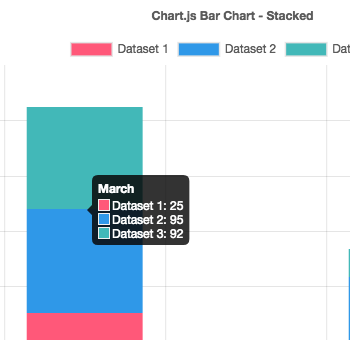
Seems like the default behavior for drawing stacked graphs bottom -> up should be altered or updated.
Maybe have stacked: true be stacked: 'normal' or stacked: 'reverse'
 ericnkatz
on 19 Oct 2017
ericnkatz
on 19 Oct 2017
Maybe have
stacked: truebestacked: 'normal'orstacked: 'reverse'
That sounds great.
Although I just came here looking for a way to sort a doughnut chart's wedges by descending order whilst displaying the legend in alphabetical order. If it's not possible now the ability to implement a custom sort function for either/both might be more flexible?
 mkstix6
on 28 Jun 2019
mkstix6
on 28 Jun 2019
Maybe have stacked: true be stacked: 'normal' or stacked: 'reverse'
this seems to be not working, any other way to resolve this
 kiran-plivo
on 13 Jan 2020
kiran-plivo
on 13 Jan 2020
Related issues
 benmccann
·
3Comments
benmccann
·
3Comments
 adriantombu
·
3Comments
adriantombu
·
3Comments
 joebirkin
·
3Comments
joebirkin
·
3Comments
 frlinw
·
3Comments
frlinw
·
3Comments
 lizbanach
·
3Comments
lizbanach
·
3Comments
Most helpful comment
So I have a similar complaint tied to the tooltips here:
Seems like the default behavior for drawing stacked graphs bottom -> up should be altered or updated.
Maybe have
stacked: truebestacked: 'normal'orstacked: 'reverse'