Chart.js: [FEATURE] Show zero values in bar graph.
A while ago, a fix was introduced to remove 0 value representation on bar graphs.
I understand why it was done (not wanting to show incorrect values and all that), but I need to be able to show something because in my situation, the data shown on a graph can be for the same label, but from multiple sessions (datasets).
Expected Behavior
A bar of very small size should be visible for 0 values.
Current Behavior
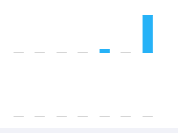
Currently, a value of 0, on a bar graph is not represented. However, if I mouse over it, I get my custom tooltip telling me it's 0.
Possible Solution
For my needs, something like a 'representZero' boolean (default value false) under the 'ticks' key would be an excellent feature.
Perhaps set a minimum non-zero pixel length for a bar?
Context
While in our system, a client can mouse over where the bar might be, and get a tooltip telling them the value is 0, but if they print out the graph, it's difficult to understand that there is supposed to be something there.
Environment
- Chart.js version: 2.5.0
- Browser name and version: Irrelevant.
- Link to your project:
PS: If this is already possible, it means I have missed it in the documentation. If this is the case, I apologize and would appreciate a push in the right direction. Alternatively, if anyone else has implemented an alternative for this, I would love to have an explanation.
 Moghul
All 7 comments
So, since no one else has shown interest over the past day, I've taken it upon myself to come up with some idea on how it should be implemented. I'd like to get some feedback before I create a pull request with any changes.
I was taking a look at the Documentation for Chart.defaults.global.elements.rectangle, and how you can edit things like the background color, and border width. I thought that that's a place where it would make sense to place this global property.
I added a key called 'minSize' to globalOpts.elements.rectangle, making it look like this:
globalOpts.elements.rectangle = {
backgroundColor: globalOpts.defaultColor,
borderWidth: 0,
borderColor: globalOpts.defaultColor,
borderSkipped: 'bottom',
minSize : 0
};
This is around like 10085 in Chart.js.
After that, I added this line
minSize: custom.minSize ? custom.minSize : helpers.getValueAtIndexOrDefault(dataset.minSize, index, rectangleElementOptions.minSize)
to Chart.controllers.bar, in the updateElement function, at the bottom. Around line 1950. I did the same to Chart.controllers.horizontalBar around line 2244.
Then, in Chart.elements.Rectangle, I made the following changes:
var borderWidth = vm.borderWidth;
// change
var minSize = vm.minSize;
if (!vm.horizontal) {
// bar
left = vm.x - vm.width / 2;
right = vm.x + vm.width / 2;
top = vm.y;
bottom = vm.base;
// start change
if(top === bottom) {
top -= minSize;
}
// end change
signX = 1;
signY = bottom > top? 1: -1;
borderSkipped = vm.borderSkipped || 'bottom';
} else {
// horizontal bar
left = vm.base;
right = vm.x;
// start change
if(right === left) {
right += minSize;
}
// end change
top = vm.y - vm.height / 2;
bottom = vm.y + vm.height / 2;
signX = right > left? 1: -1;
signY = 1;
borderSkipped = vm.borderSkipped || 'left';
}
In order to make it work, from my code, I call
Chart.defaults.global.elements.rectangle.minSize = 2;, which gives me 2 pixels on 0 length bars.
Before:


After:


Further considerations:
I was thinking about the possibility of using positive and negative values. Right now, using a negative value for minSize is the same as using 0. However, would it make sense to instead use negative values to put those tiny bars on the other side of the axis? I feel like using a negative value there would help remove any possibility that it might be confused for some other value when all your other values are positive.
For bar graphs with both positive and negative values, it might make sense to take minSize, split it into two, and then use one half to drop the bottom, and the other half to raise the top (vertical bars). This would put the bar right on the zero, and is probably the most correct in terms of representation.
I also considered having the value be a boolean, and instead use a predetermined minSize, but I feel like everyone can apply their own judgement as to how big the minimum bar size should be.
Moghul
on 17 Feb 2017
Hi, Thanks to this post, I've write a plugin to draw the little line, It looks like this when value is zero.
const zeroCompensation = {
renderZeroCompensation: function (chartInstance, d) {
// get postion info from _view
const view = d._view
const context = chartInstance.chart.ctx
// the view.x is the centeral point of the bar, so we need minus half width of the bar.
const startX = view.x - view.width / 2
// common canvas API, Check it out on MDN
context.beginPath();
// set line color, you can do more custom settings here.
context.strokeStyle = '#aaaaaa';
context.moveTo(startX, view.y);
// draw the line!
context.lineTo(startX + view.width, view.y);
// bam! you will see the lines.
context.stroke();
},
afterDatasetsDraw: function (chart, easing) {
// get data meta, we need the location info in _view property.
const meta = chart.getDatasetMeta(0)
// also you need get datasets to find which item is 0.
const dataSet = chart.config.data.datasets[0].data
meta.data.forEach((d, index) => {
// for the item which value is 0, reander a line.
if(dataSet[index] === 0) {
this.renderZeroCompensation(chart, d)
}
})
}
};
and here is how to add a plugin to Chart.js
var chart1 = new Chart(ctx, {
plugins: [plugin]
});
I've also add a answer on StackOverflowUpvote me on Stackoverflow
 LiJinyao
on 28 Jul 2017
LiJinyao
on 28 Jul 2017
However useful this may be to someone, I prefered this solution because it kept the colors of the data set. This works in 2.6.0.
/**
 * Used to show a small bar on the chart if the value is 0
 *
 * @type Object
 */
var showZeroPlugin = {
    beforeRender: function (chartInstance) {
        var datasets = chartInstance.config.data.datasets;

        for (var i = 0; i < datasets.length; i++) {
            var meta = datasets[i]._meta;
            // It counts up every time you change something on the chart so
            // this is a way to get the info on whichever index it's at
            var metaData = meta[Object.keys(meta)[0]];
            var bars = metaData.data;

            for (var j = 0; j < bars.length; j++) {
                var model = bars[j]._model;

                if (metaData.type === "horizontalBar" && model.base === model.x) {
                    model.x = model.base + 2;
                } else if (model.base === model.y) {
                    model.y = model.base - 2;
                }
            }
        }

    }
};

// Enabled by default
Chart.pluginService.register(showZeroPlugin);
If you have any improvements, they're most welcome.
PS: I have no idea how the code styling works on github
Moghul
on 21 Feb 2018
Its perfect...!Great @Moghul
Thank you...!
 avudai12
on 25 Jun 2018
avudai12
on 25 Jun 2018
@Moghul Great clean solution and easy integration into my project. I'm new to chart.js and I've been looking for a solution for days. Thank you!
 zxenlogics
on 16 Oct 2018
zxenlogics
on 16 Oct 2018
Should be fixed by #5741
 simonbrunel
on 18 Oct 2018
simonbrunel
on 18 Oct 2018
However useful this may be to someone, I prefered this solution because it kept the colors of the data set. This works in 2.6.0.
/**
 * Used to show a small bar on the chart if the value is 0
 *
 * @type Object
 */
var showZeroPlugin = {
    beforeRender: function (chartInstance) {
        var datasets = chartInstance.config.data.datasets;

        for (var i = 0; i < datasets.length; i++) {
            var meta = datasets[i]._meta;
            // It counts up every time you change something on the chart so
            // this is a way to get the info on whichever index it's at
            var metaData = meta[Object.keys(meta)[0]];
            var bars = metaData.data;

            for (var j = 0; j < bars.length; j++) {
                var model = bars[j]._model;

                if (metaData.type === "horizontalBar" && model.base === model.x) {
                    model.x = model.base + 2;
                } else if (model.base === model.y) {
                    model.y = model.base - 2;
                }
            }
        }

    }
};

// Enabled by default
Chart.pluginService.register(showZeroPlugin);
If you have any improvements, they're most welcome.
PS: I have no idea how the code styling works on github
I know this is pretty old thread, but still I am sharing my opinion.
The above code works perfectly fine. This takes care of showing tooltips when hovered. No need to explicitly take care of showing tooltips.
 arjunmourya
on 30 Jul 2020
arjunmourya
on 30 Jul 2020
Related issues
 gabrieldesouza
·
3Comments
gabrieldesouza
·
3Comments
 joebirkin
·
3Comments
joebirkin
·
3Comments
 JAIOMP
·
3Comments
JAIOMP
·
3Comments
 kennsippell
·
3Comments
kennsippell
·
3Comments
 SylarRuby
·
3Comments
SylarRuby
·
3Comments
Most helpful comment
However useful this may be to someone, I prefered this solution because it kept the colors of the data set. This works in 2.6.0.
If you have any improvements, they're most welcome.
PS: I have no idea how the code styling works on github