Chart.js: Ticks covered by bar when mirrored
I want the tick to be placed on the bar. This seemed to work until I changed the background color of the bar having no transparency.
The thing is that the bar is covering the tick. Imho the tick should be always placed higher than the bar.

Or is there any possibility built in to achieve that?
 vuhrmeister
All 26 comments
@vuhrmeister are you looking for labelled bars?
 etimberg
on 20 Jun 2016
etimberg
on 20 Jun 2016
Well, if you call it like that – yes. It should look like what's shown in the screenshot but with the text being in front of the bars.
Alternatively the label could be placed above the bar. But I didn't manage to get a satisfying solution. Anyway, that's not topic of this issue.
vuhrmeister
on 21 Jun 2016
I just ran into this issue when mirroring a line chart. I was expecting the labels to provide some padding and shift the x-axis to the right.

 freewil
on 15 Jul 2016
freewil
on 15 Jul 2016
Same issue here. I have a chart that gets new data every second, and the y axis is mirrored.

The same happens when I have the yAxis position right (where I actually want it).
 steve2507
on 26 Nov 2016
steve2507
on 26 Nov 2016
@vuhrmeister did you eventually find a solution? I'm facing the same problem
 Stefanama
on 26 Jan 2017
Stefanama
on 26 Jan 2017
@Stefanama somehow …
I think I found the solution on Stackoverflow, but don't remember exactly. But here's the code I have implemented. It's quite a while since I worked on it so I'm not totally sure if that's all.
{
  animation: {
    onProgress () {
      const chartInstance = this.chart;
      const ctx = chartInstance.ctx;
      const dataset = this.data.datasets[0];
      const meta = chartInstance.controller.getDatasetMeta(0);

      Chart.helpers.each(meta.data.forEach((bar, index) => {
        const label = this.data.labels[index];
        const labelPositionX = 20;
        const labelWidth = ctx.measureText(label).width + labelPositionX;

        ctx.textBaseline = 'middle';
        ctx.textAlign = 'left';
        ctx.fillStyle = '#333';
        ctx.fillText(label, labelPositionX, bar._model.y);
      }));
    }
  }
}
Put this code into your chart options.
vuhrmeister
on 1 Feb 2017
@vuhrmeister great, it works!!!! you saved me a lot of headaches, thanks.
I am seeing that the tooltip gets put under the labels, I'll have a look into that later.
Stefanama
on 1 Feb 2017
cool! I don't need the tooltips so I didn't run into that issue.
vuhrmeister
on 1 Feb 2017
I just edited https://github.com/chartjs/Chart.js/issues/2808#issuecomment-276664281 and added event "onComplete" otherwise I lost labels when animation was finished. But now, it creates "blurry" effect because it probably creates label twice on hover.
 KamilPesek
on 6 Apr 2017
KamilPesek
on 6 Apr 2017
Closing because the the behaviour of the mirror option is as defined. Labelling bars is tracked by #327
etimberg
on 4 Jul 2017
@etimberg;
I doubt that closing this issue is the correct action. I cannot imagine that the intention of mirroring y-axis tick marks is to draw them behind any chart area (bars, area, line, radar, whatever).
From what I read, issue #327 that you are referring to exists specifically to add a label with the value of a specific bar to a bar chart.
Issue #2808 however concerns the y-axis ticks which are drawn behind the chart area. Also see my non-bar example in https://github.com/chartjs/Chart.js/issues/2808#issuecomment-263055946.
To summarize what we need here in CSS terms; The z-index of mirrored axis ticks needs to be higher than the chart area. I do not see that covered in #327.
steve2507
on 5 Jul 2017
@steve2507 when the mirrored tick was implemented I recall that we explicitly decided that mirrored ticks would appear underneath anything on the chart.
I've reopened this, but fixing this is likely quite complicated since there is currently no notion of configurable z ordering between individual pieces of the scales and any other portion of the chart
etimberg
on 5 Jul 2017
@etimberg thanks for reopening. Maybe I have time to take a look at it at some point in time.
steve2507
on 6 Jul 2017
Any updates on this, I am having the same issue with radar charts where the fill covers the tick labels and it's hard to see the numbers.

 SergioCordova
on 19 Jul 2017
SergioCordova
on 19 Jul 2017
I have the same issue as Sergio. Would be great to bring tick labels to front.

Temp fix:
                var options = {
                scale: {
                    ticks: {
                        mirror: true,
                        position: "left",
                        fontSize: 8,
                        beginAtZero: true,
                        stepSize: 1,
                        min: 0,
                        max: maxScore,
                        display: false
                    }
                },
                animation: {
                    duration: 0,
                    onProgress: function () {
                        drawScale(this.controller)
                    }
                }
            };

            myRadarChart = new Chart(ctx, {
                type: 'radar',
                data: data,
                options: options
            });

            drawScale(myRadarChart);
            function drawScale(controller) {

            var chart = controller.chart;
            var scale = controller.scale;

            var xOffset = scale.xCenter + 10;
            var center = scale.yCenter - 7;
            var top = center - scale.drawingArea;
            var yOffset = (center - top) / (scale.max)

            ctx.fillStyle = "#000000";
            for (var i = 0; i <= scale.max; i++) {
                ctx.fillText(i, xOffset, center - (yOffset * i) + 1);
            }

        }
 Aleks0308
on 26 Sep 2017
Aleks0308
on 26 Sep 2017
How would one apply this fix to a Line chart?
 fexra
on 1 Feb 2018
fexra
on 1 Feb 2018
Also the problem exists with polar chart
 nonamez
on 12 Feb 2018
nonamez
on 12 Feb 2018
Hi,
I am experiencing the same issue with Polar Area Chart.

My code:
    var ctx = document.getElementById("chart-polar");
    new Chart(ctx, {
      type: 'polarArea',
      // Data
      //
      data: {
        datasets: [
        {
          showLine: true,
          data: [
            5,
            4,
            7.5,
            3.5,
            8,
            6
          ],
          backgroundColor: [
            'rgba(208, 0, 25, 0.6)',
            'rgba(227, 156, 0, 0.6)',
            'rgba(229, 216, 0, 0.6)',
            'rgba(0, 198, 25, 0.6)',
            'rgba(0, 138, 226, 0.6)',
            'rgba(119, 0, 217, 0.6)'
          ],

          label: 'Raters' // for legend
        },
        {
          display: true,
          showLine: true,
          data: [
            3,
            7,
            3,
            6,
            10,
            7
          ],
          backgroundColor: [
            'rgba(255,99,132,0.00)',
            'rgba(75, 192, 192, 0.00)',
            'rgba(255, 159, 64, 0.00)',
            'rgba(231, 233, 237, 0.00)',
            'rgba(54, 162, 235, 0.00)',
            'rgba(54, 100, 100, 0.00)'
          ],
          borderColor: "rgba(0, 0, 0, 0.5)",
          borderWidth: "3",
          label: 'My dataset', // for legend
        }
        ,
        ],
        labels: [
          "Red",
          "Green",
          "Orange",
          "Grey",
          "Blue",
          "Black"
        ]
      },

      // Options
      //
      options: {
        showTooltips: true,
        responsive: false,
       // legend: {
          //display: false
       // },
        animation: {
          animateRotate: false
        },
        scale: {
            // Hides the scale
            display: true
        }
      }
    });
 tanvir785
on 16 Feb 2018
tanvir785
on 16 Feb 2018
Hi @etimberg , is there any resolution for this. I am checking this page everyday :(
tanvir785
on 22 Feb 2018
Nothing on this still?
 MaxNielsen
on 8 Nov 2018
MaxNielsen
on 8 Nov 2018
If you have problems when you hover the bars, I fixed it adding: ctx.font = "italic bold 10pt Courier";
```
animation: {
onProgress () {
const chartInstance = this.chart;
const ctx = chartInstance.ctx;
const dataset = this.data.datasets[0];
const meta = chartInstance.controller.getDatasetMeta(0);
  Chart.helpers.each(meta.data.forEach((bar, index) => {
    const label = this.data.labels[index];
    const labelPositionX = 20;
    const labelWidth = ctx.measureText(label).width + labelPositionX;

    ctx.textBaseline = 'middle';
    ctx.textAlign = 'left';
    ctx.fillStyle = '#333';
    ctx.font = "italic bold 10pt Courier";
    ctx.fillText(label, labelPositionX, bar._model.y);
  }));
}
},
```
 sgoifo
on 12 Dec 2018
sgoifo
on 12 Dec 2018
How about adding 'top' option for ticks.display?
 kurkle
on 13 Dec 2018
kurkle
on 13 Dec 2018
I like the 'top' idea mentioned by kurkle.
 mattieusch
on 16 Apr 2019
mattieusch
on 16 Apr 2019
has this been released yet?
 curiousPup
on 13 Jun 2019
curiousPup
on 13 Jun 2019
Is there any solution?
 maksakoviliya
on 4 Jul 2020
maksakoviliya
on 4 Jul 2020
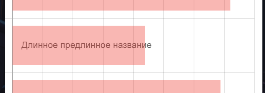
I think, i found a solution)
https://chartjs-plugin-datalabels.netlify.app/
And in options
options() {
      return {
        plugins: {
          datalabels: {
            formatter: function(value, context) {
              return context.chart.data.labels[context.dataIndex];
            }
          }
        }
      };
    }
maksakoviliya
on 4 Jul 2020
Related issues
 JewelsJLF
·
3Comments
JewelsJLF
·
3Comments
 joebirkin
·
3Comments
joebirkin
·
3Comments
 gouthamrv
·
3Comments
gouthamrv
·
3Comments
 akashrajkn
·
3Comments
akashrajkn
·
3Comments
 longboy
·
3Comments
longboy
·
3Comments
Most helpful comment
@Stefanama somehow …
I think I found the solution on Stackoverflow, but don't remember exactly. But here's the code I have implemented. It's quite a while since I worked on it so I'm not totally sure if that's all.
Put this code into your chart options.