Chart.js: Fixed width label, horizontal bar chart
I am wondering if chart.js supports fixed width labels in the graph, something like this in google charts https://jsfiddle.net/xxvii27/guxox9hn/
As you can see the labels scales at a fixed space, while the graph has the remaining space. I am encountering this issue while listing 4 graphs together in a column, and they're not aligned properly, with the labels taking the graph space.
 xxvii27
All 4 comments
@xxvii27 can you post the fiddle of what you have so far?
 etimberg
on 28 May 2016
etimberg
on 28 May 2016
I think this is a request to have the vertical axis have a fixed width.
There is a way to do this
options: {
  scales: {
    yAxes: [{
      afterFit: function(scaleInstance) {
        scaleInstance.width = 100; // sets the width to 100px
      }
    }]
  }
}
@etimberg Yeah, this is was i looking for, thanks bro!!
 gerardoepp
on 3 Feb 2017
gerardoepp
on 3 Feb 2017
Hi @etimberg . I used your code and it seemed to work. But still it is not the cleanest solution. It sets the width to 100px. I wish to set max width as 100px.
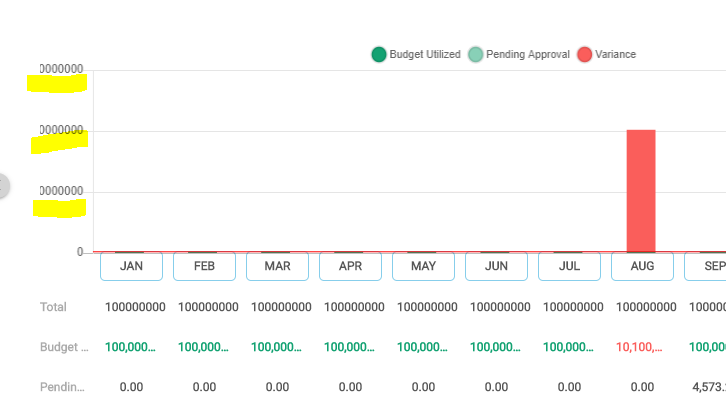
And one more trouble is that if the label crosses the width limit then the label cuts out. For example, my label is '1500000000000'. I set my width to 50px. If the width is exceeded, my label shows like '00000000'. '15000' from my label is truncated.
 Xstream007
on 6 Nov 2019
Xstream007
on 6 Nov 2019
Related issues
 nickgoodliff
·
3Comments
nickgoodliff
·
3Comments
 JAIOMP
·
3Comments
JAIOMP
·
3Comments
 HeinPauwelyn
·
3Comments
HeinPauwelyn
·
3Comments
 joebirkin
·
3Comments
joebirkin
·
3Comments
 akashrajkn
·
3Comments
akashrajkn
·
3Comments
Most helpful comment
I think this is a request to have the vertical axis have a fixed width.
There is a way to do this