Chart.js: StackedBar Tooltips missordered
Hi
I'm now using V2 of the chart.js and it works very great
While using a stackedBar with 3 elements, the top part of the graph is in the bottom of the tooltip
(A pcture is better to understand, here is it)

In My side, datas are declared in the color order 'blue-gray-green' so tooltip seems being in the right order
Is it a bug (or a possible enhancement) or is it a missconfiguration by my side ?
If any needs, here is my chart config :
/* DATA TABLE */
var ChartData4 =
    {
        labels : ["<?php echo $CI->langs->gettext(92).' '.$CI->langs->gettext(1); ?>"
                 ,"<?php echo $CI->langs->gettext(92).' '.$CI->langs->gettext(108); ?>"
                 ,"<?php echo $CI->langs->gettext(93).' '.$CI->langs->gettext(1); ?>"
                 ,"<?php echo $CI->langs->gettext(93).' '.$CI->langs->gettext(108); ?>"
                 ,"<?php echo $CI->langs->gettext(94).' '.$CI->langs->gettext(1); ?>"
                 ,"<?php echo $CI->langs->gettext(94).' '.$CI->langs->gettext(108); ?>"
                 ,"<?php echo $CI->langs->gettext(95).' '.$CI->langs->gettext(1); ?>"
                 ,"<?php echo $CI->langs->gettext(95).' '.$CI->langs->gettext(108); ?>"
                 ],
        datasets : [
            {
                label:              "<?php echo $CI->langs->gettext(1); ?>",
                backgroundColor :   "<?php echo getRGBA('blue',0.5); ?>",
                borderColor :       "<?php echo getRGBA('blue',0.8); ?>",
                hoverBackgroundColor:   "<?php echo getRGBA('blue',0.75); ?>",
                hoverBorderColor:   "<?php echo getRGBA('blue',1); ?>",
                <?php echo 'data : ['.$costanalyse['MyProduct']['ProductCat1']['Q1'].',
                                    '.$costanalyse['OtherProduct']['ProductCat1']['Q1'].',
                                    '.$costanalyse['MyProduct']['ProductCat1']['Q2'].',
                                    '.$costanalyse['OtherProduct']['ProductCat1']['Q2'].',
                                    '.$costanalyse['MyProduct']['ProductCat1']['Q3'].',
                                    '.$costanalyse['OtherProduct']['ProductCat1']['Q3'].',
                                    '.$costanalyse['MyProduct']['ProductCat1']['Q4'].',
                                    '.$costanalyse['OtherProduct']['ProductCat1']['Q4'].']'; ?>
            },
            {
                label:              "<?php echo $CI->langs->gettext(90); ?>",
                backgroundColor :   "<?php echo getRGBA('gray',0.5); ?>",
                borderColor :       "<?php echo getRGBA('gray',0.8); ?>",
                hoverBackgroundColor:   "<?php echo getRGBA('gray',0.75); ?>",
                hoverBorderColor:   "<?php echo getRGBA('gray',1); ?>",
                <?php echo 'data : ['.$costanalyse['MyProduct']['ProductCat2']['Q1'].',
                                    '.$costanalyse['OtherProduct']['ProductCat2']['Q1'].',
                                    '.$costanalyse['MyProduct']['ProductCat2']['Q2'].',
                                    '.$costanalyse['OtherProduct']['ProductCat2']['Q2'].',
                                    '.$costanalyse['MyProduct']['ProductCat2']['Q3'].',
                                    '.$costanalyse['OtherProduct']['ProductCat2']['Q3'].',
                                    '.$costanalyse['MyProduct']['ProductCat2']['Q4'].',
                                    '.$costanalyse['OtherProduct']['ProductCat2']['Q4'].']'; ?>
            },
            {
                label:              "<?php echo $CI->langs->gettext(89); ?>",
                backgroundColor :   "<?php echo getRGBA('green',0.5); ?>",
                borderColor :       "<?php echo getRGBA('green',0.8); ?>",
                hoverBackgroundColor:   "<?php echo getRGBA('green',0.75); ?>",
                hoverBorderColor:   "<?php echo getRGBA('green',1); ?>",
                <?php echo 'data : ['.$costanalyse['MyProduct']['ProductCat3']['Q1'].',
                                    '.$costanalyse['OtherProduct']['ProductCat3']['Q1'].',
                                    '.$costanalyse['MyProduct']['ProductCat3']['Q2'].',
                                    '.$costanalyse['OtherProduct']['ProductCat3']['Q2'].',
                                    '.$costanalyse['MyProduct']['ProductCat3']['Q3'].',
                                    '.$costanalyse['OtherProduct']['ProductCat3']['Q3'].',
                                    '.$costanalyse['MyProduct']['ProductCat3']['Q4'].',
                                    '.$costanalyse['OtherProduct']['ProductCat3']['Q4'].']'; ?>
            }
        ]
    };
/* CHARTS OPTIONS */
var stackedBar_Options={
            type: 'bar',
            options:{
                responsive:true,
                scales:{
                    xAxes:[{stacked:true}],
                    yAxes:[{stacked:true}]
                },
                tooltips: {
                    enable: true,
                    mode: 'label',
                    callbacks: {
                        label: function(tooltipItem, data){
                            var datasetLabel = data.datasets[tooltipItem.datasetIndex].label || '';
                            return datasetLabel + ': ' + Number(tooltipItem.yLabel).toFixed(2) + ' €';
                        }
                    }
                },
                legend:{
                    display: true,
                    position: 'bottom'
                }
            }
        };
/* CHART BUILDING */
        var ctx4 = document.getElementById("canvas4").getContext("2d");
        window.chart4 = new Chart(ctx4,$.extend({},stackedBar_Options,{data:ChartData4}));
Thanks for support
 Dergonic
All 4 comments
Fixed in #2027
 etimberg
on 20 Feb 2016
etimberg
on 20 Feb 2016
still not fixed with 2.1.6

- adding reverse: true only changes the legend, not the tooltip order.
am I missing an option?
 D4NH
on 22 Jun 2016
D4NH
on 22 Jun 2016
Using 2.4.0, toolip still does not respect the stacked scale property. D4NH's fiddle is still broken with the latest release.
 Czevak
on 6 Feb 2017
Czevak
on 6 Feb 2017
same here :
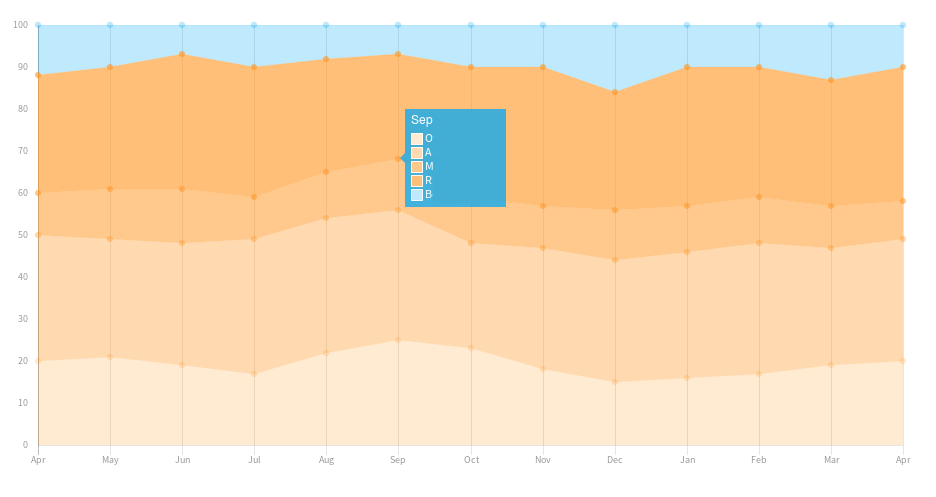
I fixed it but it is not really intuitive…
tooltips: {
    itemSort: function(a, b) {
    return b.datasetIndex - a.datasetIndex
},
Thanks for what you do there ;)
 DomitienAdW
on 30 Jun 2017
DomitienAdW
on 30 Jun 2017
Related issues
 longboy
·
3Comments
longboy
·
3Comments
 nickgoodliff
·
3Comments
nickgoodliff
·
3Comments
 HeinPauwelyn
·
3Comments
HeinPauwelyn
·
3Comments
 frlinw
·
3Comments
frlinw
·
3Comments
 SylarRuby
·
3Comments
SylarRuby
·
3Comments
Most helpful comment
same here :

I fixed it but it is not really intuitive…
tooltips: {
    itemSort: function(a, b) {
    return b.datasetIndex - a.datasetIndex
},
Thanks for what you do there ;)