Chapel: Having Trouble using two Nvidia Jetson nano developer kits using Chapel
I'm using Chapel for a project in my class and I am trying to do multilocale executution with my two Nvidia Jetson nano boards. Following this tutorial https://chapel-lang.org/docs/usingchapel/multilocale.html#readme-multilocale. I keep getting errors when I try to run the hello executable. I run the code by doing "./hello -nl 2"
Here is the error message I keep getting
*** GASNET WARNING(Node 0): int sendPacket(ep_t, amudp_msg_t*, size_t, en_t, packet_type) returning an error code: AM_ERR_RESOURCE (Problem with requested resource)
  from function sendPacket
  at /home/chico/chapel-1.20.0/third-party/gasnet/gasnet-src/other/amudp/amudp_reqrep.cpp:112
  reason: Invalid argument

*** GASNET WARNING(Node 0): int AMUDP_RequestGeneric(amudp_category_t, ep_t, amudp_node_t, handler_t, void*, size_t, uintptr_t, int, va_list, uint8_t, uint8_t) returning an error code: AM_ERR_RESOURCE (Problem with requested resource)
  at /home/chico/chapel-1.20.0/third-party/gasnet/gasnet-src/other/amudp/amudp_reqrep.cpp:1045

GASNet gasnetc_AMRequestShort encountered an AM Error: AM_ERR_RESOURCE(3)
  at /home/chico/chapel-1.20.0/third-party/gasnet/gasnet-src/udp-conduit/gasnet_core.c:827
*** WARNING (proc 0): GASNet gasnetc_AMRequestShort returning an error code: GASNET_ERR_RESOURCE (Problem with requested resource)
  at /home/chico/chapel-1.20.0/third-party/gasnet/gasnet-src/udp-conduit/gasnet_core.c:829
*** FATAL ERROR(Node 1): An active message was returned to sender,
    and trapped by the default returned message handler (handler 0):
Error Code: ECONGESTION: Congestion at destination endpoint
Message type: AM_REQUEST_M
Destination: (127.0.0.1:52171) (0)
Handler: 64
Tag: 0x7f0001010000629e
Arguments(5): 0x00000000  0x00000001  0x00000000  0x00000000  0x00000009
Aborting...
*** Caught a fatal signal (proc 1): SIGABRT(6)
NOTICE: Before reporting bugs, run with GASNET_BACKTRACE=1 in the environment to generate a backtrace.
NOTICE: We recommend linking the debug version of GASNet to assist you in resolving this application issue.
bash: line 1:  1658 Aborted                 (core dumped) env 'AMUDP_SLAVE_ARGS=1,JetsonNano:52561,' './hello_real' '-nl' '2' '-E' 'LD_LIBRARY_PATH=:/usr/local/cuda/lib64' '-E' 'LS_COLORS=rs=0:di=01;34:ln=01;36:mh=00:pi=40;33:so=01;35:do=01;35:bd=40;33;01:cd=40;33;01:or=40;31;01:mi=00:su=37;41:sg=30;43:ca=30;41:tw=30;42:ow=34;42:st=37;44:ex=01;32:*.tar=01;31:*.tgz=01;31:*.arc=01;31:*.arj=01;31:*.taz=01;31:*.lha=01;31:*.lz4=01;31:*.lzh=01;31:*.lzma=01;31:*.tlz=01;31:*.txz=01;31:*.tzo=01;31:*.t7z=01;31:*.zip=01;31:*.z=01;31:*.Z=01;31:*.dz=01;31:*.gz=01;31:*.lrz=01;31:*.lz=01;31:*.lzo=01;31:*.xz=01;31:*.zst=01;31:*.tzst=01;31:*.bz2=01;31:*.bz=01;31:*.tbz=01;31:*.tbz2=01;31:*.tz=01;31:*.deb=01;31:*.rpm=01;31:*.jar=01;31:*.war=01;31:*.ear=01;31:*.sar=01;31:*.rar=01;31:*.alz=01;31:*.ace=01;31:*.zoo=01;31:*.cpio=01;31:*.7z=01;31:*.rz=01;31:*.cab=01;31:*.wim=01;31:*.swm=01;31:*.dwm=01;31:*.esd=01;31:*.jpg=01;35:*.jpeg=01;35:*.mjpg=01;35:*.mjpeg=01;35:*.gif=01;35:*.bmp=01;35:*.pbm=01;35:*.pgm=01;35:*.ppm=01;35:*.tga=01;35:*.xbm=01;35:*.xpm=01;35:*.tif=01;35:*.tiff=01;35:*.png=01;35:*.svg=01;35:*.svgz=01;35:*.mng=01;35:*.pcx=01;35:*.mov=01;35:*.mpg=01;35:*.mpeg=01;35:*.m2v=01;35:*.mkv=01;35:*.webm=01;35:*.ogm=01;35:*.mp4=01;35:*.m4v=01;35:*.mp4v=01;35:*.vob=01;35:*.qt=01;35:*.nuv=01;35:*.wmv=01;35:*.asf=01;35:*.rm=01;35:*.rmvb=01;35:*.flc=01;35:*.avi=01;35:*.fli=01;35:*.flv=01;35:*.gl=01;35:*.dl=01;35:*.xcf=01;35:*.xwd=01;35:*.yuv=01;35:*.cgm=01;35:*.emf=01;35:*.ogv=01;35:*.ogx=01;35:*.aac=00;36:*.au=00;36:*.flac=00;36:*.m4a=00;36:*.mid=00;36:*.midi=00;36:*.mka=00;36:*.mp3=00;36:*.mpc=00;36:*.ogg=00;36:*.ra=00;36:*.wav=00;36:*.oga=00;36:*.opus=00;36:*.spx=00;36:*.xspf=00;36:' '-E' 'SSH_CONNECTION=132.241.216.227 8794 192.168.1.20 22' '-E' 'LESSCLOSE=/usr/bin/lesspipe %s %s' '-E' 'LANG=en_US.UTF-8' '-E' 'CHPL_REGEXP=none' '-E' 'OLDPWD=/home/chico/chapel-1.20.0' '-E' 'CHPL_GMP=none' '-E' 'LLVM_CONFIG=/usr/bin/llvm-config-7' '-E' 'XDG_SESSION_ID=132' '-E' 'USER=chico' '-E' 'PWD=/home/chico' '-E' 'HOME=/home/chico' '-E' 'SSH_CLIENT=132.241.216.227 8794 22' '-E' 'CHPL_COMM=gasnet' '-E' 'XDG_DATA_DIRS=/usr/local/share:/usr/share:/var/lib/snapd/desktop' '-E' 'CHPL_MEM=cstdlib' '-E' 'GASNET_SSH_SERVERS=JetsonNano JetsonNano2' '-E' 'SPARK_HOME=/opt/spark' '-E' 'SSH_TTY=/dev/pts/4' '-E' 'MAIL=/var/mail/chico' '-E' 'TERM=xterm-256color' '-E' 'SHELL=/bin/bash' '-E' 'CHPL_TASKS=fifo' '-E' 'CHPL_LLVM=none' '-E' 'SHLVL=1' '-E' 'GASNET_SPAWNFN=S' '-E' 'MANPATH=/home/chico/chapel-1.20.0/man:' '-E' 'CHPL_HOME=/home/chico/chapel-1.20.0' '-E' 'LOGNAME=chico' '-E' 'DBUS_SESSION_BUS_ADDRESS=unix:path=/run/user/1001/bus' '-E' 'XDG_RUNTIME_DIR=/run/user/1001' '-E' 'PATH=/home/chico/.cargo/bin:/home/chico/.local/bin:/home/chico/chapel-1.20.0/bin/linux64-aarch64:/home/chico/chapel-1.20.0/util:/usr/local/sbin:/usr/local/bin:/usr/sbin:/usr/bin:/sbin:/bin:/usr/games:/usr/local/games:/snap/bin:/usr/local/cuda-10.0/bin/:/opt/spark/bin:/opt/spark/sbin' '-E' 'LESSOPEN=| /usr/bin/lesspipe %s' '-E' '_=./hello
It works if I only use the localhost.
Note: I have been using mpy4py with python across my two boards and it works. Also, I'm using an ansible playbook to sync both boards across the network.
 bofomiso
All 30 comments
Hi @bofomiso — Thanks for filing this.
Over on the original SO post, we talked about running with GASNET_BACKTRACE=1 and CHPL_COMM_DEBUG=1 on (which, for GASNet experts, causes GASNet to be configured with --enable-debug and installed into a sibling directory). You mentioned in the comments that you were still getting the same error. But are you suggesting that the output was identical overall? Specifically, I wouldn't expect the two NOTICE: lines in the output to appear if those settings had been made, suggesting that something didn't take.
 bradcray
on 5 Dec 2019
bradcray
on 5 Dec 2019
@bofomiso I work on GASNet (not Chapel) and am hoping I can help you out a bit. Please do follow-through on Brad's request for a backtrace from a debug build. That will clarify significantly what is happening at the time of the failure. However, I'd like to also start pursuing a parallel track:
When users report problems with udp-based GASNet, it is often a network configuration issue. This is especially true when clustering VMs or "developer kit" systems that often feature automated minimal configuration. That said, such errors are most often seen in the initial connection setup, and your error seems to be taking place later than that. So, I am not certain what is taking place (but can make some educated guesses).
Can you verify that from each of your nodes (JetsonNano and JetsonNano2, if I am reading correctly) you can ssh to the other and that you actually connect to the _expected_ host. Something like the following:
JetsonNano $ ssh JetsonNano2 hostname
JetsonNano2
and
JetsonNano2 $ ssh JetsonNano hostname
JetsonNano
I am especially looking for the possibility that either command prints its own hostname instead of the remote one, which would probably indicate an incorrect /etc/hosts.
 PHHargrove
on 5 Dec 2019
PHHargrove
on 5 Dec 2019
@bradcray
When I am on my terminal I do
export GASNET_BACKTRACE=1
export CHPL_COMM_DEBUG=1
before I re-build the Chapel runtime correct?
Just making sure I went through the steps correctly
bofomiso
on 5 Dec 2019
Yes, that's right. After setting those variables, do:
cd $CHPL_HOME/runtime && make clean
to clean out the previous version of the runtime and then a top-level re-build:
cd $CHPL_HOME && make
This should rebuild a copy of GASNet in debug mode and the runtime against that debug copy of GASNet (note that we have our directories set up so that debug and non-debug versions of GASNet can coexist simultaneously, but not the runtime directory, which is why the initial clean step that I'd forgotten about on SO is necessary. We've opened up an internal issue (https://github.com/Cray/chapel-private/issues/626) to improve this situation and avoid the need for the "clean the runtime" step above.
Also, make sure to take a look at Paul's guess at the problem above which should be much faster to try than the rebuild, if his guess is correct.
bradcray
on 5 Dec 2019
chico@JetsonNano:~$ export CHPL_COMM=gasnet
chico@JetsonNano:~$ export GASNET_BACKTRACE=1
chico@JetsonNano:~$ export CHPL_COMM_DEBUG=1
chico@JetsonNano:~$ cd $CHPL_HOME/runtime && make clean
chico@JetsonNano:~/chapel-1.20.0/runtime$ cd $CHPL_HOME && make
chico@JetsonNano:~/chapel-1.20.0$ chpl -o hello $CHPL_HOME/examples/hello6 taskpar-dist.chpl
chico@JetsonNano:~/chapel-1.20.0$ export GASNET_SPAWNFN=S
chico@JetsonNano:~/chapel-1.20.0$ export GASNET_SSH_SERVERS="JetsonNano JetsonNano2"
chico@JetsonNano:~/chapel-1.20.0$ ./hello -nl 2
^^^ Those are the commands I went through
and this is the output i got
*** GASNET WARNING(Node 1): int sendPacket(ep_t, amudp_msg_t*, size_t, en_t, packet_type) returning an error code: AM_ERR_RESOURCE (Problem with requested resource)
from function sendPacket
at /home/chico/chapel-1.20.0/third-party/gasnet/gasnet-src/other/amudp/amudp_reqrep.cpp:112
reason: Invalid argument
*** GASNET WARNING(Node 1): int AMUDP_RequestGeneric(amudp_category_t, ep_t, amudp_node_t, handler_t, void*, size_t, uintptr_t, int, va_list, uint8_t, uint8_t) returning an error code: AM_ERR_RESOURCE (Problem with requested resource)
at /home/chico/chapel-1.20.0/third-party/gasnet/gasnet-src/other/amudp/amudp_reqrep.cpp:1045
GASNet gasnetc_AMRequestShort encountered an AM Error: AM_ERR_RESOURCE(3)
at /home/chico/chapel-1.20.0/third-party/gasnet/gasnet-src/udp-conduit/gasnet_core.c:827
*** WARNING (proc 1): GASNet gasnetc_AMRequestShort returning an error code: GASNET_ERR_RESOURCE (Problem with requested resource)
at /home/chico/chapel-1.20.0/third-party/gasnet/gasnet-src/udp-conduit/gasnet_core.c:829
*** FATAL ERROR(Node 0): An active message was returned to sender,
and trapped by the default returned message handler (handler 0):
Error Code: ECONGESTION: Congestion at destination endpoint
Message type: AM_REQUEST_M
Destination: (127.0.0.1:57983) (1)
Handler: 64
Tag: 0x7f000101000173fc
Arguments(5): 0x00000000 0x00000001 0x00000000 0x00000000 0x00000009
Aborting...
*** Caught a fatal signal (proc 0): SIGABRT(6)
[0] Invoking GDB for backtrace...
[0] /usr/bin/gdb -nx -batch -x /tmp/gasnet_uaYkeW '/home/chico/chapel-1.20.0/./hello_real' 9683
[0] [Thread debugging using libthread_db enabled]
[0] Using host libthread_db library "/lib/aarch64-linux-gnu/libthread_db.so.1".
[0] 0x0000007f825c7298 in __GI___waitpid (pid=9767, stat_loc=stat_loc@entry=0x7fea65d9e8, options=options@entry=0) at ../sysdeps/unix/sysv/linux/waitpid.c:30
[0] Id Target Id Frame
[0] * 1 Thread 0x7f82965be0 (LWP 9683) "hello_real" 0x0000007f825c7298 in __GI___waitpid (pid=9767, stat_loc=stat_loc@entry=0x7fea65d9e8, options=options@entry=0) at ../sysdeps/unix/sysv/linux/waitpid.c:30
[0]
[0] Thread 1 (Thread 0x7f82965be0 (LWP 9683)):
[0] #0 0x0000007f825c7298 in __GI___waitpid (pid=9767, stat_loc=stat_loc@entry=0x7fea65d9e8, options=options@entry=0) at ../sysdeps/unix/sysv/linux/waitpid.c:30
[0] #1 0x0000007f82563f38 in do_system (line=<optimized out>) at ../sysdeps/posix/system.c:149
[0] #2 0x000000557b47fdf0 in gasneti_system_redirected (cmd=0x557b7f5750 <cmd> "/usr/bin/gdb -nx -batch -x /tmp/gasnet_uaYkeW '/home/chico/chapel-1.20.0/./hello_real' 9683", stdout_fd=7) at /home/chico/chapel-1.20.0/third-party/gasnet/gasnet-src/gasnet_tools.c:1271
[0] #3 0x000000557b4806c4 in gasneti_bt_gdb (fd=7) at /home/chico/chapel-1.20.0/third-party/gasnet/gasnet-src/gasnet_tools.c:1518
[0] #4 0x000000557b4811d8 in gasneti_print_backtrace (fd=2) at /home/chico/chapel-1.20.0/third-party/gasnet/gasnet-src/gasnet_tools.c:1793
[0] #5 0x000000557b4818f0 in _gasneti_print_backtrace_ifenabled (fd=2) at /home/chico/chapel-1.20.0/third-party/gasnet/gasnet-src/gasnet_tools.c:1925
[0] #6 0x000000557b698c48 in gasneti_defaultSignalHandler (sig=6) at /home/chico/chapel-1.20.0/third-party/gasnet/gasnet-src/gasnet_internal.c:704
[0] #7 <signal handler called>
[0] #8 __GI_raise (sig=sig@entry=6) at ../sysdeps/unix/sysv/linux/raise.c:51
[0] #9 0x0000007f825588b4 in __GI_abort () at abort.c:79
[0] #10 0x000000557b7279ec in AMX_FatalErr (msg=0x557b7bc5c8 "An active message was returned to sender,\n and trapped by the default returned message handler (handler 0):\nError Code: %s\nMessage type: %s\nDestination: %s (%i)\nHandler: %i\nTag: %s\nArguments(%i): %"...) at /home/chico/chapel-1.20.0/third-party/gasnet/gasnet-src/other/amudp/../amx/amx_internal.c:96
[0] #11 0x000000557b73ab70 in AMUDP_DefaultReturnedMsg_Handler (status=8, opcode=1, token=0x5584d35c48) at /home/chico/chapel-1.20.0/third-party/gasnet/gasnet-src/other/amudp/amudp_reqrep.cpp:1458
[0] #12 0x000000557b7324d0 in AMUDP_HandleRequestTimeouts (ep=0x5584cd5740, numtocheck=1) at /home/chico/chapel-1.20.0/third-party/gasnet/gasnet-src/other/amudp/amudp_reqrep.cpp:457
[0] #13 0x000000557b736b90 in AM_Poll (eb=0x5584cd3410) at /home/chico/chapel-1.20.0/third-party/gasnet/gasnet-src/other/amudp/amudp_reqrep.cpp:889
[0] #14 0x000000557b445f3c in gasnetc_AMPoll (_gasneti_threadinfo_farg=0x5584cd6550) at /home/chico/chapel-1.20.0/third-party/gasnet/gasnet-src/udp-conduit/gasnet_core.c:794
[0] #15 0x000000557b45220c in _gasneti_AMPoll (_gasneti_threadinfo_farg=0x5584cd6550) at /home/chico/chapel-1.20.0/third-party/gasnet/gasnet-src/gasnet_help.h:931
[0] #16 0x000000557b476200 in gasnete_amdbarrier_wait (team=0x5584cd67d0, id=0, flags=9) at /home/chico/chapel-1.20.0/third-party/gasnet/gasnet-src/extended-ref/gasnet_extended_refbarrier.c:996
[0] #17 0x000000557b479a0c in gasnete_barrier_default (team=0x5584cd67d0, id=0, flags=9) at /home/chico/chapel-1.20.0/third-party/gasnet/gasnet-src/extended-ref/gasnet_extended_refbarrier.c:2160
[0] #18 0x000000557b478cc8 in gasnete_barrier_common (team=0x5584cd67d0, id=0, flags=9) at /home/chico/chapel-1.20.0/third-party/gasnet/gasnet-src/extended-ref/gasnet_extended_refbarrier.c:2043
[0] #19 0x000000557b4797f4 in gasnet_barrier (id=0, flags=9) at /home/chico/chapel-1.20.0/third-party/gasnet/gasnet-src/extended-ref/gasnet_extended_refbarrier.c:2130
[0] #20 0x000000557b443d2c in gasnetc_attach (_tm=0xffffffaa7b32dfff, table=0x557b7dc480 <ftable>, numentries=17, segsize=0) at /home/chico/chapel-1.20.0/third-party/gasnet/gasnet-src/udp-conduit/gasnet_core.c:495
[0] #21 0x000000557b3f322c in gasnet_attach (_table=0x557b7dc480 <ftable>, _numentries=17, _segsize=18446744073709551615, _minheapoffset=0) at /home/chico/chapel-1.20.0/third-party/gasnet/install/linux64-gnu-unknown-none/substrate-udp/seg-everything/debug/include/gasnet.h:88
[0] #22 0x000000557b402fb4 in chpl_comm_init (argc_p=0x7fea661b4c, argv_p=0x7fea661b40) at comm-gasnet.c:813
[0] #23 0x000000557b3e0dd8 in chpl_rt_init ()
[0] #24 0x000000557b36845c in main ()
bash: line 1: 9683 Aborted (core dumped) env 'AMUDP_SLAVE_ARGS=1,JetsonNano:40411,' './hello_real' '-nl' '2' '-E' 'LD_LIBRARY_PATH=:/usr/local/cuda/lib64' '-E' 'LS_COLORS=rs=0:di=01;34:ln=01;36:mh=00:pi=40;33:so=01;35:do=01;35:bd=40;33;01:cd=40;33;01:or=40;31;01:mi=00:su=37;41:sg=30;43:ca=30;41:tw=30;42:ow=34;42:st=37;44:ex=01;32:*.tar=01;31:*.tgz=01;31:*.arc=01;31:*.arj=01;31:*.taz=01;31:*.lha=01;31:*.lz4=01;31:*.lzh=01;31:*.lzma=01;31:*.tlz=01;31:*.txz=01;31:*.tzo=01;31:*.t7z=01;31:*.zip=01;31:*.z=01;31:*.Z=01;31:*.dz=01;31:*.gz=01;31:*.lrz=01;31:*.lz=01;31:*.lzo=01;31:*.xz=01;31:*.zst=01;31:*.tzst=01;31:*.bz2=01;31:*.bz=01;31:*.tbz=01;31:*.tbz2=01;31:*.tz=01;31:*.deb=01;31:*.rpm=01;31:*.jar=01;31:*.war=01;31:*.ear=01;31:*.sar=01;31:*.rar=01;31:*.alz=01;31:*.ace=01;31:*.zoo=01;31:*.cpio=01;31:*.7z=01;31:*.rz=01;31:*.cab=01;31:*.wim=01;31:*.swm=01;31:*.dwm=01;31:*.esd=01;31:*.jpg=01;35:*.jpeg=01;35:*.mjpg=01;35:*.mjpeg=01;35:*.gif=01;35:*.bmp=01;35:*.pbm=01;35:*.pgm=01;35:*.ppm=01;35:*.tga=01;35:*.xbm=01;35:*.xpm=01;35:*.tif=01;35:*.tiff=01;35:*.png=01;35:*.svg=01;35:*.svgz=01;35:*.mng=01;35:*.pcx=01;35:*.mov=01;35:*.mpg=01;35:*.mpeg=01;35:*.m2v=01;35:*.mkv=01;35:*.webm=01;35:*.ogm=01;35:*.mp4=01;35:*.m4v=01;35:*.mp4v=01;35:*.vob=01;35:*.qt=01;35:*.nuv=01;35:*.wmv=01;35:*.asf=01;35:*.rm=01;35:*.rmvb=01;35:*.flc=01;35:*.avi=01;35:*.fli=01;35:*.flv=01;35:*.gl=01;35:*.dl=01;35:*.xcf=01;35:*.xwd=01;35:*.yuv=01;35:*.cgm=01;35:*.emf=01;35:*.ogv=01;35:*.ogx=01;35:*.aac=00;36:*.au=00;36:*.flac=00;36:*.m4a=00;36:*.mid=00;36:*.midi=00;36:*.mka=00;36:*.mp3=00;36:*.mpc=00;36:*.ogg=00;36:*.ra=00;36:*.wav=00;36:*.oga=00;36:*.opus=00;36:*.spx=00;36:*.xspf=00;36:' '-E' 'SSH_CONNECTION=132.241.216.227 52304 192.168.1.20 22' '-E' 'LESSCLOSE=/usr/bin/lesspipe %s %s' '-E' 'GASNET_BACKTRACE=1' '-E' 'CHPL_COMM_DEBUG=1' '-E' 'LANG=en_US.UTF-8' '-E' 'CHPL_REGEXP=none' '-E' 'OLDPWD=/home/chico/chapel-1.20.0/runtime' '-E' 'CHPL_GMP=none' '-E' 'LLVM_CONFIG=/usr/bin/llvm-config-7' '-E' 'XDG_SESSION_ID=56' '-E' 'USER=chico' '-E' 'PWD=/home/chico/chapel-1.20.0' '-E' 'HOME=/home/chico' '-E' 'SSH_CLIENT=132.241.216.227 52304 22' '-E' 'CHPL_COMM=gasnet' '-E' 'XDG_DATA_DIRS=/usr/local/share:/usr/share:/var/lib/snapd/desktop' '-E' 'CHPL_MEM=cstdlib' '-E' 'GASNET_SSH_SERVERS=JetsonNano JetsonNano2' '-E' 'SPARK_HOME=/opt/spark' '-E' 'SSH_TTY=/dev/pts/3' '-E' 'MAIL=/var/mail/chico' '-E' 'TERM=xterm-256color' '-E' 'SHELL=/bin/bash' '-E' 'CHPL_TASKS=fifo' '-E' 'CHPL_LLVM=none' '-E' 'SHLVL=1' '-E' 'GASNET_SPAWNFN=S' '-E' 'MANPATH=/home/chico/chapel-1.20.0/man:' '-E' 'CHPL_HOME=/home/chico/chapel-1.20.0' '-E' 'LOGNAME=chico' '-E' 'DBUS_SESSION_BUS_ADDRESS=unix:path=/run/user/1001/bus' '-E' 'XDG_RUNTIME_DIR=/run/user/1001' '-E' 'PATH=/home/chico/.cargo/bin:/home/chico/.local/bin:/home/chico/chapel-1.20.0/bin/linux64-aarch64:/home/chico/chapel-1.20.0/util:/usr/local/sbin:/usr/local/bin:/usr/sbin:/usr/bin:/sbin:/bin:/usr/games:/usr/local/games:/snap/bin:/usr/local/cuda-10.0/bin/:/opt/spark/bin:/opt/spark/sbin:/home/chico/julia-1.3.0/bin/' '-E' 'LESSOPEN=| /usr/bin/lesspipe %s' '-E' '_=./hello'
@bradcray @PHHargrove
By the way, I are able to ssh between boards with no issues. The ssh keys are in both boards and there is even an identical user with the same password available in both boards.
bofomiso
on 5 Dec 2019
The backtrace shows that the problem is occurring at the very first attempt to communicate, before GASNet has even completed initialization. So, this is not a Chapel-specific problem unless (unlikely) the environment has been munged in some manner.
At the moment my suspicions lie with the line Destination: (127.0.0.1:52171) (0).
Normally, we should not see UDP traffic to the loopback address for the two-locale/two-host configuration you are running. This is why I asked for the ssh test to confirm, for instance, that JetsonNano2 did not have 127.0.0.1 JestonNano in /etc/hosts. However, if you have performed that test, then I don't immediately have any good hypothesis as to the cause of this failure.
While I continue to think about what might be going wrong, it might be helpful if you could verify that there is no firewall which might be blocking UDP communication between the two hosts. Unfortunately, how to check that that is going to be specific to the Linux distro (and outside my expertise). So, I cannot provide any concrete guidance in this.
PHHargrove
on 6 Dec 2019
@bofomiso: I'm nothing like an ssh/UDP expert, but when reading this from you:
By the way, I are able to ssh between boards with no issues
I wanted to check that you had tested Paul's suggestion to not just verify that you could (seemingly) ssh from each box to the other, but also that having the ssh command run hostname gave the opposite board's name—in both directions. Your response didn't make it obvious to me that you had. Thanks for confirming.
bradcray
on 6 Dec 2019
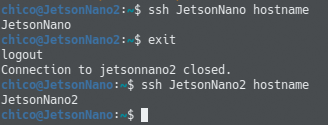
Posting what I did just to be sure I followed the right steps that @PHHargrove suggested.
Would it be a problem that the only way I can ssh into JetsonNano2 is through JetsonNano? I was wondering if that would cause any issues?
@bradcray
bofomiso
on 6 Dec 2019
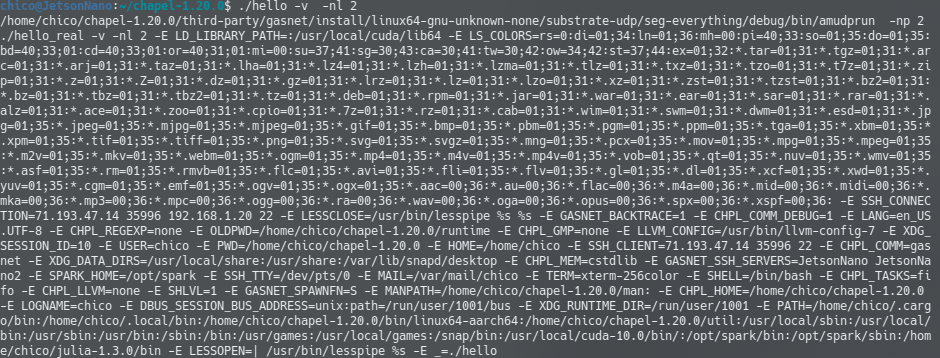
Thanks for confirming—Paul's test looks correct to me. I'll have to defer to him on whether JetsonNano2 only being accessible from JetsonNano is a problem. Would I be correct in assuming that you're running the Chapel program from JetsonNano? And as long as we're brainstorming about next steps, would you try:
(a) re-running the Chapel program with the --verbose flag and showing what's printed before the GASNet errors occur, and
(b) sending the output of $CHPL_HOME/util/printchplenv --anonymize?
Thanks!
bradcray
on 6 Dec 2019
Yes I am running the Chapel program from JetsonNano.
(a)
(B)
CHPL_TARGET_PLATFORM: linux64
CHPL_TARGET_COMPILER: gnu
CHPL_TARGET_ARCH: aarch64
CHPL_TARGET_CPU: unknown
CHPL_LOCALE_MODEL: flat
CHPL_COMM: gasnet *
CHPL_COMM_SUBSTRATE: udp
CHPL_GASNET_SEGMENT: everything
CHPL_TASKS: fifo *
CHPL_LAUNCHER: amudprun
CHPL_TIMERS: generic
CHPL_UNWIND: none
CHPL_MEM: cstdlib *
CHPL_ATOMICS: cstdlib
CHPL_NETWORK_ATOMICS: none
CHPL_GMP: none *
CHPL_HWLOC: none
CHPL_REGEXP: none *
CHPL_LLVM: none *
CHPL_AUX_FILESYS: none
@bradcray
bofomiso
on 6 Dec 2019
Great, thanks! Nothing about that looks amiss to me, so I'm hoping Paul will have some more insights tomorrow. Did you have any thoughts about his comment about checking to ensure that there is no firewall that would block UDP communications between the boards? (e.g., do you have another UDP ping-pong style test that you could run between them to take GASNet out of the mix?)
bradcray
on 6 Dec 2019
I have an iptables rule that redirects Google DNS from Port 53 to my PiHole.
I don’t know if that would cause any issues.
@bradcray
bofomiso
on 6 Dec 2019
Hi - I'm the author of the udp-conduit.
I don't have a good theory based on the (very incomplete picture) I'm getting from the output above. However I should explain there appear to be two things going on here:
- first, one node (call it "A") is getting an EINVAL error returned from a socket
sendto()system call while trying to inject an AMUDP/GASNet AM Request, and returns error codes back up the call chain (these are the initial outputs we see). This is a pretty generic error code from the kernel, and could indicate a number of different problems. The output we've seen so far doesn't tell us much more about this A node, which is the initial failure point -but whatever code invoked this AM Request injection apparently gets "stuck" after the failure. - the OTHER node ("B"), after a timeout (which defaults to 30 seconds) notices that the node A is "stuck" and not responding to an AMRequest that it had previously sent (apparently without a
sendtoerror). AMUDP/udp-conduit on node B then decides the "stuck" node A must be dead and returns the undeliverable AMRequest with an ECONGESTION error, which leads to a fatal error and the backtrace we are seeing (of node B).
IOW, the backtrace shown here is a bit of red herring because it's the one for the "wrong" node (B), not the node A that actually encountered the initial failure. So if there's something corrupted about the arguments to the failingsendto()call on A, we cannot see it from the output gathered so far.
What we can learn from the output is that both nodes are clearly running, so this is not an ssh/spawning issue. However it's entirely possible this failure is happening on the first attempt by A to send a UDP packet to B, so it's possible might be some kind of firewall issue preventing communication, although such a situation seems more likely to simply swallow packets rather than return a socket write error.
At this point our best guess is that one of the Nanos is trying to use the incorrect localhost subnet for connecting to the other, as a result of some botched confusion at job wire-up. Please try the following for tracking this down further:
Re-run the last experiment, but this time add
GASNET_VERBOSEENV=1in the run environment. This will give us more diagnostics about the job setup and might reveal the problem.Re-run the experiment a second time keeping
GASNET_VERBOSEENV=1in the run environment, but additionally addGASNET_MASTERIP=192.168.1.20(please also confirm this is the correct non-loopback IP address for your spawning console "Nano")If that still doesn't work, the next thing to try is setting
GASNET_WORKERIP=192.168.1.0, this should have a similar effect of forcing all UDP comms to use the shared 192.168.1. subnet.
From udp-conduit README:
* GASNET_MASTERIP
  Specify the exact IP address which the worker nodes should use to connect
  to the master (spawning) node.  By default the master node will pass the
  result of gethostname() to the worker nodes, which will then resolve that
  to an IP address using gethostbynname().

* GASNET_WORKERIP
  Specify the IP subnet to be used for communication among the worker nodes.
  By default, worker nodes will communicate among themselves using the same
  interface used to connect to the master node (see GASNET_MASTERIP, above).
  Example: GASNET_WORKERIP=192.168.0.0
Hope this helps..
 bonachea
on 6 Dec 2019
bonachea
on 6 Dec 2019
OOPS - Apologies I meant GASNET_VERBOSEENV=1 above, not GASNET_VERBOSE
bonachea
on 6 Dec 2019
Just to be sure in the terminal do:
export GASNET_VERBOSEENV=1
after I have remaked the Chapel enviroment?
@bonachea
bofomiso
on 6 Dec 2019
Just to be sure in the terminal do:
export GASNET_VERBOSEENV=1
after I have remaked the Chapel enviroment?
@bonachea
export GASNET_VERBOSEENV=1 only affects the executable at runtime, you don't have to recompile anything.
Same with GASNET_MASTERIP and GASNET_WORKERIP
bonachea
on 6 Dec 2019
executing on node 0 of 2 node(s): JetsonNano
0: enter barrier for 'barrier before main'
executing on node 1 of 2 node(s): JetsonNano2
1: enter barrier for 'barrier before main'
1: enter barrier for 'fill node 0 globals buf'
0: enter barrier for 'fill node 0 globals buf'
0: enter barrier for 'broadcast global vars'
1: enter barrier for 'broadcast global vars'
1: enter barrier for 'pre-user-code hook begin'
0: enter barrier for 'pre-user-code hook begin'
0: enter barrier for 'pre-user-code hook end'
1: enter barrier for 'pre-user-code hook end'
Hello, world! (from locale 0 of 2 named JetsonNano)
Hello, world! (from locale 1 of 2 named JetsonNano2)
0: enter barrier for 'stop polling'
1: enter barrier for 'stop polling'
0: enter barrier for 'exit_comm_gasnet'
1: enter barrier for 'exit_comm_gasnet'
So I think it worked just doing the first step adding export GASNET_VERBOSEENV=1
@bonachea
Is this what I am suppose to see if it worked?
bofomiso
on 6 Dec 2019
This looks like it ran correctly, but enabling diagnostics should not have changed the behavior, so I don't understand why it's working for you with only GASNET_VERBOSEENV=1. Also, GASNET_VERBOSEENV when properly set should dump alot of GASNet diagnostics that I don't see here, all I see is what look like diagnostics from Chapel.
Is this the complete output? What envvars are set here? What is the exact command line?
bonachea
on 6 Dec 2019
I meant step 2 sorry it started working after I added GASNET_MASTERIP=192.168.1.20
These were my steps:
export CHPL_COMM=gasnet
export GASNET_BACKTRACE=1
export CHPL_COMM_DEBUG=1
cd $CHPL_HOME/runtime && make clean
cd $CHPL_HOME && make
chpl -o hello $CHPL_HOME/examples/hello6-taskpar-dist.chpl
export GASNET_SPAWNFN=S
export GASNET_SSH_SERVERS="JetsonNano JetsonNano2"
export GASNET_VERBOSEENV=1
export GASNET_MASTERIP=192.168.1.20
./hello -v -nl 2
@bonachea
bofomiso
on 6 Dec 2019
@bradcray
Is there a command I can use in Chapel that allows me to see if all 8 cores are being used?
bofomiso
on 6 Dec 2019
There's no great way to see if all cores are in use at a given time short of using a standard tool like top. But a good sanity check to make sure that Chapel is recognizing, and will try to utilize, all 8 cores on a system would be to run a program like:
coforall loc in Locales do
  on loc do
    writeln("locale ", here.id, " named ", here.name, " has ", here.numPUs(), " cores.");
making sure that you get the number of locales you'd expect, that they have distinct names, and that they each report the right number of cores.
bradcray
on 6 Dec 2019
@bradcray @bonachea @PHHargrove
Thanks so much guys it's working now. I really appreciate it.
bofomiso
on 6 Dec 2019
Great!
Before closing this, I'd like to understand better (from @bonachea, e.g.) what having GASNET_MASTERIP set causing things to be fixed implies. I.e., for future reference, what is the implication, how would we debug it, and is there any chance that Chapel messed things up in this regard?
[edit: reading the gasnet docs and checkout our sources, I'm thinking it's unlikely that we messed anything up in Chapel, and that it might suggest that gethostname() / gethostbyname() combination isn't working properly on this system across nodes?]
bradcray
on 6 Dec 2019
Quick question @bradcray
coforall loc in Locales do
  on loc do
    writeln("locale ", here.id, " named ", here.name, " has ", here.numPUs(), " cores.");
I named this file cores.chpl
It will not allow me to do cores -nl 2?
Is there something else I need to add to the code?
Sorry for all the questions, started learning the language this week.
bofomiso
on 7 Dec 2019
It will not allow me to do cores -nl 2?
That ought to work. What is the result when you try it?
(taking a guess), if it is:
error: Only 1 locale may be used for CHPL_COMM layer 'none'
To use multiple locales, see $CHPL_HOME/doc/rst/usingchapel/multilocale.rst
then the most likely cause is that you did not have CHPL_COMM=gasnet set when you compiled the program (alternatively, you could compile with --comm=gasnet).
You can avoid setting this each time you open a shell / compile by using a Chapel config file, documented here: https://chapel-lang.org/docs/usingchapel/chplenv.html#chapel-configuration-file
bradcray
on 7 Dec 2019
@bradcray
Ya that was the case, It seems when I close down the connection to the board and reconnect I just have to set up CHPL_COMM=gasnet for it to work again.
bofomiso
on 7 Dec 2019
Using the config file feature should save you this hassle if you want to try that.
bradcray
on 7 Dec 2019
Before closing this, I'd like to understand better (from @bonachea, e.g.) what having GASNET_MASTERIP set causing things to be fixed implies. I.e., for future reference, what is the implication, how would we debug it, and is there any chance that Chapel messed things up in this regard?
Hi @bradcray - Thanks for your patience and bringing this to our attention.
This failure mode does not appear to be anything Chapel-related.
If we understand the failure mode correctly, this was a combination of two factors:
- The spawning console is also a compute node in a multi-node job
- That compute node resolved its own hostname as '127.0.0.1' (localhost subnet), and the default behavior is to use this resolved IP as the address for UDP communication between ranks... but that won't work in this case, because for a multi-node job the localhost subnet is partitioned and does not include all the workerss.
The GASNET_VERBOSEENV output (not provided above) should have revealed this problem, showing the translation table as containing IP entries on two separate, disconnected subnets.
There are various potential fixes. The best is probably for the sysadmin to fix name resolution on the nodes to return a IP on the "public" subnet for their 'public' host name, instead of 127.0.0.1. The most expedient is to set GASNET_MASTERIP or GASNET_WORKERIP to force use of the correct fully-connected subnet.
I'm already planning to add a diagnostic check in AMUDP to detect "suspicious" subnet entries such as those in this case and and issue a warning at startup.
So hopefully by the upcoming GASNet release in March (which Chapel will hopefully merge for its own March release!), a similar situation will issue a diagnostic to the console to clue people in to the configuration problem.
bonachea
on 7 Dec 2019
Great, thanks for the additional detail, Dan, and for the thought to make this even more bulletproof.
I'm going to close this Chapel issue now and will try to think of something useful to put on the original SO question.
bradcray
on 7 Dec 2019
Thanks guys once again!
bofomiso
on 7 Dec 2019
Related issues
 ankingcodes
·
3Comments
ankingcodes
·
3Comments
 vasslitvinov
·
3Comments
vasslitvinov
·
3Comments
 buddha314
·
3Comments
bradcray
·
4Comments
bradcray
·
3Comments
buddha314
·
3Comments
bradcray
·
4Comments
bradcray
·
3Comments
Most helpful comment
Hi - I'm the author of the udp-conduit.
I don't have a good theory based on the (very incomplete picture) I'm getting from the output above. However I should explain there appear to be two things going on here:
sendto()system call while trying to inject an AMUDP/GASNet AM Request, and returns error codes back up the call chain (these are the initial outputs we see). This is a pretty generic error code from the kernel, and could indicate a number of different problems. The output we've seen so far doesn't tell us much more about this A node, which is the initial failure point -but whatever code invoked this AM Request injection apparently gets "stuck" after the failure.sendtoerror). AMUDP/udp-conduit on node B then decides the "stuck" node A must be dead and returns the undeliverable AMRequest with an ECONGESTION error, which leads to a fatal error and the backtrace we are seeing (of node B).IOW, the backtrace shown here is a bit of red herring because it's the one for the "wrong" node (B), not the node A that actually encountered the initial failure. So if there's something corrupted about the arguments to the failing
sendto()call on A, we cannot see it from the output gathered so far.What we can learn from the output is that both nodes are clearly running, so this is not an ssh/spawning issue. However it's entirely possible this failure is happening on the first attempt by A to send a UDP packet to B, so it's possible might be some kind of firewall issue preventing communication, although such a situation seems more likely to simply swallow packets rather than return a socket write error.
At this point our best guess is that one of the Nanos is trying to use the incorrect localhost subnet for connecting to the other, as a result of some botched confusion at job wire-up. Please try the following for tracking this down further:
Re-run the last experiment, but this time add
GASNET_VERBOSEENV=1in the run environment. This will give us more diagnostics about the job setup and might reveal the problem.Re-run the experiment a second time keeping
GASNET_VERBOSEENV=1in the run environment, but additionally addGASNET_MASTERIP=192.168.1.20(please also confirm this is the correct non-loopback IP address for your spawning console "Nano")If that still doesn't work, the next thing to try is setting
GASNET_WORKERIP=192.168.1.0, this should have a similar effect of forcing all UDP comms to use the shared 192.168.1. subnet.From udp-conduit README:
Hope this helps..