Channels: Django Debug Toolbar prevents logging/tracebacks appearing in runserver
Let's say I start Django channels server with command:
python3 manage.py runserver 0.0.0.0:8001
There is no any customisation in settings.py regarding Logging except
DEBUG = True
And all what I can see in logging are 4 types of messages:
WebSocket HANDSHAKING, WebSocket CONNECT, WebSocket DISCONNECT and WebSocket REJECT
Even if I set assert False right before self.connect(), the only logs I get:
WebSocket HANDSHAKING /core/ [192.168.122.4:52494]
WebSocket DISCONNECT /core/ [192.168.122.4:52494]
Yes, just 2 lines. Nothing about assertion error or anything else.
This is how it suppose to be?
How can I see the same logging that shows errors as it was on WSGI?
I'm using latest channels package, taken from github. There are some "fixes" in runserver.py file, but still the same. No normal logging, just messages about websocket sessions state.
 Landver
All 8 comments
Where exactly are you raising errors, and is it in a sync or async context? Tracebacks appear correctly on the console for me, but it helps to know where you are raising errors to see if I can replicate it.
 andrewgodwin
on 28 Dec 2018
andrewgodwin
on 28 Dec 2018
Where exactly are you raising errors
I tried to set them in any place in code. For example in channels.py, or in views.py or urls.py
and is it in a sync or async context?
sync
Thanks for your awesome help. After your message I retried your tutorial server
https://channels.readthedocs.io/en/latest/tutorial/index.html
And it works perfectly fine for me. With nice logging, that shows all errors.
And then I started to looking for the problem on my side.
It was caused by debug_toolbar https://github.com/jazzband/django-debug-toolbar
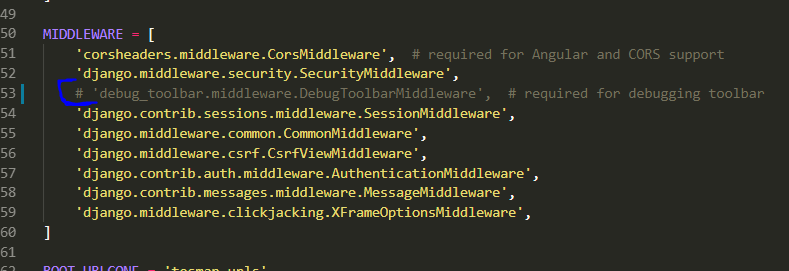
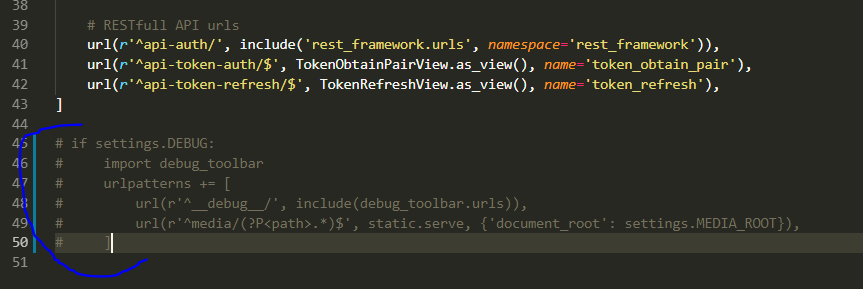
From the code, I needed to remove ALL traces of toobar, and only then started to appear error logs. Bellow are pictures of where I had components of debug toolbar, that I needed to remove. Funny, that only after I removed it from urls.py, only then logs appeared. It's not enough to remove debug_toolbar only from settings.py
settings.py

urls.py
1000 times thank you, for weeks I thought it's not possible to see logging in Channel and suffered from that heavily.
Landver
on 29 Dec 2018
I would like to reopen issue and Andrew will decide what to do with it. There is definitely some kind of bug in relationships between Channels and super popular debug_toolbar
Landver
on 29 Dec 2018
I'm not going to say this is not Channels' problem, but this issue is very low priority for me so I'm unlikely to get to it for several months - given that, other people are welcome to take a stab at tracking it down.
andrewgodwin
on 30 Dec 2018
@Landver
I was able to re-create your issue using the tutorial example, I believe it may be related to an open issue when running the server via the runserver management command.
A workaround to run the example while also including DDT is to create an asgi.py file with the following content:
# mysite/asgi.py
import os
import django
from channels.routing import get_default_application

os.environ.setdefault("DJANGO_SETTINGS_MODULE", "mysite.settings")
django.setup()
application = get_default_application()
Then run the application with the following command:
daphne -p 8001 mysite.asgi:application
 jordaneremieff
on 31 Dec 2018
jordaneremieff
on 31 Dec 2018
This is quite certainly a django-debug-toolbar issue and has already been discussed in #1193.
 matthiask
on 3 Jan 2019
matthiask
on 3 Jan 2019
Thanks for reminding me of that, @matthiask! I will close this.
andrewgodwin
on 3 Jan 2019
Sorry to reopen this discussion with a comment. But this mades lost days of works, trying to find a proper solution, I particularly have lot of rules in my LOGGING config so disabling the logging in the develop mode was really inconvenient.
Another solution and a more clean one, is to remove the logging panel that is enable by default in django debug toolbar.
DEBUG_TOOLBAR_PANELS = [
    "debug_toolbar.panels.versions.VersionsPanel",
    "debug_toolbar.panels.timer.TimerPanel",
    "debug_toolbar.panels.settings.SettingsPanel",
    "debug_toolbar.panels.headers.HeadersPanel",
    "debug_toolbar.panels.request.RequestPanel",
    "debug_toolbar.panels.sql.SQLPanel",
    "debug_toolbar.panels.staticfiles.StaticFilesPanel",
    "debug_toolbar.panels.templates.TemplatesPanel",
    "debug_toolbar.panels.cache.CachePanel",
    "debug_toolbar.panels.signals.SignalsPanel",
    # "debug_toolbar.panels.logging.LoggingPanel",
    "debug_toolbar.panels.redirects.RedirectsPanel",
    "debug_toolbar.panels.profiling.ProfilingPanel",
]
Just that fixes the issues, you keep django debug toolbar working for your http requests and have also the tracebacks in the console.
Hope is useful for others
 mariocesar
on 2 Jul 2020
mariocesar
on 2 Jul 2020
Related issues
 KStenK
·
3Comments
KStenK
·
3Comments
 ademidun
·
3Comments
ademidun
·
3Comments
 pirate
·
5Comments
pirate
·
5Comments
 bruecksen
·
4Comments
bruecksen
·
4Comments
 prokher
·
5Comments
prokher
·
5Comments