Chalk: Chalk not working in GitLab runner terminal
const str1 = 'str1';

console.log(str1, str1.length); // clean
const str2 = chalk.red('str2');
console.log(str2, str2.length); // chalk styled

console.log(str1, str1.length); // clean
const str3 = '\x1b[42mstr3\x1b[0m';
console.log(str3, str3.length); // my styled

console.log(str1, str1.length); // clean

process.exit(0);
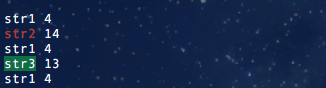
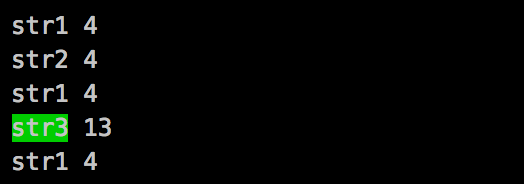
The above code resutls in the below two results.
My local computer terminal (working):
GitLab runner (not working):
 basickarl
All 3 comments
This is probably related to: https://github.com/chalk/supports-color/issues/65
basickarl
on 24 Aug 2017
This seems more like a duplicate issue to #195
@Qix- can confirm I believe
@basickarl try using the environment variable FORCE_COLOR=1 and see if it works in GitLab Runners
 CyberiumShadow
on 29 Aug 2017
CyberiumShadow
on 29 Aug 2017
@CyberiumShadow Ah indeed you are correct, that link perfectly summed up what was wrong.
I fixed the issue adding this to my .gitlab-ci.yml if anyone else stumbles upon this:
variables:
    FORCE_COLOR: '1'
Thanks again!
basickarl
on 29 Aug 2017
👍10
🎉8
❤3
🚀2
😄2
Was this page helpful?
0 / 5 - 0 ratings
Related issues
 sindresorhus
·
4Comments
sindresorhus
·
4Comments
 macOneOone
·
6Comments
macOneOone
·
6Comments
 Martodox
·
3Comments
Martodox
·
3Comments
 langpavel
·
8Comments
langpavel
·
8Comments
 HillTravis
·
8Comments
HillTravis
·
8Comments
Most helpful comment
@CyberiumShadow Ah indeed you are correct, that link perfectly summed up what was wrong.
I fixed the issue adding this to my
.gitlab-ci.ymlif anyone else stumbles upon this:Thanks again!