Chalice: Authorizer won't work on after deployment.
After each successful deployment, I am facing some problems with Authorizer.
So whenever i ran the following command:
chalice deploy --stage development
My endpoint response is following with incorrect Headers and Payload:
HTTP/1.1 500 Internal Server Error
Connection: keep-alive
Content-Length: 16
Content-Type: application/json
Date: Tue, 09 Jan 2018 05:27:23 GMT
x-amzn-ErrorType: AuthorizerConfigurationException
x-amzn-RequestId: c549c9dc-f4fd-11e7-9066-2d91a1bf8bf4

{
    "message": null
}
My endpoint definition is as following:
@app.route('/dataset', methods=['POST'], authorizer=auth0, cors=True)
  ...
The Solution is to login into console and go to API Gateway > Authorizer > Edit and without any changes click on save. It will ask to Grant permission to invoke the arn click on Grant and re-deploy the API to it's stage.


After re-deploying same request started working and i am getting correct headers as well:
HTTP/1.1 200 OK
Access-Control-Allow-Headers: Authorization,Content-Type,X-Amz-Date,X-Amz-Security-Token,X-Api-Key
Access-Control-Allow-Origin: *
Connection: keep-alive
Content-Length: 3278
Content-Type: application/json
Date: Tue, 09 Jan 2018 05:37:32 GMT
X-Amzn-Trace-Id: sampled=0;root=1-5a54551b-f344e6467c4fb4d33d05a081
x-amzn-RequestId: 2ef0086e-f4ff-11e7-9473-3fe4e73405a2

[]
 abdullah353
All 23 comments
Hi @mabdullah353,
So does this happen with the initial chalice deployment? Or does it occur in the subsequent deployment after changing your authorizer? We have seen issues in the past on API Gateway side before related to not properly updating the authorizer.
 kyleknap
on 11 Jan 2018
kyleknap
on 11 Jan 2018
Note, I am also experiencing something similar recently on a project that used to deploy. Either me or another developer will follow back shortly with our version of the issue. Very similar behavior though.
 noahgift
on 11 Jan 2018
noahgift
on 11 Jan 2018
@mabdullah353 If you test the authorizer from the API gateway (using the Test button next to the Edit button in your screenshot) What's the error message?
We've been getting
Execution failed due to configuration error: Authorizer function failed with response body: {"errorMessage": "Handler 'authorizer' missing on module 'app'"}
But the Edit trick you mentioned has not worked for us.
 RobertAtomic
on 11 Jan 2018
RobertAtomic
on 11 Jan 2018
@kyleknap it's happening after each deploy command.
So following is what happens when i deploy it using chalice deploy command.
Response
Response Code: 500
Execution log for request test-request
Thu Jan 11 04:43:50 UTC 2018 : Starting authorizer: XX for request: test-request
Thu Jan 11 04:43:50 UTC 2018 : Incoming identity: ****[TRUNCATED]
Thu Jan 11 04:43:50 UTC 2018 : Endpoint request URI: https://lambda.us-west-2.amazonaws.com/2015-03-01/functions/arn:aws:lambda:us-west-2:X:function:X/invocations
Thu Jan 11 04:43:50 UTC 2018 : Endpoint request headers: {x-amzn-lambda-integration-tag=test-request, Authorization=******[TRUNCATED]
Thu Jan 11 04:43:50 UTC 2018 : Endpoint request body after transformations: {"type":"TOKEN","methodArn":"arn:aws:execute-api:us-west-2:XXXX:X/null/GET/","authorizationToken":"Bearer [TRUNCATED]
Thu Jan 11 04:43:50 UTC 2018 : Sending request to https://lambda.us-west-2.amazonaws.com/2015-03-01/functions/arn:aws:lambda:us-west-2:XXX:function:XXXX/invocations
Thu Jan 11 04:43:50 UTC 2018 : Lambda invocation failed with status: 403
Thu Jan 11 04:43:50 UTC 2018 : Execution failed due to configuration error:
Thu Jan 11 04:43:50 UTC 2018 : Execution failed due to configuration error: Authorizer error
Thu Jan 11 04:43:50 UTC 2018 : AuthorizerConfigurationException
Now i will simply click on edit and save the Authotizer as shown in the above picture.
With Same Authorization key it's started working.
Response
Response Code: 200
Latency 1823
{
"Version": "2012-10-17",
"Statement": [
{
"Action": "execute-api:Invoke",
"Effect": "Allow",
"Resource": "arn:aws:execute-api:us-west-2:X:X/null/GET/"
}
]
}
Just to report I am having the same issue. But the workaround is not working for me, because I never see the screen in the 2nd step.
 sbassi
on 19 Jan 2018
sbassi
on 19 Jan 2018
Did anyone eventually resolve this problem? I have the exact same issue except I do not see the permissions dialog when editing the Lambda function.
I am stuck. Any pointers would be appreciated!
 rajbala
on 15 Jun 2018
rajbala
on 15 Jun 2018
I'm having the same problem.
My chalice (1.3.0) code:
authorizer = CustomAuthorizer (
'MyCustomAuth', header = 'Authorization',
authorizer_uri = ('arn: aws: apigateway: eu-west-1: lambda: path / 2015-03-01'
'/ functions / arn: aws: lambda: eu-west-1: XXXXXXXX:'
'function: firebase-authorize-dev-check_token / invocations'),
ttl_seconds = 0)
@ app.route ('/', methods = ['GET'], authorizer = authorizer, cors=True)
def index ():
return {'success': 'xxx'}
After every chalice deployments I get this response from the api endpoint
{
"message": null
}
MyCustomAuth - Test Authorizer (was API Gateway Authorizer dashboard)
Response Code: 500 - Internal server error
Execution log for request test-request Thu Jul 19 09:59:18 UTC 2018: Starting authorizer: hhdo4y for request: test-request Thu Jul 19 09:59:18 UTC 2018: Incoming identity: * dfg Thu Jul 19 09 : 59: 18 UTC 2018: Endpoint request URI: https://lambda.eu-west-1.amazonaws.com/2015-03-01/functions/arn:aws:lambda:eu-west-1:xxxxxxxxx:function : firebase-authorize-dev-check_token / invocations Thu Jul 19 09:59:18 UTC 2018: Endpoint request headers: {x-amzn-lambda-integration-tag = test-request, Authorization = ** *************** *************** *************** *************** *************** *************** ** 71103b, X-Amz-Date = 20180719T095918Z, x-amzn-apigateway-api-id = uni47iym3e, X-Amz-Source-Arn = arn: aws: execute-api: eu-west-1: xxxxxxx: uni47iym3e / authorizers / hhdo4y, Accept = application / json, Us [TRUNCATED] Thu Jul 19 09:59:18 UTC 2018: Endpoint request body after transformations: {"type": "TOKEN", "methodArn" : "arn: aws: execute-api: eu-west-1: xxxxxxx: uni47iym3e / null / GET /", "authorizationToken": "dfgdfg"} Thu Jul 19 09:59:18 UTC 2018: Sending request to https: //lambda.eu-west-1.amazonaws.com/2015-03-01/functions/arn:aws:lambda:eu-west-1:xxxxxx:function:firebase-authorize-dev-check_token/invocations Thu Jul 19 09:59:18 UTC 2018: Lambda invocation failed with status: 403 Thu Jul 19 09:59:18 UTC 2018: Execution failed due to configuration error: Thu Jul 19 09:59:18 UTC 2018: Execution failed due to configuration error : Authorizer error Thu Jul 19 09:59:18 UTC 2018: AuthorizerConfigurationException
So I need to go to the AWS Gateway API dashboard -> Authorizers -> Edit -> save (without change anything)
Now it works perfect ..
MyCustomAuth - Test Authorizer
Response
Response Code: 200
{
"Version": "2012-10-17",
"Statement": [
{
"Action": "execute-api: Invoke",
"Effect": "Allow",
"Resource": [
"arn: aws: execute-api: eu-west-1: xxxxxx: uni47iym3e / null / * / *"
]
}
]
}
then I need to go to Resources -> Action -> deploy API (re-deploy the API to it's stage)
After that the API endpoint works. It's a constant behavior on all chalice deployments
I would appreciate if we had a solution for this
Thanks
 LucioSt
on 19 Jul 2018
LucioSt
on 19 Jul 2018
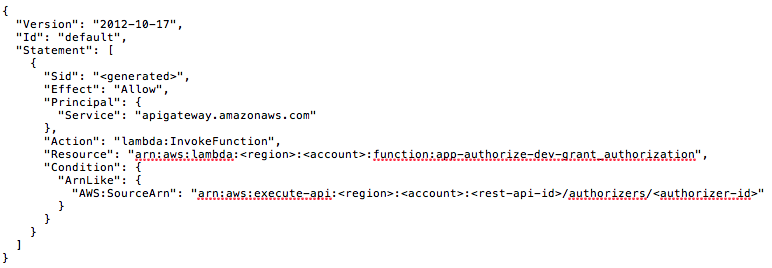
Not sure if this helps but I've had this happen before when the IAM permissions weren't right, e.g. the APIG didn't have permission to execute the lambda as an authorizer.
In the AWS console the Function Policy for the lambda needs to have a statement allowing the APIG to execute it, e.g.
{
"Version": "2012-10-17",
"Id": "default",
"Statement": [
{
"Sid": "<generated>",
"Effect": "Allow",
"Principal": {
"Service": "apigateway.amazonaws.com"
},
"Action": "lambda:InvokeFunction",
"Resource": "arn:aws:lambda:<region>:<account>:function:<lambda-name>",
"Condition": {
"ArnLike": {
"AWS:SourceArn": "arn:aws:execute-api:<region>:<account>:<rest-api-id>/authorizers/<authorizer-id>"
}
}
},
]
}
 ravenscar
on 27 Jul 2018
ravenscar
on 27 Jul 2018
@ravenscar How did you apply this policy? I'm not using Chalice, but I'm getting the same issue with APIG + Lambda as everyone else
Execution failed due to configuration error: Authorizer error
 rms1000watt
on 7 Aug 2018
rms1000watt
on 7 Aug 2018
@rms1000watt I use terraform and it's a aws_lambda_permission resource.
However you can set it in the aws console when editing the lambda by clicking the key in the screenshot below and then entering it in the Function policy box

ravenscar
on 8 Aug 2018
I am still getting that problem.
I just checked my authoriser function and I already have that function policy which was created by chalice.
I would appreciate if we had a solution for this
Thanks
LucioSt
on 5 Sep 2018
Same problem here... This is very frustrating.
Can I help you to figure out why with some code/configuration or anything else?
I solved selecting again the Authorizer Lambda and granting permission
 claudiopastorini
on 11 Sep 2018
claudiopastorini
on 11 Sep 2018
@claudiopastorini Did you have any success with the Authorizer problem ?
LucioSt
on 27 Sep 2018
@claudiopastorini Did you have any success with the Authorizer problem ?
No, I have to change the Authorizer to a wrong one, granting permissions and then to change again to the right Authorizer and granting permission.
I saw that this problem has randomly occurred.
claudiopastorini
on 30 Sep 2018
I had exactly the same thing happen when deploying my API using CloudFormation in a SAM YAML template. This was my permission config in the SAM YAML template:
AWSTemplateFormatVersion: '2010-09-09'
Transform: 'AWS::Serverless-2016-10-31'
Resources:
  MyApiGateway:
    Type: AWS::Serverless::Api
    Properties:
      StageName: Prod
      DefinitionBody:
        swagger: "2.0"  # Had to inline the swagger.yaml so that I don't have to hard code function names into the function uri
  ... snip ...
  MyLambdaAuthoriser:
    Type: 'AWS::Serverless::Function'
    Properties:
      Handler: lambda_function.lambda_handler
      Runtime: python3.6
  ... snip ...
  ApiAuthLambdaPermission:
    DependsOn: MyApiGateway
    Type: 'AWS::Lambda::Permission'
    Properties:
      Action: 'lambda:InvokeFunction'
      FunctionName: !Ref MyLambdaAuthoriser
      Principal: !Sub "apigateway.amazonaws.com"
      SourceArn: !Sub "arn:aws:execute-api:${AWS::Region}:${AWS::AccountId}:${MyApiGateway}/authorizers/*"
The SourceArn is built up using the $ macros, including the API Id which is resolved by ${MyApiGateway}, where MyApiGateway is the name of the serverless api resource.
I'd prefer to have the actual authorizer id at the end of the SourceArn, but I'm not sure how to get it with the macros. This works and is good enough for me.
 DaBozUK
on 19 Oct 2018
DaBozUK
on 19 Oct 2018
Hi everyone
I think I have figured out the solution for this.
TLDR;
The example from the Chalice documentation for setting up a Lambda authorizer contains a a URI of the form:
authorizer = CustomAuthorizer(
    'MyCustomAuth', header='Authorization',
    authorizer_uri=('arn:aws:apigateway:region:lambda:path/2015-03-01'
                    '/functions/arn:aws:lambda:region:account-id:'
                    'function:FunctionName/invocations'))
Note the date component of the Lambda URI: 2015-03-01
To work as expected with API Gateway, this date needs to be: 2015-03-31, -31 not -01!
The Lambda permissions, if you set them up as detailed elsewhere in the thread (eg as per @DaBozUK 's example), work fine as either wildcard or specific authorizer IDs.
To detail the process, I used CloudTrail to monitor exactly what API Gateway is doing when going through the process:
_API Gateway > Authorizer > Edit and without any changes click on save._
Like @DaBozUK I'm using a YAML template and specifying custom authorizers as:
SourceArn: !Sub "arn:aws:execute-api:${AWS::Region}:${AWS::AccountId}:${MyApiGateway}/authorizers/*"
I found via the CloudTrail logs that APIGateway was making an UpdateAuthorizer call on the unchanged edit save, but only replacing the value of the lambda function URI:
    "requestParameters": {
        "restApiId": "XXXXXX",
        "updateAuthorizerInput": {
            "patchOperations": [
                {
                    "path": "/authorizerUri",
                    "value": "arn:aws:apigateway:ap-southeast-2:lambda:path/2015-03-31/functions/arn:aws:lambda:ap-southeast-2:XXXXX:function:CustomAuth/invocations",
                    "op": "replace"
                }
            ]
        },
It was subsequently updating the Lambda invoke permissions as well, but with the authorizer ID:
    "requestParameters": {
        "statementId": "3eb4a3df-3fdb-497b-9557-7dcba38c4289",
        "action": "lambda:InvokeFunction",
        "functionName": "arn:aws:lambda:ap-southeast-2:XXXXX:function:CustomAuth",
        "principal": "apigateway.amazonaws.com",
        "sourceArn": "arn:aws:execute-api:ap-southeast-2:XXXXX:XXXXXX/authorizers/lr4y5i"
    },
Previously I'd tried manually updating the Lambda invoke permissions to use the entire Arn (rather than the wildcard authorizers/*), but this made no difference. This lead me to suspect that the problem was likely to be on the API Gateway side, as testing the authorizer would fail with the permissions error with single millisecond latency.
I also tried the various other flush operations on the API Gateway CLI without success, as well as updating just the name of the authorizer, these didn't work either.
However, after a lot of false starts I finally noticed when inspecting the logs from the authorizer test on the API Gateway console that the dates on the URIs are subtly different.
Reconfiguring all my templates to use the 2015-03-31 format URI had everything working flawlessly.
I really hope that this insight helps someone else, as this has been a rather frustrating exercise!
 rjw
on 28 Nov 2018
rjw
on 28 Nov 2018
I'm still having this issue as of today... Following the workarounds worked, but there should be a better way.... Is there a way to assign the IAM role for the authorizer?
 d33kayyy
on 21 May 2019
d33kayyy
on 21 May 2019
People who are still facing this issue.
Below steps to fix it on deployment:
- Create a new role.
- Edit Trust relationships to
{
  "Version": "2012-10-17",
  "Statement": [
    {
      "Sid": "",
      "Effect": "Allow",
      "Principal": {
        "Service": [
          "lambda.amazonaws.com",
          "apigateway.amazonaws.com"
        ]
      },
      "Action": "sts:AssumeRole"
    }
  ]
}
- Create a new policy [allow lambda:invokeFunction] allow resource according to your needs.
{
    "Version": "2012-10-17",
    "Statement": [
        {
            "Effect": "Allow",
            "Action": "lambda:InvokeFunction",
            "Resource": "*"
        }
    ]
}
Now use this role at the time of deployment in chalice config.json, like below
    "dev": {
      "api_gateway_stage": "api",
      "manage_iam_role": false,
      "iam_role_arn": "created role arn"
    }
Cheers!
Eye opener: https://docs.aws.amazon.com/apigateway/latest/developerguide/integrating-api-with-aws-services-lambda.html
 Dev-Root2IoT
on 13 Jan 2020
Dev-Root2IoT
on 13 Jan 2020
People who are still facing this issue.
Below steps to fix it on deployment:
1. Create a new role.

2. Edit Trust relationships to
{ "Version": "2012-10-17", "Statement": [ { "Sid": "", "Effect": "Allow", "Principal": { "Service": [ "lambda.amazonaws.com", "apigateway.amazonaws.com" ] }, "Action": "sts:AssumeRole" } ] }1. Create a new policy [allow lambda:invokeFunction] allow resource according to your needs.{ "Version": "2012-10-17", "Statement": [ { "Effect": "Allow", "Action": "lambda:InvokeFunction", "Resource": "*" } ] }Now use this role at the time of deployment in chalice config.json, like below
    "dev": {
      "api_gateway_stage": "api",
      "manage_iam_role": false,
      "iam_role_arn": "created role arn"
    }
Cheers!
Eye opener: https://docs.aws.amazon.com/apigateway/latest/developerguide/integrating-api-with-aws-services-lambda.html
It's not working every time.
Please reopen this issue.
 kj96
on 14 Jan 2020
kj96
on 14 Jan 2020
Just in case someone is having the same issue. I noticed there was a slight difference between the AWS::Lambda::Permission that I created and the one the API Gateway appends when you "edit" the Authorizer config.
In this case the sourceArn was the issue. At the end of my pattern(arn:(aws[a-zA-Z0-9-]):([a-zA-Z0-9-])+:([a-z]{2}(-gov)?-[a-z]+-d{1})?:(d{12})?:(.)) I had three asterisks(/*/*/*) to allow everything, my CRUD Lambda function is configured the same way and the API Gateway is able to call it without any issues.
To solve the issue, instead of the three asterisks(/*/*/*), I changed it to (/authorizers/*).
The entire policy looks like this.
"myfunctionnamepermission": {
    "Type": "AWS::Lambda::Permission",
    "Properties": {
        "FunctionName": {
            "Fn::GetAtt": [
                "functionName",
                "Arn"
            ]
        },
        "Action": "lambda:InvokeFunction",
        "Principal": "apigateway.amazonaws.com",
        "SourceArn": {
            "Fn::Join":[
             "",
                [
                   "arn:aws:execute-api:",
                   {
                          "Ref": "AWS::Region"
                   },
                   ":",
                   {
                           "Ref": "AWS:AccountId"
                   },
                   ":",
                   {
                           "Ref": "awsAccountTrackingAPI"
                   },
                   "/authorizers/*"
                ]
            ]
       }
   }
}
 geoff192
on 20 Jan 2020
geoff192
on 20 Jan 2020
For people still don't work, you might accessing the wrong header path in your authorizer script. Example: My Case:
Wrong: event.headers.Authorization
Actual: event.authorizationToken
Full structure:
{
type: 'TOKEN',
methodArn: 'arn:aws:execute-api:*',
authorizationToken: 'Basic *'
}
log your incoming and identify yours.
My Ref Repo: https://github.com/davidgf/serverless-http-basic-auth
 pgsridhar
on 3 Feb 2020
pgsridhar
on 3 Feb 2020
I am still hitting this issue. It basically started to happen when I started using the authorizer=my_authorizer attribute on my routes. I haven't investigated much but if I redeploy a few times (without changing anything) it actually starts to work eventually.
 reik-wargaming
on 10 Jun 2020
reik-wargaming
on 10 Jun 2020
@jamesls since this issue is closed, do you know what the fix is? does it make sense to reopen or create a new issue for this problem? I can provide the code that I am trying to deploy.
reik-wargaming
on 11 Jun 2020
Related issues
 mrdavidhanson
·
3Comments
mrdavidhanson
·
3Comments
 davidolmo
·
3Comments
davidolmo
·
3Comments
 michaeldimchuk
·
3Comments
michaeldimchuk
·
3Comments
 variable
·
4Comments
variable
·
4Comments
 adsahay
·
4Comments
adsahay
·
4Comments
Most helpful comment
I had exactly the same thing happen when deploying my API using CloudFormation in a SAM YAML template. This was my permission config in the SAM YAML template:
The SourceArn is built up using the $ macros, including the API Id which is resolved by
${MyApiGateway}, where MyApiGateway is the name of the serverless api resource.I'd prefer to have the actual authorizer id at the end of the SourceArn, but I'm not sure how to get it with the macros. This works and is good enough for me.