Chakra-ui: Request to add option to easily disable Tab boxShadow on focus
Problem description
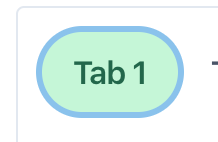
I personally dont like the blue shadow/outline on the tabs - for one its blue no matter what color my tabs are and if its an accessibility thing its not being carried over to links and buttons (which I personally would not want). To turn it off involves adding _focus={{ boxShadow: 'none' }} to all Tab elements which is a bit of a pain - or building a component on top which takes away from default ease of use.
Proposed solution
Preferred choice is no shadow - but thats just me :). Else can we explore having an option on the main Tabs component to not have shadows - something like outline={true|false} type of thing?
 cyberwombat
All 3 comments
Hi @cyberwombat,
You might be interested in this post that explains how to achieve that:
https://medium.com/@keeganfamouss/accessibility-on-demand-with-chakra-ui-and-focus-visible-19413b1bc6f9
Let me know if you find it useful.
 segunadebayo
on 6 Apr 2020
segunadebayo
on 6 Apr 2020
It was to me at least, thank you!
 PSalaun
on 9 Apr 2020
PSalaun
on 9 Apr 2020
While this seems to partially work the Textarea component uses a border-color property which I have so far not been able to undo without affecting the normal state.
cyberwombat
on 29 Apr 2020
Related issues
 feross
·
3Comments
feross
·
3Comments
 Calvein
·
3Comments
Calvein
·
3Comments
 harshzalavadiya
·
3Comments
harshzalavadiya
·
3Comments
 Machinezero
·
3Comments
Machinezero
·
3Comments
 kripod
·
3Comments
kripod
·
3Comments
Most helpful comment
Hi @cyberwombat,
You might be interested in this post that explains how to achieve that:
https://medium.com/@keeganfamouss/accessibility-on-demand-with-chakra-ui-and-focus-visible-19413b1bc6f9
Let me know if you find it useful.