Cesium: Labels/billboards on terrain and depthTestAgainstTerrain
When labels/billboards are clamped to terrain, they require depthTestAgainstTerrain to be false so they do not sink into terrain. However, this allows 3D models and extruded geometries, for example, to come through terrain.
@bagnell and I have brainstormed a few ideas like using an extra depth buffer or stenciling. We're hoping for something simpler though.
 pjcozzi
All 32 comments
Was this addressed by the heightReference stuff? Or is this still an issue?
 mramato
on 15 Oct 2015
mramato
on 15 Oct 2015
@pjcozzi @bagnell is this still a problem?
 hpinkos
on 9 Sep 2016
hpinkos
on 9 Sep 2016
Yes, it's still a problem. For example, if you have a label on the side of a mountain. Its possible to rotate so the part of the label fails the depth test with the mountain.
 bagnell
on 9 Sep 2016
bagnell
on 9 Sep 2016
Here's exactly what @bagnell is talking about. Hopefully something we can address sooner rather than later. (along with other label/depth improvements).

mramato
on 9 Sep 2016
Reported in this post: https://groups.google.com/d/msg/cesium-dev/mm2Xipqbp-g/AoSvaHcUAQAJ
hpinkos
on 5 Oct 2016
CC #2160
pjcozzi
on 2 Jan 2017
Also came up in this forum post: https://groups.google.com/d/msg/cesium-dev/Z68H4SHnAAY/MzQTuxkQDAAJ
hpinkos
on 15 Feb 2017
@pjcozzi @bagnell We would love to see this one get addressed. Do you have a time estimate on it? As we begin to integrate 3D models into our application, this issue is causing some unintended side effects.
 juburr
on 27 Jun 2017
juburr
on 27 Jun 2017
@jburr-nc no time frame for this exact fix, but check out Label.disableDepthTestDistance, which can be used to fix this.
pjcozzi
on 27 Jun 2017
@pjcozzi Thanks for the tip! That worked!
juburr
on 27 Jun 2017
Discussed a bit offline with @bagnell today. @bagnell said he already tried this, but I still think we should re-investigate something like checking the center and corner points of a billboard/label against the depth buffer in the vertex shader, and then "passing depth" (e.g., not pushing in front of the near plane to clip it) if all (or maybe n) points pass. Probably enable depth writes but not reads in the render state.
pjcozzi
on 22 Aug 2017
Unsure if this is related or not, but is anyone else experiencing 3D dome shapes distorting KML data sources?
juburr
on 1 Sep 2017
I'm currently combining disableDepthTestDistance with translucencyByDistance to make labels visible through terrain, but hidden at a certain distance from the viewer. This mitigates the issue where entities show through the earth (!) in 3D mode when disableDepthTestDistance is set to Infinity. I'm still hoping for a solution where billboards don't get clipped by terrain, but "whole entities" are hidden when they're behind something (like, say, the planet).
 thw0rted
on 20 Oct 2017
thw0rted
on 20 Oct 2017
I like the "whole entity" idea. I've encountered more than one project where they want an all-or-nothing test for visibility of the entity (point, billboard, and label, together). If the entity's single location is exposed to the camera, then the point+billboard+label graphics should be visible in their entirety, unfettered by depth-buffering. But if the entity is obscured, even just hidden behind a small hill, then the point+billboard+label graphics are turned off completely. At no time is a partial label or partial marker symbol (billboard) ever shown to the user, nor a marker without a label or vice-versa. Essentially, the 2D elements don't need to participate in the 3D scene at all, beyond yes-or-no knowledge of whether the object they represent is visible within the scene, and its screen-space location.
Points, billboards, and labels in such a system could even be moved to a separate render pass where FXAA was not applied to them, which would be an added win.
 emackey
on 24 Oct 2017
emackey
on 24 Oct 2017
I had two thoughts about this. Being able to designate entities as all-or-nothing, at the top level, would be a helpful feature, for the reasons you've laid out. But I also think that certain 2D graphical elements should be excluded from individual depth testing, as you've described, either behind an option or as a global rendering engine change. I can't think of a reason anybody would ever want a billboard or label to be partially obscured by terrain (though of course I wouldn't say it's impossible), so at the very least the default behavior should be to avoid doing this.
thw0rted
on 25 Oct 2017
Yes, every time I think about this, I can't imagine a valid reason why a user would want per-fragment visibility testing of 2D elements (points/billboards/labels). They either want all fragments of all the available 2D elements for a given entity, or none.
emackey
on 26 Oct 2017
@emackey @thw0rted I agree - feel free to hack up a prototype. This could even become a bit easier with the upcoming post-processing framework, #5808, providing access to the terrain/environment depth texture.
CC @bagnell
pjcozzi
on 26 Oct 2017
Came up again on the forum: https://groups.google.com/forum/#!topic/cesium-dev/73iP8rzzGuU
 ggetz
on 4 Dec 2017
ggetz
on 4 Dec 2017
Came up again on the forum: https://groups.google.com/forum/#!topic/cesium-dev/kQiuFbnTpSQ
ggetz
on 12 Jan 2018
Congratulations on closing the issue! I found these Cesium forum links in the comments above:
https://groups.google.com/d/msg/cesium-dev/mm2Xipqbp-g/AoSvaHcUAQAJ
https://groups.google.com/d/msg/cesium-dev/Z68H4SHnAAY/MzQTuxkQDAAJ
https://groups.google.com/forum/#!topic/cesium-dev/73iP8rzzGuU
https://groups.google.com/forum/#!topic/cesium-dev/kQiuFbnTpSQ
If this issue affects any of these threads, please post a comment like the following:
> The issue at https://github.com/AnalyticalGraphicsInc/cesium/issues/2694 has just been closed and may resolve your issue. Look for the change in the next stable release of Cesium or get it now in the master branch on GitHub https://github.com/AnalyticalGraphicsInc/cesium.
__I am a bot who helps you make Cesium awesome! Contributions to my configuration are welcome.__
:earth_africa: :earth_americas: :earth_asia:
 cesium-concierge
on 22 Jun 2018
cesium-concierge
on 22 Jun 2018
Hello there:
Any news with this issue?
I'm trying to add billboards on terrain, when I set camera at a certain angle, it's completely invisible.

my code:
var info={
 country:"foo",
 region:"bar",
 longitude:123,
 latitude:12
}
 billboard = viewer.entities.add(new Cesium.Entity({
                            name: info.country + " " + info.region,
                            position: Cesium.Cartesian3.fromDegrees(info.longitude, info.latitude),
                            billboard: {
                                image: info.url,
                                width: 40,
                                height: 40,
                                verticalOrigin: Cesium.VerticalOrigin.BOTTOM
                            }
                        }));
 gooin
on 9 Aug 2018
gooin
on 9 Aug 2018
Your billboard is not clamped to the ground. Add heightReference: Cesium.HeightReference.CLAMP_TO_GROUND and see if it behaves the way you want.
thw0rted
on 9 Aug 2018
@thw0rted Awesome!Thank you.
gooin
on 9 Aug 2018
I am getting error normalized result is not a number while set heightReference: Cesium.HeightReference.CLAMP_TO_GROUND in my code and globe map become black.
Here are my complete code
entity.polygon.material = Cesium.Color.CYAN.withAlpha(0.5);
              entity.polygon.outlineColor=Cesium.Color.BLACK;
              entity.polygon.extrudedHeight =entity.properties.Hght;
              entity.polygon.extrudedHeightReference=Cesium.HeightReference.CLAMP_TO_GROUND;
 munna
on 28 Sep 2018
munna
on 28 Sep 2018
Can you dump your entity definition and post it here? Like, console.log(entity) then copy/paste or make a screenshot. Alternately, you could log the values being used in the entity definition separately. For example, is entity.properties.Hght really the value you want for extrudedHeight?
thw0rted
on 28 Sep 2018
Thanks for reply @thw0rted .
consloe.log is not visible properly as it is big object. Please check this screenshot

munna
on 28 Sep 2018
I haven't tried setting this up after the fact, have you tried making an entity with constructor options for the polygon definition, rather than making the entity then altering its polygon on the fly?
thw0rted
on 28 Sep 2018
@munna can you please put together a Sandcastle example to reproduce the issue? https://cesiumjs.org/Cesium/Build/Apps/Sandcastle/
hpinkos
on 28 Sep 2018
@hpinkos I have created here Sandcastle URL to reproduce but i am not getting same issue. but got another two issue.
- When I apply
entity.polygon.extrudedHeightReference=Cesium.HeightReference.CLAMP_TO_GROUND;, 3D building become 2D. - when i enable 2-8 line code. geometry goes underground and become invisible.
var scene =viewer.scene;
scene.terrainProvider = Cesium.createWorldTerrain({requestWaterMask : true,
      requestVertexNormals : true });
scene.imageryLayers.addImageryProvider(
      new Cesium.IonImageryProvider({ assetId: 2 })
    );
scene.globe.depthTestAgainstTerrain = true;
munna
on 29 Sep 2018
hello, I want to ask if the problem of pickPositionSupported is not supported under IE.
 18616594872
on 30 Sep 2018
18616594872
on 30 Sep 2018
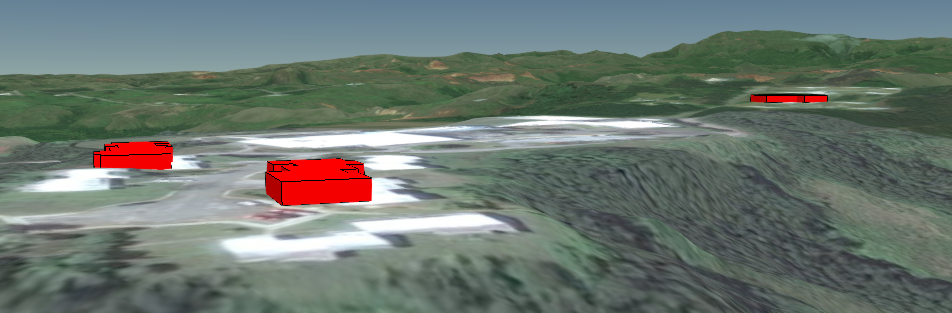
I think you want to set the polygon's height reference to be CLAMP_TO_GROUND and perPositionHeight to false, and set the extrusion's height reference to RELATIVE_TO_GROUND. Here's your example with those changes.
```var viewer = new Cesium.Viewer('cesiumContainer');
//var scene =viewer.scene;
//scene.terrainProvider = Cesium.createWorldTerrain({requestWaterMask : true,
// requestVertexNormals : true });
//scene.imageryLayers.addImageryProvider(
// new Cesium.IonImageryProvider({ assetId: 2 })
// );
//scene.globe.depthTestAgainstTerrain = true;
var promise = Cesium.GeoJsonDataSource.load( "https://raw.githubusercontent.com/munna/react-gis/master/building.geojson",
{clampToGround: true});
promise.then(function(dataSource) {
console.log("Munna");
console.log(viewer);
viewer.dataSources.add(dataSource);
      //Get the array of entities
      var entities = dataSource.entities.values;

      var colorHash = {};
      for (var i = 0; i < entities.length; i++) {
          //For each entity, create a random color based on the state name.
          //Some states have multiple entities, so we store the color in a
          //hash so that we use the same color for the entire state.
          var entity = entities[i];
          var name = "Munna";//entity.name;
          var color = colorHash[name];
          if (!color) {
              color = Cesium.Color.fromRandom({
                  alpha : 0.4
              });
              colorHash[name] = color;
          }

          //Set the polygon material to our random color.
          entity.polygon.material = Cesium.Color.RED.withAlpha(1);
          //Remove the outlines.
          entity.polygon.outline = true;
          entity.polygon.outlineColor=Cesium.Color.BLACK;
          //Extrude the polygon based on the state's population.  Each entity
          //stores the properties for the GeoJSON feature it was created from
          entity.polygon.extrudedHeight =entity.properties.Hght;// / 50.0;
          entity.polygon.extrudedHeightReference=Cesium.HeightReference.RELATIVE_TO_GROUND;
          entity.polygon.perPositionHeight =false;
          //entity.polygon.height=67;
          entity.polygon.heightReference=Cesium.HeightReference.CLAMP_TO_GROUND;
      }
      viewer.flyTo(promise);
  }).otherwise(function(error){
      //Display any errrors encountered while loading.
      console.log(error);
  });```
And what it looks like.
 GatorScott
on 30 Sep 2018
GatorScott
on 30 Sep 2018
@GatorScott , Thank you very much . its working as expected.
munna
on 1 Oct 2018
Related issues
pjcozzi
·
4Comments
 JacksonBates
·
3Comments
hpinkos
·
4Comments
JacksonBates
·
3Comments
hpinkos
·
4Comments
 worlddai
·
3Comments
worlddai
·
3Comments
 hanbollar
·
4Comments
hanbollar
·
4Comments
Most helpful comment
I like the "whole entity" idea. I've encountered more than one project where they want an all-or-nothing test for visibility of the entity (point, billboard, and label, together). If the entity's single location is exposed to the camera, then the point+billboard+label graphics should be visible in their entirety, unfettered by depth-buffering. But if the entity is obscured, even just hidden behind a small hill, then the point+billboard+label graphics are turned off completely. At no time is a partial label or partial marker symbol (billboard) ever shown to the user, nor a marker without a label or vice-versa. Essentially, the 2D elements don't need to participate in the 3D scene at all, beyond yes-or-no knowledge of whether the object they represent is visible within the scene, and its screen-space location.
Points, billboards, and labels in such a system could even be moved to a separate render pass where FXAA was not applied to them, which would be an added win.