Cesium: PolylineGeometry 2D rendering incorrectly at certain zoom levels
A concise explanation of the problem you're experiencing.
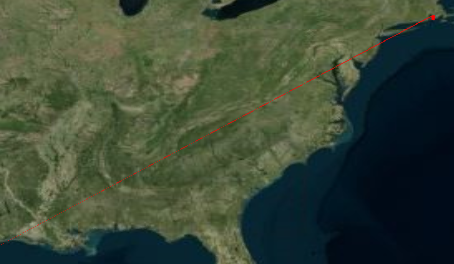
While in 2D polylineGeometry are not being rendered correctly at certain zoom levels. Occassionally the graphic appears to extend down towards the lower left corner of screen. In 3D it appears to render properly. It seems to be related to the Z component is equal to 0.A minimal code example. If you've found a bug, this helps us reproduce and repair it.
Once the globe appears click on the 2D (scene picker) button and zoom in/out slowly. At some zoom levels you will see the line exten down to the lower left corner of the screen.
var geomInst = null;
var linePoints = null;
var primitive = null;
var sceneModePicker = null;
var viewer = null;
viewer = new Cesium.CesiumWidget('cesiumContainer');
sceneModePicker = new Cesium.SceneModePicker('sceneButton', viewer.scene, 0);
linePoints = [-71.19881, 41.6785, 0,
-71.19994, 41.46332, 0,
-71.11713, 41.49306, 0,
-71.14121, 41.65527, 127,
-71.19881, 41.6785, 0];
geomInst = new Cesium.GeometryInstance({
geometry: new Cesium.PolylineGeometry({
positions: Cesium.Cartesian3.fromDegreesArrayHeights(linePoints),
width: 1.0,
vertexFormat: Cesium.PolylineColorAppearance.VERTEX_FORMAT,
}),
attributes: {
color: Cesium.ColorGeometryInstanceAttribute.fromColor(Cesium.Color.RED)
}
});
primitive = new Cesium.Primitive({
geometryInstances: geomInst,
interleave : true,
appearance: new Cesium.PolylineColorAppearance()
});
viewer.scene.primitives.add(primitive);
- Context. Why do you need to do this? We might know a better way to accomplish your goal.
The only thing that is a little different is that I am using the Cesium Widget and the Geometry API. I am using the widget for performance reasons I only need to deal with a large set of Geometries.
- The Cesium version you're using, your operating system and browser.
Cesium version 35, Windows 7, Chrome 59.0.3071.115 verified that this is a problem with the latest Firefox ESR release as well.
This has been reported to the Cesium forum and a picture is attached to the thread.
 BigDog6432
All 8 comments
Hi @BigDog6432! Sorry you are having issues with this. When I put this code into sandcastle, I could not replicate the behavior in the images. Could this be a problem with your graphics card?
For reference, link to the forum post with pcitures: https://groups.google.com/forum/#!topic/cesium-dev/5VDuZ4lQ_V0
 ggetz
on 7 Aug 2017
ggetz
on 7 Aug 2017
I was able to reproduce this:
var geomInst = null;
var linePoints = null;
var primitive = null;
var sceneModePicker = null;
var viewer = null;

viewer = new Cesium.CesiumWidget('cesiumContainer',{ sceneMode: 2});

linePoints = [-71.19881, 41.6785, 0,
-71.19994, 41.46332, 0,
-71.11713, 41.49306, 0,
-71.14121, 41.65527, 127,
-71.19881, 41.6785, 0];

geomInst = new Cesium.GeometryInstance({
geometry: new Cesium.PolylineGeometry({
positions: Cesium.Cartesian3.fromDegreesArrayHeights(linePoints),
width: 1.0,
vertexFormat: Cesium.PolylineColorAppearance.VERTEX_FORMAT,
}),
attributes: {
color: Cesium.ColorGeometryInstanceAttribute.fromColor(Cesium.Color.RED)
}
});

primitive = new Cesium.Primitive({
geometryInstances: geomInst,
interleave : true,
appearance: new Cesium.PolylineColorAppearance()
});

viewer.scene.primitives.add(primitive);
 hpinkos
on 7 Aug 2017
hpinkos
on 7 Aug 2017
@BigDog6432 as a workaround, try using a polyline primitive instead:
var viewer = new Cesium.CesiumWidget('cesiumContainer', {
    sceneMode: Cesium.SceneMode.SCENE2D
});

var linePoints = [-71.19881, 41.6785, 0,
-71.19994, 41.46332, 0,
-71.11713, 41.49306, 0,
-71.14121, 41.65527, 127,
-71.19881, 41.6785, 0];

var polylines = viewer.scene.primitives.add(new Cesium.PolylineCollection());
polylines.add({
    positions: Cesium.Cartesian3.fromDegreesArrayHeights(linePoints),
    material: Cesium.Material.fromType('Color', {
        color: Cesium.Color.RED
    })
});
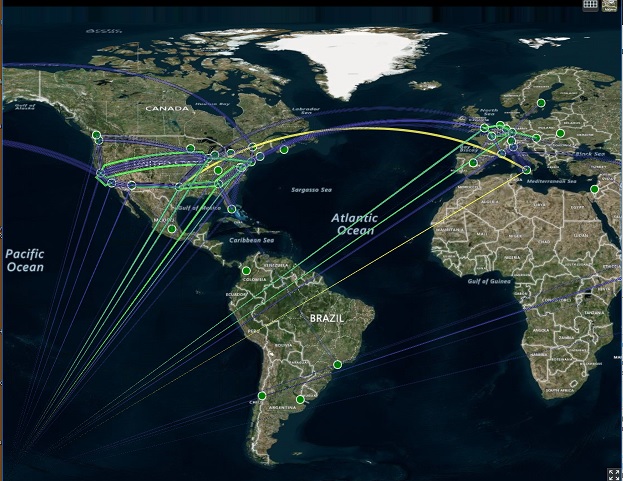
I've been having a similar problem as I've been developing a network weather map. It seems to be present on all zoom levels of SCENE2D. SCENE3D and COLUMBUS_VIEW render fine. As I zoom in closer they're less visible as they seem to almost grow more narrow and darker. The lines are recognized as part of the entity (I can click on them and get the popup) but the behavior has me thinking it's strictly about how the geometry is converted to pixel screen locations -- not a core geometry issue.
 Rikaelus
on 28 Aug 2017
Rikaelus
on 28 Aug 2017
Thanks for the info @Rikaelus! We'll give you an update when we have a chance to look into this. Or if you have some time and are able to find a solution, we're happy to review a pull request. Thanks!
hpinkos
on 28 Aug 2017
I'd be happy to poke around but with Cesium being something of a beast, I could use some pointers towards where to start looking.
Rikaelus
on 6 Sep 2017
Brought up on the forum here: https://groups.google.com/forum/#!topic/cesium-dev/oZfpHfuAXok
ggetz
on 20 Dec 2017
I had this issue and found a solution that works if you have access to the data.
If I had polyline or GeoJson line with three points, where the third point was the same as the first point, the line would appear tapered. So, for example, I track flights. If a flight flew from JFK to SFO and back to JFK, the line would appear tapered at the point of return to JFK, so SFO. My solution was, on a multi point polyline to just add in a conditional that if the origin and destination were the same, don't add the destination to the polyline.
Here is a GeoJSON example:
{
    "geometry": {
        "type": "LineString",
        "coordinates": [
            [-73.70760345458984, 41.06700134277344],
            [-74.26460266, 41.50999832],
            [-73.70760345458984, 41.06700134277344]
        ]
    }
}
The third point in the LineString, or Polyline is the same as the first point. That third point will cause the line to appear tapered and even partially invisible. The easiest workaround is to just remove that third point, which isn't needed for the visualization anyway.
Example:
{
    "geometry": {
        "type": "LineString",
        "coordinates": [
            [-73.70760345458984, 41.06700134277344],
            [-74.26460266, 41.50999832]
        ]
    }
}
 arelenglish
on 20 Dec 2017
arelenglish
on 20 Dec 2017
Related issues
hpinkos
·
4Comments
 worlddai
·
3Comments
worlddai
·
3Comments
 rahwang
·
3Comments
rahwang
·
3Comments
 pjcozzi
·
4Comments
pjcozzi
·
4Comments
 hanbollar
·
4Comments
hanbollar
·
4Comments