cert-manager-webhook deployment tooks too long to start.. secret "cert-manager-webhook-tls" not found
Describe the bug:
cert-manager deployment takes too long to full start..
Log:
Events:
  Type     Reason       Age                    From                                    Message
  ----     ------       ----                   ----                                    -------
  Normal   Scheduled    4m14s                  default-scheduler                       Successfully assigned cert-manager/cert-manager-webhook-64d6cc8864-n2jhv to aks-tier1-17832576-vmss000001
  Warning  FailedMount  3m10s (x8 over 4m14s)  kubelet, aks-tier1-17832576-vmss000001  MountVolume.SetUp failed for volume "certs" : secret "cert-manager-webhook-tls" not found
  Warning  FailedMount  2m11s                  kubelet, aks-tier1-17832576-vmss000001  Unable to mount volumes for pod "cert-manager-webhook-64d6cc8864-n2jhv_cert-manager(a294e3d7-f101-4a19-bc32-ae63334af67c)": timeout expired waiting for volumes to attach or mount for pod "cert-manager"/"cert-manager-webhook-64d6cc8864-n2jhv". list of unmounted volumes=[certs]. list of unattached volumes=[certs cert-manager-webhook-token-fh2b6]
  Normal   Pulled       117s                   kubelet, aks-tier1-17832576-vmss000001  Container image "quay.io/jetstack/cert-manager-webhook:v0.12.0" already present on machine
  Normal   Created      117s                   kubelet, aks-tier1-17832576-vmss000001  Created container cert-manager
  Normal   Started      117s                   kubelet, aks-tier1-17832576-vmss000001  Started container cert-manage
Not sure if cert-manager-webhook-tls is created with cainjector + admission hook, but it looks like it.
Any idea how to speed up things?
Expected behaviour:
cert-manager-webhook pods are fully started asap, it should not take 4-5mins to start.
Steps to reproduce the bug:
1.
kustomization base -> https://github.com/jetstack/cert-manager/releases/download/v0.12.0/cert-manager.yaml
2.
kustomization.yaml
resources:
- ../../base
namespace: cert-manager
3.
kustomize build . | kubectl apply -f -
Anything else we need to know?:
Environment details::
- Kubernetes version (e.g. v1.10.2): v1.15.7
- Cloud-provider/provisioner (e.g. GKE, kops AWS, etc): Azure AKS
- cert-manager version (e.g. v0.4.0): 0.12.0
- Install method (e.g. helm or static manifests): manifest/kustomization
/kind bug
Related::
- https://github.com/jetstack/cert-manager/issues/1730
- https://github.com/jetstack/cert-manager/issues/2484
Edit::
I had success with:
1.
kustomization base -> https://github.com/jetstack/cert-manager/releases/download/v0.12.0/cert-manager.yaml
2.
kustomization.yaml
resources:
- ../../base
patchesStrategicMerge:
- patch.yaml
namespace: cert-manager
3.
patch.yaml
---
apiVersion: apps/v1
kind: Deployment
metadata:
  name: cert-manager-cainjector
  namespace: cert-manager
spec:
  template:
    spec:
      containers:
        - name: cert-manager
          args:
          - --v=2
          - --leader-election-namespace=$(POD_NAMESPACE)
---
apiVersion: apps/v1
kind: Deployment
metadata:
  name: cert-manager
  namespace: cert-manager
spec:
  template:
    spec:
      containers:
        - name: cert-manager
          args:
          - --v=2
          - --cluster-resource-namespace=$(POD_NAMESPACE)
          - --leader-election-namespace=$(POD_NAMESPACE)
          - --webhook-namespace=$(POD_NAMESPACE)
          - --webhook-ca-secret=cert-manager-webhook-ca
          - --webhook-serving-secret=cert-manager-webhook-tls
          - --webhook-dns-names=cert-manager-webhook,cert-manager-webhook.cert-manager,cert-manager-webhook.cert-manager.svc
4.
kustomize build . | kubectl apply --validation=false -f -
, but now I am getting: ( kubectl logs cert-manager-webhook-7c7ddc98-46tdx -n cert-manager )
I0122 14:18:56.704896       1 main.go:64]  "msg"="enabling TLS as certificate file flags specified"
I0122 14:18:56.705141       1 server.go:126]  "msg"="listening for insecure healthz connections"  "address"=":6080"
I0122 14:18:56.705202       1 server.go:138]  "msg"="listening for secure connections"  "address"=":10250"
I0122 14:18:56.705230       1 server.go:155]  "msg"="registered pprof handlers"
I0122 14:18:59.168427       1 server.go:307]  "msg"="Health check failed as CertificateSource is unhealthy"
I0122 14:19:09.167818       1 server.go:307]  "msg"="Health check failed as CertificateSource is unhealthy"
I0122 14:19:19.167874       1 server.go:307]  "msg"="Health check failed as CertificateSource is unhealthy"
I0122 14:19:29.167866       1 server.go:307]  "msg"="Health check failed as CertificateSource is unhealthy"
I0122 14:19:39.167731       1 server.go:307]  "msg"="Health check failed as CertificateSource is unhealthy"
I0122 14:19:49.167910       1 server.go:307]  "msg"="Health check failed as CertificateSource is unhealthy"
I0122 14:19:59.167832       1 server.go:307]  "msg"="Health check failed as CertificateSource is unhealthy"
I0122 14:20:06.705647       1 tls_file_source.go:144]  "msg"="detected private key or certificate data on disk has changed. reloading certificate"
, so deployment time is reduced from 4-5mins to 1-2mins
 lukasmrtvy
All 9 comments
Have the same issue, webhook pod doing error because it can't find the secret.
The secret eventually appeared in the namespace, but the webhook pod already failed.
Feels like a racing condition
 JnMik
on 22 Jan 2020
JnMik
on 22 Jan 2020
This issue occurs due to the way the webhookbootstrap controller incrementally updates the Secret resource, meaning when the Pod first starts there is no tls.key or tls.crt available.
We should refactor/update this controller to better handle this case, and to atomically issue the tls.key and tls.crt into the Secret upon the first Create() call.
/milestone v0.14
 munnerz
on 27 Jan 2020
munnerz
on 27 Jan 2020
Do you have a reliable workaround? Above suggestions haven't worked for me and I cannot upgrade without a reliable workaround.
 theresemchale
on 28 Jan 2020
theresemchale
on 28 Jan 2020
I've faced the same issue with a new K8s cluster version 1.16.
I have 3 more clusters and all shares the same configuration of cert-manager via helm chart 0.12, so far everything worked in an instance.
My deployment of cert-manager includes additional webhook annotations that I'm placing for the cert-manager pod.
Running the chart with my values resulted in the same behavior as described here..
So I've tested the following scenarios:
- Installed cert-manager from here https://github.com/jetstack/cert-manager/releases/download/v0.12.0/cert-manager.yaml - no webhook-tls at all.
- Installed cert-manager version 0.11 https://github.com/jetstack/cert-manager/releases/download/v0.11.0/cert-manager.yaml - webhook-tls got created after 2 minutes.
- I've downloaded the manifest and added the annotations applied the same file with the annotations - webhook-tls failed to create.
What eventually worked for me is a bit awkward:
- Installed cert-manager using v0.11.0 release without modifications.
- Confirmed that everything is working.
- Modified the manifest to include my annotations and re-run the file - everything still worked.
- Upgraded it to release 0.12.0 with my annotations - everything is still working.
So my only assumption in my case is that 0.11.0 works and creates the webhook-tls but only if there isn't another webhook on cert-manager pod.
 tomerleib
on 28 Jan 2020
tomerleib
on 28 Jan 2020
I seem to be running into a similar issue. The webhook for cert-manger takes almost 5 minutes to come up. I have a v.1.14.8 running on Azure Kubernetes Service. I am now using cert-manager version v.14.0 with the legacy YAML since I'm running < 1.15 for K8s. Is this normal? It's a fresh install of cert-manager and an Azure kubernetes cluster.
 deathcat05
on 13 Mar 2020
deathcat05
on 13 Mar 2020
@deathcat05 I'm not able to reproduce your issue - on a new Kubernetes cluster, using Helm to install and adding the --wait flag (which waits for all pods to become Ready):
$ time helm install \
  cert-manager jetstack/cert-manager \
  --namespace cert-manager \
  --version v0.14.0 --wait
...
0.46s user 0.28s system 2% cpu 27.474 total
(i.e. 27.5s altogether).
munnerz
on 17 Mar 2020
I get this issue with k3s when using the vanilla tutorial, nothing out of the ordinary. k3s uses Kubernetes 1.17 and this is a first-time installation of cert-manager. So all the typical reasons for this problem aren't applicable. That said, it does not work, at all. I would be happy if I only had to wait 5 minutes, but it never finishes (already waited 15 minutes during one try and still did not work).
@munnerz command does not finish ever for me.
I don't understand what the issue is, because I have NO old cert-manager installation or old Kubernetes versions. This is a FRESH installation on a FRESH server with k3s. Everything should work according to the setup instructions.
For the protocol, output of kubectl get events --all-namespaces --sort-by='.metadata.creationTimestamp':
...
cert-manager   106s        Warning   BackOff             pod/cert-manager-cainjector-79f4496665-bntgx    Back-off restarting failed container
cert-manager   26s         Warning   FailedMount         pod/cert-manager-webhook-6d57dbf4f-xn9hb        Unable to attach or mount volumes: unmounted volu
mes=[certs], unattached volumes=[certs cert-manager-webhook-token-fkjm4]: timed out waiting for the condition
 theAkito
on 28 Apr 2020
theAkito
on 28 Apr 2020
@munnerz Apologies for the late reply. But it indeed was an issue on my end. IIRC, I forgot to open up port 80 on my external load balancer, which Let's Encrypt requires for validating the domain for "challenges." Appreciate you looking into my issue though!
deathcat05
on 8 May 2020
@munnerz
I am unable to receive a working certificate thru the default CERT-MANAGER from letsencrypt prod/staging API comes with istio-dex.1.0.2.yaml( kfctl_istio_dex.v1.0.2.yaml)
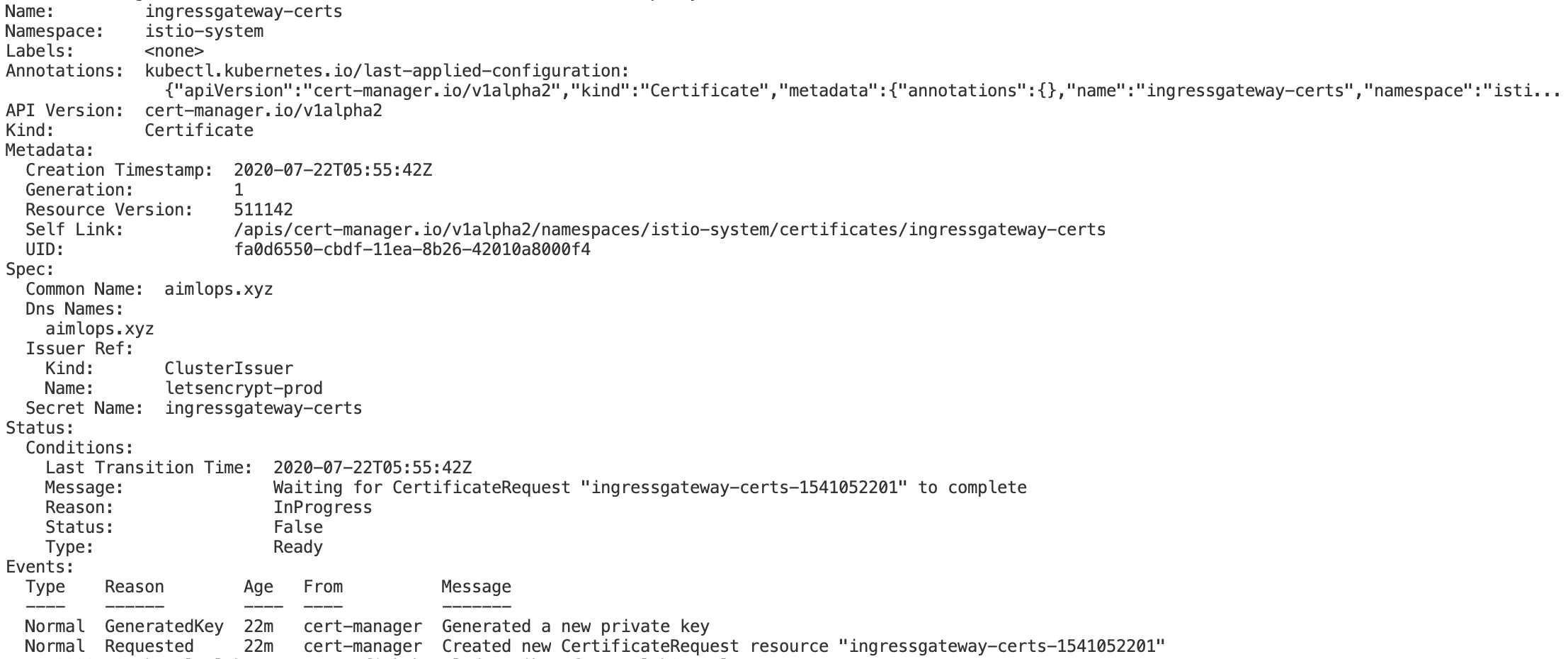
The current setup includes below approach
K8s cluster setup with 1.0.2 Istio Dex Yaml, mentioned in kubeflow.org documentation, which comes with istio 1.3.1 and cert-manager by default.
As my major task is to complete this with kubeflow enabled with istio-ingressgateway along with HTTPS Lets-Encrypt ACME SSL Certificate generation.
Kindly let me know a possible solution.
Environment:
Kubeflow version:
K8s API version 1.14
kfctl version: 1.0.2
Kubernetes platform: GKE
Kubernetes version:(kubectl version --short
Client Version: v1.17.0
Server Version: v1.14.10-gke.36)
OS: default
Istio -1.3.1
Cert-Manager: the same which comes with default manifest.
 Anujay-Saraf
on 22 Jul 2020
Anujay-Saraf
on 22 Jul 2020
Related issues
 jbartus
·
4Comments
jbartus
·
4Comments
 dontreboot
·
3Comments
dontreboot
·
3Comments
 Stono
·
3Comments
Stono
·
3Comments
 timblakely
·
4Comments
timblakely
·
4Comments
 jbeda
·
4Comments
jbeda
·
4Comments