Cert-manager: Propagation check failed, wrong service used by cm-acme-http-solver
Describe the bug:
Propagation check failed, wrong service used by cm-acme-http-solver and ACME cannot check validity of the domain and deliver certificate
Expected behaviour:
Challenge success and certificate delivered
Steps to reproduce the bug:
Following https://docs.cert-manager.io/en/latest/tutorials/acme/http-validation.html , but I have multiple subdomains at the same time.
Anything else we need to know?:
I move from cert-manager 0.8 to 0.11 few weeks. All works fine, with new subdomains added. Since few days, new subdomains failed to be validated.
Environment details::
- Kubernetes version : v1.13.10
- Cloud-provider : Azure AKS
- cert-manager version : v0.11.0
- Install method : helm
/kind bug
kubectl describe challenge:
Name:         tls-secret-1495667673-716095195-908999738
Namespace:    default
Labels:       <none>
Annotations:  <none>
API Version:  acme.cert-manager.io/v1alpha2
Kind:         Challenge
Metadata:
  Creation Timestamp:  2019-11-20T10:00:11Z
  Finalizers:
    finalizer.acme.cert-manager.io
  Generation:  1
  Owner References:
    API Version:           cert-manager.io/v1alpha2
    Block Owner Deletion:  true
    Controller:            true
    Kind:                  Order
    Name:                  tls-secret-1495667673-716095195
    UID:                   81e087b8-0b7c-11ea-95a0-7e8b3f31c3c5
  Resource Version:        10962589
  Self Link:               /apis/acme.cert-manager.io/v1alpha2/namespaces/default/challenges/tls-secret-1495667673-716095195-908999738
  UID:                     8a97cf77-0b7c-11ea-95a0-7e8b3f31c3c5
Spec:
  Authz URL:  https://acme-v02.api.letsencrypt.org/acme/authz-v3/1322577887
  Dns Name:   domain20.convertigo.net
  Issuer Ref:
    Group:  cert-manager.io
    Kind:   Issuer
    Name:   letsencrypt-prod
  Key:      BZiefIaNveMd0bwXbjywYExT6wGHdETnJLs5D6iZOAY.zIJBhOqgURIGfuNbqfatmAXt5je_GyTDV34tQ02Xqmw
  Solver:
    Http 01:
      Ingress:
        Class:  nginx
  Token:        BZiefIaNveMd0bwXbjywYExT6wGHdETnJLs5D6iZOAY
  Type:         http-01
  URL:          https://acme-v02.api.letsencrypt.org/acme/chall-v3/1322577887/aUEJmg
  Wildcard:     false
Status:
  Presented:   true
  Processing:  true
  Reason:      Waiting for http-01 challenge propagation: wrong status code '503', expected '200'
  State:       pending
Events:        <none>
I have a cm-acme-http-solver-wmpps Ingress with:
  "spec": {
    "rules": [
      {
        "host": "domain20.convertigo.net",
        "http": {
          "paths": [
            {
              "path": "/.well-known/acme-challenge/BZiefIaNveMd0bwXbjywYExT6wGHdETnJLs5D6iZOAY",
              "backend": {
                "serviceName": "cm-acme-http-solver-9mddf",
                "servicePort": 8089
              }
            }
          ]
        }
      }
    ]
  },
It refers a Service cm-acme-http-solver-9mddf that don't exist but I have a cm-acme-http-solver-6c7r2. Is this normal ?
Do you need another information or do you know a work around ?
Thx !
 nicolas-albert
All 28 comments
I delete the Ingress of the Challenge that point a wrong service and ... a new valid Ingress was created !
The certificate is now good.
I let the ticket open in case of new cases for few days.
nicolas-albert
on 22 Nov 2019
@nicolas-albert we are experiencing the exact same issue. Ingress created by cert-manager points to an acme solver service that doesn't exist in the namespace (another one exists with a different name)
This looks like a bug.
We tend to issue multiple requests like this (for many subdomains at a time), and most times they appear to succeed, but there's always the odd one that gets stuck like this.
 greywolve
on 30 Nov 2019
greywolve
on 30 Nov 2019
@greywolve try to remove the service, a new one should be created with the right name. It was working for us but it can be nice if you confirm that.
nicolas-albert
on 1 Dec 2019
@nicolas-albert that does work for us too.
Though in our case, we often issue multiple requests for certs like this per day (for different domains), so inevitably some get stuck and require manual intervention like that - not ideal.
greywolve
on 2 Dec 2019
We got this issue once, but we don't create many subdomains for now.
In few weeks, we will request some subdomains by days.
I hope cert-manager 0.12 fix this, but it isn't released yet.
Do you have tested the beta ?
nicolas-albert
on 2 Dec 2019
0.12 seems out? https://github.com/jetstack/cert-manager/releases/tag/v0.12.0
We've just upgraded, so I'm holding thumbs that it will sort of this issue.
greywolve
on 2 Dec 2019
0.12 doesn't appear to fix it, we've upgraded and certificates still get stuck with the ingress pointing to a service that doesn't exist anymore
greywolve
on 3 Dec 2019
Bad news :-/
Are you using AKS too ?
nicolas-albert
on 3 Dec 2019
Same here, AKS too (on a new created cluster).
 aitgelion
on 3 Dec 2019
aitgelion
on 3 Dec 2019
I upgrade to cert-manager v0.12 and create a new subdomain : same error.
But when I delete the wrong named service, another wrong service is created and the validation failed again.
Do you have the same issue with the v0.12 @greywolve ?
nicolas-albert
on 3 Dec 2019
I finally got it work by changing the service name directly to the Ingress, the 2nd time ...
This is very annoying and it's strange to be only 3 witnesses here.
nicolas-albert
on 3 Dec 2019
Yes @nicolas-albert, we (along with @greywolve) are still seeing this issue on 0.12.
In case the info is at all useful, we are issuing the certs via labels on an ingress, and they use http01 challenges via nginx-ingress. As stated before, this works some of the time, but some other times we get this bug.
 mvdan
on 3 Dec 2019
mvdan
on 3 Dec 2019
Heyo! I got the same issue on a K3S cluster with traefik as Ingress. Once I edited the Ingress object to point towards the correct service it resolved itself quickly. Also version 0.12
 schemen
on 4 Dec 2019
schemen
on 4 Dec 2019
Thanks for the reports here - it seems like some people are running into this fairly frequently. Has anyone been able to isolate the issue and come up with a reproducible example so we can begin investigating?
Alternatively, if you can provide as much info as possible about when you've seen this occur (i.e. immediately after an upgrade, or after a controller restart, or after manually modifying some other resource, etc.) that'd be great and really help to begin working out what is going on!
 munnerz
on 5 Dec 2019
munnerz
on 5 Dec 2019
Hard to come up with a reproducible example because it doesn't seem to happen every time, only sometimes.
I'll do my best to give you as much alternative info as possible. Going to see if I can provoke it again, and record all the logs etc.
greywolve
on 5 Dec 2019
I use a single Ingress for multiple subdomains.
One configuration file is generated and applied once.
New domains are added by a regeneration of a big configuration file.
Here a sample of our configuration :
apiVersion: extensions/v1beta1
kind: Ingress
metadata:
 name: c8o-ingress
 annotations:
   kubernetes.io/ingress.class: nginx
   cert-manager.io/issuer: letsencrypt-prod
   nginx.ingress.kubernetes.io/rewrite-target: /
   nginx.ingress.kubernetes.io/affinity: "cookie"
   nginx.ingress.kubernetes.io/session-cookie-name: "route"
   nginx.ingress.kubernetes.io/session-cookie-hash: "sha1"
   nginx.ingress.kubernetes.io/proxy-body-size: 500m
   nginx.ingress.kubernetes.io/proxy-read-timeout: "3600"
   nginx.ingress.kubernetes.io/proxy-send-timeout: "3600"
spec:
 tls:
 - hosts:
   - 'domain1.convertigo.net'
   - 'domain2.convertigo.net'
   - 'domain3.convertigo.net'
   - ...
   secretName: tls-secret
 rules:
 - host: domain1.convertigo.net
   http:
     paths:
     - path: /
       backend:
         serviceName: c8o-front-domain1
         servicePort: 80
 - ....
---
apiVersion: cert-manager.io/v1alpha2
kind: Issuer
metadata:
  name: letsencrypt-prod
spec:
  acme:
    server: https://acme-v02.api.letsencrypt.org/directory
    email: [email protected]
    privateKeySecretRef:
      name: letsencrypt-prod
    solvers:
    - http01:
        ingress:
          class: nginx
---
apiVersion: cert-manager.io/v1alpha2
kind: Certificate
metadata:
 name: tls-secret
spec:
 secretName: tls-secret
 dnsNames:
 - 'domain1.convertigo.net'
 - 'domain2.convertigo.net'
 - 'domain3.convertigo.net'
 - ...

 acme:
   config:
   - http01:
       ingressClass: nginx
     domains:
     - 'domain1.convertigo.net'
     - 'domain2.convertigo.net'
     - 'domain3.convertigo.net'
     - ...

 issuerRef:
   name: letsencrypt-prod
   kind: Issuer
If you tell me what exactly you want to see, I can try to add another domain and retrieve logs from cert-manager (from 3 pods ?).
Thank for watching this.
nicolas-albert
on 5 Dec 2019
We upgraded to Helm v3 yesterday, and since then, we haven't been able to reproduce this bug. I'm not sure if this was caused by us using a pre v3 Helm or not. @nicolas-albert did you install cert-manager with Helm, and if so, which version?
In summary. cert-manager v0.12.0 with Helm v3 appears to fix this issue, but we'll keep you updated if we spot this happening again.
greywolve
on 6 Dec 2019
@munnerz @nicolas-albert @schemen we've had this bug pop up again on the weekend. I spent some time digging, and I now have a decent hypothesis on what's happening. I created a new issue to describe the bug here: https://github.com/jetstack/cert-manager/issues/2442 .
greywolve
on 9 Dec 2019
I have the same problem, cert-manager v0.10.1, Helm v2.14.2
It's really easy to reproduce when you have lots of domains on your certificate. Let's Encrypt allows up to 100 alternate names, and some of our certs have more than 50. It's trivial to reproduce this problem with that many domains.
 andrew-cormick-dockery
on 13 Dec 2019
andrew-cormick-dockery
on 13 Dec 2019
Should be fixed by https://github.com/jetstack/cert-manager/pull/2460
Waiting for the v0.13 release to test it.
Unless there is a simple way to use this patch now.
nicolas-albert
on 17 Dec 2019
We are currently using the patch by temporarily editing the cert manager deployment to use https://hub.docker.com/r/oliverpowell84/cert-manager-controller/tags for the controller image @nicolas-albert
greywolve
on 19 Dec 2019
@greywolve Thanks! I've just switch on it, create one domain and it works!
I hope next domains will be ok too :)
nicolas-albert
on 19 Dec 2019
How can I apply this patch now?
I am using the following command to deploy the cert-manager:
helm install cert-manager \
--namespace cert-manager \
--version v0.12.0 \
jetstack/cert-manager
 debanjanbasu
on 4 Jan 2020
debanjanbasu
on 4 Jan 2020
bare-metal k8s v1.16.3, kind: certificate with 10 domains.
have same problem with cert-manager 0.12
all fine work with cert-manager v0.13
 LuckySB
on 2 Feb 2020
LuckySB
on 2 Feb 2020
For me the problem still exists with kubernetes/ingress-nginx and cert-manager v0.13.0/v0.13.1:
Name:         httpd-sample-tls-2519976466-3240946659-870949068
Namespace:    httpd
Labels:       <none>
Annotations:  <none>
API Version:  acme.cert-manager.io/v1alpha2
Kind:         Challenge
Metadata:
  Creation Timestamp:  2020-02-26T12:24:48Z
  Finalizers:
    finalizer.acme.cert-manager.io
  Generation:  1
  Owner References:
    API Version:           acme.cert-manager.io/v1alpha2
    Block Owner Deletion:  true
    Controller:            true
    Kind:                  Order
    Name:                  httpd-sample-tls-2519976466-3240946659
    UID:                   4a28e6c7-b051-4675-a7f9-df4ee8a162ed
  Resource Version:        8605295
  Self Link:               /apis/acme.cert-manager.io/v1alpha2/namespaces/httpd/challenges/httpd-sample-tls-2519976466-3240946659-870949068
  UID:                     19001ea2-e58c-47c9-abad-531d93d46841
Spec:
  Authz URL:  https://api.internal.de/authZ/5e52fe3887546608acde70f2
  Dns Name:   httpd.internal.de
  Issuer Ref:
    Group:  cert-manager.io
    Kind:   ClusterIssuer
    Name:   acme-qs
  Key:      rw1YLophKqrq_EOnlr4slkcj7RyezOnJhrHNPIHfqrEiwZggtlE_w0mFNCMRohS5xSjhTT-D4MOt_L4Rh7qSTU_5kYMAe8L1JgxGDh_VWO8jD-iTZ-rra4k8fbg1V_6N6J6QTGfDkny2VeVE_lpV-NwBPkvyg6Q2PVdbbpsHqes.ccsI09oPobbrh46E1NUwvXp3E4ATQhowtbbjUlSz8Ro
  Solver:
    http01:
      Ingress:
        Class:  nginx
  Token:        rw1YLophKqrq_EOnlr4slkcj7RrHNPIHfqrEiwZggtlE_w0mFNCMRohS5xSjhTT-D4MOt_L4Rh7qSTU_5kYMAe8L1JgxGDh_VWO8jD-iTZ-rra4k8fbg1V_6N6J6QTGfDkny2VeVE_lpV-NwBPkvyg6Q2PVdbbpsHqes
  Type:         http-01
  URL:          https://api.internal.de/chalZ/5e52fe3887546608acde70f3
  Wildcard:     false
Status:
  Presented:   true
  Processing:  true
  Reason:      Waiting for http-01 challenge propagation: wrong status code '503', expected '200'
  State:       pending
Events:
  Type    Reason     Age   From          Message
  ----    ------     ----  ----          -------
  Normal  Started    24s   cert-manager  Challenge scheduled for processing
  Normal  Presented  24s   cert-manager  Presented challenge using http-01 challenge mechanism
curl httpd.internal.de/.well-known/acme-challenge/rw1YLophKqrq_EOnlr4slkcj7RyezOnJhrHNPIHfqrEiwZggtlE_w0mFNCMRohS5xSjhTT-D4MOt_L4Rh7qSTU_5kYMAe8L1JgxGDh_VWO8jD-iTZ-rra4k8fbg1V_6N6J6QTGfDk
ny2VeVE_lpV-NwBPkvyg6Q2PVdbbpsHqes
<html>
<head><title>503 Service Temporarily Unavailable</title></head>
<body>
<center><h1>503 Service Temporarily Unavailable</h1></center>
<hr><center>nginx/1.17.8</center>
</body>
</html>
 macevil
on 26 Feb 2020
macevil
on 26 Feb 2020
Since #2460 has merged and #2442 closed, I think this issue can also be closed.
@macevil if you are still experiencing this problem, could you open an issue with some info explaining exactly what you're seeing, i.e. including output for all of kubectl get clusterissuer,issuer,certificate,certificaterequest,order,challenge,pod,svc,ing -o yaml -n {relevant_namespace}, as well as a copy of logs from cert-manager too (the more the better - we can grep through them ourselves, and sometimes issues can be hard to pin-point exactly where/when they began).
munnerz
on 23 Apr 2020
Hi,
I found the same issue with gateway timeout.
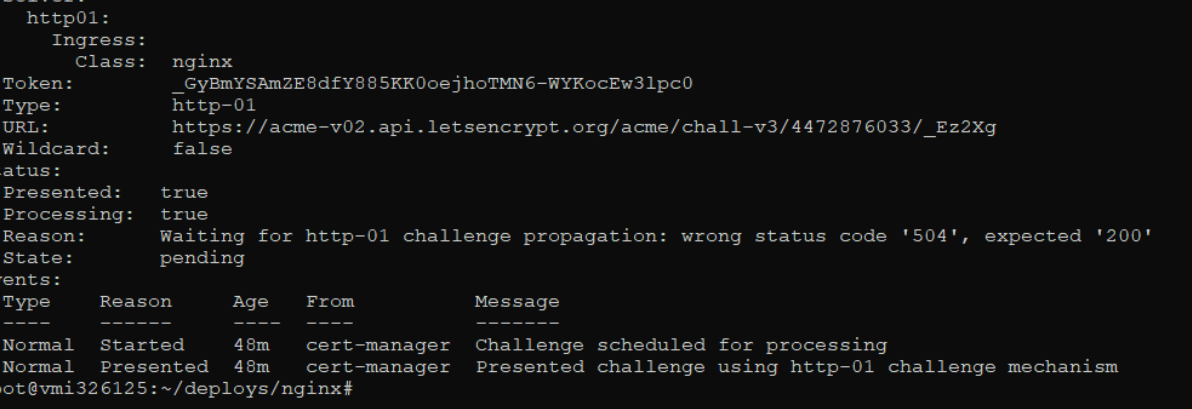
Badly that the pod cm-acme-http-solver only created in 1 node (u1) although i have 10 nodes.
I delete the pod solver in u1 but then scheduler still created solver in that node u1.
So can i change nodeSelector: u2,u3 only when create solver?
Thank you!
 tamphuc0503
on 9 May 2020
tamphuc0503
on 9 May 2020
@macevil I added a node so the pods could start, this fixed it for me!
 benjick
on 24 May 2020
benjick
on 24 May 2020
Related issues
 kragniz
·
4Comments
kragniz
·
4Comments
 f-f
·
4Comments
f-f
·
4Comments
 r0bj
·
3Comments
r0bj
·
3Comments
 timblakely
·
4Comments
timblakely
·
4Comments
 jbeda
·
4Comments
jbeda
·
4Comments
Most helpful comment
I delete the Ingress of the Challenge that point a wrong service and ... a new valid Ingress was created !
The certificate is now good.
I let the ticket open in case of new cases for few days.