Cert-manager: [doc] helm chart version confusion
Describe the bug:
https://github.com/jetstack/cert-manager/blob/master/deploy/charts/cert-manager/Chart.yaml#L3
version: v0.1.0
while in https://hub.helm.sh/charts/jetstack/cert-manager

At least for me it take a while to understand what is happening while I got an error there is no chart version v0.1.0.
I opened https://charts.jetstack.io as a good luck, because usually this kind of sites don't help.
It also make me a question if https://github.com/jetstack/cert-manager/tree/master/deploy/charts/cert-manager is not used to generate version for Chart what I install using https://charts.jetstack.io so where is true source of Chart?
Expected behaviour:
Consistent versions or info users should use different Chart version.
 kwladyka
All 14 comments
@kwladyka if you want to build the cert-manager helm chart from scratch then take a look at the developer documentation that cert-manager supplies to build it with what looks to be bazel: https://docs.cert-manager.io/en/latest/devel/develop-with-minikube.html
 jaitaiwan
on 28 May 2019
jaitaiwan
on 28 May 2019
@jaitaiwan I am doing GitOps based on helm Chart which wrap cert-manager Chart.
kwladyka
on 28 May 2019
@kwladyka brings up a good point. This discrepancy creates confusion. And commit https://github.com/jetstack/cert-manager/commit/111a26be9950c806d6d970e2344e39ef867c02ff does not help.
Branch release-0.7 has expected values in Chart.yaml
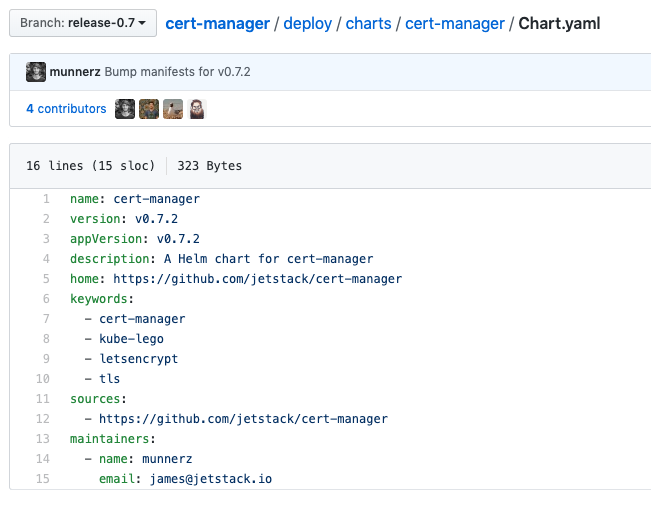 , unlike
 release-0.8 Chart.yaml
On the same note, chart v0.8.0 is using image tag v0.8.0-beta.0, telling everyone to stay away from beta version for production deploys?
For now, deploying cert-manager with --version v0.7.2 passed to helm cli.
 anapsix
on 29 May 2019
anapsix
on 29 May 2019
The chart should not be used directly from the repository, as it is not an actual release version of that chart at all (it is used for development only).
We purposely don't include version numbers in the repository as this implies that the version in the repository matches what we actually publish on releases.
You should be able to use helm fetch jetstack/cert-manager to fetch a built .tgz of the Helm chart that includes the correct version numbers.
 munnerz
on 29 May 2019
munnerz
on 29 May 2019
On the same note, chart v0.8.0 is using image tag v0.8.0-beta.0,
I'm not able to reproduce this:
$ helm fetch --version v0.8.0 jetstack/cert-manager
$ tar xvf cert-manager-v0.8.0.tgz
$ cat cert-manager/Chart.yaml | grep v0.8.0
appVersion: v0.8.0
version: v0.8.0
$ cat cert-manager/templates/deployment.yaml | grep image
          image: "{{ .Values.image.repository }}:{{ default .Chart.AppVersion .Values.image.tag }}"
          imagePullPolicy: {{ .Values.image.pullPolicy }}
$ cat values.yaml | grep tag
  # Override the image tag to deploy by setting this variable.
  # tag: canary
(note that 'canary' in the values.yaml file is commented out, meaning the default of the appVersion is used)
munnerz
on 29 May 2019
@munnerz writing it in this Chart to not use it and point to the right source will be huge improvement to start with :)
However we can explain why you are doing this, we have to agree it makes confusion for people :)
kwladyka
on 29 May 2019
We do currently note that the version number is set automatically by the release tooling (here), but we could be more explicit and explain that you should not use this version at all here too.
I want to avoid putting this message into README.md, else it will also appear when rendered on the Helm Hub. We could extend our release process to strip this note/warning from the published README.md though instead if needs be 😄
If you can create a PR against master for the first bit, we can then improve this to add to the README.md file too.
munnerz
on 29 May 2019
@munnerz
@anapsix referred to the doc of Chart (README)

kwladyka
on 29 May 2019
@anapsix referred to the doc of Chart (README)
Ah! 🤦♂
munnerz
on 29 May 2019
We do currently note that the version number is set automatically by the release tooling (here), but we could be more explicit and explain that you should not use this version at all here too.
I saw this note (it is well hidden ;)), but I didn't know what to do with this information. After all I figured out this, but my suggestion is to make it clear and easy for people. Now when I know it is obviously, but when I didn't know it wasn't :)
kwladyka
on 29 May 2019
This threw me off too, I am only using the repo as a source of documentation and, wrongly I see, assumed that if I packaged the chart from the release branch it would be the same as what I see if I fetched it from the chart repo.
I get master not having the right version (although, it could just use the next version with like a build or a commit sha, i.e. 1.2.3-beta.1+build345, 1.2.3-next) but release-0.8 not having the right version is what really caused me to get confused
 stormmore
on 6 Jun 2019
stormmore
on 6 Jun 2019
Issues go stale after 90d of inactivity.
Mark the issue as fresh with /remove-lifecycle stale.
Stale issues rot after an additional 30d of inactivity and eventually close.
If this issue is safe to close now please do so with /close.
Send feedback to jetstack.
/lifecycle stale
 retest-bot
on 4 Sep 2019
retest-bot
on 4 Sep 2019
Stale issues rot after 30d of inactivity.
Mark the issue as fresh with /remove-lifecycle rotten.
Rotten issues close after an additional 30d of inactivity.
If this issue is safe to close now please do so with /close.
Send feedback to jetstack.
/lifecycle rotten
/remove-lifecycle stale
retest-bot
on 4 Oct 2019
I'm going to close this as we do refer to the Helm Hub in all our documentation, and it's unlikely we'll change our release process to include bumping versions in this repo again as it's a huge pain, and often the source of issues when we forget to do it.
munnerz
on 15 Oct 2019
Related issues
 gaieges
·
3Comments
gaieges
·
3Comments
 jbeda
·
4Comments
jbeda
·
4Comments
 munjal-patel
·
3Comments
munjal-patel
·
3Comments
 matthew-muscat
·
4Comments
matthew-muscat
·
4Comments
 jbouzekri
·
4Comments
jbouzekri
·
4Comments
Most helpful comment
@kwladyka brings up a good point. This discrepancy creates confusion. And commit https://github.com/jetstack/cert-manager/commit/111a26be9950c806d6d970e2344e39ef867c02ff does not help.
 , unlike
Branch
release-0.7has expected values in Chart.yamlrelease-0.8Chart.yamlOn the same note, chart
v0.8.0is using image tagv0.8.0-beta.0, telling everyone to stay away from beta version for production deploys?For now, deploying cert-manager with
--version v0.7.2passed to helm cli.