Cert-manager: istio letsencrypt cert-manager cloudns dns01 failing with Google API Error 403
Hi All,
I have installed certmanager on GKE with issurers using clouddns provider for dns01 validation. The providers are using GCP serviceaccount with cloudns admin roles .
However, on deploying a certificate, all challenges are failing with this error
error processing: GoogleCloud API call failed: googleapi: Error 403: Forbidden, forbidden
What could I be missing here?
My issuers are
apiVersion: certmanager.k8s.io/v1alpha1
kind: ClusterIssuer
metadata:
  name: internal-issuer
spec:
  selfSigned: {}
---

apiVersion: certmanager.k8s.io/v1alpha1
kind: ClusterIssuer
metadata:
  name: letsencrypt-prod
spec:
  acme:
    server: https://acme-v02.api.letsencrypt.org/directory
    email: [email protected]
    privateKeySecretRef:
      name: letsencrypt-prod
    dns01:
      providers:
        - name: clouddns
          clouddns:
            serviceAccountSecretRef:
              name: clouddns-dns01-solver-svc-acct
              key: service-account.json
            project: mygcpproject
---

apiVersion: certmanager.k8s.io/v1alpha1
kind: ClusterIssuer
metadata:
  name: letsencrypt-staging
spec:
  acme:
    server: https://acme-staging-v02.api.letsencrypt.org/directory
    email: [email protected]

    privateKeySecretRef:
      name: letsencrypt-staging

    dns01:

      providers:

        - name: clouddns
          clouddns:
            serviceAccountSecretRef:
              name: clouddns-dns01-solver-svc-acct
              key: service-account.json
            project: mygcpproject
 Piusdan
All 18 comments
Same issue here, was working fine a month ago, I just forked a new cluster, nothing changed in all my configurations, so I'm guessing the last gcloud components update or the upgrade of the nodes kubernetes version messed up something...
If anyone has any clue, that would be great
 sylver
on 9 Apr 2019
sylver
on 9 Apr 2019
I am also facing same issue :/
 ayushlodhi11
on 11 Apr 2019
ayushlodhi11
on 11 Apr 2019
Getting almost the same behavior on another provider DigitalOcean with DNS01 #1530
 roonie007
on 11 Apr 2019
roonie007
on 11 Apr 2019
Creating new service account with owner permission solved the problem. Updating old key was not working.
ayushlodhi11
on 11 Apr 2019
@ayushlodhi11 can we specify less privilege permission?
 sandangel
on 18 Apr 2019
sandangel
on 18 Apr 2019
Creating new service account with owner permission solved the problem. Updating old key was not working.
this actually workerd for me
Piusdan
on 19 Apr 2019
@ayushlodhi11 can we specify less privilege permission?
not sure, haven't tried it.
ayushlodhi11
on 27 Apr 2019
Did anybody find a solution to this?
 honi
on 6 Jun 2019
honi
on 6 Jun 2019
Same question
 nik-sviridenko
on 7 Sep 2019
nik-sviridenko
on 7 Sep 2019
I reinstalled cert-manager using latest version and now things work as expected. Not very helpful, I know :/
honi
on 8 Sep 2019
Creating new service account with owner permission solved the problem. Updating old key was not working.
We are also having the same issue (#2069). However, giving SA and owner permission can't really be the answer nor an accepted solution!
I also tried this on v0.10.0 and still was able to constantly produce the issue.
 munjal-patel
on 13 Sep 2019
munjal-patel
on 13 Sep 2019
I am having the same issue, but I ran:
gcloud projects add-iam-policy-binding $MY_PROJECT \
--member serviceAccount:$SERVICE_ACCOUNT \
--role roles/dns.admin
giving the SA dns.admin permission, and it worked here
 pvsousalima
on 17 Sep 2019
pvsousalima
on 17 Sep 2019
OK I managed to find some replicable steps as this drove me nuts for about 3 hours yesterday.
I have a cluster where this works fine it uses a domain like *.knative.example.com
If I launch a second cluster in the same project and want to use say *.svc.example.com, I get 403 errors. This is odd, as the service account clearly has access. I also tried *.svc.different.com and same, so it isn't domain specific.
This project also has Google App Engine and Firebase accounts managing domains.
When I created a clean project and deployed a cluster with *.svc.different.com it worked first time.
I am going to raise this internally with the Cloud DNS team to see if we can get to the bottom of this, because this kind of discrete error causes a lot of wasted human heart beats.
 justingrayston
on 22 Oct 2019
justingrayston
on 22 Oct 2019
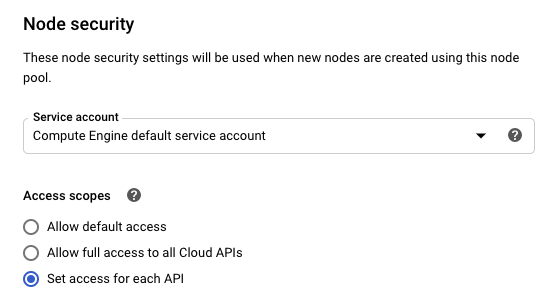
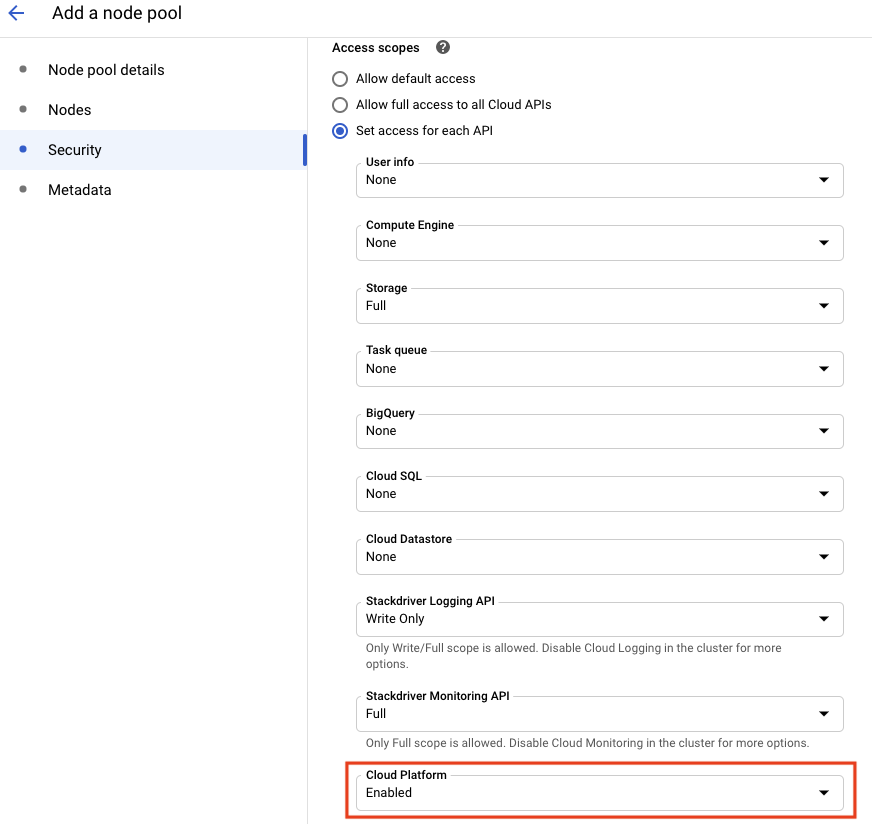
I finally figure it out. It's all about node-pool permissions(scopes).
I verify my node with:
gcloud compute instances describe my-cluster-pre-1-cc377318-cgl1
It missed https://www.googleapis.com/auth/cloud-platform
email: [email protected]
  scopes:
  - https://www.googleapis.com/auth/monitoring
  - https://www.googleapis.com/auth/servicecontrol
  - https://www.googleapis.com/auth/service.management.readonly
  - https://www.googleapis.com/auth/trace.append
So, what you need to do is "add Cloud Platform" scope.
 RammusXu
on 12 May 2020
RammusXu
on 12 May 2020
To be honest, none of these are ideal options, folks,
jetstack What are those least privileged permissions actually required for cert-manager to operate within the Kubernetes cluster?
 jpantsjoha
on 22 May 2020
jpantsjoha
on 22 May 2020
https://github.com/cert-manager/website/pull/221/files addresses this question
 meyskens
on 22 May 2020
meyskens
on 22 May 2020
@jpantsjoha opening up access scopes is fine, see: https://cloud.google.com/kubernetes-engine/docs/how-to/access-scopes limiting dns can be done by creating a custom role with only the privlege the cert manager service needs, review https://cert-manager.io/docs/configuration/acme/dns01/google/ for the suggested permissions. even these can be limited further. might i suggest:
["dns.changes.create", "dns.changes.get", "dns.managedZones.list", "dns.resourceRecordSets.create", "dns.resourceRecordSets.delete", "dns.resourceRecordSets.list"]
 so-jelly
on 15 Jun 2020
so-jelly
on 15 Jun 2020
For any weary travelers getting here, I found this post: https://github.com/jetstack/cert-manager/issues/2069#issuecomment-531428320 , I recreated my service account with a different ID and things started working.
so-jelly
on 15 Jun 2020
Related issues
 jbeda
·
4Comments
jbeda
·
4Comments
 howardjohn
·
3Comments
howardjohn
·
3Comments
 Stono
·
3Comments
Stono
·
3Comments
 gaieges
·
3Comments
gaieges
·
3Comments
 jakubknejzlik
·
3Comments
jakubknejzlik
·
3Comments
Most helpful comment
I finally figure it out. It's all about node-pool permissions(scopes).
I verify my node with:
It missed
https://www.googleapis.com/auth/cloud-platformSo, what you need to do is "add Cloud Platform" scope.