Cert-manager: Cert Manager enters endless loop with Vault Issuer
Describe the bug:
When using Vault as the Certificate Issuer, cert-manager enters an endless loop creating new auth leases and certificates instead of renewing leases.
The cert-manager pod gets flooded with these logs:
E1106 07:57:59.325474       1 controller.go:145] certificates controller: Re-queuing item "project/example-project" due to error processing: Operation cannot be fulfilled on certificates.certmanager.k8s.io "example-project": the object has been modified; please apply your changes to the latest version and try again
E1106 07:58:11.725670       1 controller.go:145] certificates controller: Re-queuing item "project/example-project" due to error processing: Operation cannot be fulfilled on certificates.certmanager.k8s.io "example-project": the object has been modified; please apply your changes to the latest version and try again
E1106 07:58:12.533639       1 controller.go:145] certificates controller: Re-queuing item "project/example-project" due to error processing: Operation cannot be fulfilled on certificates.certmanager.k8s.io "example-project": the object has been modified; please apply your changes to the latest version and try again
Expected behaviour:
After the issuer has been authenticated with Vault, only one certificate should be issued and stored in the target secret and cert-manager should monitor the lease for automatic renewal.
Steps to reproduce the bug:
Have Vault (0.11.0) running with approle auth and pki secret backend enabled at default mounts.
Deploy cert-manager with-rbac.yaml static manifest (set image version to canary)
Create Issuer and Certificate with below manifests (replacing variables as needed)
apiVersion: v1
kind: Secret
type: Opaque
metadata:
  name: cert-manager-vault-approle
data:
  secretId: "$secret_id"
---
apiVersion: certmanager.k8s.io/v1alpha1
kind: Issuer
metadata:
  name: vault-issuer
spec:
  vault:
    caBundle: "$vault_ca"
    path: pki/sign/aqueduct
    server: "https://vault.project:8200"
    auth:
      appRole:
        path: approle
        roleId: "$role_id"
        secretRef:
          name: cert-manager-vault-approle
          key: secretId
---
apiVersion: certmanager.k8s.io/v1alpha1
kind: Certificate
metadata:
  name: example-project
spec:
  secretName: example-project-tls
  issuerRef:
    name: vault-issuer
  commonName: example.project
  dnsNames:
  - example-project.nip.io
This is the Vault policy I've got for the Approle Role
path "pki*"                { capabilities = ["read", "list"] }
path "pki/sign/default"    { capabilities = ["create", "update"] }
path "pki/issue/default"   { capabilities = ["create"] }
path "pki/roles/default"   { capabilities = ["read"] }
Anything else we need to know?:
Environment details::
- Kubernetes version (e.g. v1.10.2):
$ oc version
oc v3.11.0+0cbc58b
kubernetes v1.11.0+d4cacc0
features: Basic-Auth GSSAPI Kerberos SPNEGO

Server https://192.168.11.132:8443
kubernetes v1.11.0+d4cacc0
- Cloud-provider/provisioner (e.g. GKE, kops AWS, etc):
oc cluster up --public-hostname=$(hostname -i | cut -f 1 -d" ") --base-dir=/tmp/openshift.cluster.up \
     && oc login -u system:admin --server=https://$(hostname -i | cut -f 1 -d" "):8443 \
     && oc adm policy add-cluster-role-to-user cluster-admin admin \
     && oc patch scc nonroot -p '{"allowedCapabilities":["IPC_LOCK"]}' \
     && oc adm policy add-scc-to-group nonroot system:authenticated
- cert-manager version (e.g. v0.4.0):
canarybecausev0.5.0doesn't have the ability to import the Vault internal CA - Install method (e.g. helm or static manifests): static manifests on master branch
- Vault version:
0.11.0
/kind bug
Edit:
I forgot to mention that describing the Certificate shows that the certificate is being successfully issued and the target secret is being created with the correct certificate.
The problem is that cert-manager continues to attempt to issue new certificates even though there is already a valid certificate in the target secret and cert-manager no longer needs to issue any certificates.
 rblaine95
All 9 comments
Hm, ... the object has been modified; please apply your changes to the latest version and try again implies that something else is modifying the Certificate resource before cert-manager is able to write/persist its changes.
Do you have two instances of cert-manager running by any chance?
 munnerz
on 6 Nov 2018
munnerz
on 6 Nov 2018
Thank you for the response @munnerz, I only have one instance of cert-manager
rblaine95
on 6 Nov 2018
Here is the full output of doing oc describe on the resources:
$ oc describe issuer vault-issuer
Name:         vault-issuer
Namespace:    operators
Labels:       <none>
Annotations:  <none>
API Version:  certmanager.k8s.io/v1alpha1
Kind:         Issuer
Metadata:
  Creation Timestamp:  2018-11-06T11:15:53Z
  Generation:          1
  Resource Version:    17995
  Self Link:           /apis/certmanager.k8s.io/v1alpha1/namespaces/operators/issuers/vault-issuer
  UID:                 53485220-e1b5-11e8-9157-484520e20d60
Spec:
  Vault:
    Auth:
      App Role:
        Path:     approle
        Role Id:  5a329fcf-6087-a188-0777-de00dd10f73b
        Secret Ref:
          Key:   secretId
          Name:  cert-manager-vault-approle
      Token Secret Ref:
        Key:
        Name:
    Ca Bundle:  LS0tLS1CRU...
    Path:       pki/sign/aqueduct
    Server:     https://vault.operators:8200
Status:
  Conditions:
    Last Transition Time:  2018-11-06T11:15:58Z
    Message:               Vault verified
    Reason:                VaultVerified
    Status:                True
    Type:                  Ready
Events:                    <none>
bash
$ oc describe certificate example-operators
Name:         example-operators
Namespace:    operators
Labels:       <none>
Annotations:  <none>
API Version:  certmanager.k8s.io/v1alpha1
Kind:         Certificate
Metadata:
  Creation Timestamp:  2018-11-06T11:17:49Z
  Generation:          1
  Resource Version:    18684
  Self Link:           /apis/certmanager.k8s.io/v1alpha1/namespaces/operators/certificates/example-operators
  UID:                 984cb1d1-e1b5-11e8-9157-484520e20d60
Spec:
  Common Name:  example.operators
  Dns Names:
    example-operators.nip.io
  Issuer Ref:
    Name:       vault-issuer
  Secret Name:  example-operators-tls
Status:
  Conditions:
    Last Transition Time:  2018-11-06T11:18:00Z
    Message:               Certificate issued successfully
    Reason:                CertIssued
    Status:                True
    Type:                  Ready
Events:
  Type    Reason      Age               From          Message
  ----    ------      ----              ----          -------
  Normal  CertIssued  1s (x17 over 9s)  cert-manager  Certificate issued successfully
rblaine95
on 6 Nov 2018
How long is each certificate issued by that particular PKI backend/role valid for? Until #893 merges, you'll need to set this to something >30d if I recall correctly.
cc @vdesjardins
munnerz
on 6 Nov 2018
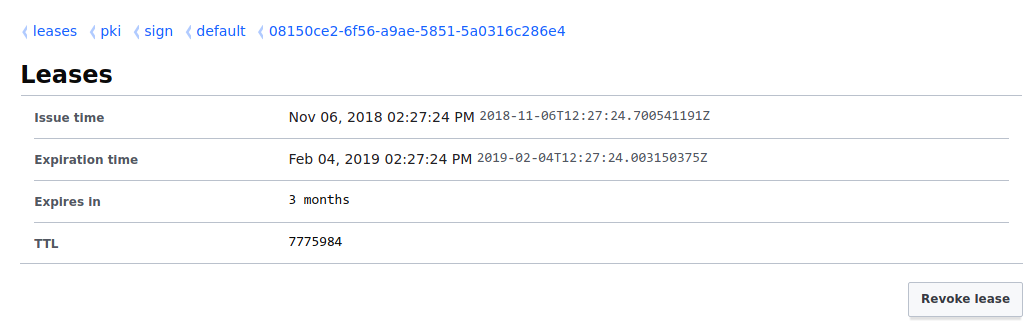
Each certificate being issued is valid for 3 months
Screenshot of a pki lease:
$ openssl x509 -noout -in cert.pem -text

Certificate:
    Data:
        Version: 3 (0x2)
        Serial Number:
            02:9a:c0:b0:68:4e:aa:50:cf:79:f2:5a:f1:b3:37:4e:16:66:2c:b2
        Signature Algorithm: sha256WithRSAEncryption
        Issuer: CN = vault.operators
        Validity
            Not Before: Nov  6 12:28:24 2018 GMT
            Not After : Feb  4 12:28:54 2019 GMT
        Subject: CN = example.operators
        Subject Public Key Info:
            Public Key Algorithm: rsaEncryption
                RSA Public-Key: (2048 bit)
                Modulus:
                    00:b8:b7:23:03:fd:94:d7:ad:c7:81:1a:73:e0:35:
                    29:8e:81:1f:80:b7:68:fa:21:6e:64:ed:27:e4:a4:
                    a6:34:8d:47:55:53:65:e4:6a:95:eb:50:b0:76:20:
                    ed:e6:c7:b7:59:2f:9c:b3:e4:cd:17:98:74:51:21:
                    51:b0:27:c9:5a:cf:c1:c6:e0:c1:40:60:a1:60:54:
                    62:88:e4:e4:b4:3f:b3:ef:9a:6e:b1:e1:57:15:81:
                    43:ad:37:df:d9:77:95:f8:95:50:79:fb:97:f4:61:
                    30:6a:72:c5:f3:47:0a:26:a1:05:3c:ed:09:05:4f:
                    07:bb:8f:d8:1c:dc:ad:97:e6:de:3e:13:36:45:3f:
                    4e:f4:1d:b8:da:08:76:eb:da:82:87:7b:17:6b:9c:
                    94:60:29:2f:28:5d:5b:b8:64:0c:24:ee:9d:20:cf:
                    cc:8b:27:bc:13:99:bb:e3:0d:65:da:a7:ef:bb:5e:
                    3e:2f:f7:db:c5:ef:bd:0b:f4:62:bf:05:d2:3d:b7:
                    1d:5b:9d:db:e7:23:b8:6c:5a:04:57:bb:4e:75:be:
                    19:f9:cf:2b:0a:62:b5:2d:bc:55:9d:14:13:37:2b:
                    b4:1f:e1:06:f7:9e:f9:e8:5f:10:3e:fc:45:88:74:
                    2e:11:92:65:74:75:74:54:8e:d0:c4:41:0a:84:29:
                    b5:a5
                Exponent: 65537 (0x10001)
        X509v3 extensions:
            X509v3 Key Usage: critical
                Digital Signature, Key Encipherment, Key Agreement
            X509v3 Extended Key Usage:
                TLS Web Server Authentication, TLS Web Client Authentication
            X509v3 Subject Key Identifier:
                6F:43:E2:75:69:9B:FB:E0:6F:69:9F:98:8E:2D:97:0C:59:83:82:33
            X509v3 Authority Key Identifier:
                keyid:B1:B5:B3:64:19:84:B7:D1:A9:1A:E2:DA:13:C8:BD:21:18:DB:15:C3

            Authority Information Access:
                CA Issuers - URI:https://vault.operators:8200/v1/pki/ca

            X509v3 Subject Alternative Name:
                DNS:example.operators, DNS:example-operators.nip.io
            X509v3 CRL Distribution Points:

                Full Name:
                  URI:https://vault.operators:8200/v1/pki/crl

    Signature Algorithm: sha256WithRSAEncryption
         76:ff:3c:c4:44:40:cd:9e:f9:c7:fe:c0:3a:9c:89:c0:39:a7:
         65:ab:03:94:6e:fa:55:81:34:db:66:0d:72:97:02:7d:a3:6d:
         9c:71:1e:8a:64:ff:c0:89:d7:6e:95:87:d5:5c:dd:18:b5:c6:
         96:61:2d:82:4b:6c:b4:e1:2e:1b:67:11:97:f5:a2:de:90:1e:
         0e:3f:2c:53:d9:e2:fc:32:e4:ea:95:30:a0:ea:8d:0b:06:e0:
         99:d4:89:31:fd:e3:a3:5c:88:87:55:2b:30:a1:80:60:9c:5b:
         c4:4a:ec:fe:a6:ed:a4:a3:f2:4d:3c:a5:e5:d3:ff:8d:a4:2f:
         10:07:9e:11:0c:91:86:1c:7f:d5:57:ec:ec:41:d2:4e:d0:b7:
         13:9f:f5:72:89:b1:af:f3:c6:d1:79:69:8c:8a:38:50:58:ab:
         79:33:83:90:ad:cb:b2:c7:2e:9c:ab:7d:fe:32:a0:1b:d1:bd:
         83:3b:33:05:77:44:50:8a:64:5f:7b:a7:b9:9e:00:f9:9b:21:
         06:63:11:ac:6d:58:88:ff:b6:05:89:a2:1a:0d:00:bf:6f:27:
         ea:6e:77:e1:93:73:ef:21:7a:2b:39:a1:41:4b:75:66:5a:31:
         50:22:3d:c8:23:e3:1a:5f:aa:16:84:51:b5:7b:b7:22:3a:5a:
         f8:77:25:29
Could you share the commands used to configure the Vault PKI backend & role?
munnerz
on 6 Nov 2018
I'm using banzaicloud/bank-vaults Vault Operator to spin up Vault and configure it.
The Vault Custom Resource config I'm using looks like this:
externalConfig:
  policies:
  - name: allow_secrets
    rules: path "secret/*" { capabilities = ["create", "read", "update", "delete", "list"] }
  - name: allow_certs
    rules: path "pki*"                { capabilities = ["read", "list"] }
           path "pki/sign/default"    { capabilities = ["create", "update"] }
           path "pki/issue/default"   { capabilities = ["create"] }
           path "pki/roles/default"   { capabilities = ["read"] }
  auth:
  - type: kubernetes
    roles:
    - name: default
      bound_service_account_names: default
      bound_service_account_namespaces: default,operators
      policies: allow_secrets,allow_certs
      ttl: 1h
  - type: approle
    roles:
    - name: cert-manager
      policies: allow_certs
      token_ttl: 20m
      period: 10m
  secrets:
  - type: pki
    description: Vault PKI Backend
    config:
      default_lease_ttl: 720h # sets global default ttl
      max_lease_ttl: 8760h # sets global max ttl
    configuration:
      config:
      - name: urls
        issuing_certificates: https://vault.operators:8200/v1/pki/ca
        crl_distribution_points: https://vault.operators:8200/v1/pki/crl
      root/generate:
      - name: internal
        common_name: vault.operators
        ttl: 8760h
      roles:
      - name: default
        allowed_domains: localhost,pod,svc,nip.io,operators
        allow_subdomains: true
        generate_lease: true
        ttl: 30m # sets role specific default ttl
Edit: Increasing the role Default TTL to 40 days and Maximum TTL to 300 days has no effect
rblaine95
on 6 Nov 2018
I think I've found the issue - can you try renaming your spec.secretName field on the Certificate resource to be the same as the Certificate name to confirm?
I've put in a fix, #1048, which should fix this bug 😅
munnerz
on 6 Nov 2018
Using this config (where spec.secretName is the same as metadata.name) fixed the endless loop!
apiVersion: certmanager.k8s.io/v1alpha1
kind: Certificate
metadata:
  name: example-operators
spec:
  secretName: example-operators
  issuerRef:
    name: vault-issuer
  commonName: example.operators
  dnsNames:
  - example-operators.nip.io
Thank you @munnerz
rblaine95
on 7 Nov 2018
Related issues
 gaieges
·
3Comments
gaieges
·
3Comments
 jbouzekri
·
4Comments
jbouzekri
·
4Comments
 Stono
·
3Comments
Stono
·
3Comments
 timblakely
·
4Comments
timblakely
·
4Comments
 jbeda
·
4Comments
jbeda
·
4Comments
Most helpful comment
I think I've found the issue - can you try renaming your
spec.secretNamefield on the Certificate resource to be the same as the Certificate name to confirm?I've put in a fix, #1048, which should fix this bug 😅