Cerebro: App icons not showing up in v0.2.8
- [x] I am on the latest Cerebro.app version
- [x] I have searched the issues of this repo and believe that this is not a duplicate
- OS version and name: Windows 10
- Cerebro.app version: 0.2.8
- Relevant information from devtools _(See above how to open it)_:
Issue
The app icons are not showing up in windows 10 for any app. They are just showing broken links.

 ishaanverma
All 22 comments
@SkaceKamen do you have any idea why could it happen?
 KELiON
on 9 May 2017
KELiON
on 9 May 2017
I'm not sure what could be causing it, it works on my system (windows 7 x64), so it's probably related to windows 10?
 SkaceKamen
on 9 May 2017
SkaceKamen
on 9 May 2017
This is not my computer, but I got you a few of the relevant screenshots (Windows 10 x64).
Notice duplicate entries for the same app, as well as missing icons.


 maximbaz
on 9 May 2017
maximbaz
on 9 May 2017
I am having the same problem on Windows 7 x64. I tried to reinstall the program but nothing changed.

 italolanza
on 9 May 2017
italolanza
on 9 May 2017
Hello,
I am also experiencing this issue. My system information is below:
OS version and name: Windows 10
Cerebro.app version: 0.2.8
If you need any additional information to help in the troubleshooting process, please let me know. Thank you in advance for all of your time and help, it is greatly appreciated!
Thanks,
Asif
 a4orce84
on 16 May 2017
a4orce84
on 16 May 2017
Could you show me the console output for both the main and background? I'm interested in any errors shown.
By the details you've posted, it looks like the icon loader failed and decided to use the path instead, but I don't know how that happens neither am I able to replicate the issue.
SkaceKamen
on 19 May 2017
I do not have much experience with programming but i can try if you tell how. What do I need to do to get this outputs ?
italolanza
on 19 May 2017
@italolanza steps to get output:
- open cerebro preferences;
- turn on
developer mode,show in menu bar - in tray menu open development -> Dev. Tools (Main), Dev. Tools (background)
- In tray menu choose development -> reload
Check both developer tools windows in console tab. If you see any errors – attach screenshot/text from this tab
KELiON
on 22 May 2017
@KELiON thanks for the explanation. If you need more information just ask.
Here some screenshots i made.


italolanza
on 22 May 2017
No errors (related to this issue), so the function for retrieving icon is working, but returns empty image.
I found this: https://github.com/electron/electron/issues/8767
Is it possible you have non-standard DPI?
SkaceKamen
on 22 May 2017
OK, I just replicated the issue by changing DPI. @KELiON updating the electron should solve the issue, but I'm unsure if the fix is in the latest release of electron.
SkaceKamen
on 22 May 2017
Just to make sure, can you try to execute one piece of code, @italolanza? For that you can open Dev. tools (main) (using instructions above) and copy-paste this code to console (but make sure you replace /Applications/1Password.app with absolute path for file, that doesn't show icon in Cerebro now:
require('electron').remote.app.getFileIcon('/Applications/1Password.app', (err, icon) => {
  if (err) {
    console.log('error', err)
  } else {
    console.log(icon.toDataURL())
  }
})
In my case (when it works) it shows this:

KELiON
on 23 May 2017
There you go for that Windows laptop I mentioned earlier. And yes, it has a HiDPI screen.

maximbaz
on 23 May 2017
Hello Everyone,
I apologize for joining late to this discussion. Has there been a solution identified that we can test out?
Thanks again for everyone's work on this, it is greatly appreciated!
From: Maxim Baz notifications@github.com
Sent: Tuesday, May 23, 2017 3:55:52 AM
To: KELiON/cerebro
Cc: a4orce84; Comment
Subject: Re: [KELiON/cerebro] App icons not showing up in v0.2.8 (#301)
There you go for that Windows laptop I mentioned earlier. And yes, it has a HiDPI screen.
[screenshot]https://cloud.githubusercontent.com/assets/1177900/26346386/5263b322-3fa6-11e7-92c4-ee67eec7ef2c.png
—
You are receiving this because you commented.
Reply to this email directly, view it on GitHubhttps://github.com/KELiON/cerebro/issues/301#issuecomment-303334907, or mute the threadhttps://github.com/notifications/unsubscribe-auth/AGGT1_aVNyhJnq0zatiJgGVoLTEopmNqks5r8p8YgaJpZM4NMozx.
a4orce84
on 23 May 2017
@a4orce84 hey! Not yet – we're going to update electron in next release, it should fix the problem
KELiON
on 23 May 2017
@KELiON, sorry for the delay. Just to confirm what @SkaceKamen said, here in my computer I use the DPI set in 125%. When I changed it back to 100% the icons started to show up. Here the screenshots that you asked.
I don't know if I am doing something wrong but even with the DPI set in 100% i had the same output that when I changed to 125%.
With the DPI set in 125%:


With the DPI set in 100%:


italolanza
on 23 May 2017
Just to clarify, the icon not working in preview (in both cases) was fixed in https://github.com/KELiON/cerebro/pull/276
SkaceKamen
on 23 May 2017
Nice! If it is necessary I am available for testing on Windows again. Thanks!
italolanza
on 23 May 2017
When is the new version with the fix being released approximately? Thanks.
From: Italo Lanza notifications@github.com
Sent: Tuesday, May 23, 2017 4:44:30 PM
To: KELiON/cerebro
Cc: a4orce84; Mention
Subject: Re: [KELiON/cerebro] App icons not showing up in v0.2.8 (#301)
Nice! If it is necessary I am available for testing on Windows again. Thanks!
—
You are receiving this because you were mentioned.
Reply to this email directly, view it on GitHubhttps://github.com/KELiON/cerebro/issues/301#issuecomment-303541388, or mute the threadhttps://github.com/notifications/unsubscribe-auth/AGGT11zURZIVYFo4UyFpB2mx1f1vecNkks5r81M-gaJpZM4NMozx.
a4orce84
on 24 May 2017
Can someone check if it is fixed in the latest version?
KELiON
on 12 Jun 2017
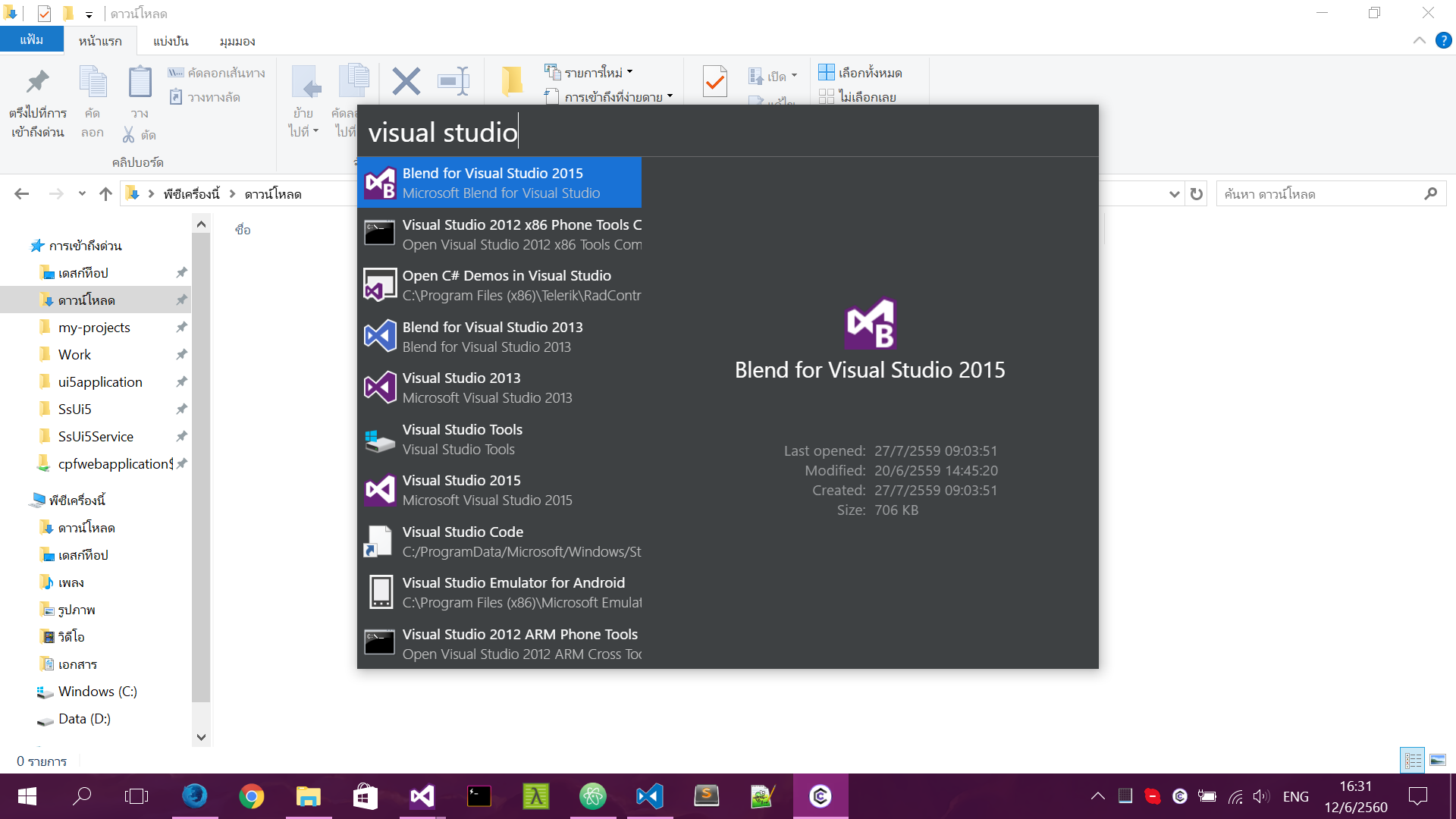
It work! 🎉
 gluons
on 12 Jun 2017
gluons
on 12 Jun 2017
It worked after updating to 0.3.0 but the icon is small 32x32. It would be a lot better if it was larger! Is it possible ?
 sepehrHosseini
on 14 Jun 2017
sepehrHosseini
on 14 Jun 2017
Related issues
 andylima
·
6Comments
andylima
·
6Comments
 helmutgranda
·
4Comments
maximbaz
·
3Comments
helmutgranda
·
4Comments
maximbaz
·
3Comments
 egoist
·
6Comments
egoist
·
6Comments
 vandamm
·
5Comments
vandamm
·
5Comments
Most helpful comment
There you go for that Windows laptop I mentioned earlier. And yes, it has a HiDPI screen.