Centreon: Connection refused to database after upgrade of Centreon 19.10 to 20.04
BUG REPORT INFORMATION
Prerequisites
Versions
Centreon 20.04
For the RPM based systems
using packages for the installation of centreon
-- Copy/Paste the result of the following command --
$ rpm -qa | grep centreon
For the deb based systems
-- Copy/Paste the result of the following command --
$ dpkg -l | grep centreon
Operating System
CentOS7
Description
Hello,
After upgrade of Centreon 19.10 to 20.04 , I have this error

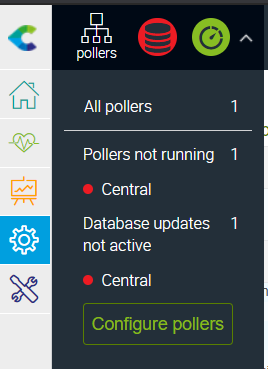
Pointed out that the BDD is external to the Central Centreon.
And I don't know why the connection is refused because the error only appears after the upgrade.
The centcore configuration file is /etc/centreon/conf.pm, and I noticed that the gorgon service does not use this file.
So I need help to solve and find the origin of this error and the new BDD configuration file.
Logs
PHP error logs
tail -f /var/log/centreon/centcore.log

 IdrissaHilda
All 9 comments
I have same problem.
 rafaelgesser
on 6 May 2020
rafaelgesser
on 6 May 2020
Hi @IdrissaHilda and @rafaelgesser.
We found a little problem during the upgrade. Can you check the /etc/centreon/config.d/10-database.yaml file specially for the password (maybe double incorrect quote around the password).
Once this file is corrected, restart the gorgoned process:
systemctl restart gorgoned
Regards,
 lpinsivy
on 7 May 2020
lpinsivy
on 7 May 2020
Hello,
My /etc/centreon/config.d/10-database.yaml file is here.
======ORIGINAL FILE=====
database:
db_configuration:
dsn: "mysql:host=localhost:3306;dbname=centreon"

username: "centreon"

password: "MYPASS"
db_realtime:
dsn: "mysql:host=localhost:3306;dbname=centreon_storage"

username: "centreon"

password: "MYPASS"
======ORIGINAL FILE=====
I try as below, but it didn't work
======TEST FILE=====
database:
db_configuration:
dsn: ‘mysql:host=localhost:3306;dbname=centreon’

username: ‘centreon’

password: ‘MYPASS’
db_realtime:
dsn: ‘mysql:host=localhost:3306;dbname=centreon_storage’

username: ‘centreon’

password: ‘MYPASS’
======TEST FILE=====
Do you have a sample file?
Best regards,
Rafael Gesser
rafaelgesser
on 7 May 2020
This is an example:
database:
  db_configuration:
    dsn: "mysql:host=localhost:3306;dbname=centreon"
    username: "centreon"
    password: "MYPASS"
  db_realtime:
    dsn: "mysql:host=localhost:3306;dbname=centreon_storage"
    username: "centreon"
    password: "MYPASS"
Hello @lpinsivy,
I do the same test as @rafaelgesser, I replaced the double quote with the single quote but the problem persists.
Hilda IDRISSA
IdrissaHilda
on 7 May 2020
Can you try to apply dos2unix on this file, then stop and start gorgoned?
lpinsivy
on 11 May 2020
I applied this command dos2unix 10-database.yaml but the problem is not solved.
IdrissaHilda
on 11 May 2020
Can you try to apply dos2unix on this file, then stop and start gorgoned?
Problem is not solved.
rafaelgesser
on 11 May 2020
Hi @lpinsivy , I need a solution to resolve my problem it's important. Currently my server is inoperable, even though I've tried everything.
best regard
IdrissaHilda
on 19 May 2020
Related issues
 benoitb21
·
6Comments
benoitb21
·
6Comments
 JohnTianGuo
·
3Comments
JohnTianGuo
·
3Comments
 kabreu
·
7Comments
kabreu
·
7Comments
 garnier-quentin
·
4Comments
garnier-quentin
·
4Comments
 BenoitPoulet
·
4Comments
BenoitPoulet
·
4Comments