Cbioportal: Hide NA bar in the bar charts of study view
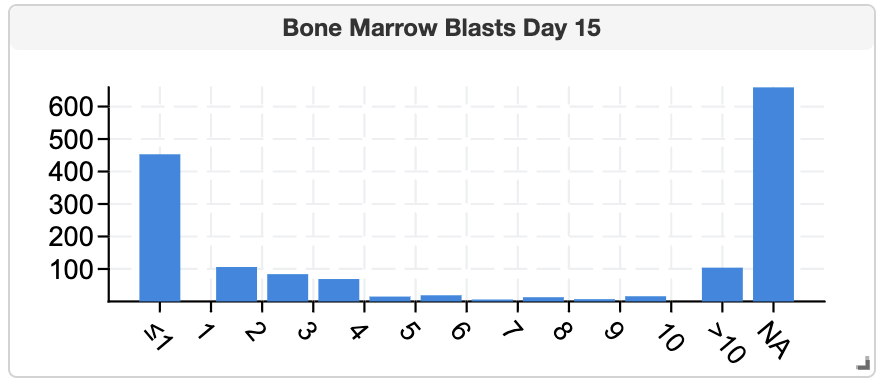
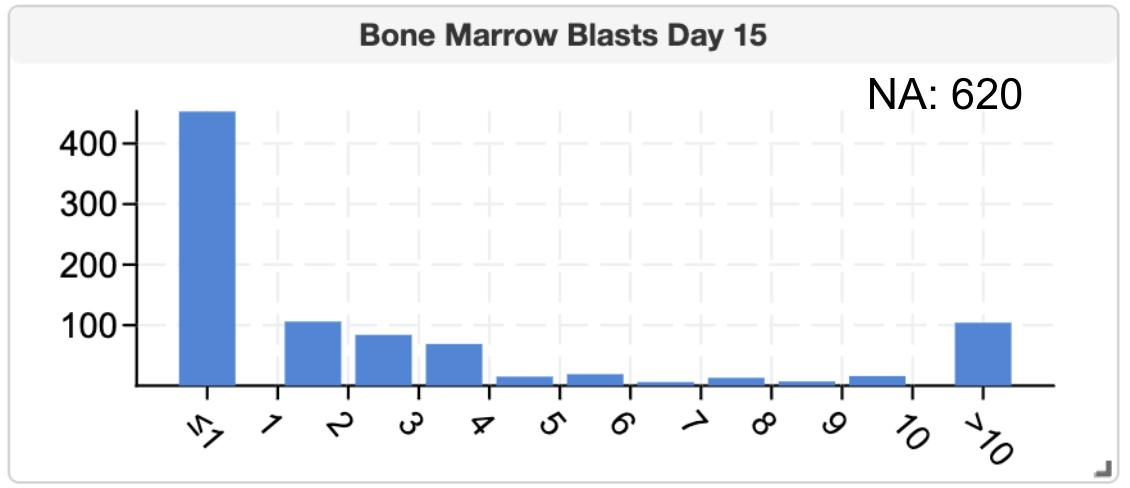
 zhx828
All 24 comments
@zhx828 good point. I am wondering if it's possible to use a different shade?
 jjgao
on 22 May 2020
jjgao
on 22 May 2020
@jjgao we could, but in a histogram that NA has few samples, the shade does not help much. And they are very easy to be selected.
zhx828
on 22 May 2020
Maybe show NA bar as gray similar to pie chart and also allow hiding NA https://github.com/cBioPortal/cbioportal/issues/5204
jjgao
on 22 May 2020
@cBioPortal/product thoughts?
jjgao
on 22 May 2020
I would not show a bar for NA at all - we could add a number next to the chart, e.g. "NA: 27"
Or is there a good reason to show them in a bar?
 schultzn
on 22 May 2020
schultzn
on 22 May 2020
Adding a number instead of a bar is a good idea! Then we don't need to the option to hide NA...
Where should we add "NA: 27"?
jjgao
on 22 May 2020
Niki suggested on the top right correct showing NA:27. I will need to generate some mockups to see whether it's feasible.
zhx828
on 11 Jun 2020
This issue has been automatically marked as stale because it has not had recent activity. It will be closed if no further activity occurs. Thank you for your contributions.
![stale[bot] picture](https://avatars.githubusercontent.com/in/1724?v=4&s=40) stale[bot]
on 19 Oct 2020
stale[bot]
on 19 Oct 2020
@jtquach1 maybe you can help with this?
jjgao
on 30 Oct 2020
Should a tooltip also display over the NA text when hovered, similar to hovering over the barchart bars?
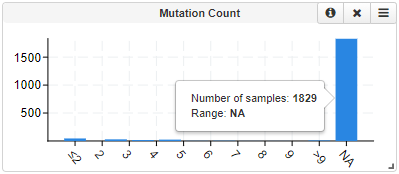
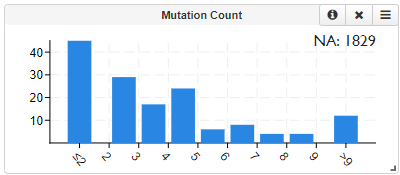
This is what the chart looks like without the NA bar:
 jtquach1
on 11 Nov 2020
jtquach1
on 11 Nov 2020
@jtquach1 @cBioPortal/product i think it should be "n/a". there's a little risk the last bar will poke up into it but i guess that's ok.
 alisman
on 11 Nov 2020
alisman
on 11 Nov 2020
Wait, if we remove the NA bar, how do we select samples that are NA?
 Sjoerd-van-Hagen
on 11 Nov 2020
Sjoerd-van-Hagen
on 11 Nov 2020
Wait, if we remove the NA bar, how do we select samples that are NA?
I removed the NA from the rendering of the barchart, but didn't touch the NA bar anywhere else; here is a preview of the PR: https://deploy-preview-3497--cbioportalfrontend.netlify.app/study/summary?id=all_phase2_target_2018_pub
jtquach1
on 11 Nov 2020
But the user could select samples/patients that have NA for an attribute by
selecting that bar in the bar chart. Now that the NA is not part of the bar
chart anymore, how do I select all samples/patients that have an NA for an
attribute?
--
T. +31(0)30 700 9713
On Wed, Nov 11, 2020 at 10:34 PM Joyce Quach notifications@github.com
wrote:
Wait, if we remove the NA bar, how do we select samples that are NA?
The NA bar is removed from the barchart, but isn't touched anywhere else;
here is a preview of the PR:
https://deploy-preview-3497--cbioportalfrontend.netlify.app/study/summary?id=all_phase2_target_2018_pub—
You are receiving this because you are on a team that was mentioned.
Reply to this email directly, view it on GitHub
https://github.com/cBioPortal/cbioportal/issues/7527#issuecomment-725673743,
or unsubscribe
https://github.com/notifications/unsubscribe-auth/ACMGKNLFPVS2VBGYAYDPGJDSPL7OVANCNFSM4NG6JFLQ
.
Sjoerd-van-Hagen
on 11 Nov 2020
I'd like to clarify: is this by dragging over the barchart bar?

jtquach1
on 11 Nov 2020
Yes, indeed.
--
T. +31(0)30 700 9713
On Wed, Nov 11, 2020 at 10:47 PM Joyce Quach notifications@github.com
wrote:
I'd like to clarify: is this by dragging over the barchart bar?
[image: drag_over_na_bar]
https://user-images.githubusercontent.com/33106214/98868016-7fc2a600-243d-11eb-9566-a34677c4a7b8.gif—
You are receiving this because you are on a team that was mentioned.
Reply to this email directly, view it on GitHub
https://github.com/cBioPortal/cbioportal/issues/7527#issuecomment-725678986,
or unsubscribe
https://github.com/notifications/unsubscribe-auth/ACMGKNN2QXGVIY3XO24SWXDSPMA5ZANCNFSM4NG6JFLQ
.
Sjoerd-van-Hagen
on 11 Nov 2020
Yes, indeed.
…
-- E. [email protected] T. +31(0)30 700 9713 W. www.thehyve.nl
On Wed, Nov 11, 2020 at 10:47 PM Joyce Quach @.*> wrote: I'd like to clarify: is this by dragging over the barchart bar? [image: drag_over_na_bar] https://user-images.githubusercontent.com/33106214/98868016-7fc2a600-243d-11eb-9566-a34677c4a7b8.gif — You are receiving this because you are on a team that was mentioned. Reply to this email directly, view it on GitHub <#7527 (comment)>, or unsubscribe https://github.com/notifications/unsubscribe-auth/ACMGKNN2QXGVIY3XO24SWXDSPMA5ZANCNFSM4NG6JFLQ .
Thank you for the heads up, I'll look into enabling selecting NA samples/patients via clicking on the NA text
jtquach1
on 12 Nov 2020
@Sjoerd-van-Hagen good point.
Should we just add a checkbox before n/a for selection? The UI would look ugly, though. In fact, I think it doesn't look great even without the checkbox. One option to make it look better is to only display the n/a text when hovering over the chart. Thoughts? @cBioPortal/product @alisman @zhx828 @inodb
jjgao
on 12 Nov 2020
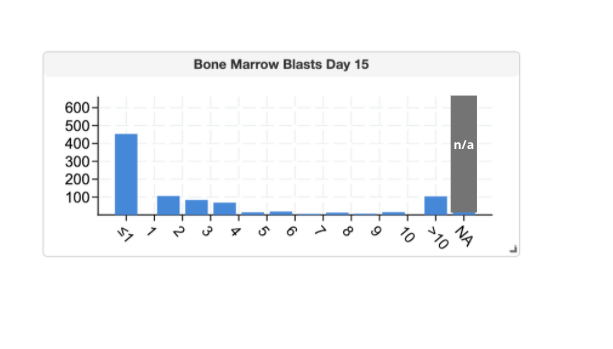
What about just giving the bar a different color and also putting the n/a in the bar to make sure people get it.
Alternately, if it's edge case that people really want to select N/A, then we could prompt user with a dialog when they make selection wit NA? More complicated but ...
alisman
on 12 Nov 2020
That helps (as would moving it to the side a little). But giving users the option to hide it is also useful, since that could rescale the x-axis, which is useful when there are lots of NAs.
On Nov 12, 2020, at 5:08 PM, alisman notifications@github.com wrote:
What about just giving the bar a different color and also putting the n/a in the bar to make sure people get it.
https://user-images.githubusercontent.com/186521/99001874-93d3d980-2509-11eb-8925-3beafc075075.png
—
You are receiving this because you commented.
Reply to this email directly, view it on GitHub https://github.com/cBioPortal/cbioportal/issues/7527#issuecomment-726369218, or unsubscribe https://github.com/notifications/unsubscribe-auth/AC2XPYFDTHLICQ6RIBNNEE3SPRMETANCNFSM4NG6JFLQ.
schultzn
on 12 Nov 2020
I prefer the NA to have their own bar indeed, just for uniformity. Giving
it a different color to make it easily distinguished is a good idea. Moving
it away from the other bars would also work.
--
T. +31(0)30 700 9713
On Thu, Nov 12, 2020 at 11:08 PM alisman notifications@github.com wrote:
What about just giving the bar a different color and also putting the n/a
in the bar to make sure people get it.[image: image]
https://user-images.githubusercontent.com/186521/99001874-93d3d980-2509-11eb-8925-3beafc075075.png—
You are receiving this because you were mentioned.
Reply to this email directly, view it on GitHub
https://github.com/cBioPortal/cbioportal/issues/7527#issuecomment-726369218,
or unsubscribe
https://github.com/notifications/unsubscribe-auth/ACMGKNPOIZZW7KKRP4VYTITSPRMETANCNFSM4NG6JFLQ
.
Sjoerd-van-Hagen
on 12 Nov 2020
But that could also occur when you have a lot of samples which have the
same numeric value...
--
T. +31(0)30 700 9713
On Thu, Nov 12, 2020 at 11:11 PM schultzn notifications@github.com wrote:
That helps (as would moving it to the side a little). But giving users the
option to hide it is also useful, since that could rescale the x-axis,
which is useful when there are lots of NAs.On Nov 12, 2020, at 5:08 PM, alisman notifications@github.com wrote:
What about just giving the bar a different color and also putting the
n/a in the bar to make sure people get it.<
https://user-images.githubusercontent.com/186521/99001874-93d3d980-2509-11eb-8925-3beafc075075.png—
You are receiving this because you commented.
Reply to this email directly, view it on GitHub <
https://github.com/cBioPortal/cbioportal/issues/7527#issuecomment-726369218>,
or unsubscribe <
https://github.com/notifications/unsubscribe-auth/AC2XPYFDTHLICQ6RIBNNEE3SPRMETANCNFSM4NG6JFLQ
.—
You are receiving this because you were mentioned.
Reply to this email directly, view it on GitHub
https://github.com/cBioPortal/cbioportal/issues/7527#issuecomment-726370679,
or unsubscribe
https://github.com/notifications/unsubscribe-auth/ACMGKNM7UFWBB5UNAOMQV63SPRMRDANCNFSM4NG6JFLQ
.
Sjoerd-van-Hagen
on 12 Nov 2020
giving the bar a different color
+1
giving users the option to hide it is also useful
+1
jjgao
on 12 Nov 2020
Here's the solution we're going for: Add a check box in the hamburger menu to hide the N/A bar. The bar will be shown by default. The user's decision to hide n/a for each respective chart should be stored in user settings.
 Luke-Sikina
on 16 Nov 2020
Luke-Sikina
on 16 Nov 2020
Related issues
Luke-Sikina
·
9Comments
 inodb
·
8Comments
inodb
·
8Comments
 chenh4
·
11Comments
chenh4
·
11Comments
 c4cam
·
4Comments
c4cam
·
4Comments
 tmazor
·
11Comments
tmazor
·
11Comments
Most helpful comment
Here's the solution we're going for: Add a check box in the hamburger menu to hide the N/A bar. The bar will be shown by default. The user's decision to hide n/a for each respective chart should be stored in user settings.