Catch2: How to integrate Catch2 with NDK?
I don't think we can Supplying main() yourself in NDK environment. There is no main entry point function in a NDK lib.
Following is what I have done to use Catch2 in a NDK based lib.
__native-lib.cpp__
#define CATCH_CONFIG_RUNNER
#include "catch.hpp"

extern "C"
JNIEXPORT JNICALL
int Java_com_example_someproj_MyTest_runTest(JNIEnv *env, jclass type) {
    char *argv[] = {"whatever"};
    int result = Catch::Session().run(1, argv);//fake `argc` and `argv`
    return result;
}

unsigned int Factorial( unsigned int number ) {
    return number <= 1 ? number : Factorial(number-1)*number;
}

//some example tests
TEST_CASE( "Factorials are computed", "[factorial]" ) {
    REQUIRE( Factorial(1) == 1 );
    REQUIRE( Factorial(2) == 2 );
    REQUIRE( Factorial(3) == 6 );
    REQUIRE( Factorial(10) == 3628800 );
}
__MyTest.java__
package com.example.someproj;

public class MyTest {
    static {
        System.loadLibrary("native-lib");
    }
    public void runNativeTest() {//this is called somewhere to execute Catch2 tests
        assertTrue("Some test doesn't not past.", 0 == runTest());
    }

    public static native int runTest();
}
 zwcloud
All 5 comments
I am sorry, but I don't understand what is the issue here?
The important part of the "own main" documentation is how to set up a Session and then let Catch run the tests. It is part of main because that is the auto-run section in most environments. It might be worth adding some notes to documentation about this though.
 horenmar
on 30 Aug 2018
horenmar
on 30 Aug 2018
There is no need to supply the Java-based entrypoint, native (as in: comprised solely of C++ code) binaries work fine. You should be able to provide a regular main() function and execute your application through it.
 janisozaur
on 30 Aug 2018
janisozaur
on 30 Aug 2018
@horenmar
No all people uses auto-run unit tests all the time. For me, I write small unit tests when developing my app, just to ensure that I haven't done anything wrong in the small section of code I just wrote. People call this TDD you know. In this case, I just want to click a button and run a test case.
@janisozaur
There is no need to supply the Java-based entrypoint, native (as in: comprised solely of C++ code) binaries work fine.
It may work, but it is far from working Fine. That's how I work with the Android Studio, a java unit test method allows me to click the button and run a unit test in the IDE.
You should be able to provide a regular main() function and execute your application through it.
No. I'm not able to do that. Because a java-based Android app doesn't expose the main() function. (Even a NativeActivity-based Android app doesn't expose the main function.) If you can achieve that, I'll appreciate it if you tell me how to do it.
zwcloud
on 30 Aug 2018
Below is how I use it in a practical Android project in Android Studio:

The red-circled ▶ is the "button" I can click to run a unit test with specific test name.
And the testName is passed to a jni function runTest:
extern "C" JNIEXPORT JNICALL
int Java_cn_easyar_androidaudiondk_ExampleInstrumentedTest_runTest(JNIEnv *env, jclass type, jstring testName_) {

    auto buf = std::make_shared<androidbuf>();
    std::cout.rdbuf(buf.get());

    //https://github.com/catchorg/Catch2/blob/master/docs/command-line.md#specifying-which-tests-to-run
    const char *arguments[] = {
            "fake.exe",
            jstring_to_string(env, testName_).c_str()
    };
    int argc = 2;
    auto argv = const_cast<char**>(arguments);
    int result = Catch::Session().run(argc, argv);

    return result;
}
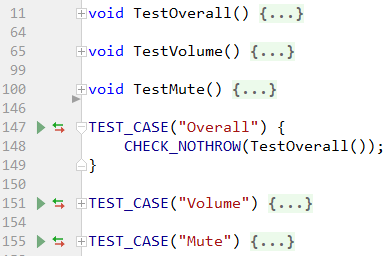
And the test code:
zwcloud
on 30 Aug 2018
@zwcloud Thanks for sharing, that's exactly the kind of setup that I was looking for.
I also think that it is a completely valid setup for Android developers, for the same reasons given by @zwcloud . This would be a valuable addition to the Catch docs.
 zimtkeks
on 3 Jun 2019
zimtkeks
on 3 Jun 2019
Related issues
 qneverless
·
6Comments
qneverless
·
6Comments
 pwinston
·
5Comments
pwinston
·
5Comments
 jmeekhof
·
4Comments
jmeekhof
·
4Comments
 aldanor
·
3Comments
aldanor
·
3Comments
 david8dixon
·
7Comments
david8dixon
·
7Comments
Most helpful comment
Below is how I use it in a practical Android project in Android Studio:
The red-circled ▶ is the "button" I can click to run a unit test with specific test name.
And the
testNameis passed to a jni functionrunTest:And the test code:
