Caseflow: Judges cannot assign draft decision tasks to acting judges
When judges attempt to assign draft decision AttorneyTasks to attorneys who are acting as judges, the application instead reassigns the JudgeAssignTask. This ticket exists to fix this bug and allow judges to assign draft decision AttorneyTasks to attorneys who are acting as judges.
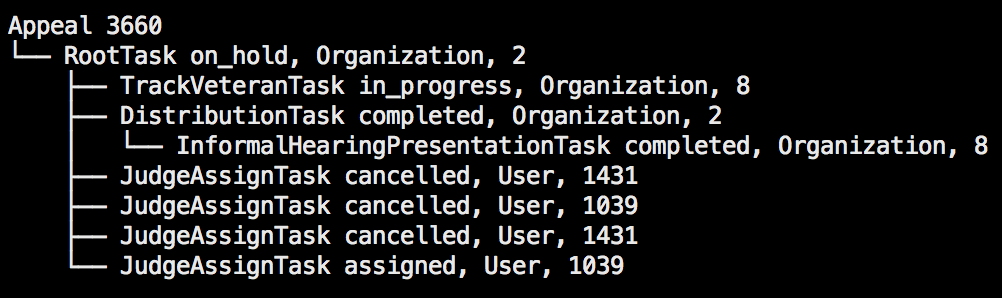
Steps to reproduce locally
- Add an acting judge to AABSHIRE's judge team.
rails c> judge = User.find_by(css_id: "BVAAABSHIRE")
rails c> atty = FactoryBot.create(:user, css_id: "BVALODELL", full_name: "Lorena Odell")
rails c> vacols_atty = FactoryBot.create(:staff, :attorney_judge_role, user: atty)
rails c> OrganizationsUser.add_user_to_organization(atty, JudgeTeam.for_judge(judge))
rails c> JudgeTeam.create_for_judge(atty)
- Attempt to assign a case to this new attorney through either the judge assign cases view or the case details page and observe that we instead reassigned the
JudgeAssignTask.
Acceptance criteria
- [ ] Judges can assign draft decision
AttorneyTasks to attorneys who are acting judges - [ ] Judges can still transfer
JudgeAssignTasks to other judges on the case details page and through the judge assign view
 lowellrex
All 6 comments
This appears to have been caused by acting judges being given JudgeTeams as a workaround until #11570 was completed. Now that #11570 is live in production we can remove the JudgeTeams for attorneys acting as judges and they should be able to properly receive draft decision AttorneyTasks instead of JudgeAssignTasks.
We uncovered another problem here though, that needs to be addressed before we move the identification of acting judges in Caseflow: the JudgeAssignTasksController determines whether we reassign JudgeAssignTasks or create AttorneyTasks without any way to control that behaviour on the front-end.
lowellrex
on 13 Aug 2019
1 |
2 | |||
3 | |||||
5 | ||||
8 |
(How do we know someone is a judge? User.judge_in_vacols? methods)
Though the votes say "3", subsequent discussion has made this group decide this is a
5
Rant incoming.
 kevmo
on 3 Oct 2019
kevmo
on 3 Oct 2019
From the Judge assign page, a judge can select a case and any attorney user (this includes judges and acting judges) and hit "Assign". We determine if the judge meant to reassign the JudgeAssignTask to another judge or assign an AttorneyTask to an attorney based on if the assignee is a judge. Acting judges are both attorneys and judges and need the ability to have judge tasks reassigned to them AND have attorney tasks assigned to them. On the judge assign page, there is no way for judges to stipulate if they are intending to assign or reassign when selecting an acting judge.
One possible solution is to completely remove the ability to reassign tasks to judges on the assign page (regression of #7612 and remove ability to reassign legacy appeals) and to only allow reassigning though the reassign task action on the case details page (which may need to be built out for legacy cases).
Whatever path we choose, this will need release notes. Please notify Shawn when complete!
 hschallhorn
on 3 Oct 2019
hschallhorn
on 3 Oct 2019
Unless I'm missing something, as our code currently stands, judges have the ability to reassign any AMA judge task, but only have the ability to reassign a JudgeLegacyAssignTask via initialAssignTasksToUser or reassignTasksToUser in the AssignWidget. For this reason, I'm similarly only going to focus on reassigning JudgeLegacyAssignTask and not JudgeLegacyDecisionReviewTask
hschallhorn
on 16 Oct 2019
@stwards11 and @msj0nes This is closed and ready to go out today. Here are some key changes:
AMA cases cannot be reassigned to a judge from their "Assign cases" page. They will need to use the "Re-assign to judge" dropdown action on the case details screen for that specific case.
This allows them to stipulate how they would like to assign a case to an acting judge:
- If the judge would like to assign a case to an acting judge in order for the acting judge to draft a decision, they should assign it to them from their "Assign cases" page or via the "Assign to attorney" dropdown on the case details page.
- If the judge would like to transfer the case to the acting judge in order for the acting judge to assign the case to an attorney, they should reassign it to them via the "Re-assign to judge" dropdown action on the case details page.
hschallhorn
on 17 Oct 2019
@stwards11 and @msj0nes now that #12402 is merged, after deployment tomorrow, the same actions above should be taken for assigning/reassigning legacy appeals to acting judges. "Assign cases" page and the "Assign to attorney" dropdown on the case details page will assign the case to them as an attorney and "Re-assign to judge" dropdown action on the case details page will assign the case to them as a judge.
hschallhorn
on 17 Oct 2019
Related issues
 nikitarockz
·
3Comments
nikitarockz
·
3Comments
 yoomlam
·
5Comments
lowellrex
·
5Comments
yoomlam
·
5Comments
lowellrex
·
5Comments
 lomky
·
4Comments
lomky
·
4Comments
 lomaxap
·
3Comments
lomaxap
·
3Comments