Context
When a query filters out the_geom column, Builder enters in bad state.
Steps to Reproduce
- Go to
datatab and modify the SQL query. - Apply a query selecting only one column. For instance,
SELECT name FROM airbnb_listings.
Current Result
The applying query is shown ad infinitum.

The analysis tab is broken.

SQL API queries fail, but the error is neihert captured nor shown.

Expected result
- An error is shown in the user interface.
- Analysis tab is properly rendered.
Browser and version
Chrome
 ivanmalagon
All 9 comments
Good catch! I saw it yesterday. Bad queries could be any query without the_geom, the_geom_webmercator and/or cartodb_id. This is also happening when you create a map from a bad query.
 ramiroaznar
on 21 Feb 2018
ramiroaznar
on 21 Feb 2018
looking into this
 matallo
on 21 Feb 2018
matallo
on 21 Feb 2018
I have identified the following cases in production:
| | SQL | UI message | Blank panels | Inf. loop |
|---|----------------------------------------------|-----------------------------------------------------------------------------------------------------------------------------------------------------------------------------------------------------------------------|--------------|-----------|
| 1 | SELECT x FROM | Error in SQL query: column "x" does not exist | Yes | No |
| 2 | SELECT the_geom FROM | The column "the_geom_webmercator" does not exist | No | No |
| 3 | SELECT the_geom_webmercator FROM | - | No | Yes |
| 4 | SELECT the_geom, the_geom_webmercator FROM | lineas_metro_madrid: Postgis Plugin: ERROR: column "cartodb_id" does not existLINE 1: ...e_geom_webmercator",0.001),0.001,true),3) AS geom,"cartodb_i... ^in executeQuery Full sql was: 'SELECT ST_AsTWKB(ST_Simplify | No | No |
| 5 | SELECT cartodb_id FROM | - | Yes | Yes |
| 6 | SELECT 1 as x FROM | - | Yes | Yes |
| 7 | SELECT * FROM wrong_table | Error in SQL query: relation "wrong_table" does not exist | Yes | No |
The blank panels can be restored going Back and entering the Layer again.
In the cases that there is an Error in SQL or blank panels, the Analysis panel does not remove the placeholder properly and the warning message says Empty layer:
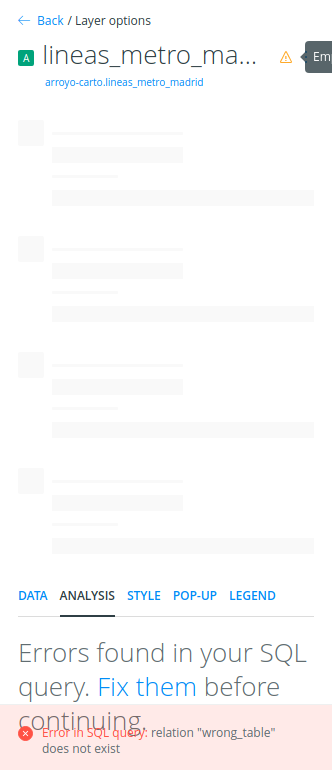
@ramiroaznar could you write the correct behavior and UI messages for each SQL query? Thanks! :smile:
 Jesus89
on 27 Feb 2018
Jesus89
on 27 Feb 2018
After talking to ramiro, this is the table for the UI messages:
| | SQL | UI message |
|---|----------------------------------------------|-----------------------------------------------------------|
| 1 | SELECT x FROM | Error in SQL query: column "x" does not exist |
| 2 | SELECT the_geom FROM | The column "the_geom_webmercator" does not exist |
| 3 | SELECT the_geom_webmercator FROM | The column "cartodb_id" does not exist |
| 4 | SELECT the_geom, the_geom_webmercator FROM | The column "cartodb_id" does not exist |
| 5 | SELECT cartodb_id FROM | The column "the_geom_webmercator" does not exist |
| 6 | SELECT 1 as x FROM | The column "the_geom_webmercator" does not exist |
| 7 | SELECT * FROM wrong_table | Error in SQL query: relation "wrong_table" does not exist |
Also no blank panels and infinite loops.
NOTE: tested in version v4.10.20
Jesus89
on 27 Feb 2018
In another turn of events, it looks like if an analysis does not return the_geom, BUILDER breaks as reported by @erodespons. I will try to comment or create a new issue when I have the STR.
UPDATE: this bug seems different, reported here.
ramiroaznar
on 27 Feb 2018
It seems that:
infinite loopbug was introduced in https://github.com/CartoDB/cartodb/pull/12916 (Oct 2017)blank panelsbug was introduced in https://github.com/CartoDB/cartodb/pull/13324 (Jan 2018)
Jesus89
on 28 Feb 2018
Good catch!
ramiroaznar
on 28 Feb 2018
Jesus89
on 5 Mar 2018
:boom:
ramiroaznar
on 5 Mar 2018
Related issues
 fernando-carto
·
5Comments
fernando-carto
·
5Comments
 makella
·
3Comments
makella
·
3Comments
 saleiva
·
4Comments
saleiva
·
4Comments
 arianaescobar
·
4Comments
arianaescobar
·
4Comments
 rochoa
·
4Comments
rochoa
·
4Comments