Cartodb: Recover the "SQL" and "READ" tags
At some point along the way, we lost the "SQL" and "READ" tags that appeared on both the Layers List and the Layers header besides the dataset node.

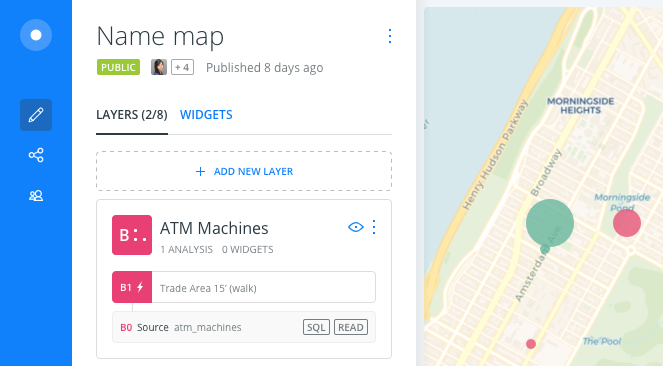
SQL: Indicates that a SQL query has been applied to that dataset, either by the advanced SQL editor in the DATA tab or by an analysis.
READ: Indicates that it's a read-only dataset, so its data can't be transformed. Which occurs when:
- A layer has an analysis applied
- The data comes from the Data Library
- The data comes from a Shared dataset with read-only permission.
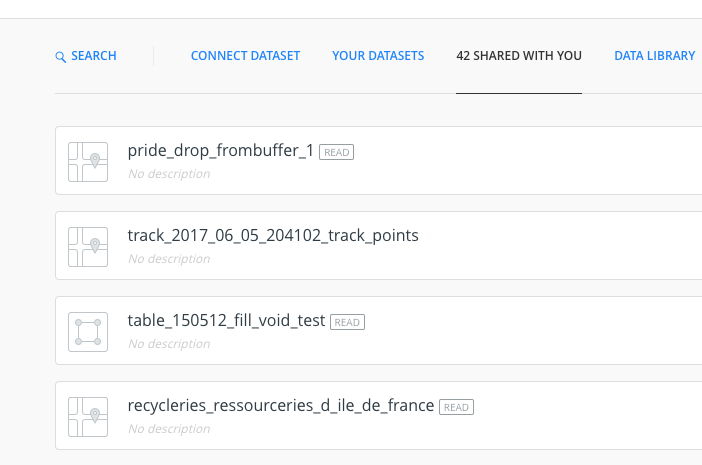
Just to clarify, we already had this implemented and for some reason, its no longer appearing. It's actually still present in some parts of the tool, like in the "Shared with you" tab of the Add a new layer modal:
cc @alonsogarciapablo @ramiroaznar
 arianaescobar
All 9 comments
Hey @arianaescobar I am seeing the SQL tag when applying a query or importing a .carto file:
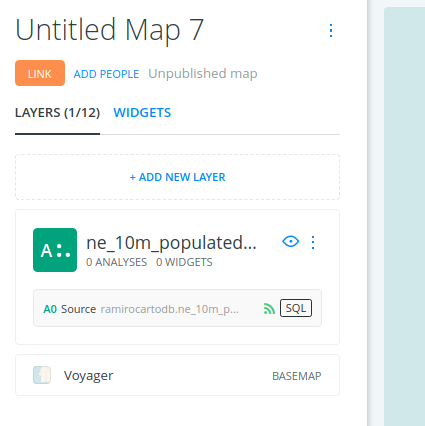
Although it is missing here:
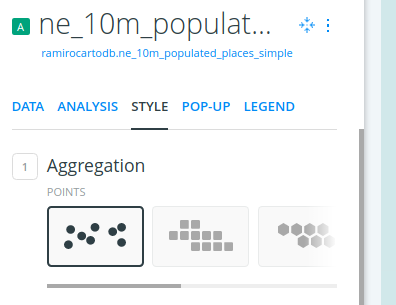
Regarding the other tag, I have some concerns:
READshould only be shown when the data is synced and/or it is a read-only dataset shared within an organization.- What happens when you apply a query and then add an analysis? I do not think that we should add the
READlabel in this case. - You can change a dataset from the Data Library after deactivating the sync option.
 ramiroaznar
on 5 Feb 2018
ramiroaznar
on 5 Feb 2018
Uuuuh I love this synergy!
I am seeing the SQL tag when applying a query or importing a .carto file
- Why are we showing the
SQLtag when importing a .carto file? Did the file had a query applied?
- READ should only be shown when the data is synced and/or it is a read-only dataset shared within an organization.
- What happens when you apply a query and then add an analysis? I do not think that we should add the READ label in this case.
- Are you saying that we shouldn't show
READafter an analysis has been applied? (The data does become read-only, tho...) I might have misunderstood.
- You can change a dataset from the Data Library after deactivating the sync option.
- Nice to know that! So in that case, if you change it to never, the
READtag disappears.
arianaescobar
on 5 Feb 2018
Why are we showing the SQL tag when importing a .carto file? Did the file had a query applied?
- I think it is something related to changing the postgres schema. Maybe @javitonino can give a better answer.
Are you saying that we shouldn't show READ after an analysis has been applied? (The data does become read-only, tho...) I might have misunderstood.
- Yes, I think we shouldn't because you can drag out the original node and work with the SQL panel. Something I do very often.
ramiroaznar
on 5 Feb 2018
Yes, I think we shouldn't because you can drag out the original node and work with the SQL panel. Something I do very often.
But that's a different workflow... one that we should make more explicit, btw.
If you drag the node out and it can be edited, then it definitely should have the READ tag. But the original layer with the analyses applied would be read-only and because of that, it requires said tag. Right?
arianaescobar
on 5 Feb 2018
But that's a different workflow... one that we should make more explicit, btw.
Totally agree. Dragging out analysis is one of the coolest (and very useful) feature in BUILDER. Regarding the issue in hand, I suppose you are right. After dragging the original layer source out, the label can be removed (but keep it in the analysis node).
ramiroaznar
on 5 Feb 2018
Why are we showing the SQL tag when importing a .carto file? Did the file had a query applied?
I think it is something related to changing the postgres schema. Maybe @javitonino can give a better answer.
Basically that. It's not an easy problem to avoid, but I'd consider it a bug. Please report it if you have detailed STR with a .carto file that has been recently exported from carto (include details about original and destination accounts, most importantly if they are plain user or organizations and, in the second case, if it the same organization, etc).
 javitonino
on 6 Feb 2018
javitonino
on 6 Feb 2018
I will try to replicate it!
ramiroaznar
on 6 Feb 2018
Thank you guys :)
arianaescobar
on 6 Feb 2018
This issue has been automatically marked as stale because it has not had recent activity. It will be closed if no further activity occurs. Thank you for your contributions.
![stale[bot] picture](https://avatars.githubusercontent.com/in/1724?v=4&s=40) stale[bot]
on 6 Feb 2019
stale[bot]
on 6 Feb 2019
Related issues
 rochoa
·
4Comments
javitonino
·
5Comments
arianaescobar
·
5Comments
rochoa
·
4Comments
javitonino
·
5Comments
arianaescobar
·
5Comments
 nygeog
·
5Comments
nygeog
·
5Comments
 jesusbotella
·
4Comments
jesusbotella
·
4Comments