Goal: Implement the proposed UI for the new Auth API.
Links:
Auth API Keys pages must provide the UI to the new Auth API
Top levels operations are:
- Regenerating the
masterkey. - Edit the
publickey settings. - Create, regenerate and delete
regularkeys.
As you can check in the attached Invision project, there are two main forms:
- API keys list. First key is the
masterkey, the second one is thepublickey and then the regular ones. - API key settings page: this form has two differents ways of presenting the information:
- For the
publickey: you can change APIs access and dataset Read access. Notice that there's only read access for this kind of key. - For the
regularones: you can set APIs access and CRUD operations for each dataset. These keys can't be edited.
- For the
NOTES:
- There's neither Import nor Analysis API even though they're present in the mockup.
- The link icon copies the key to the clipboard.
- Now this page must get all the user datasets. It's not clear what happens with shared datasets so far so let's begin getting only your own datasets.
 ivanmalagon
All 19 comments
Hi!
Right now there is also a section related to Google API keys, what are we doing with it? Are we still showing it under the same conditions? Are we removing it?

cc @piensaenpixel
 rubenmoya
on 5 Feb 2018
rubenmoya
on 5 Feb 2018
Hi again! I'm adding the regenerate and delete buttons functionality, and it seems a little bit weird to remove the key or regenerate it without a previous warning to the user, do you think we should add a dialog/modal alerting the user before regenerating/deleting the key?
cc @CartoDB/design
rubenmoya
on 6 Feb 2018
AFAIK that action can be extremely destructive, so I would definitely warn the user about the consequences.
Regarding the Google API Keys... no idea. Surely someone else can give you a better answer than us. I'm not sure who, though. Sorry!
 arianaescobar
on 6 Feb 2018
arianaescobar
on 6 Feb 2018
Good catch, Ruben.
@inigomedina What do we do with the Google Maps form? We have two options:
- Keep it below the keys section as it is right now. That will move it down and perhaps it's a bit hard to find but it's my preferred option.
- Create a tab only for Google Maps: easier to find, harder to develop as it will require changes both in API keys and Mobile apps page.
ivanmalagon
on 6 Feb 2018
Design-wise, I would go with the first option. Makes more sense having all your keys grouped in the same place than separated into tabs. But then I would probably rename the tab from "CARTO" to Keys, API Keys or something like that.
arianaescobar
on 6 Feb 2018
Design-wise, I would go with the first option. Makes more sense having all your keys grouped in the same place than separated into tabs. But then I would probably rename the tab from "CARTO" to Keys, API Keys or something like that.
Yes, we go with the first option. Good enough for this step.
If we face issues regarding the visibility of those external keys, we can always include anchor links from an introduction content to the different parts of the page. But right now we don't need that.
Just replicate the same structure of the page we had in Editor and let's see.
 inigomedina
on 6 Feb 2018
inigomedina
on 6 Feb 2018
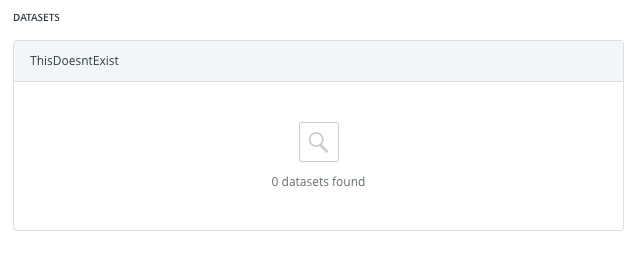
I've added some placeholders to show when the user has no datasets, or when the search result is empty, what do you think @piensaenpixel?

rubenmoya
on 14 Feb 2018
I had a conversation this morning with @javitonino regarding the public and master API keys:
We decided to show in public API show view the list of public datasets, and in the regular keys form view we were going to select by default, and disabled, the read checkbox for public datasets, but not sending that information to the backend, this lead to that permission not being returned in the GET request of the API keys, which lead to inconsistencies between the UI and the API.
After some more thought and another conversation with @inigomedina, we decided to change that behavior, we won't select anything by default in the form view, the user will have to select them explicitly.
rubenmoya
on 16 Feb 2018
We need to address changes also in organization tabs. This will be made outside the current migration to deliver sooner.
More info in this ticket https://github.com/CartoDB/cartodb/issues/13559
ivanmalagon
on 16 Feb 2018
The Auth API UI has been deployed to a dedicated staging with apikeys user.
This user is not included in any organization, so maybe we need to create one later to test that use case.
 jesusbotella
on 27 Feb 2018
jesusbotella
on 27 Feb 2018
While doing a small acceptance I realized that the title could be improved, right now we're showing:
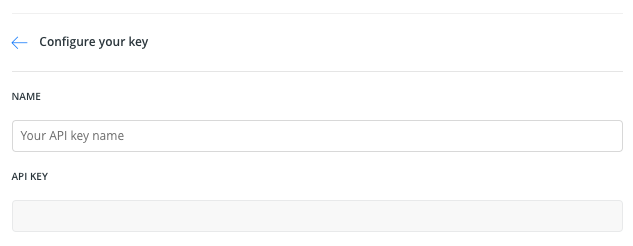
which could make sense when you are creating a new API key, since you have to configure it first, but when the API key is already created you can't configure/edit it, so I think we could change the title to something like Your API key details, what do you think @piensaenpixel?
rubenmoya
on 27 Feb 2018
If there is no action, we shouldn't use any verb. Your solution, in that case, looks good.
However, if there is some kind of action, but not one so specific like edit or configure, we could just go for a generic one like Manage your API key.
inigomedina
on 28 Feb 2018
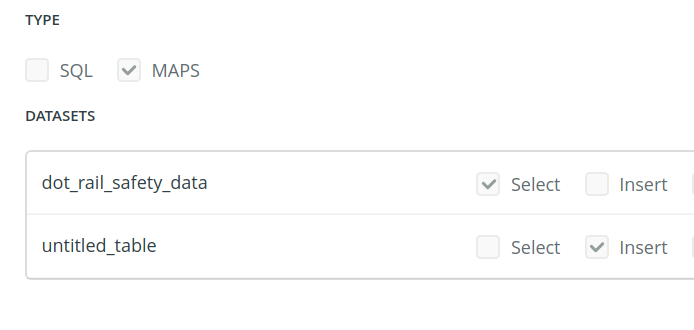
Maps API only understands select grants, but the UI allows you to choose others as well. After discussing on the Auth API slack channel, we're going to leave it as it is at least for now. Otherwise, looks good to me.
 danicarrion
on 28 Feb 2018
danicarrion
on 28 Feb 2018
+1 to @inigomedina comments
 piensaenpixel
on 28 Feb 2018
piensaenpixel
on 28 Feb 2018
Did a quick pass, found some issue:
- Datasets with privacy == link do not show up in the
default publickey listing (and they should). - Styles look weird, at least in firefox (spacing btween previous input and next header):

- Master/default_public keys do not show the [MAPS] [SQL] tags (and they have them). On purpose?
- Create a new api key, mark an insert permission, mark the Maps API, save. The API key has that insert permission but is not displayed in the UI
- Only the first 20 api keys are shown. The
api_keysendpoint has paging (default per_page = 20) but it seems frontend does not implement it.
Pending:
- Test with organizations
 javitonino
on 1 Mar 2018
javitonino
on 1 Mar 2018
- So, in the
public keywe should show the shared datasets, right? - I'll take care of that, also check IE and Safari
- Master and default_public don't show any API tags
- That was a last-hour change, we decided to hide some checkbox when only
mapsAPI is selected which solves some problems but leave us with that corner case, anyway, that permission won't work. - We didn't take into account the pagination, neither in design or in code, we should talk about this
rubenmoya
on 1 Mar 2018
- I was speaking about datasets with privacy set to
LINK. About shared datasets, the public api key will have access to shared datasets that are public/link. However, maybe we should not show that, as we decided not to support organization shares in api keys for now, so it would be consistent to not show shared datasets here as well) - :+1:
- Ok, just felt strange in comparison with the others
- Ok, it is weird, but I guess it's enough of an edge case to ignore.
- :dancer: We have
per_pageandpagequery parameters to do this. An alternative would be to impose a limit to the number of api keys per user.
javitonino
on 1 Mar 2018
We should probably remove this: Learn more about using your simple API key in CARTO from the bottom of the page. Maybe replace it for a link to the new docs. For sure, remove that simple now that our api keys rock :guitar:
javitonino
on 1 Mar 2018
Yes, @javitonino. We should replace that link for a new one bringing users to the new docs, specifically to the fundamentals section regarding authorization. We didn't include it on the roadmap of Auth since it wasn't clear that the developer center would be available at the time of its launch. Let me think about the final URL, and when we have something ready to be implemented, I'll just create a PR.
inigomedina
on 5 Mar 2018
Related issues
 rochoa
·
4Comments
ivanmalagon
·
3Comments
rochoa
·
4Comments
ivanmalagon
·
3Comments
 makella
·
3Comments
makella
·
3Comments
 nygeog
·
5Comments
jesusbotella
·
4Comments
nygeog
·
5Comments
jesusbotella
·
4Comments
Most helpful comment
We should probably remove this:
Learn more about using your simple API key in CARTOfrom the bottom of the page. Maybe replace it for a link to the new docs. For sure, remove thatsimplenow that our api keys rock :guitar: