Cartodb: Adding contextual help to Analysis UI
Context
We'd like to add a few links to Learn from Builder, as contextual help, to help users understand analysis better. For more context about this, please take a look at the design issue.
Let us know whenever you start working on this so we can all have a kickoff together.
Design
The link says "More info" and it's placed below the analysis name, on the second step of each analysis:

We are also changing the "Info about analysis" link to "More info" in the Add analysis modal and moving it below the analysis description in uppercase. In the cases where there's no guide for that analysis yet, we just don't show any link on the card.

This means that we are only linking to Learn and removing this second step of that modal window:

And thanks to that we could close these other issues:
Measurement
Could you add a class to those links (one for the links on the analysis UI and another for the modal links) so we could measure their performance?
Links
- Enrich from Data Observatory: https://carto.com/learn/guides/analysis/enrich-from-data-observatory
- Filter by Layer: https://carto.com/learn/guides/analysis/filter-by-layer
- Georeference: https://carto.com/learn/guides/analysis/georeference
- Join Columns from 2nd Layer: https://carto.com/learn/guides/analysis/join-column-from-second-layer
- Intersect Second Layer: https://carto.com/learn/guides/analysis/intersect-second-layer
- Create Areas of Influence: https://carto.com/learn/guides/analysis/areas-of-influence
- Find Centroid of Geometries: https://carto.com/learn/guides/analysis/find-centroid-of-geometries
- Group points into polygons: https://carto.com/learn/guides/analysis/group-points-into-polygons
- Filter by Column Value: https://carto.com/learn/guides/analysis/filter-by-column-value
- Filter points in polygons: https://carto.com/learn/guides/analysis/filter-points-in-polygons
- Connect with Lines: https://carto.com/learn/guides/analysis/connect-with-lines
- Subsample percent of rows: https://carto.com/learn/guides/analysis/subsample-percent-of-rows
- Calculate Clusters of Points: https://carto.com/learn/guides/analysis/calculate-clusters-of-points
- Detect Outliers and Clusters: https://carto.com/learn/guides/analysis/detect-outliers-and-clusters
- Predict Trends and Volatility: https://carto.com/learn/guides/analysis/predict-trends-and-volatility
@namessanti could you confirm us if that list is correct?
Regarding the Design team, I'm the owner of the project, so please ping me if there's any doubt or question about the issue 🙃
 arianaescobar
All 13 comments
@arianaescobar Looks good.
FYI
Two of those analysis that don't have guides are ready to be merged in the Learn design pipeline project:
Centroids of Geometry: https://github.com/CartoDB/learn/pull/285
Group Points into Polygons: https://github.com/CartoDB/learn/pull/306
The remaining outstanding analysis guides progress is tracked here: https://github.com/CartoDB/learn/issues/312
Looking forward to rolling this out.
 namessanti
on 3 Apr 2017
namessanti
on 3 Apr 2017
Thos are already in the kanban! @csubira is just landing (HA!) so expect an speed increase during the next few weeks
 saleiva
on 3 Apr 2017
saleiva
on 3 Apr 2017
To whoever to take this. In order to add the measurement css class, let's take the component forms as an example, so those links should be something like track-[analysis name]-form-learn and track-[analysis name]-modal-learn for instance.
 nobuti
on 14 Sep 2017
nobuti
on 14 Sep 2017
Hi @arianaescobar, what about the "Find nearest" link?
 Jesus89
on 15 Sep 2017
arianaescobar
on 18 Sep 2017
Jesus89
on 15 Sep 2017
arianaescobar
on 18 Sep 2017
@Jesus89 I updated the original list of links because we already have guides for every analysis.
arianaescobar
on 18 Sep 2017
OK Thanks!
Jesus89
on 18 Sep 2017
One more question @arianaescobar. The link must be opened in a new tab, right?
Jesus89
on 18 Sep 2017
yes!
arianaescobar
on 18 Sep 2017
I have checked that the analysis modal has no the same style as the design:
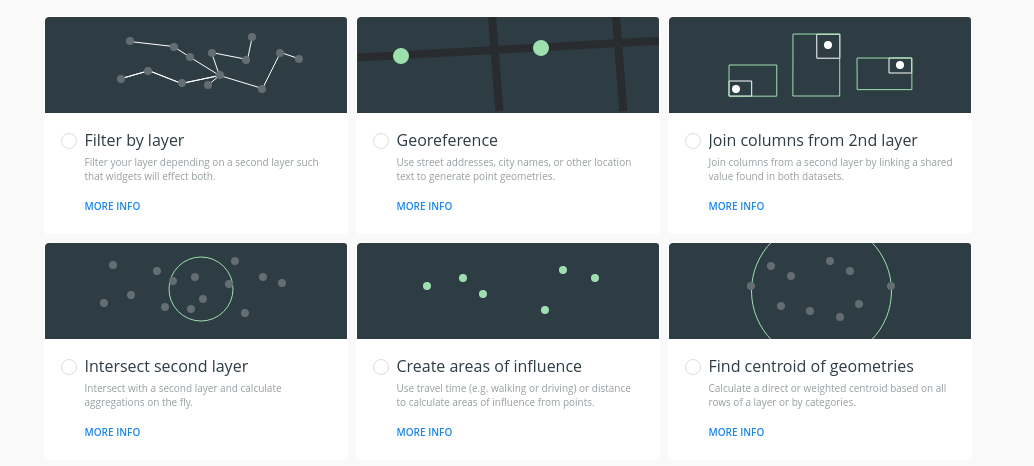
@arianaescobar Can I fix that (border, paddings, etc)?
Jesus89
on 18 Sep 2017
That would be amazing! Maybe let's leave the padding differences for later, the most urgent changes from our point of view are the following ones:
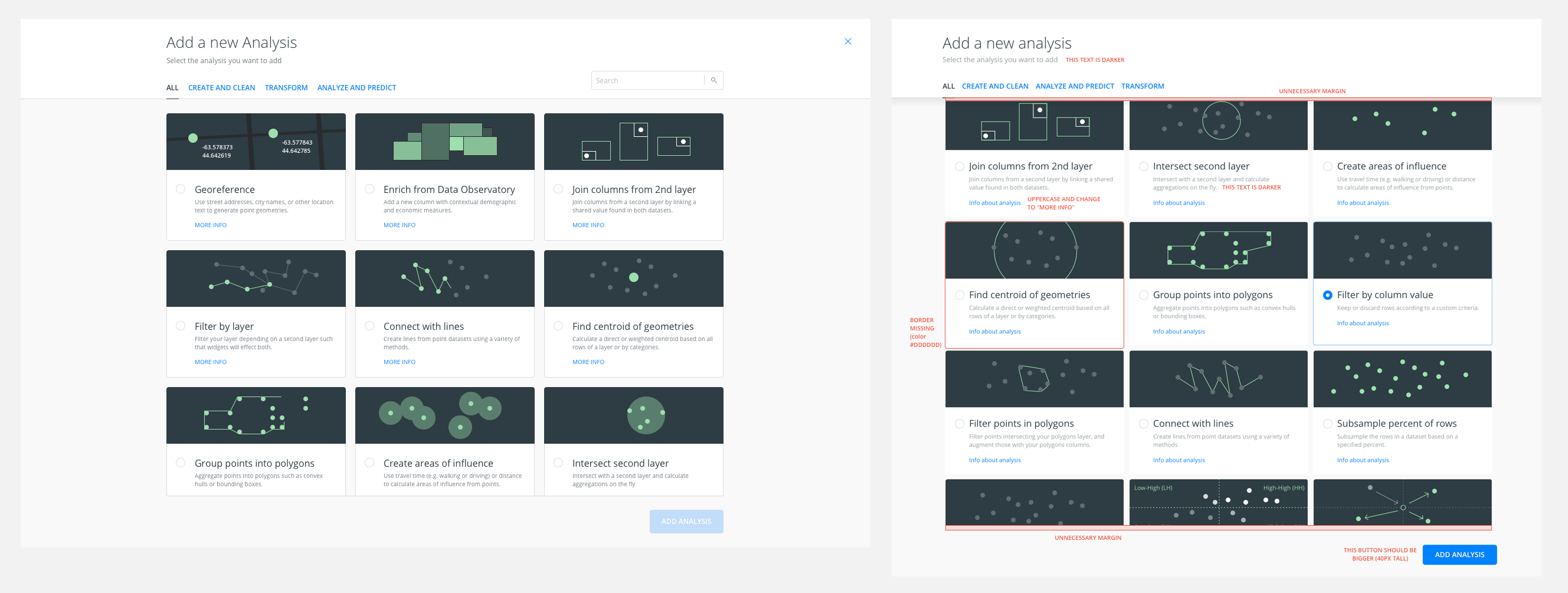
(left: mockup / right: production)
arianaescobar
on 18 Sep 2017
@csobier for visibility & asset update (soon)
Nice work design guys/gals
namessanti
on 18 Sep 2017
Closed by #12814
nobuti
on 28 Sep 2017
Related issues
 jesusbotella
·
4Comments
arianaescobar
·
5Comments
jesusbotella
·
4Comments
arianaescobar
·
5Comments
 rochoa
·
3Comments
rochoa
·
3Comments
 ivanmalagon
·
3Comments
ivanmalagon
·
3Comments
 atlefren
·
3Comments
atlefren
·
3Comments
Most helpful comment
Thos are already in the kanban! @csubira is just landing (HA!) so expect an speed increase during the next few weeks