Carthage: `carthage copy-framework` not copying folders in frameworks for watchkit extension
I get the following error when I try to install my app via xcode:
Signed resources have been added, removed, or modified
Running codesign to verify the watchkit extension results in:
/Users/lokisnake/Library/Developer/Xcode/DerivedData/SomeApp-dsmkwtskmzgijgeuqlthcfbmbtqm/Build/Products/Debug-iphoneos/SomeApp.app/PlugIns/SomeApp WatchKit Extension.appex: a sealed resource is missing or invalid
file missing: /Users/lokisnake/Library/Developer/Xcode/DerivedData/SomeApp-dsmkwtskmzgijgeuqlthcfbmbtqm/Build/Products/Debug-iphoneos/SomeApp.app/PlugIns/SomeApp WatchKit Extension.appex/Frameworks/ReactiveCocoa.framework/Headers/UIImagePickerController+RACSignalSupport.h
and many more of the file missing errors.
My current setup has a carthage copy-framework run script build phase for both the main app and the watch extension.
 simonyangme
All 12 comments
Hmm, I don't think we've tested copy-frameworks with an extension. I'm not sure what its behavior would be.
Could you share a screenshot of that Run Script build phase?
 jspahrsummers
on 20 May 2015
jspahrsummers
on 20 May 2015
This is what I had for the Run Script Build Phase for the watch app extension (Really the same as what I had for my main app):

P.S. I've since switched to using CocoaPods as this was blocking some of my work. I'll try to provide as much info as I can.
simonyangme
on 20 May 2015
I'm glad you have a workaround for this, as I'm not immediately certain what's causing the issue. :confused:
If you could get a chance, could you please share the ReactiveCocoa.framework bundle that actually got copied into the WatchKit extension (missing files as it may)?
jspahrsummers
on 21 May 2015
As far as I know you shouldn't copy frameworks into the Watch Extension. Instead, add those frameworks to the copy phase of the main target. The watch extension will be able to find them there. (It's in the runtime search paths.)
Fun fact: I actually moved from CocoaPods to Carthage because CocoaPods did not work for me in this case. It looks like they've fixed it since.
 Thomvis
on 22 May 2015
Thomvis
on 22 May 2015
@Thomvis Looks like that worked! Thanks!
@jspahrsummers, sorry for the wild goose chase. 😳
simonyangme
on 23 May 2015
No worries! I learned something. :smile:
jspahrsummers
on 23 May 2015
I believe with the new Watch App architecture on watchOS 2 this has changed.
I managed to make the frameworks visible and get rid of the error "No such module 'X'" by adding $(PROJECT_DIR)/Carthage/Build/iOS to the Framework Search Paths of the Watch Extension and adding the copy frameworks phase.
Unfortunately I'm now stuck on the error:
Module file was created for incompatible target i386-apple-ios8.0
The app and the extension are targeting iOS 9 and xcode-select -p gives me the latest Xcode 7 beta.
Any ideas anyone?
 MarcoSero
on 17 Jun 2015
MarcoSero
on 17 Jun 2015
@MarcoSero I haven't built anything for the watch yet, but shouldn't you be linking against a watchOS version of the framework and not iOS, e.g. $(PROJECT_DIR)/Carthage/Build/watchOS?
 neilpa
on 18 Jun 2015
neilpa
on 18 Jun 2015
@neilpa Thanks, that makes sense. Does Carthage support building frameworks for the watchOS arch yet?
EDIT: I see, all the frameworks have to support it with a new target.
MarcoSero
on 18 Jun 2015
Hey guys!
I have the same issue. Trying to use RxSwift and RxCocoa with a watch extension. (Deployment target: 3.2)
Module file was created for incompatible target i386-apple-ios8.0
Unfortunately it wasn't clear for me, what was the solution.
I tried adding the same Run Script to the Watch extension target, that I used for the iOS target, with the following input files:
$(SRCROOT)/Carthage/Build/watchOS/RxCocoa.framework
$(SRCROOT)/Carthage/Build/watchOS/RxSwift.framework
I also tried adding the same Input files to the Run Phase Script of the iOS app.
Non of these solved my problem.
I am also a bit unsure about the following:
I dragged the iOS frameworks to the Linked Frameworks and Libraries of the iOS target and the watchOS frameworks to the Watch extension target.
Is it the correct way?
Any pointers would be highly appreciated.
Thanks in advance.
 BalazsSzamody
on 5 Jul 2018
BalazsSzamody
on 5 Jul 2018
The error seems to tell me that those frameworks are for the wrong architecture
Try:
file Carthage/Build/watchOS/RxCocoa.framework
 tmspzz
on 5 Jul 2018
tmspzz
on 5 Jul 2018
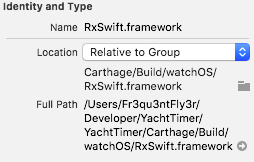
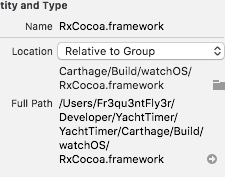
I think that's not a problem. I am already using the files from the watchOS folder.
BalazsSzamody
on 5 Jul 2018
Related issues
 mdiep
·
3Comments
mdiep
·
3Comments
 abbeyjackson
·
3Comments
abbeyjackson
·
3Comments
 rogernolan
·
3Comments
rogernolan
·
3Comments
 billypchan
·
3Comments
billypchan
·
3Comments
 chrislconover
·
3Comments
chrislconover
·
3Comments