Carthage: Environment variable not set: ARCHS
- carthage install method: [ ] .pkg, [x] homebrew, [ ] source
which carthage: /usr/local/Homebrew/bin/carthagecarthage version: 0.36.0xcodebuild -version: Xcode 12.1 (12A7403)- Are you using
--no-build? No - Are you using
--no-use-binaries? No - Are you using
--use-submodules? No - Are you using
--cache-builds? No - Are you using
--new-resolver? No
I’m using the Xcode 12 workaround script to update my carthage dependencies and when I build in Xcode with the new dependencies, I get an error stating “Environment variables not set: ARCHS”. I’ve excluded arm64 from simulator builds but not sure how to deal with this last one. How can I set ARCHS on carthage builds?
 sorinc03
All 5 comments
They are part of your build settings in your project.
 tmspzz
on 29 Oct 2020
tmspzz
on 29 Oct 2020
They are part of your build settings in your project.
Thanks @tmspzz. I do have ARCHS and VALID_ARCHS defined in my project though, although they don’t seem to be passed forward to Carthage. The issue specifically happens at the Carthage build step rather than for my project code.
sorinc03
on 29 Oct 2020
@tmspzz I got it to work now by setting ARCHS in the workaround script.
sorinc03
on 30 Oct 2020
@sorinc03 Could you share the adjusted workaround script please? I am struggling with this issue as well.
 BucekJiri
on 29 Dec 2020
BucekJiri
on 29 Dec 2020
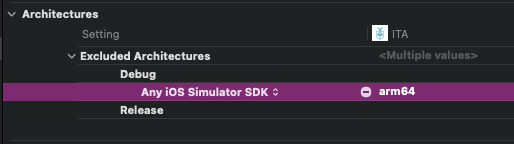
What worked for me was making sure that in Build Settings > Excluded Architectures I set arm64 only for the iOS Simulator SDK, and not when compiling on device.
 volbap-mobomo
on 4 Feb 2021
volbap-mobomo
on 4 Feb 2021
Related issues
 justinmakaila
·
4Comments
justinmakaila
·
4Comments
 CAPIStkidd
·
3Comments
CAPIStkidd
·
3Comments
 billypchan
·
3Comments
billypchan
·
3Comments
 abbeyjackson
·
3Comments
abbeyjackson
·
3Comments
 pmhood
·
3Comments
pmhood
·
3Comments
Most helpful comment
What worked for me was making sure that in Build Settings > Excluded Architectures I set
arm64only for the iOS Simulator SDK, and not when compiling on device.