Carthage: Wrong build order with nested dependencies
Hi, first of all, thank you for working on such a great tool for dependency-management :+1:
I have encountered a weird issue with nested dependencies and I am not sure if Carthage works as intended here.
I have the following dependency graph (A requires B, B requires C, ...).
A -> B -> C -> D
Carthage recognizes the Cartfiles of all projects and checks out the correct versions of all dependencies. However, during the build step, Project B is built before D and C. This results in a build error in B.
error: no such module
import C
When I run carthage update for Project B only, everything seems to work fine.
Is there a way to make the order of dependencies explicit?
 aloco
aloco
All 15 comments
I found a quickfix for that: After running carthage update (which fails) open your Carthage.resolved file and manually reorder the affected dependencies. After that, simply run carthage bootstrapcarthage build and carthage will build your dependencies in the correct order.
However, I am not sure if that is the correct way to go when running into this issue.
aloco
on 8 Apr 2015
Can you please share the Cartfile and Cartfile.private for each project involved?
 jspahrsummers
on 10 Apr 2015
jspahrsummers
on 10 Apr 2015
Cartfile Project D
github "ReactiveCocoa/ReactiveCocoa" "v3.0-alpha.3"
github "aschuch/AwesomeCache" == 1.0.1
github "thoughtbot/Argo" == 0.4.3
github "aschuch/Argonaut" == 0.1
github "aschuch/GoldenFleece" == 0.1
Cartfile Project C
git "path/to/projectD" "master"
github "aloco/SimpleButton" "master"
Cartfile Project B
git "path/to/projectC" "master"
git "path/to/projectD" "master"
github "aschuch/StatefulViewController" == 0.1.1
Cartfile Project A
github "aschuch/StatefulViewController" == 0.1.1
github "Alamofire/Alamofire" "2ff5749ffc0425f05a1411b5b6fd2c25241b5b14"
github "thoughtbot/Argo" == 0.4.3
github "aschuch/AwesomeCache" == 1.0.1
git "https://github.com/vasarhelyia/SIOSocket" "749c697df752ae81ae7aeff79de917f2981a6590"
github "ReactiveCocoa/ReactiveCocoa" "v3.0-alpha.3"

git "path/to/projectB" "master"
There is no Cartfile.private in any related project.
Cartfile.resolved for Project A
github "Alamofire/Alamofire" "2ff5749ffc0425f05a1411b5b6fd2c25241b5b14"
github "aschuch/AwesomeCache" "1.0.1"
github "LlamaKit/LlamaKit" "v0.6.0"
git "https://github.com/vasarhelyia/SIOSocket" "749c697df752ae81ae7aeff79de917f2981a6590"
github "aloco/SimpleButton" "0231bed8a36307ad76425afe7f6fbc544646820d"
github "aschuch/StatefulViewController" "0.1.1"
github "thoughtbot/runes" "v1.2.2"
github "thoughtbot/Argo" "v0.4.3"
github "aschuch/GoldenFleece" "0.1"
github "ReactiveCocoa/ReactiveCocoa" "ad02d8356b43e2c38f3d4d87ea0127c5f8572668"
github "aschuch/Argonaut" "8ac87ac03b621c9dfb6a383e932a7bd66a35ce1a"
github "aschuch/MoyaCarthage" "ad43619727dce555073ba50bc9bedbbc12c6938c"

git "path/to/projectB" "master"
git "path/to/projectD" "master"
git "path/to/projectC" "master"
(running Carthage 0.6.4)
aloco
on 13 Apr 2015
Is that the actual Cartfile.resolved generated by Carthage? The ordering is important, so please don't edit it before posting (besides changing paths to hide information, if you really need to).
jspahrsummers
on 14 Apr 2015
This is the actual Cartfile.resolved carthage generates. I just replaced the URL, added spacing between MoyaCarthage and ProjectB, but I didn´t touch the order. I double-checked it
aloco
on 14 Apr 2015
Hmm, very odd! Thanks for the additional details. :sparkles:
jspahrsummers
on 15 Apr 2015
I will try to reproduce that issue with accessible projects, however I think its really hard to reproduce .. thanks anyway ✌🏼
aloco
on 17 Apr 2015
Have the same issue.
Dependencies look like this:
zm-client-ios ---> zshare ---> zmc-images ---> zmc-system, zmc-testing
zm-client-ios/Cartfile:
github "wearezeta/zclient-ziphy" "1.1.0"
github "kompozer/SmoothLineView" "0.1.9"
github "swisspol/GCDWebServer" "3.2.5"
github "kompozer/TSMarkdownParser" "1.0.16"
github "wearezeta/zshare" "master"
zshare/Cartfile:
github "wearezeta/zmc-images" "master"
zmc-images/Cartfile:
github "wearezeta/zmc-system" "master"
github "wearezeta/zmc-testing" "master"
When I run carthage update --use-submodules --platform "iOS" in zm-client-ios I got this:
*** Fetching zshare
*** Fetching TSMarkdownParser
*** Fetching GCDWebServer
*** Fetching SmoothLineView
*** Fetching zclient-ziphy
*** Fetching zmc-images
*** Fetching zmc-testing
*** Fetching zmc-system
*** Fetching ocmock
*** Checking out GCDWebServer at "bdfe6728ae5faec83c08f807722090abcde2c496"
*** Checking out zmc-testing at "cad86bddcca5fd55df335dc0015711c0b152f297"
*** Checking out zclient-ziphy at "5434f2dd77f50b572d4a7910138459bdb9d9ca57"
*** Checking out zmc-system at "3ede47ff531e5592bb33e8f876ad8de89f337177"
*** Checking out ocmock at "3b003b2e25f90399db8ff1d3286807bf761aaa21"
*** Checking out SmoothLineView at "6526bdd6e4701d5470c3f730065ac84cf5346dc6"
*** Checking out TSMarkdownParser at "8aa160127a84573f5f4c61ce65dd451275cd91f6"
*** Checking out zshare at "471b073c86431c115ae6042fdcc5d8dd15b37a5b"
*** Checking out zmc-images at "09892cef9184ebeb89a586fbb2afab71887db8e4"
*** xcodebuild output can be found in /var/folders/nt/g2pgfj2x1bjg2h9jrr_l7l5r0000gn/T/carthage-xcodebuild.Sf6519.log
*** Building scheme "GCDWebServers (iOS)" in GCDWebServer.xcodeproj
*** Building scheme "SmoothLineView" in SmoothLineView.xcodeproj
*** Building scheme "MarkdownParser" in TSMarkdownParser.xcodeproj
*** Building scheme "OCMock iOS" in OCMock.xcodeproj
*** Building scheme "ziphy" in ziphy.xcodeproj
*** Building scheme "ZMSystem-ios" in ZMSystem.xcodeproj
*** Building scheme "zshare" in zshare.xcodeproj
** BUILD FAILED **


The following build commands failed:
    CompileSwift normal x86_64 /Users/ilya/zclient-ios/Carthage/Checkouts/zshare/zshare/Private/Network/RequestProcessing.swift
    CompileSwift normal x86_64 /Users/ilya/zclient-ios/Carthage/Checkouts/zshare/zshare/Private/Network/TransportSession.swift
    CompileSwift normal x86_64 /Users/ilya/zclient-ios/Carthage/Checkouts/zshare/zshare/Private/Network/AssetPreprocessing.swift
    CompileSwift normal x86_64 /Users/ilya/zclient-ios/Carthage/Checkouts/zshare/zshare/Private/Network/Backend.swift
    CompileSwift normal x86_64 /Users/ilya/zclient-ios/Carthage/Checkouts/zshare/zshare/Private/Network/Encoders.swift
    CompileSwift normal x86_64 /Users/ilya/zclient-ios/Carthage/Checkouts/zshare/zshare/Public/ShareExtensionAPI.swift
    CompileSwift normal x86_64 /Users/ilya/zclient-ios/Carthage/Checkouts/zshare/zshare/Private/Network/RequestSigning.swift
    CompileSwift normal x86_64 /Users/ilya/zclient-ios/Carthage/Checkouts/zshare/zshare/Private/Network/Decoders.swift
    CompileSwiftSources normal x86_64 com.apple.xcode.tools.swift.compiler
(9 failures)
/Users/ilya/zclient-ios/Carthage/Checkouts/zshare/zshare/Private/Network/AssetPreprocessing.swift:10:8: error: no such module 'zimages'
/Users/ilya/zclient-ios/Carthage/Checkouts/zshare/zshare/Private/Network/AssetPreprocessing.swift:10:8: error: no such module 'zimages'
/Users/ilya/zclient-ios/Carthage/Checkouts/zshare/zshare/Private/Network/AssetPreprocessing.swift:10:8: error: no such module 'zimages'
/Users/ilya/zclient-ios/Carthage/Checkouts/zshare/zshare/Private/Network/AssetPreprocessing.swift:10:8: error: no such module 'zimages'
/Users/ilya/zclient-ios/Carthage/Checkouts/zshare/zshare/Private/Network/AssetPreprocessing.swift:10:8: error: no such module 'zimages'
/Users/ilya/zclient-ios/Carthage/Checkouts/zshare/zshare/Private/Network/AssetPreprocessing.swift:10:8: error: no such module 'zimages'
/Users/ilya/zclient-ios/Carthage/Checkouts/zshare/zshare/Private/Network/AssetPreprocessing.swift:10:8: error: no such module 'zimages'
/Users/ilya/zclient-ios/Carthage/Checkouts/zshare/zshare/Private/Network/AssetPreprocessing.swift:10:8: error: no such module 'zimages'
A shell task failed with exit code 65:
** BUILD FAILED **


The following build commands failed:
    CompileSwift normal x86_64 /Users/ilya/zclient-ios/Carthage/Checkouts/zshare/zshare/Private/Network/RequestProcessing.swift
    CompileSwift normal x86_64 /Users/ilya/zclient-ios/Carthage/Checkouts/zshare/zshare/Private/Network/TransportSession.swift
    CompileSwift normal x86_64 /Users/ilya/zclient-ios/Carthage/Checkouts/zshare/zshare/Private/Network/AssetPreprocessing.swift
    CompileSwift normal x86_64 /Users/ilya/zclient-ios/Carthage/Checkouts/zshare/zshare/Private/Network/Backend.swift
    CompileSwift normal x86_64 /Users/ilya/zclient-ios/Carthage/Checkouts/zshare/zshare/Private/Network/Encoders.swift
    CompileSwift normal x86_64 /Users/ilya/zclient-ios/Carthage/Checkouts/zshare/zshare/Public/ShareExtensionAPI.swift
    CompileSwift normal x86_64 /Users/ilya/zclient-ios/Carthage/Checkouts/zshare/zshare/Private/Network/RequestSigning.swift
    CompileSwift normal x86_64 /Users/ilya/zclient-ios/Carthage/Checkouts/zshare/zshare/Private/Network/Decoders.swift
    CompileSwiftSources normal x86_64 com.apple.xcode.tools.swift.compiler
(9 failures)
zm-client-ios/Cartfile.resolved:
github "swisspol/GCDWebServer" "bdfe6728ae5faec83c08f807722090abcde2c496"
github "kompozer/SmoothLineView" "6526bdd6e4701d5470c3f730065ac84cf5346dc6"
github "kompozer/TSMarkdownParser" "8aa160127a84573f5f4c61ce65dd451275cd91f6"
github "wearezeta/ocmock" "3b003b2e25f90399db8ff1d3286807bf761aaa21"
github "wearezeta/zclient-ziphy" "5434f2dd77f50b572d4a7910138459bdb9d9ca57"
github "wearezeta/zmc-system" "3ede47ff531e5592bb33e8f876ad8de89f337177"
github "wearezeta/zshare" "471b073c86431c115ae6042fdcc5d8dd15b37a5b"
github "wearezeta/zmc-testing" "cad86bddcca5fd55df335dc0015711c0b152f297"
github "wearezeta/zmc-images" "09892cef9184ebeb89a586fbb2afab71887db8e4"
If I move zshare line in Cartfile.resolved after zmc-images and run carthage build --platform "iOS" build works. So the problem is in the order of checkout as I can tell.
After changing lines in Carfile.resolved output looks like this:
*** Building scheme "GCDWebServers (iOS)" in GCDWebServer.xcodeproj
*** Building scheme "SmoothLineView" in SmoothLineView.xcodeproj
*** Building scheme "MarkdownParser" in TSMarkdownParser.xcodeproj
*** Building scheme "OCMock iOS" in OCMock.xcodeproj
*** Building scheme "ziphy" in ziphy.xcodeproj
*** Building scheme "ZMSystem-ios" in ZMSystem.xcodeproj
*** Building scheme "ZMTesting-ios" in ZMTesting.xcodeproj
*** Building scheme "zimages-ios" in zimages.xcodeproj
*** Building scheme "zshare" in zshare.xcodeproj
 ilyapuchka
on 30 Jul 2015
ilyapuchka
on 30 Jul 2015
I seem to be having the same issue. in my case, the dependency graph goes:
A -> B -> C
_(A is an app, B and C are frameworks)_
When running carthage update on project A, Carthage tries to build B _before_ C.
My Cartfile for project A has:
github "MyOrganization/C.git"
github "MyOrganization/B.git"
...but that gets resolved to:
github "MyOrganization/B.git" "<latest version>"
github "MyOrganization/C.git" "<latest version>"
I ran brew upgrade carthage, but it says I already have 0.29.0 installed.
Reordering the Cartfile.resolved and then running carthage build doesn't seem to work for me.
I tried commenting out the dependant B framework from the Cartfile, running carthage update (so than C can be built once), then un-commenting and running again, but to no avail.
 nicolas-miari
on 11 Apr 2018
nicolas-miari
on 11 Apr 2018
The order in Cartfile.resolved is not related to the build order now. Please make it sure that C is listed in B's Cartfile.
 ikesyo
on 11 Apr 2018
ikesyo
on 11 Apr 2018
@ikesyo
Well, this is funny. I removed the dependency altogether for now, to move on (the current state of B doesn't really reference any symbol from C yet), so I temporarily switched to this dependency graph instead:
    -> B
A
    -> C
, but I could swear that previously, my B/Cartfile was listing C.
Now I re-added it to the list, and the build proceeds as follows:
*** Fetching B
*** Fetching C
*** Checking out C
*** Checking out B
*** xcodebuild output can be found in /var/folders... (etc)
*** Building scheme "B" in B.workspace
*** Building scheme "C" in C.workspace
%
...without problem. Now I need to restore the linking of the C framework from the B project, import C somewhere in the source code, and see what happens...
...aaand it fails.
Since I can't share my actual code, I put together a minimal reproducible example here: https://github.com/nicolas-miari/NestedFrameworkDemo-A
(has dependencies on the two other repos NestedFrameworkDemo-B and NestedFrameworkDemo-C).
Again, running carthage update on the app repo (A) fetches the intermediate dependency (B), starts to build it but fails.
The Checked out source folder for B does have the Cartfile, but it does not have a Carthage folder, let alone a checked out copy of C.
nicolas-miari
on 11 Apr 2018
If you'd like help, please open a new issue.
 mdiep
on 11 Apr 2018
mdiep
on 11 Apr 2018
@mdiep
Of course; I just want to make sure I’m not missing something obvious and/or open a duplicate. I’m still quite inexperienced with Carthage, will look a bit more into it first...
nicolas-miari
on 11 Apr 2018
@nicolas-miari I checked your repositories and the problem is that B’s Cartfile is not in the root dir of the repo. Cartfile must be at the top level.
ikesyo
on 12 Apr 2018
@ikesyo
I see... Thank you for taking the time.
If I move it up, that's where the Carthage directory will end up being created, right? for some reason I though it needed to be at the same level as the .xcodeproj. Let me see if I can fix it as you suggested.
Update
I moved the cartfile to the repository root (same directory as .git, .gitignore etc.), deleted old Carthage directory, re-ran carthage update from repo root, and re-linked framework in Xcode against the newly built binary. When building, I got the link error "No such module" on import statements such as:
import Foundation
import C
       ^
So I added a Framework Search Paths entry two directories above the original one:
$(inherited)(the default)$(PROJECT_DIR)/Carthage/Build/iOS(initially added by me)$(PROJECT_DIR)/../../Carthage/Build/iOS(added just now)
This lets me successfully build the B project from the B workspace. Let me push these changes and see if I can build the App A too...
Update 2:
The update succeeds:
$ carthage update
*** Fetching NestedFrameworkDemo-C
*** Fetching NestedFrameworkDemo-B
*** Checking out NestedFrameworkDemo-B at "v1.0.1"
*** Checking out NestedFrameworkDemo-C at "v0.0.2"
*** xcodebuild output can be found in /var/folders/bg/47dzdxk55n7_9dy13jns_cj00000gn/T/carthage-xcodebuild.YQWhzo.log
*** Building scheme "C" in C.xcworkspace
*** Building scheme "B" in B.xcworkspace
$
_(notice how the innermost dependency C gets built first)_
I linked the build frameworks to the A app as indicated in the Carthage docs:

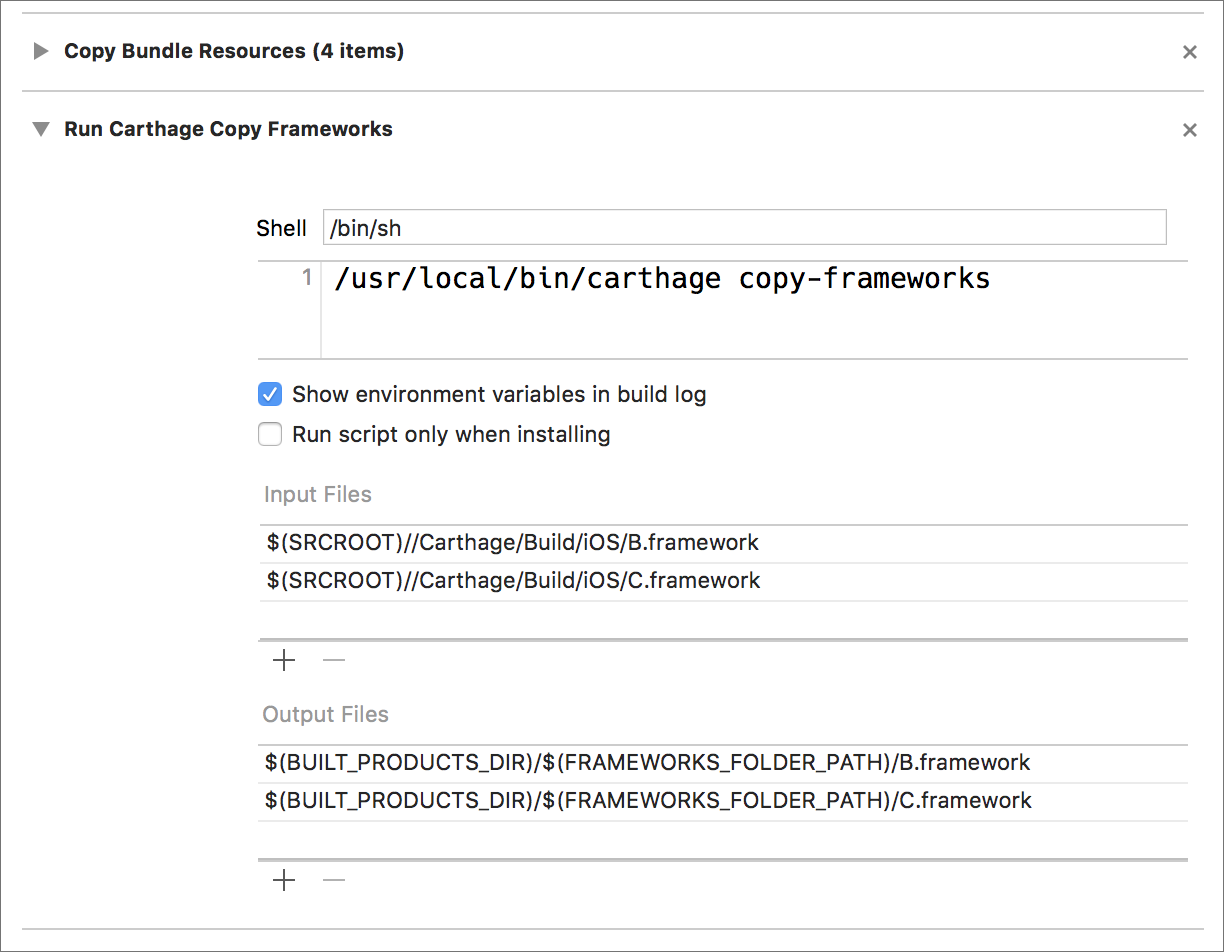
...and now it works!
On my app code:
import UIKit
import B
import C

class ViewController: UIViewController {
    override func viewDidLoad() {
        super.viewDidLoad()
        // Do any additional setup after loading the view, typically from a nib.

        let sample = SampleClass() // Defined in C fraemwork
        print("\(sample)")
    }
}
Console output:
C.SampleClass
Related issues
 josercc
·
3Comments
josercc
·
3Comments
 willhains
·
3Comments
willhains
·
3Comments
 CAPIStkidd
·
3Comments
CAPIStkidd
·
3Comments
 abbeyjackson
·
3Comments
abbeyjackson
·
3Comments
 billypchan
·
3Comments
billypchan
·
3Comments
Most helpful comment
The order in
Cartfile.resolvedis not related to the build order now. Please make it sure that C is listed in B'sCartfile.