Carthage: How to release/download a private framework with Carthage?
I'm playing around with trying to release a Kotlin/Native framework to my iOS team privately via Carthage. Kotlin/native gives us an objc framework, and it seems there are 2 ways to release the framework via Carthage:
Have carthage build the repository for them - which it does via an xcode configuration. Since I'm not using xcode to build this, is there another way that I can tell carthage how to build it? i.e. Can I somehow tell it what command to run, and then where to find the compiled
.frameworkfolder?Compile the
.frameworkfolder myself, use lipo to make it a fat framework, and release it to a private repo where I can point carthage to the json file. But we also found: https://github.com/Carthage/Carthage/issues/2388 , indicating that Carthage doesn't support any form of authenticated requests for handling this - meaning that I can't use private repos like this.
We found a hard block with option 22 - so that means we need to find a way to make option 1 work right?
I have a simple command to build the framework, and then the framework can be found at a folder that I specify. Do you have any suggestions / paths forward that you can suggest that I haven't found yet?
 ScottPierce
All 17 comments
You can try this branch: https://github.com/Carthage/Carthage/pull/2774
 tmspzz
on 18 Jul 2019
tmspzz
on 18 Jul 2019
@tmspzz Is there a solution that would allow me to use github releases with private repositories maybe? We are looking into that but having difficulty getting carthage to find the framework.
ScottPierce
on 18 Jul 2019
I cannot think of a way to do this. But maybe I'm overlooking something.
@mdiep might know
tmspzz
on 19 Jul 2019
We found that zipping up a framework into a zip and using the github releases works pretty well and allows us to distribute privately.
ScottPierce
on 22 Jul 2019
@ScottPierce Just to confirm where you able to host your binary in github release and setup Cartfile to retrieve it, or you mean you simply use direct downloads from github releases?
 mofarajmandi
on 24 Jul 2019
mofarajmandi
on 24 Jul 2019
we were able to setup cartfile to retrieve the zipped framework from the github release assets, and then we'd find our unzipped framework file in the carthage build folder.
ScottPierce
on 24 Jul 2019
@ScottPierce I am looking at a similar problem; I appreciate any hints on how you got around auth issues, cause presumably your github releases (of private repo) were behind auth, correct?
mofarajmandi
on 24 Jul 2019
@mofarajmandi yes, it is behind auth. The fact that I could download it seems to indicate that carthage is accessing it via git. Since I can push and pull to the repo from git it works with my repo, and that's all I've done to give myself access.
Something I learned the hard way - carthage caches everything. Any time you do anything with a version of of a release, if you want to change anything and see it's impact, you need to do another release. i.e. if you do a release and then try to pull that version with carthage and it doesn't work, you need to make a new version when you try to pull again. If you pull from carthage and it works, and you want to change something and see if it still works, you need a new version.
ScottPierce
on 24 Jul 2019
Thanks @ScottPierce for additional clarifications.
So the way I see it, looks like github releases made available are via HTTPS, I suspect you are right, and perhaps cause you have signed in your credentials via command line perhaps this works for you. I wonder if we are behind a two-factor auth and it's why it's not working for me. I think it there github release were available via ssh somehow, it would work for me as well.
And yes you are right about Carthage cache I've been deleting ~/Library/Caches/org.carthage.CarthageKit to get around the cache issue, but updating version works as well.
mofarajmandi
on 24 Jul 2019
I'm behind 2 factor auth as well. I have git setup to my github account with an access token.
ScottPierce
on 24 Jul 2019
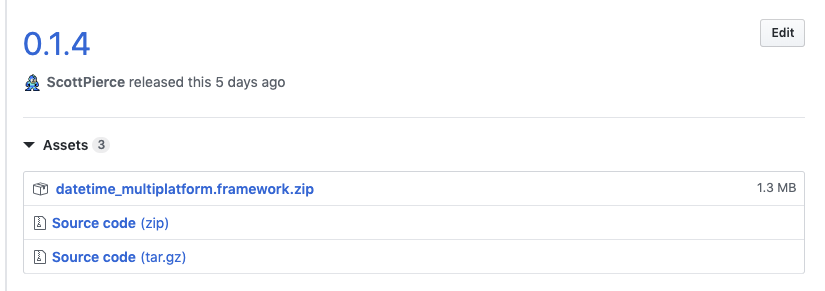
How are you releasing your framework in the assets? A few notes:
- It needs to be an actual zip file that is named with the following schema:
<framework-name>.framework.zip - it can't be a draft release, or just a tag. You have to actually perform a github release, and include the zip as an asset to that release. See the image below.
- The github releases name and tag (I'm not sure which one carthage uses) should only contain numbers, i.e.
0.1.4. Letters before the numbers are ignored, and letters after the numbers aren't supported. - If you are using the github releases for something else with the project - you can just create another github repo specifically for releasing the framework internally
- Carthage could be caching data somewhere else besides that location. I'd stick to creating new versions. We couldn't get it to work either until we started creating new versions.
If you still can't get this to work, an alternative is that you could just put the framework in your root git directory (unzipped) and then link the framework manually from the checkout directory instead of the build directory. Since it's my understanding carthage doesn't link thinks manually anyways, this seems like a valid approach as well. This is of course assuming that you can get carthage to checkout your private repo. That's just always worked for us. Since we got the releases to work, we stopped playing around with it, but I'm pretty sure you can get versioning to work based on official releases or tags.
Good luck!
ScottPierce
on 24 Jul 2019
Thanks again @ScottPierce, appreciate your elaborate clarification.
So I guess for the most part I misread your comments, I didn't realize Carthage was setup to do https://github.com/Carthage/Carthage/pull/257 which is pretty cool, I thought you were still using binary syntax, and creating a json manifest to refer to assets in your github release (which I couldn't get to work even after setting up the access token etc.)
So with that --use-binaries and github releases feature, this would work for most general cases, but doesn't seem to be setup to support use cases where one may have multiple Xcodeproj/sdks in a larger monorepo style repository. In addition, we want to support multiple swift compiler versions, so we also have that to deal with.
I think once https://github.com/Carthage/Carthage/pull/2774 is merged we should have a path forward with Carthage.
Thank again for your time.
mofarajmandi
on 24 Jul 2019
@mofarajmandi So for the mono-repo approach, I'm not sure this will work for you anyways, since it's my understanding that carthage doesn't do well when there are multiple options to choose from (I've never tried though). My suggestion to you is to setup a separate github repo for every set of frameworks you want to release under a single version, check nothing in, and just use it for releases. That's what we're doing now. Then we can add the following to our cartfile, and we're good to go:
github "<Org Name>/<repo name>" ~> 0.1.4
Anyways, best of luck.
ScottPierce
on 24 Jul 2019
Hello @ScottPierce
Quick question.
You said:
It needs to be an actual zip file that is named with the following schema: <framework-name>.framework.zip
But what about if what I have is an xcframework? That is, a framework like Manager.xcframework that compressed generates Manager.xcframework.zip
Is that OK? What are the rules in that case?
And another question, an I use whatever I want for framework-name? for example, can I use Manager_1.0.3?
Thanks a lot.
 Ricardo1980
on 25 Mar 2021
Ricardo1980
on 25 Mar 2021
@Ricardo1980 I don't know what an xcframework is, but if carthage supports it, it probably still needs to be in a zip file.
an I use whatever I want for framework-name?
I honestly can't remember. I remember the version tags that carthage looks at are restricted / limited, i.e. they ignore any letters before the semantic version, and suffixed letters just aren't supported. I don't know the restrictions around names. At the end of the day, Carthage doesn't provide much magic. It either downloads the file at the right location so that you can link it to your project or it doesn't. Play around with it until you figure it out.
ScottPierce
on 25 Mar 2021
But what about if what I have is an xcframework?
@Ricardo1980 this will be supported in the next release.
tmspzz
on 25 Mar 2021
@tmspzz
Great! Thanks.
I guess you mean 0.38.0
https://github.com/Carthage/Carthage/pull/3152
Is that a matter of weeks?
Thanks a lot!
Ricardo1980
on 25 Mar 2021
Related issues
 pmhood
·
3Comments
pmhood
·
3Comments
 hamchapman
·
3Comments
hamchapman
·
3Comments
 3lvis
·
3Comments
3lvis
·
3Comments
 yonaskolb
·
3Comments
yonaskolb
·
3Comments
 jdecarlo
·
3Comments
jdecarlo
·
3Comments
Most helpful comment
@mofarajmandi So for the mono-repo approach, I'm not sure this will work for you anyways, since it's my understanding that carthage doesn't do well when there are multiple options to choose from (I've never tried though). My suggestion to you is to setup a separate github repo for every set of frameworks you want to release under a single version, check nothing in, and just use it for releases. That's what we're doing now. Then we can add the following to our cartfile, and we're good to go:
Anyways, best of luck.