Carthage: Automatically change dynamic frameworks to static?
Hello!
Latest release includes support for static library. Also README says about it. However, there is no info about which flag needs to be passed to Carthage to output a static framework. I've been looking in sources of Carthage but with no luck so far.
 dimazen
All 29 comments
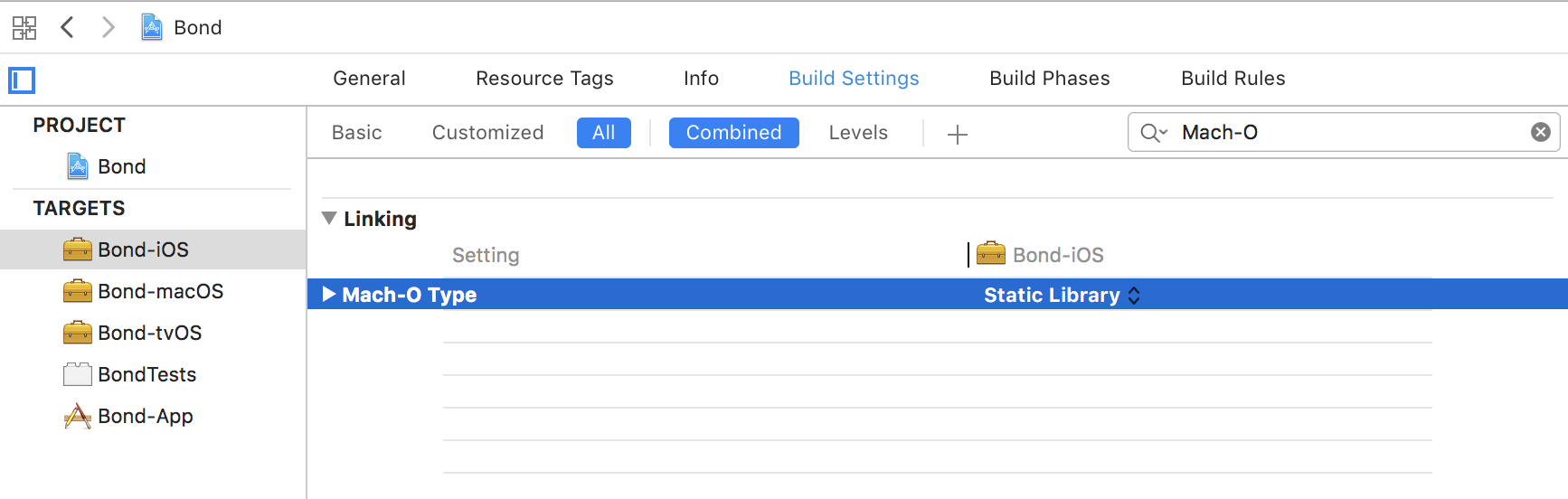
@dimazen The Mach-O type of your project should be "static library". Carthage doesn't turn a dynamic library into a static one for you.
 tmspzz
on 11 Sep 2018
tmspzz
on 11 Sep 2018
I have similiar question.
When I change Mach-O type to static for dependencies pulled by carthage and then do cartage build, it indeed creates folder with static frameworks.
But it said when I already has Cartfile in my project, and pull project from github, I can just do carthage bootstrap, but this will pull dependencies and build dynamic frameworks, although I would like to build static for the ones I need.
Am I right that I have to remember every time to do separate pull and manual check Mach-O to static and then do separate build every time I need to clone my repo again?
@dimazen answer for how to build statically with carthage is in my question
 dannydaddy3
on 12 Sep 2018
dannydaddy3
on 12 Sep 2018
@dannydaddy3 actually I thought that Carthage has a way to build dynamic frameworks as a static just as StaticFrameworks does. And ideally it would be automatic. However this is not the case, since we need dependency to support this way of distribution. This is ok, but it requires some additional automation for me.
dimazen
on 12 Sep 2018
@dimazen and @dannydaddy3 you're both correct, it's not automatic.
If you want to avoid the Mach-O types every time, just fork the projects you want to be static and use your forks.
If you have a proposal on how an automatic process would look like, feel free to to submit it here and we'll discuss it.
tmspzz
on 12 Sep 2018
@blender I currently doesn't have any code to show, but from what I understood: not all of the frameworks can be linked as a static ones. For example if framework uses resources and a NSBundle API, linking it statically will mess things up. Preferred way would be to put an additional attribute in the Cartfile like use_static_linking (or anything else). This will instruct Carthage to use workaround from the StaticFramworks guide.
Having this attribute in one place is much more preferable (in comparison to the extra file, manual scripting, etc) since it affects on all of the processed by Carthage like build, update, bootstrap.
dimazen
on 12 Sep 2018
@dimazen @blender Yes, forks is a good option, but has some overhead with updating dependencies.
It would be super convenient if we could mark somehow those frameworks to be build statically in Cartfile. And after pulling dependencies Carthage would update Mach-O type in build setting for marked ones.
dannydaddy3
on 12 Sep 2018
Sorry, I don't think we want to touch the Cartfile. I was more thinking of a CLI switch but that works only if build one framework at the time with Carthage
tmspzz
on 12 Sep 2018
@blender
Thats exactly what I'm messing around because it requires some automation as well as play well with generic commands like carthage update and similar.
Maybe there is a way to start adding attributes to the Cartfile?
dimazen
on 12 Sep 2018
I understand, but so far any change to the Cartfile is a no go.
It might change in the future.
tmspzz
on 12 Sep 2018
@blender
Ok, I have one more proposal, I don't know if it would be okay. But we could have for example StaticCartfile where we would duplicate dependencies from Cartfile that need Mach-O update to static.
And Carthage would check it and update what we need.
It seems to me that we somehow and somewhere has to instruct Carthage about what we want to be static. If we couldn't do this in Cartfile for now, may be it could be separate file?
dannydaddy3
on 12 Sep 2018
I am afraid that is not an option either but let's consult @mdiep
I think the best way it to just fork the repo and update the Mach-O type.
tmspzz
on 12 Sep 2018
Ok, got you.
Agree, fork is an option, but in case you have 10+ dependencies, its a lot routine with forking and updating.
Generally it's just seems to be an important feature that majority of Carthage users would make use of. Hope to see this implemented in future.
dannydaddy3
on 12 Sep 2018
I would really interested to know more on why we can't introduce either attributes or a separate file for static dependencies. Maintaining multiple forks when it comes to an update would be really time consuming.
Therefore waiting for @mdiep response.
dimazen
on 12 Sep 2018
as I suggested in another issue:
$ carthage update --no-build
$ ./myScriptThatChangesTypes
$ carthage build
should ease the pain of forking and you can still use the regular repos
tmspzz
on 13 Sep 2018
Damn, that looks promising as for me. I'll try to take a look at what can be done by script. Maybe good implementation can be included into a Carthage
dimazen
on 13 Sep 2018
Has anyone succeeded integrating static framework using this approach with Xcode 10?
I've patched the project setting Mach-O to "static library", but dyld can't find the "matching architecture" when I try to Run the app via Xcode:
dyld: Library not loaded: @rpath/Kingfisher.framework/Kingfisher
Referenced from:<redacted path>/MeetHubDev.app/MeetHubDev
Reason: no suitable image found. Did find:
<redacted path>/MeetHubDev.app/Frameworks/Kingfisher.framework/Kingfisher: no matching architecture in universal wrapper
while file and lipo -i do print the required architectures:
$ file <redacted path>/Kingfisher.framework/Kingfisher
<redacted path>/Kingfisher.framework/Kingfisher: Mach-O universal binary with 4 architectures: [arm_v7:current ar archive] [arm64]
<redacted path>/Kingfisher.framework/Kingfisher (for architecture armv7): current ar archive
<redacted path>/Kingfisher.framework/Kingfisher (for architecture i386): current ar archive
<redacted path>/Kingfisher.framework/Kingfisher (for architecture x86_64): current ar archive
<redacted path>/Kingfisher.framework/Kingfisher (for architecture arm64): current ar archive
$ lipo -i <redacted path>/Kingfisher.framework/Kingfisher
Architectures in the fat file: <redacted path>/Kingfisher.framework/Kingfisher are: armv7 i386 x86_64 arm64
I added the Kingfisher.framework into "Link Binary With Libraries" and "Embed Frameworks" steps. If I don't add it to "Embed Frameworks" step, the linker emits this error
dyld: Library not loaded: @rpath/Kingfisher.framework/Kingfisher
Referenced from: <redacted path>/MeetHubDev.app/MeetHubDev
Reason: image not found
 uson1x
on 17 Sep 2018
uson1x
on 17 Sep 2018
As far as I can tell you are linking it dynamically and not statically. You do no need the embed step. All you should have to do is literally drag and drop.
tmspzz
on 17 Sep 2018
@blender you were right, looks like some previous build leftovers were messing things up, after all. Thanks again for your help, managed to make it work.
uson1x
on 17 Sep 2018
Ace, I'm having trouble finding myScriptThatChangesTypes - any pointers?
as I suggested in another issue:
$ carthage update --no-build $ ./myScriptThatChangesTypes $ carthage buildshould ease the pain of forking and you can still use the regular repos
Does myScriptThatChangesTypes exist - any pointers? I assume manually doing this will suffice:
 pablonosh
on 27 Sep 2018
pablonosh
on 27 Sep 2018
We currently use these two scripts:
build_frameworks.sh
#!/bin/sh -e
build_static () {
./patch_statically_linked_project.rb $2
carthage build $1 --platform iOS --no-use-binaries
}
build_static SnapKit 'Carthage/Checkouts/SnapKit/SnapKit.xcodeproj'
build_static Kingfisher 'Carthage/Checkouts/Kingfisher/Kingfisher.xcodeproj'
...
patch_statically_linked_project.rb
#!/usr/bin/env ruby
require 'xcodeproj'
path = ARGV[0]
project = Xcodeproj::Project.open(path)
project.targets.each do |target|
target.build_configurations.each do |config|
config.build_settings['MACH_O_TYPE'] = 'staticlib'
end
end
project.save
- Put these two files in project dir
- Make them executable
chmod +x patch_statically_linked_project.rb
chmod +x build_frameworks.sh
- In
build_frameworks.shupdate lines likebuild_static SnapKit 'Carthage/Checkouts/SnapKit/SnapKit.xcodeproj'with name of required library and path to its xcodeproj files. - Run
build_frameworks.sh
It doesn't support all the libraries (some libraries use xcworkspace, others just don't work for some reason), but we were able to port a few.
uson1x
on 27 Sep 2018
yes thank you!
pablonosh
on 28 Sep 2018
I've tried to automate process a little bit. So far there is a ruby script which has to be invoked from the root of the project folder (just as we do for Carthage).
#!/usr/bin/env ruby

require 'xcodeproj'
require 'yaml'
require 'set'

class IgnoreEntry
  attr_reader :dependency
  @targets

  def initialize(object)
    if object.instance_of? String then
      @dependency = object
      @targets = Set.new
    elsif object.is_a? Hash then
      dependency, targets = object.first

      @dependency = dependency
      @targets = Set.new(targets.flat_map(&:values).flatten)
    else
      @dependency = nil
      @targets = nil
      raise "Unexpected ignoreMap format"
    end
  end

  def should_ignore?
    @targets.empty?
  end

  def should_ignore_target?(target)
    return @targets.empty? || @targets.member?(target)
  end
end

def find_resolved_deps
  raw_deps = File.read(File.join(Dir.pwd, "Cartfile")).split("\n")
  regexp = %r{"(?<repo>[\w\d@\:\-\_\.\/]+)"?}

  raw_deps.map { |x|
    match = regexp.match(x)
    repo = match[:repo] unless match.nil?

    if not repo.nil? then
      repo = %x[read -a array <<< '#{repo}'; basename ${array[0]} | awk -F '.' '{print $1}']
      repo.chop
    end
  }.compact
end

def xcproject_from_workspace_at_path(dependency, directory)
  workspace_path = File.join(directory, "#{dependency}.xcworkspace")
  return unless File.exists?(workspace_path)

  workspace = Xcodeproj::Workspace.new_from_xcworkspace(workspace_path)
  project_ref = workspace.file_references.detect { |ref|
    ref if File.basename(ref.path, File.extname(ref.path)) == dependency
  }

  return nil if project_ref.nil?

  project_path = project_ref.absolute_path(directory)
  Xcodeproj::Project.open(project_path)
end

def xcodeproj_for_dependency(dependency, directory = "#{Dir.pwd}/Carthage/Checkouts/#{dependency}")
  project_path = Dir.chdir(directory) { |pwd|
    candidates = ["#{dependency}.xcodeproj"] + Dir.glob("*.xcodeproj")

    candidates.map { |name|
      File.join(pwd, name)
    }.detect { |path|
      File.exists?(path)
    }
  }

  return xcproject_from_workspace_at_path(dependency, directory) if project_path.nil?

  Xcodeproj::Project.open(project_path)
end

def patch_match_o_type(dependency, ignore_entry)
  if !ignore_entry.nil? && ignore_entry.should_ignore? then
    puts "Skipping dependency <#{dependency}>. Ignored by Patchfile"
    return
  end

  project = xcodeproj_for_dependency(dependency)

  project.native_targets.each do |target|
    if target.product_type != 'com.apple.product-type.framework' || target.resources_build_phase.files.count > 0 then
      next
    end

    target.build_configurations.each do |config|
      if not ignore_entry.nil? and ignore_entry.should_ignore_target?(target.name) then
        puts "Skipping target <#{target.name}, #{config.name}>. Ignored by Patchfile"
        next
      end

      match_o_type = config.build_settings['MACH_O_TYPE']

      if match_o_type.nil? || match_o_type == 'mh_dylib' then
        puts "Patching target <#{target.name} #{config.name}>"

        config.build_settings['MACH_O_TYPE'] = 'staticlib'
        project.save
      else
        puts "Skipping target <#{target.name} #{config.name}>. Already has MACH_O_TYPE set to <#{match_o_type}>"
      end
    end
  end
end

def prepare_ignore_hash
  config_path = File.join(Dir.pwd, "Patchfile")
  config = File.file?(config_path) ? YAML.load_file(config_path) : {}
  raw_ignore_map = config.fetch("ignoreMap", {})
  ignore_map = {}

  if raw_ignore_map.count > 0 then
    ignore_map = raw_ignore_map.map { |x|
      entry = IgnoreEntry.new(x)
      [entry.dependency, entry]
    }.to_h
  end

  ignore_map
end

ignore_hash = prepare_ignore_hash
resolved_deps = find_resolved_deps

resolved_deps.each { |dependency|
  puts "Processing dependency <#{dependency}>"
  patch_match_o_type(dependency, ignore_hash[dependency])
  puts "\n"
}
You can also skip unused targets by creating Patchfile (just a draft name). It needs to be placed in the root of the project dir as well. This is some sort of a mimic to a Romefile which was quite useful:
ignoreMap:
  - Quick:
    - target: Quick-iOS
  - Nimble:
    - targets: [Nimble-iOS, Nimble-macOS]
  - SVProgressHUD
@dimazen shall we add this to https://github.com/Carthage/workflows ?
tmspzz
on 4 Oct 2018
@blender I would first appreciate some feedback from participants. Maybe some of them will find issues, etc. (works ok on my production project with various dependencies but who knows). i.e. this script needs some polishing
Anyway, I'll keep on iterating during the week and then get back to you.
dimazen
on 4 Oct 2018
@dimazen Hi, thanks for making this script! I tried it with my project setup, but I have issues with transitive dependencies.
In this setup, I declare a dependency to RxCoreData, which depends on RxSwift. RxCoreData is built as static, but not RxSwift.
$ echo 'github "RxSwiftCommunity/RxCoreData"' > Cartfile
$ carthage bootstrap --no-build
*** No Cartfile.resolved found, updating dependencies
*** Fetching RxCoreData
*** Fetching RxSwift
*** Checking out RxSwift at "4.3.1"
*** Checking out RxCoreData at "0.5.1"
$ ./patch.rb
Processing dependency <RxCoreData>
Patching target <RxCoreData iOS Debug>
Patching target <RxCoreData iOS Release>
Patching target <RxCoreData macOS Debug>
Patching target <RxCoreData macOS Release>
Patching target <RxCoreData tvOS Debug>
Patching target <RxCoreData tvOS Release>
Patching target <RxCoreData watchOS Debug>
Patching target <RxCoreData watchOS Release>

$ carthage build --no-use-binaries --platform iOS
*** xcodebuild output can be found in /var/folders/v3/4r8_k73d42xcf35yvh8m7wsw0000gn/T/carthage-xcodebuild.zy3210.log
*** Building scheme "RxBlocking-iOS" in Rx.xcworkspace
*** Building scheme "RxCocoa-iOS" in Rx.xcworkspace
*** Building scheme "RxSwift-iOS" in Rx.xcworkspace
*** Building scheme "RxTests-iOS" in Rx.xcworkspace
*** Building scheme "RxCoreData iOS" in RxCoreData.xcodeproj
$ ls Carthage/Build/iOS/
0BF71729-EEE7-389F-9B6C-5D8D7F5CE0EC.bcsymbolmap    RxCocoa.framework
4E7BE9CF-FCE1-3AE8-8817-8D8371ED92E2.bcsymbolmap    RxCocoa.framework.dSYM
7C0F2351-7208-348F-81B5-BB9C7DFBD75D.bcsymbolmap    RxSwift.framework
C12342AE-84CD-3CCF-8480-2A2273AE707E.bcsymbolmap    RxSwift.framework.dSYM
CBCF34B3-D184-3A06-AC53-19A08BEDD850.bcsymbolmap    RxTest.framework
D3FB0727-9EAF-381E-B830-4B8D92A8C3C5.bcsymbolmap    RxTest.framework.dSYM
RxBlocking.framework                    Static
RxBlocking.framework.dSYM
$ ls Carthage/Build/iOS/Static/
RxCoreData.framework
If I add RxSwift to my own dependencies, it will be patched to static, but the build will fail because RxCoreData has set its frameworks search path to Carthage/Build/iOS/:
$ echo 'github "RxSwiftCommunity/RxCoreData"' > Cartfile
$ echo 'github "ReactiveX/RxSwift"' >> Cartfile
$ carthage bootstrap --no-build
*** No Cartfile.resolved found, updating dependencies
*** Fetching RxSwift
*** Fetching RxCoreData
*** Checking out RxCoreData at "0.5.1"
*** Checking out RxSwift at "4.3.1"
$ ./patch.rb
Processing dependency <RxCoreData>
Patching target <RxCoreData iOS Debug>
Patching target <RxCoreData iOS Release>
Patching target <RxCoreData macOS Debug>
Patching target <RxCoreData macOS Release>
Patching target <RxCoreData tvOS Debug>
Patching target <RxCoreData tvOS Release>
Patching target <RxCoreData watchOS Debug>
Patching target <RxCoreData watchOS Release>

Processing dependency <RxSwift>
Patching target <RxSwift-iOS Debug>
Patching target <RxSwift-iOS Release>
Patching target <RxSwift-iOS Release-Tests>
Patching target <RxSwift-macOS Debug>
Patching target <RxSwift-macOS Release>
Patching target <RxSwift-macOS Release-Tests>
Patching target <RxSwift-tvOS Debug>
Patching target <RxSwift-tvOS Release>
Patching target <RxSwift-tvOS Release-Tests>
Patching target <RxSwift-watchOS Debug>
Patching target <RxSwift-watchOS Release>
Patching target <RxSwift-watchOS Release-Tests>
Patching target <RxCocoa-iOS Debug>
Patching target <RxCocoa-iOS Release>
Patching target <RxCocoa-iOS Release-Tests>
Patching target <RxCocoa-macOS Debug>
Patching target <RxCocoa-macOS Release>
Patching target <RxCocoa-macOS Release-Tests>
Patching target <RxCocoa-tvOS Debug>
Patching target <RxCocoa-tvOS Release>
Patching target <RxCocoa-tvOS Release-Tests>
Patching target <RxCocoa-watchOS Debug>
Patching target <RxCocoa-watchOS Release>
Patching target <RxCocoa-watchOS Release-Tests>
Patching target <RxBlocking-iOS Debug>
Patching target <RxBlocking-iOS Release>
Patching target <RxBlocking-iOS Release-Tests>
Patching target <RxBlocking-macOS Debug>
Patching target <RxBlocking-macOS Release>
Patching target <RxBlocking-macOS Release-Tests>
Patching target <RxBlocking-tvOS Debug>
Patching target <RxBlocking-tvOS Release>
Patching target <RxBlocking-tvOS Release-Tests>
Patching target <RxBlocking-watchOS Debug>
Patching target <RxBlocking-watchOS Release>
Patching target <RxBlocking-watchOS Release-Tests>
Patching target <RxTest-iOS Debug>
Patching target <RxTest-iOS Release>
Patching target <RxTest-iOS Release-Tests>
Patching target <RxTest-macOS Debug>
Patching target <RxTest-macOS Release>
Patching target <RxTest-macOS Release-Tests>
Patching target <RxTest-tvOS Debug>
Patching target <RxTest-tvOS Release>
Patching target <RxTest-tvOS Release-Tests>
Patching target <RxTest-watchOS Debug>
Patching target <RxTest-watchOS Release>
Patching target <RxTest-watchOS Release-Tests>

$ carthage build --no-use-binaries --platform iOS
*** xcodebuild output can be found in /var/folders/v3/4r8_k73d42xcf35yvh8m7wsw0000gn/T/carthage-xcodebuild.oi9c8g.log
*** Building scheme "RxBlocking-iOS" in Rx.xcworkspace
*** Building scheme "RxCocoa-iOS" in Rx.xcworkspace
*** Building scheme "RxSwift-iOS" in Rx.xcworkspace
*** Building scheme "RxTests-iOS" in Rx.xcworkspace
*** Building scheme "RxCoreData iOS" in RxCoreData.xcodeproj
Build Failed
    Task failed with exit code 65:
    /usr/bin/xcrun xcodebuild -project /Users/maximelemoine/Downloads/test/Carthage/Checkouts/RxCoreData/RxCoreData.xcodeproj -scheme RxCoreData\ iOS -configuration Release -derivedDataPath /Users/maximelemoine/Library/Caches/org.carthage.CarthageKit/DerivedData/10.0_10A255/RxCoreData/0.5.1 -sdk iphoneos ONLY_ACTIVE_ARCH=NO CODE_SIGNING_REQUIRED=NO CODE_SIGN_IDENTITY= CARTHAGE=YES archive -archivePath /var/folders/v3/4r8_k73d42xcf35yvh8m7wsw0000gn/T/RxCoreData SKIP_INSTALL=YES GCC_INSTRUMENT_PROGRAM_FLOW_ARCS=NO CLANG_ENABLE_CODE_COVERAGE=NO STRIP_INSTALLED_PRODUCT=NO (launched in /Users/maximelemoine/Downloads/test/Carthage/Checkouts/RxCoreData)

This usually indicates that project itself failed to compile. Please check the xcodebuild log for more details: /var/folders/v3/4r8_k73d42xcf35yvh8m7wsw0000gn/T/carthage-xcodebuild.oi9c8g.log
$ ls Carthage/Build/iOS/
Static
$ ls Carthage/Build/iOS/Static/
RxBlocking.framework    RxCocoa.framework   RxSwift.framework   RxTest.framework
$ cat /var/folders/v3/4r8_k73d42xcf35yvh8m7wsw0000gn/T/carthage-xcodebuild.oi9c8g.log | grep error:
/Users/maximelemoine/Downloads/test/Carthage/Checkouts/RxCoreData/Sources/FetchedResultsControllerSectionObserver.swift:11:8: error: no such module 'RxSwift'
/Users/maximelemoine/Downloads/test/Carthage/Checkouts/RxCoreData/Sources/FetchedResultsControllerSectionObserver.swift:11:8: error: no such module 'RxSwift'
 MaximeLM
on 5 Oct 2018
MaximeLM
on 5 Oct 2018
Hello, @MaximeLM. Thanks for your feedback.
I forced this script to look only for a Cartfile and not for a Cartfile.resolved exactly to prevent touching internal / transitive dependencies. Let me check your setup on my own to see how to fix it.
dimazen
on 5 Oct 2018
@MaximeLM ok, so far here is my setup:
Add Patchfile with a following content:
ignoreMap:
  - RxSwift:
    - targets: [RxSwift-iOS, RxSwift-macOS, RxSwift-tvOS, RxSwift-watchOS]
In the Cartfile you will have:
github "RxSwiftCommunity/RxCoreData"
github "ReactiveX/RxSwift"
Make a clean build of those 2 dependencies (just throw away build artifacts for them and start a new build: carthage build RxSwift --platform iOS --no-use-binaries and same for RxCoreData).
Then you will have to link static libraries into your app target + link RxSwift and add only RxSwift.framework to copy-frameworks phase.
Also this static linking may cause symbols duplication. Lets imagine RxCoreData and RxCocoa both get linked against RxSwift. Later you're adding RxCoreData, RxCocoa and RxSwift into your app. This setup will result into 3 copies of RxSwift in your binary and gonna confuse linker. Therefore you need to be careful to not duplicate dependencies which requires some manual adjustments.
dimazen
on 5 Oct 2018
This issue has been automatically marked as stale because it has not had recent activity. It will be closed if no further activity occurs. Thank you for your contributions.
![stale[bot] picture](https://avatars.githubusercontent.com/in/1724?v=4&s=40) stale[bot]
on 4 Nov 2018
stale[bot]
on 4 Nov 2018
@dimazen Thanks for this script! I've found it very helpful.
I also think this would be a great feature to support out-of-the-box in Carthage. I think it's untenable to maintain forks of all of a project's dependencies just to patch one flag, so it would be helpful to have building-in tooling to patch this post-checkout.
 calda
on 12 Apr 2019
calda
on 12 Apr 2019
Related issues
 NachoSoto
·
36Comments
NachoSoto
·
36Comments
 minhoryang
·
35Comments
minhoryang
·
35Comments
 olejnjak
·
33Comments
olejnjak
·
33Comments
 robb
·
57Comments
NachoSoto
·
49Comments
robb
·
57Comments
NachoSoto
·
49Comments
Most helpful comment
I've tried to automate process a little bit. So far there is a ruby script which has to be invoked from the root of the project folder (just as we do for Carthage).
You can also skip unused targets by creating
Patchfile(just a draft name). It needs to be placed in the root of the project dir as well. This is some sort of a mimic to aRomefilewhich was quite useful: