Carthage: Xcode Sharp Edge: Script Output Files with unset/misspelled → `error: couldn't create directory` in root directory
0.24.0:xcodebuild -version:
Cartfile
github "lexrus/LTMorphingLabel"
github "Alamofire/Alamofire" ~> 4.4
github "Alamofire/AlamofireImage" ~> 3.2
github "danielgindi/Charts" ~> 3.0.4
Carthage Output
<OUTPUT>
I'm very new to using Carthage in order to build frameworks and use frameworks in my projects, so I apologize ahead of time if some of the questions seem very basic/trivial.
For starters, I am using Carthage 0.24.0 but I have no idea how to upgrade to 0.25.0 (yes, I know it should be easy)
I've been trying to solve this error for awhile but to no avail and similar questions that have already been asked don't seem to work in my situation. I did notice that there were some related issues filed awhile ago but all seem to be resolved at this point.
Error(s):
Here are the errors that XCode gives when building the app : error: couldn't create directory /Rankings.app/Frameworks: Permission denied Command /bin/sh emitted errors but did not return a nonzero exit code to indicate failure
The app runs fine, but the errors still persist no matter what I have tried.
I've created a link to show the complete BuildTime error: Click here to view
Background:
I recently updated XCode to version 9.0 (and Swift 4). Afterwards, I had roughly 100 errors with respect to one of the frameworks that I am using (Charts iOS) - In retrospect I believe I didn't properly set the correct Swift version. I manually fixed all of the errors but whenever I tried to create a 'Chart' the app would crash. I uninstalled and removed the Charts framework. I re-added it and the Charts work fine. I used Carthage to add/remove the framework.
As an aside, and this may be related to the bug, I had a folder in my Pods (CocoaPods) for my Charts. I removed this manually and also re-added this. I can't remember if I originally added Charts through cocoaPods when I first started developing the app, or if this folder/Target was created through Carthage???
I've also created a StackOverflow question a few days ago, but no responses yet.
https://stackoverflow.com/questions/46394373/xcode-couldnt-create-directory-permission-denied-error
I appreciate any help you can give me to get rid of these errors!!
Thank you!
 lfchockey
All 17 comments
I'm not sure what's happening here and how does this relate to carthage. Could you please elaborate and provide the contents in that script phase?
 ikesyo
on 27 Sep 2017
ikesyo
on 27 Sep 2017
I'm not really sure to be honest. I'm kind of grasping at straws at this point.
Could someone point me in the direction to instructions involved in upgrading Carthage from 0.24.0 to 0.25.0
lfchockey
on 27 Sep 2017
Could someone point me in the direction to instructions involved in upgrading Carthage from 0.24.0 to 0.25.0
Just run brew update && brew upgrade carthage if you installed by homebrew.
ikesyo
on 28 Sep 2017
What if I don't have homebrew installed?
lfchockey
on 28 Sep 2017
Then download the pkg from https://github.com/Carthage/Carthage/releases/tag/0.25.0 and install it.
ikesyo
on 28 Sep 2017
This just happened to me on latest carthage (0.27.0) and I dont feel like its been resolved so please consider reopening the issue.
Anyway, here's a quickfix:
In your copy frameworks script's output files section, change $(BUILD_PRODUCTS_DIR)/$(FRAMEWORKS_FOLDER_PATH)/Foo.framework to
$(BUILD_PRODUCTS_DIR)$(FRAMEWORKS_FOLDER_PATH)/Foo.framework (i.e. remove the /) and it starts working. Still not sure what causes this tho. The environment variables appeared to be correct in the build log.
Hope you guys can reproduce this, happened in a brand new project created with xcode Version 9.2 (9C40b)
 pteasima
on 15 Jan 2018
pteasima
on 15 Jan 2018
@pteasima, do you also see error: couldn't create directory /[…].app/Frameworks: Permission denied?
If so, which phase does it result from? (I read the implication as being a Run Script Phase (with shell /bin/sh?) with the sole script line being /usr/local/bin/carthage copy-frameworks, but let me know.)
 jdhealy
on 15 Jan 2018
jdhealy
on 15 Jan 2018
@jdhealy yes same error as op. No wonder it cant create a directory in the root fs directory (i.e. /). The problem is with the output files path as mentioned above, just dont know why it happens since both $(BUILD_PRODUCTS_DIR) and $(FRAMEWORKS_FOLDER_PATH) appear to be correct in the build log.
pteasima
on 15 Jan 2018
setup adheres to tutorial (first output files line causes the error, second works fine):
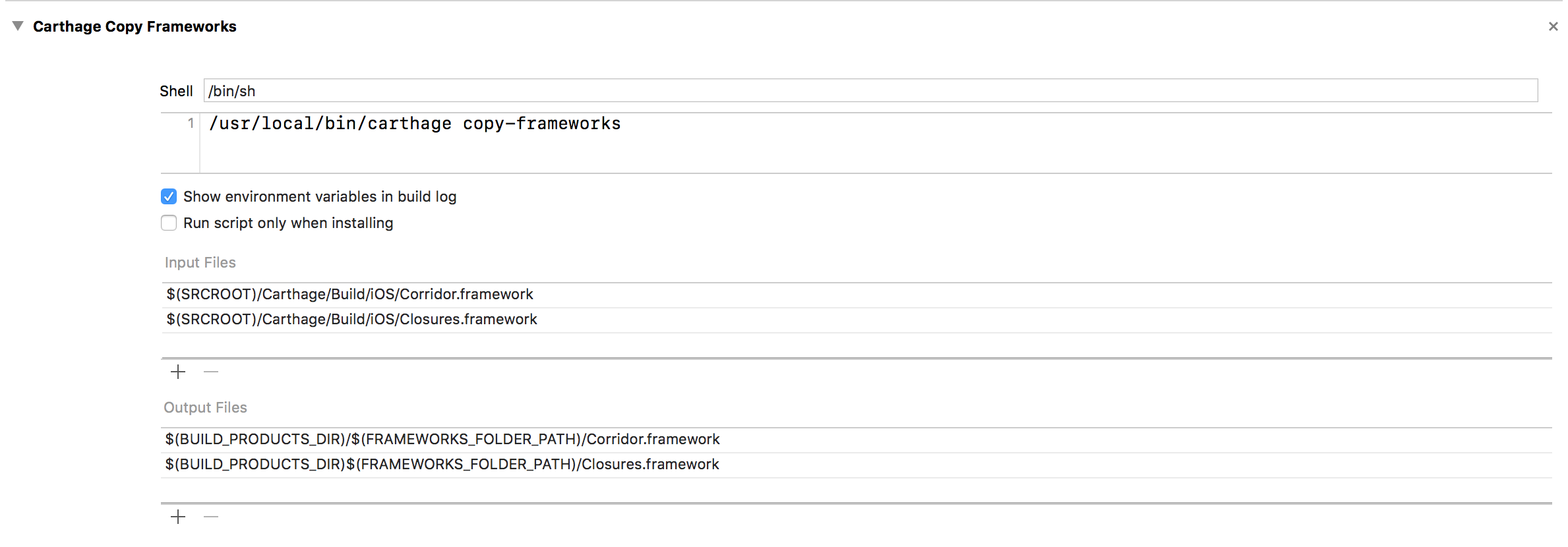
build log shows these relevant environment vars:
export BUILD_PRODUCTS_DIR=/Users/petrsima/Library/Developer/Xcode/DerivedData/AppName-aupyrkwlmxxorpawpaqmcharhaal/Build/Products/Debug-iphonesimulator
export FRAMEWORKS_FOLDER_PATH=AppName.app/Frameworks
so it would appear that theres an extra "/" inserted into the path, which causes it to fail, but I dont see when the "/" would be inserted
pteasima
on 15 Jan 2018
update:
When I replace $(BUILD_PRODUCTS_DIR) with the absolute path from above, it works. So looks like I've pinned down the problem. The trailing "/" seems to be part of the $(BUILD_PRODUCTS_DIR), no idea why it doesnt show up in the build log tho.
pteasima
on 15 Jan 2018
@pteasima yeah, strange…
Should also ask, are you using the New Build System?
jdhealy
on 15 Jan 2018
wow I completely missed this feature. I was using the old one. Switching to the new build system fixes the issue for me.
Whats strange is that with the new build system it works with and without the "/", which doesnt make much sense to me. Just xcode being xcode...
pteasima
on 15 Jan 2018
Cool, given this seems to be an Xcode bug and not something Carthage can prevent, I'm going to update the title of this issue and keep it denoted as closed.
jdhealy
on 15 Jan 2018
Looks like BUILD_PRODUCTS_DIR is wrong and BUILT_PRODUCTS_DIR is correct (typo).
https://github.com/Carthage/Carthage#if-youre-building-for-ios-tvos-or-watchos
Xcode will not set BUILD_PRODUCTS_DIR env variable so you were trying to write to the root directory.
ikesyo
on 16 Jan 2018
Yeah sorry about that, will edit the post. This wasnt the source of the problem, as you can see its correct in the screenshot. Thanks anyway
pteasima
on 16 Jan 2018
Xcode uses BUILD_DIR and BUILT_PRODUCTS_DIR but does not use BUILD_PRODUCTS_DIR so that should be the root cause.
$(BUILD_PRODUCTS_DIR)/$(FRAMEWORKS_FOLDER_PATH):/AppName.app/Frameworks$(BUILD_PRODUCTS_DIR)$(FRAMEWORKS_FOLDER_PATH):AppName.app/Frameworks$(BUILT_PRODUCTS_DIR)/$(FRAMEWORKS_FOLDER_PATH):/Users/petrsima/Library/Developer/Xcode/DerivedData/AppName-aupyrkwlmxxorpawpaqmcharhaal/Build/Products/Debug-iphonesimulator/AppName.app/Frameworks
So that should not be Xcode bug.
/cc @jdhealy
ikesyo
on 16 Jan 2018
ah I see, sorry didnt read properly. Still doesnt explain why it works without the slash and why it differs between build new and old build system. Guess there must be both versions ("BUILD" and "BUILT") in some shape or form. Anyway, will leave you guys to it ;) Thanks again for the help
pteasima
on 16 Jan 2018
Related issues
 jdecarlo
·
3Comments
jdecarlo
·
3Comments
 hamchapman
·
3Comments
hamchapman
·
3Comments
 abbeyjackson
·
3Comments
abbeyjackson
·
3Comments
 JustinJiaDev
·
3Comments
JustinJiaDev
·
3Comments
 billypchan
·
3Comments
billypchan
·
3Comments
Most helpful comment
Xcode uses
BUILD_DIRandBUILT_PRODUCTS_DIRbut does not useBUILD_PRODUCTS_DIRso that should be the root cause.$(BUILD_PRODUCTS_DIR)/$(FRAMEWORKS_FOLDER_PATH):/AppName.app/Frameworks$(BUILD_PRODUCTS_DIR)$(FRAMEWORKS_FOLDER_PATH):AppName.app/Frameworks$(BUILT_PRODUCTS_DIR)/$(FRAMEWORKS_FOLDER_PATH):/Users/petrsima/Library/Developer/Xcode/DerivedData/AppName-aupyrkwlmxxorpawpaqmcharhaal/Build/Products/Debug-iphonesimulator/AppName.app/FrameworksSo that should not be Xcode bug.
/cc @jdhealy