Carla: Spawning pedestrian in 0.9.3
Hi how do we spawn pedestrian like on the past release where they automatically randomly walk around on their area? I can only spawn static pedestrian adapting the code from manual_control.py and failed to use set_autopilot
 jmarrr
All 14 comments
I have the same question.
 heshameraqi
on 18 Feb 2019
heshameraqi
on 18 Feb 2019
I also have same question. For me instead of randomly walking, I want to make them cross intersection when ego vehicle approaches intersection.
 jagdishbhanushali
on 28 Feb 2019
jagdishbhanushali
on 28 Feb 2019
I managed to spawn pedestrian and make them walk automatically. This is what I did to make them walk straight. It's not completely autopilot, but work for me.
ped_blueprints = world.world.get_blueprint_library().filter("walker.*")
player = world.world.try_spawn_actor(random.choice(ped_blueprints),carla.Transform())
player_control = carla.WalkerControl()
player_control.speed = 3
pedestrian_heading=90
player_rotation = carla.Rotation(0,pedestrian_heading,0)
player_control.direction = player_rotation.get_forward_vector()
player.apply_control(player_control)
@jagdishbhanushali could you share your python script?
 rikardomarenzzi
on 8 Mar 2019
rikardomarenzzi
on 8 Mar 2019
Has anyone figured out how to make them walk differently? I quickly glanced at the original Carla paper, where it says:
Pedestrians navigate the streets according to a town-specific navigation map, which conveys location-based cost. This cost is designed to encourage pedestrians to walk along sidewalks and
marked road crossings, but allows them to cross roads at any point. Pedestrians wander around town in accordance with this map, avoiding each other and trying to avoid vehicles.
However, I don't seem to be able to enforce this behavior. Also when looking at other posts here on Github, people seem only able to set a fixed direction and speed.
For my simulation I would like the pedestrians to walk on the sidewalk as soon as I spawn them. When it comes to spawning I actually have an other issue. I wanted to use the map specific spawn points, however it seems to me that these only make sense for vehicles as they are all on the road.
 cstamatiadis
on 28 Mar 2019
cstamatiadis
on 28 Mar 2019
I have the same question. For pedestrain spawn locations, there seems to be "Walker Spawn Point" in CarlaUE4. However, I wonder what's the API to access those points in python scripts.
 c66tang
on 28 Mar 2019
c66tang
on 28 Mar 2019
@c66tang so far I haven't found a way to access the "Walker Spawn Points" directly through the API. I ended up creating a csv file with all the spawn points that are visible in the Unreal Editor and simply used that for my simulation. So at least now the pedestrians are where I want them to be, but I still have the problem that I cannot make them move in a smart way
cstamatiadis
on 1 Apr 2019
I modified C++ code of Carla to send me all spawn points available in the Map. Only Town01 and Town02 have those walker spawn points hence this will only work for those Towns. If you want it for different Town, you have to add spawn points manually in those Towns in unreal editor.
I modified GetRecommendedSpawnPoints function in _/CARLA/Unreal/CarlaUE4/Plugins/Carla/Source/Carla/Game/CarlaEpisode.cpp_ as below. This will append WalkerSpawnPoint and WalkerStartSpawnPoint along with VehicleSpawnPoint. You have to build Carla again to make it work.
#include "Carla/Walker/WalkerSpawnPoint.h"
TArray<FTransform> UCarlaEpisode::GetRecommendedSpawnPoints() const
{
UE_LOG(LogCarla, Warning, TEXT("Getting Recommended spawn points"));
TArray<FTransform> SpawnPoints;
for (TActorIterator<AVehicleSpawnPoint> It(GetWorld()); It; ++It)
{
SpawnPoints.Add(It->GetActorTransform());
}
for (TActorIterator<AWalkerSpawnPoint> It(GetWorld()); It; ++It) {
AWalkerSpawnPoint *SpawnPoint = Cast<AWalkerSpawnPoint>(*It);
if (SpawnPoint != nullptr) {
SpawnPoints.Add(It->GetActorTransform());
}
}
for (TActorIterator<AWalkerStartSpawnPoint> It(GetWorld()); It; ++It) {
AWalkerStartSpawnPoint *SpawnPoint = Cast<AWalkerStartSpawnPoint>(*It);
if (SpawnPoint != nullptr) {
SpawnPoints.Add(It->GetActorTransform());
}
}
return SpawnPoints;
}
Now when you run command world.map.get_spawn_points()from your python client you will have all spawn points available.
Caution:- Since you are returning all spawn points, if you are spawning vehicle at random location you might see error if you spawn vehicle on walker's spawn point.
I maintained count of WalkerSpawnPoints and VehicleSpawnPoints so that I don't spawn vehicle to walker's location. At the end my python client call look as follow.
# this will be different depending of map you choose
NUM_OF_VEHICLE_SPAWN_POINTS = 83
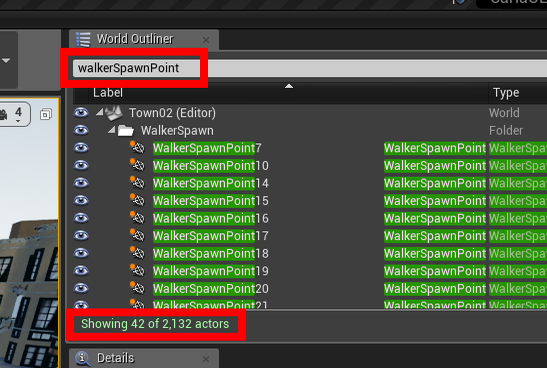
NUM_OF_WALKER_SPAWN_POINTS=42
all_spawn_points = world.map.get_spawn_points()
vehicle_spawn_points = all_spawn_points[:NUM_OF_VEHICLE_SPAWN_POINTS]
walker_spawn_points = all_spawn_points[-NUM_OF_WALKER_SPAWN_POINTS:]
You can get count of VehicleSpawnPoint and others by using filter option of "World outlier" in unreal editor.
jagdishbhanushali
on 2 Apr 2019
Hi.
I successfully created pedestrians with you help and make them move, but unfortunately, they only move along one axis. Does someone have any idea how to make pedestrians move just on sidewalk automatically with auto-navigation? I'm using 0.9.4 on Windows.
Thanks.
Klemen
 klemen666
on 9 Apr 2019
klemen666
on 9 Apr 2019
I managed to spawn pedestrian and make them walk automatically. This is what I did to make them walk straight. It's not completely autopilot, but work for me.
ped_blueprints = world.world.get_blueprint_library().filter("walker.*")
player = world.world.try_spawn_actor(random.choice(ped_blueprints),carla.Transform())
player_control = carla.WalkerControl()
player_control.speed = 3
pedestrian_heading=90
player_rotation = carla.Rotation(0,pedestrian_heading,0)
player_control.direction = player_rotation.get_forward_vector()
player.apply_control(player_control)
Why does 'world' an attribute of another 'world'? Please help me to understand
 karthi0804
on 17 Apr 2019
karthi0804
on 17 Apr 2019
I managed to spawn pedestrian and make them walk automatically. This is what I did to make them walk straight. It's not completely autopilot, but work for me.
ped_blueprints = world.world.get_blueprint_library().filter("walker.*") player = world.world.try_spawn_actor(random.choice(ped_blueprints),carla.Transform()) player_control = carla.WalkerControl() player_control.speed = 3 pedestrian_heading=90 player_rotation = carla.Rotation(0,pedestrian_heading,0) player_control.direction = player_rotation.get_forward_vector() player.apply_control(player_control)Why does 'world' an attribute of another 'world'? Please help me to understand
If you open manual_control.py, in game_loop() you will see following line.
world = World(client.get_world(), hud, args.filter)
all those code comes after initializing world object.
jagdishbhanushali
on 17 Apr 2019
This issue has been automatically marked as stale because it has not had recent activity. It will be closed if no further activity occurs. Thank you for your contributions.
![stale[bot] picture](https://avatars.githubusercontent.com/in/1724?v=4&s=40) stale[bot]
on 16 Jun 2019
stale[bot]
on 16 Jun 2019
@c66tang so far I haven't found a way to access the "Walker Spawn Points" directly through the API. I ended up creating a csv file with all the spawn points that are visible in the Unreal Editor and simply used that for my simulation. So at least now the pedestrians are where I want them to be, but I still have the problem that I cannot make them move in a smart way
Can you pls explain how? Thank you so much!
 KasraMokhtari2112
on 11 Apr 2020
KasraMokhtari2112
on 11 Apr 2020
I modified C++ code of Carla to send me all spawn points available in the Map. Only Town01 and Town02 have those walker spawn points hence this will only work for those Towns. If you want it for different Town, you have to add spawn points manually in those Towns in unreal editor.
I modified
GetRecommendedSpawnPointsfunction in _/CARLA/Unreal/CarlaUE4/Plugins/Carla/Source/Carla/Game/CarlaEpisode.cpp_ as below. This will append WalkerSpawnPoint and WalkerStartSpawnPoint along with VehicleSpawnPoint. You have to build Carla again to make it work.
#include "Carla/Walker/WalkerSpawnPoint.h"TArray<FTransform> UCarlaEpisode::GetRecommendedSpawnPoints() const { UE_LOG(LogCarla, Warning, TEXT("Getting Recommended spawn points")); TArray<FTransform> SpawnPoints; for (TActorIterator<AVehicleSpawnPoint> It(GetWorld()); It; ++It) { SpawnPoints.Add(It->GetActorTransform()); } for (TActorIterator<AWalkerSpawnPoint> It(GetWorld()); It; ++It) { AWalkerSpawnPoint *SpawnPoint = Cast<AWalkerSpawnPoint>(*It); if (SpawnPoint != nullptr) { SpawnPoints.Add(It->GetActorTransform()); } } for (TActorIterator<AWalkerStartSpawnPoint> It(GetWorld()); It; ++It) { AWalkerStartSpawnPoint *SpawnPoint = Cast<AWalkerStartSpawnPoint>(*It); if (SpawnPoint != nullptr) { SpawnPoints.Add(It->GetActorTransform()); } } return SpawnPoints; }Now when you run command
world.map.get_spawn_points()from your python client you will have all spawn points available.Caution:- Since you are returning all spawn points, if you are spawning vehicle at random location you might see error if you spawn vehicle on walker's spawn point.
I maintained count of WalkerSpawnPoints and VehicleSpawnPoints so that I don't spawn vehicle to walker's location. At the end my python client call look as follow.
# this will be different depending of map you choose
NUM_OF_VEHICLE_SPAWN_POINTS = 83
NUM_OF_WALKER_SPAWN_POINTS=42

all_spawn_points = world.map.get_spawn_points()
vehicle_spawn_points =  all_spawn_points[:NUM_OF_VEHICLE_SPAWN_POINTS]
walker_spawn_points = all_spawn_points[-NUM_OF_WALKER_SPAWN_POINTS:]
You can get count of VehicleSpawnPoint and others by using filter option of "World outlier" in unreal editor.
I just started working with CARLA and have a very basic question! Where are these cpp code in CARLA? I downloaded the latest version and I don't see any cpp code in their folder! Can you please help me with that? Thanks!
KasraMokhtari2112
on 11 Apr 2020
Related issues
 jinfagang
·
3Comments
cstamatiadis
·
3Comments
jinfagang
·
3Comments
cstamatiadis
·
3Comments
 chankim
·
3Comments
chankim
·
3Comments
 rowanmcallister
·
3Comments
rowanmcallister
·
3Comments
 mallela
·
3Comments
mallela
·
3Comments
Most helpful comment
I managed to spawn pedestrian and make them walk automatically. This is what I did to make them walk straight. It's not completely autopilot, but work for me.