Cargo: Windows / Colors are displayed as codes
I'm on Windows 10 Build 16299.19
I've recently updated from cargo 0.20.0 to 0.22.0 and now I have the following issue.
Colors (especially green) are not displayed correctly under normal circumstances.
When I redirect stdout to a file everything seems to _almost_ work fine.
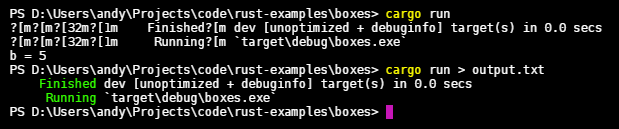
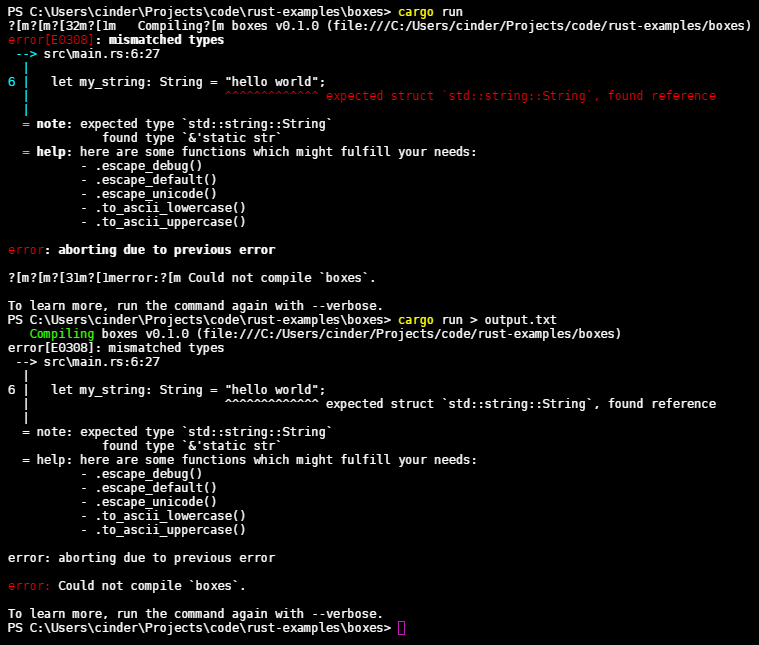
I've tried this with cargo 0.21.1 and had the same bug.
A VM with the same Windows Version did't have this problem.
An other device with an older windows version did't have this bug until I updated to the current version.
Could the recent cmd.exe change be the problem?
The nightly version has the same bug. Only 0.20.0 seems to work normal.
This is the same for cmd, powershell and hyper (the terminal emulator I use).
I've posted this on StackOverflow before.
 AndyBitz
All 14 comments
Thanks for the report!
@BurntSushi you wouldn't happen to know what's going on here would you? We're using a pretty thin wrapper over the termcolor crate
 alexcrichton
on 14 Nov 2017
alexcrichton
on 14 Nov 2017
Yes, termcolor seems to be the problem.
It replaced term after 0.20.0.
But I'm not sure why it only works when stdout is redirected.
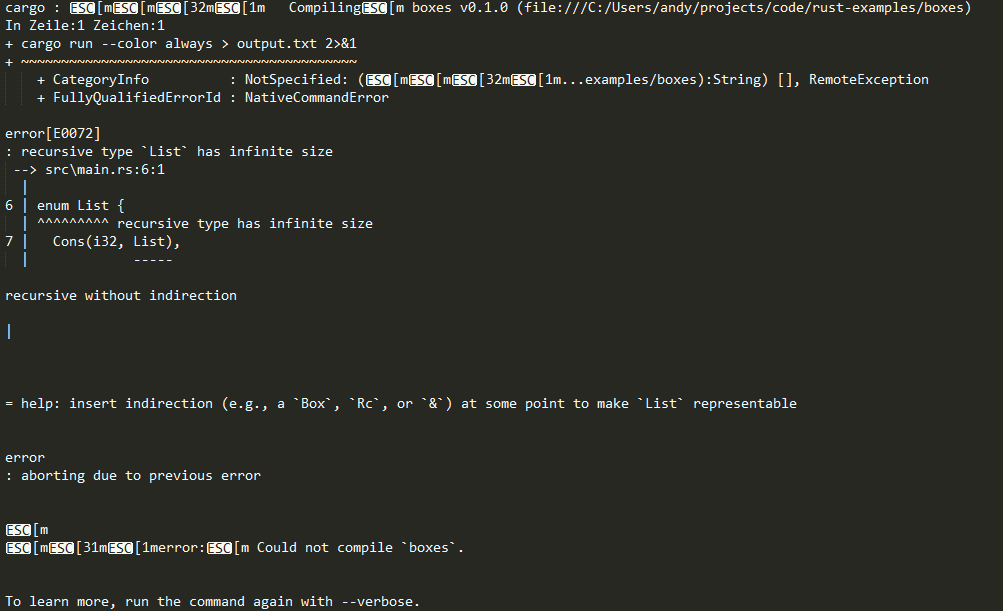
It also seems to print wrong color codes when stderr is redirected to stdout.
cargo run --color always > output.txt 2>&1
output.txt
AndyBitz
on 15 Nov 2017
Do you have the TERM environment variable set? If so, do you know what its value is?
alexcrichton
on 18 Nov 2017
Ahhh. It is xterm-256color. Setting it to nothing solves the problem.
AndyBitz
on 18 Nov 2017
Ok that'd explain it! Do you know how come that variable is set? Should Cargo not be interpreting that environment variable?
alexcrichton
on 19 Nov 2017
If TERM is set, then it will forcefully attempt to use ANSI codes even if the stdout/stderr it is writing to is a windows console. This is clearly the wrong behavior as the correct behavior is to unconditionally use the windows console API as the way to perform colors when stdout/stderr is a windows console. Even if the color choice is set to ColorChoice::AlwaysAnsi, even if TERM is set, stick to the windows console API!
That said, if you are writing to the windows console and you successfully set ENABLE_VIRTUAL_TERMINAL_PROCESSING via SetConsoleMode (or it was already set via GetConsoleMode), then and only then are you allowed to use Microsoft's flavor of ANSI escape codes. The supported escape codes in this case depend on the version of Windows 10, not the TERM environment variable!
 retep998
on 19 Nov 2017
retep998
on 19 Nov 2017
@alexcrichton Probably when working with hyper.js.
@retep998 so, termcolor needs to get fixed?
AndyBitz
on 20 Nov 2017
@AndyBitz hm I'm a little confused then as to what's going on, it sounds like you're using a terminal emulator which claims to support ansi escape codes but it doesn't?
alexcrichton
on 20 Nov 2017
I'm also confused. If you're setting TERM to something other than dumb, then you're declaring that your terminal supports ANSI colors.
 BurntSushi
on 20 Nov 2017
BurntSushi
on 20 Nov 2017
@BurntSushi If you're writing to the windows console, then you must disregard what TERM says. Unless the console has the ENABLE_VIRTUAL_TERMINAL_PROCESSING mode enabled, ANSI escape codes will never work. This is the chain of logic that should occur:
- Call
GetConsoleMode - If
GetConsoleModefails then use ansi escape codes based onTERM, theColorChoice, and the name of the pipe. - If
GetConsoleModesucceeds and the current modes already haveENABLE_VIRTUAL_TERMINAL_PROCESSINGthen use Microsoft flavor escape codes. - Otherwise call
SetConsoleModewith the current modes or'd withENABLE_VIRTUAL_TERMINAL_PROCESSING. - If
SetConsoleModesucceeds then use Microsoft flavor escape codes. - Otherwise use the Windows console API for colors.
retep998
on 20 Nov 2017
Sorry for the confusion, I meant that when I worked on hyper the TERM variable (probably) got set globally and was therefore available in every terminal I used which caused cargo to display _wrong colors_ everywhere.
Also I found this in the Microsoft docs, which is as @retep998 says.
AndyBitz
on 20 Nov 2017
My own experience: my TERM is set to msys (not set by me, but set by GitHub's old "git shell" CLI package). I haven't yet upgraded to GitHub's new desktop app, because the old "git shell" CLI package is stunningly useful and I don't want to break it. I do confirm that removing TERM restores colors to cargo's windows console output, so I'm glad that I found this thread.
 jacobmorzinski
on 10 Jan 2018
jacobmorzinski
on 10 Jan 2018
As there hasn't been any activity here in over 6 months I've marked this as stale and if no further activity happens for 7 days I will close it.
I'm a bot so this may be in error! If this issue should remain open, could someone (the author, a team member, or any interested party) please comment to that effect?
The team would be especially grateful if such a comment included details such as:
- Is this still relevant?
- If so, what is blocking it?
- Is it known what could be done to help move this forward?
Thank you for contributing!
(The cargo team is currently evaluating the use of Stale bot, and using #6035 as the tracking issue to gather feedback.)
If you're reading this comment from the distant future, fear not if this was closed automatically. If you believe it's still an issue please leave a comment and a team member can reopen this issue. Opening a new issue is also acceptable!
![stale[bot] picture](https://avatars3.githubusercontent.com/in/1724?v=4&s=40) stale[bot]
on 17 Sep 2018
stale[bot]
on 17 Sep 2018
I couldn't reproduce this with the latest version of cargo and rustc.
I'll assume that it got fixed and close the issue.
AndyBitz
on 26 Sep 2018
Related issues
 ckaran
·
3Comments
ckaran
·
3Comments
 rodoufu
·
3Comments
rodoufu
·
3Comments
 briansmith
·
3Comments
briansmith
·
3Comments
 japaric
·
3Comments
japaric
·
3Comments
 alilleybrinker
·
3Comments
alilleybrinker
·
3Comments
Most helpful comment
@BurntSushi If you're writing to the windows console, then you must disregard what
TERMsays. Unless the console has theENABLE_VIRTUAL_TERMINAL_PROCESSINGmode enabled, ANSI escape codes will never work. This is the chain of logic that should occur:GetConsoleModeGetConsoleModefails then use ansi escape codes based onTERM, theColorChoice, and the name of the pipe.GetConsoleModesucceeds and the current modes already haveENABLE_VIRTUAL_TERMINAL_PROCESSINGthen use Microsoft flavor escape codes.SetConsoleModewith the current modes or'd withENABLE_VIRTUAL_TERMINAL_PROCESSING.SetConsoleModesucceeds then use Microsoft flavor escape codes.