Cardview: Strange rendering in TabControl and Carousel Layout
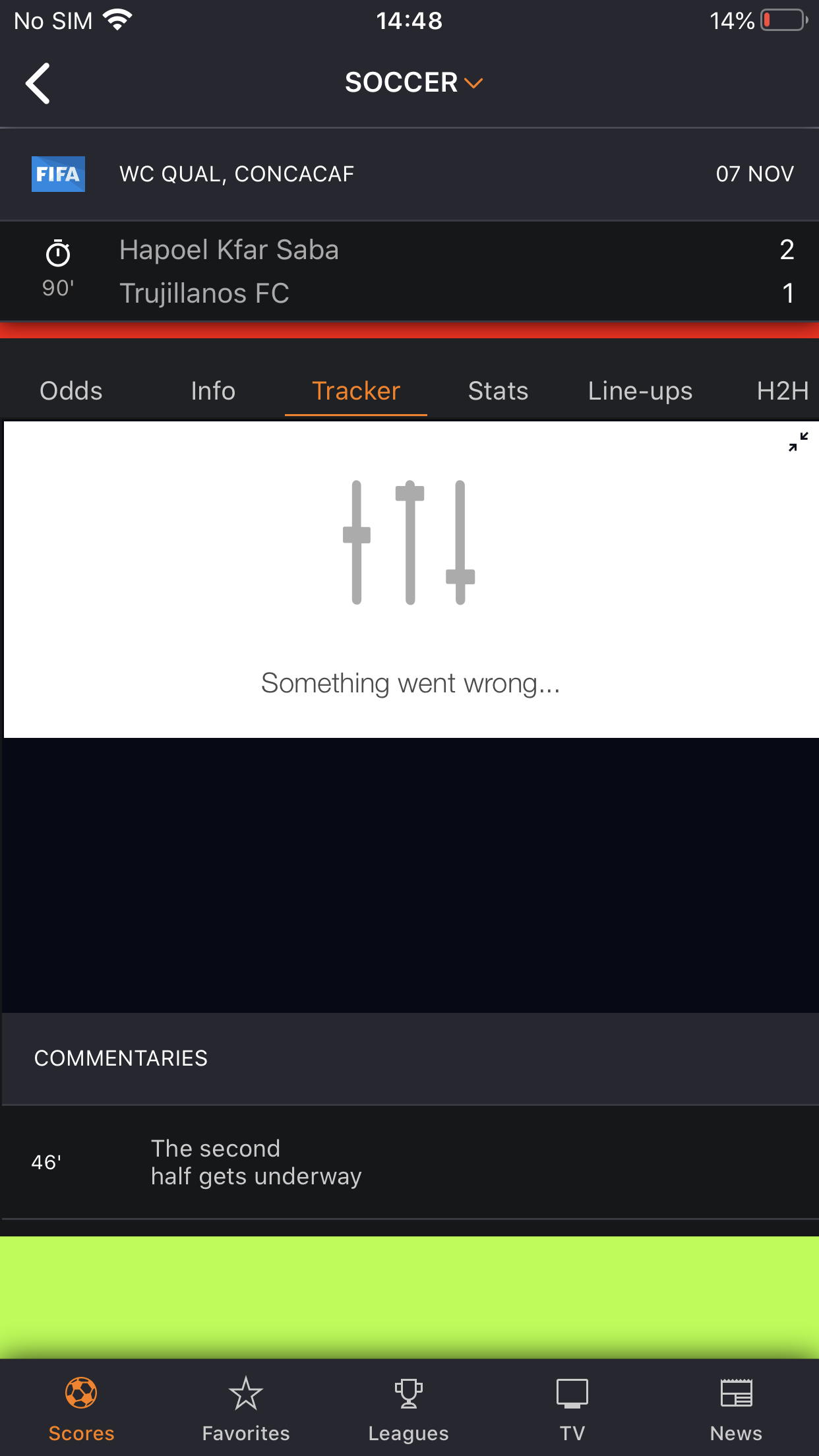
@AndreiMisiukevich Sorry for open this issue again, but it really happen regularly in my app, emulators can not reproduce, only the real devices can get that issue. The TabControl sometimes break layout with bigger height, and the Carousel Layout sometimes is cropped at bottom. I even don't know why the issue happened, few days ago, I thought it related to Absolute layout issue of xamarin forms. Can you take time to check it. Thank you so much

 <cards:CarouselView x:Name="ScoresCarouselView"
                            HorizontalOptions="FillAndExpand"
                            IsCyclical="False"
                            IsViewReusingEnabled="False"
                            BackViewsDepth="1"
                            ItemAppearedCommand="{Binding ScoreItemAppearedCommand}"
                            ItemDisappearingCommand="{Binding ScoreItemDisappearingCommand}"
                            ItemsSource="{Binding ScoreItemSources}"
                            SelectedItem="{Binding SelectedScoreItem}"
                            VerticalOptions="FillAndExpand">
            <x:Arguments>
                <processors:BaseCarouselFrontViewProcessor AnimationLength="250"
                                                           NoItemMaxPanDistance="1000"
                                                           OpacityFactor="0.25" />
                <processors:BaseCarouselBackViewProcessor AnimationLength="250"
                                                          OpacityFactor="0.25" />
            </x:Arguments>
            <cards:CarouselView.ItemTemplate>
                <DataTemplate x:DataType="viewModels:ScoreItemViewModel">
                    <FlexLayout JustifyContent="Center">
                        <Label FlexLayout.AlignSelf="Center"
                               IsVisible="{Binding IsComingSoon}"
                               Style="{StaticResource NotificationLabel}"
                               Text="Coming Soon" />
                        <StackLayout IsVisible="{Binding IsNotComingSoon}">
                            <Label IsVisible="{Binding NoData}"
                                   Style="{StaticResource NotificationLabel}"
                                   Text="{langs:Translate NoGames}" />
                            <customListView:CustomListView x:Name="LeagueTable"
                                                           AutomationId="LeagueTableId"
                                                           AutomationProperties.IsInAccessibleTree="False"
                                                           Footer="{Binding .}"
                                                           GroupDisplayBinding="{Binding Key}"
                                                           GroupHeaderTemplate="{StaticResource MatchHeaderTemplate}"
                                                           HasUnevenRows="true"
                                                           IsGroupingEnabled="True"
                                                           IsPullToRefreshEnabled="true"
                                                           IsRefreshing="{Binding IsRefreshing}"
                                                           ItemTemplate="{StaticResource MatchItemTemplateSelector}"
                                                           ItemsSource="{Binding MatchItemsSource}"
                                                           LoadMoreCommand="{Binding LoadMoreCommand}"
                                                           RefreshCommand="{Binding RefreshCommand}"
                                                           RefreshControlColor="White"
                                                           SelectionMode="None"
                                                           SeparatorVisibility="None"
                                                           Style="{StaticResource ListViewHasBackground}"
                                                           TriggerLoadMoreIndex="1"
                                                           VerticalOptions="FillAndExpand">
                                <x:Arguments>
                                    <ListViewCachingStrategy>RecycleElementAndDataTemplate</ListViewCachingStrategy>
                                </x:Arguments>
                                <customListView:CustomListView.Behaviors>
                                    <b:EventToCommandBehavior Command="{Binding TappedMatchCommand}"
                                                              EventArgsParameterPath="Item"
                                                              EventName="ItemTapped" />
                                </customListView:CustomListView.Behaviors>
                                <customListView:CustomListView.FooterTemplate>
                                    <DataTemplate>
                                        <StackLayout>
                                            <coreTemplates:MatchSkeletonTemplate />
                                            <coreTemplates:MatchSkeletonTemplate IsVisible="{Binding IsNotLoadMore}" />
                                            <coreTemplates:MatchSkeletonTemplate IsVisible="{Binding IsNotLoadMore}" />
                                            <coreTemplates:MatchSkeletonTemplate IsVisible="{Binding IsNotLoadMore}" />
                                        </StackLayout>
                                    </DataTemplate>
                                </customListView:CustomListView.FooterTemplate>
                            </customListView:CustomListView>
                        </StackLayout>
                    </FlexLayout>
                </DataTemplate>
            </cards:CarouselView.ItemTemplate>
        </cards:CarouselView>
TabControl DataTemplate
<DataTemplate xmlns="http://xamarin.com/schemas/2014/forms"
              xmlns:x="http://schemas.microsoft.com/winfx/2009/xaml"
              xmlns:d="http://xamarin.com/schemas/2014/forms/design"
              xmlns:mc="http://schemas.openxmlformats.org/markup-compatibility/2006"
              xmlns:views="clr-namespace:LiveScore.Core.Controls.DateBar.Views;assembly=LiveScore.Core"
              xmlns:converters="clr-namespace:LiveScore.Core.Controls.DateBar.Converters;assembly=LiveScore.Core"
              mc:Ignorable="d"
              x:Class="LiveScore.Core.Controls.DateBar.Views.Templates.DateTemplate">

    <FlexLayout HorizontalOptions="FillAndExpand"
                Direction="Column"
                Padding="0,12,0,12"
                AlignItems="Center"
                JustifyContent="SpaceBetween">
        <FlexLayout.Resources>
            <ResourceDictionary>
                <ResourceDictionary.MergedDictionaries>
                    <views:DateBarResource />
                </ResourceDictionary.MergedDictionaries>
                <converters:DayNameConverter x:Key="DayNameConverter" />
                <converters:DayMonthConverter x:Key="DayMonthConverter" />
                <converters:ActiveColorConverter x:Key="ActiveColorConverter" />
            </ResourceDictionary>
        </FlexLayout.Resources>
        <Label Text="{Binding ViewDate, Converter={StaticResource DayNameConverter}}"
               TextColor="{Binding IsActive, Converter={StaticResource ActiveColorConverter}}"
               Style="{StaticResource DateBarDayNameLabel}" />
        <Label Text="{Binding ViewDate, Converter={StaticResource DayMonthConverter}}"
               TextColor="{Binding IsActive, Converter={StaticResource ActiveColorConverter}}"
               Style="{StaticResource DateBarDayMonthLabel}" />
    </FlexLayout>
</DataTemplate>
 huyjack178
All 37 comments
First of all. TabsControl doesn't affect a carouselView
 AndreiMisiukevich
on 6 Nov 2019
AndreiMisiukevich
on 6 Nov 2019
Seems CustomListView height is wrong
Check CarouselView.Height and CustomListView height. Are they the same?
AndreiMisiukevich
on 6 Nov 2019
You can set BackgroundColor to Red and make sure what is the root cause of the height issue.
I lean towards that this is ListView sizing bug.
<cards:CarouselView.ItemTemplate>
                <DataTemplate x:DataType="viewModels:ScoreItemViewModel">
                    <FlexLayout JustifyContent="Center" BackgroundColor="Red">
Seems CustomListView height is wrong
Check CarouselView.Height and CustomListView height. Are they the same?
Not same, I think list view has bug when put it in AbsoluteLayout
huyjack178
on 7 Nov 2019
@huyjack178 then you can work around it.
Bind ListView's HeightRequest to AbsoulteLayout's Height
AndreiMisiukevich
on 8 Nov 2019
or just set HeightRequest of you ListView
AndreiMisiukevich
on 8 Nov 2019
@AndreiMisiukevich Issue happens in iphone X, Xr, Xs regularly, I try your recommendation but not work :(. Can you spend time to check it, I can not launch to production because of this issue
huyjack178
on 28 Nov 2019
@huyjack178 for doing that I need to have a reproduction sample
Can you build it?
AndreiMisiukevich
on 28 Nov 2019
okay, please wait
huyjack178
on 28 Nov 2019
@huyjack178 is it possible to reproduce on the simulator?
AndreiMisiukevich
on 28 Nov 2019
@AndreiMisiukevich Simulator is working normal, only real device happened
huyjack178
on 28 Nov 2019
@huyjack178 and only on iOS, right?
well, it's definitely XF issue, but let's try to workaround. I am waiting for the sample
AndreiMisiukevich
on 28 Nov 2019
@AndreiMisiukevich yes iOS
huyjack178
on 28 Nov 2019
Here you are, please check out the page in src/LiveScore.Features/Score/Views/ScoresView.xaml
Try to deploy the app to iPhone X/Xr. If the issue not happen, kill the app and open again. There is 60% issue happen
huyjack178
on 28 Nov 2019
Thx
AndreiMisiukevich
on 28 Nov 2019
I will look at this sample tonight
AndreiMisiukevich
on 28 Nov 2019
huyjack178
on 28 Nov 2019
@AndreiMisiukevich Is there any good news ? :)
huyjack178
on 3 Dec 2019
@huyjack178 can you pack it to .zip file?
AndreiMisiukevich
on 3 Dec 2019
https://drive.google.com/file/d/1reNw2WsdIvZjPYRoZCO4B3zRXcpF6Yie/view?usp=sharing
@AndreiMisiukevich here you are
huyjack178
on 3 Dec 2019
well, I see the issue and I see that it's not a CardsView issue. Because FlexLayout occupies the full height.
I suggest you to subscite sizeChanged of your FlexLayout and set its Height to HeighRequest of ListView (or use Layout method)
AndreiMisiukevich
on 3 Dec 2019
In MatchesTemplate
find flexLayout like
this.Parent.Parent etc.
subscribe sizeChanged event and do a trick
AndreiMisiukevich
on 3 Dec 2019
It will help, because
        public MatchesTemplate()
        {
            InitializeComponent();
            MatchesListView.HeightRequest = 640;
        }
Helped for my iPhone XR.. so, just do a workaround
AndreiMisiukevich
on 3 Dec 2019
I try to implemented it in MatchesTemplate
  protected override void OnSizeAllocated(double width, double height)
        {
            base.OnSizeAllocated(width, height);
            MatchesListView.Layout(new Rectangle(0, 0, width, height));
        }
MatchesTemplate
No, MatchesTemplate has wrong size as well.
You should set the size of FlexLayout (root view)
AndreiMisiukevich
on 3 Dec 2019
It is inside the DataTemplate, how can I set the height?
huyjack178
on 3 Dec 2019
It is inside the DataTemplate, how can I set the height?
public MatchesTemplate()
        {
            InitializeComponent();
            (this.Parent.Parent as View).SizeChanged += (s, e) =>
        }
this.Parent is null, I can not find the parent view
huyjack178
on 3 Dec 2019
@huyjack178 oh... override OnParentSet
AndreiMisiukevich
on 3 Dec 2019
I still find the parent StackLayout, the root FlexLayout can not be reached
huyjack178
on 3 Dec 2019
By the way, what if I access from the ScoreView, that contains CardsView
huyjack178
on 3 Dec 2019
     public ScoresView()
        {
            InitializeComponent();
            (BindingContext as ScoresViewModel)?.OnAppearing();
            ScoresCarouselView.ItemAppearing += ScoresCarouselView_ItemAppearing;
        }

        private void ScoresCarouselView_ItemAppearing(PanCardView.CardsView view, PanCardView.EventArgs.ItemAppearingEventArgs args)
        {
            view.CurrentView.SizeChanged += ScoresView_SizeChanged;
        }

        private void ScoresView_SizeChanged(object sender, System.EventArgs e)
        {
            var view = sender as View;
            view.HeightRequest = Height;
        }
@AndreiMisiukevich I have set the FlexLayout height but not work :(
huyjack178
on 6 Dec 2019
How did you do it?
I tried to set HeightRequest 680 and it worked
On Fri, Dec 6, 2019 at 11:43 huyjack178 notifications@github.com wrote:
@AndreiMisiukevich https://github.com/AndreiMisiukevich I have set the
FlexLayout height but not work :(—
You are receiving this because you were mentioned.
Reply to this email directly, view it on GitHub
https://github.com/AndreiMisiukevich/CardView/issues/306?email_source=notifications&email_token=ACNH4DWYCT2LBBPNCM47UK3QXIGDNA5CNFSM4JJPI6B2YY3PNVWWK3TUL52HS4DFVREXG43VMVBW63LNMVXHJKTDN5WW2ZLOORPWSZGOEGDNPAA#issuecomment-562485120,
or unsubscribe
https://github.com/notifications/unsubscribe-auth/ACNH4DWRUSOEL3AYKV7FCVLQXIGDNANCNFSM4JJPI6BQ
.>
Andrei Misiukevich
Lead Software Engineer at ISsoft Solutions
*mobile: *+375 29 <+375%2017%20389%200100>303 40 07 Email:
andrei.[email protected] Skype: csi.andreymisyukevich
Minsk, *Belarus *(GMT+3)
AndreiMisiukevich
on 6 Dec 2019
On Fri, Dec 6, 2019 at 11:46 Andrei Misiukevich <
[email protected]> wrote:
How did you do it?
I tried to set HeightRequest 680 and it workedOn Fri, Dec 6, 2019 at 11:43 huyjack178 notifications@github.com wrote:
@AndreiMisiukevich https://github.com/AndreiMisiukevich I have set the
FlexLayout height but not work :(—
You are receiving this because you were mentioned.
Reply to this email directly, view it on GitHub
https://github.com/AndreiMisiukevich/CardView/issues/306?email_source=notifications&email_token=ACNH4DWYCT2LBBPNCM47UK3QXIGDNA5CNFSM4JJPI6B2YY3PNVWWK3TUL52HS4DFVREXG43VMVBW63LNMVXHJKTDN5WW2ZLOORPWSZGOEGDNPAA#issuecomment-562485120,
or unsubscribe
https://github.com/notifications/unsubscribe-auth/ACNH4DWRUSOEL3AYKV7FCVLQXIGDNANCNFSM4JJPI6BQ
.>
Andrei Misiukevich
Lead Software Engineer at ISsoft Solutions
*mobile: *+375 29 <+375%2017%20389%200100>303 40 07 Email:
andrei.[email protected] Skype: csi.andreymisyukevichMinsk, *Belarus *(GMT+3)
--
Andrei Misiukevich
Lead Software Engineer at ISsoft Solutions
*mobile: *+375 29 <+375%2017%20389%200100>303 40 07 Email:
andrei.[email protected] Skype: csi.andreymisyukevich
Minsk, *Belarus *(GMT+3)
AndreiMisiukevich
on 6 Dec 2019
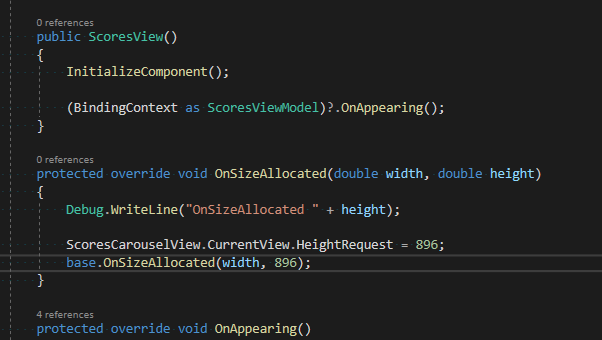
I add code in ScoresView and update the CurrentView of CarouselView
huyjack178
on 6 Dec 2019
@AndreiMisiukevich https://forums.xamarin.com/discussion/37897/vertically-expand-listview-inside-an-absolutelayout
I found this issue already posted
huyjack178
on 6 Dec 2019
Related issues
 jolugarbe
·
8Comments
jolugarbe
·
8Comments
 2092015
·
5Comments
2092015
·
5Comments
 LeoJHarris
·
3Comments
LeoJHarris
·
3Comments
 jungjanos
·
8Comments
jungjanos
·
8Comments
 TSerra-PT
·
6Comments
TSerra-PT
·
6Comments