Cardview: Cannot set initial position via SelectedItem binding
Hi Andrei,
I am using the 'CoverFlowView' and when i bind the ItemSource and set the SelectedItem to the last item in the list, it keeps resetting the SelectedItem to the first item in the list.
Any tips?
Regards,
Jorg
 jorgvanriet
All 25 comments
Hi @jorgvanriet could you please share your xaml?
 AndreiMisiukevich
on 9 Oct 2019
AndreiMisiukevich
on 9 Oct 2019
<panCardView:CoverFlowView
x:Name="CoverFlowView1"
ItemsSource="{Binding Path=BindingContext.ProgressList, Source={x:Reference Name=DevelopmentViewName}}"
VerticalOptions="FillAndExpand"
IsCyclical="False"
SelectedItem="{Binding Path=BindingContext.SelectedItem, Source={x:Reference Name=DevelopmentViewName}, Mode=OneWay}">

        <panCardView:CoverFlowView.ItemTemplate>
            <DataTemplate>
                <StackLayout VerticalOptions="FillAndExpand" Padding="20">
                    <Label Text="{Binding Title}" Style="{StaticResource LabelPinkLarge}" />
                    <Label Text="{Binding Week, StringFormat='Week {0}'}" Style="{StaticResource LabelPink}" />
                    <Label Text="{Binding Message}" Style="{StaticResource LabelBlack}" />
                </StackLayout>

            </DataTemplate>
        </panCardView:CoverFlowView.ItemTemplate>

    </panCardView:CoverFlowView>
Sorry quotes are messing it up
jorgvanriet
on 9 Oct 2019
Mode=OneWay
I presume should be a default (two-way, cuz you want to keep it updated in case of any swipes)
AndreiMisiukevich
on 9 Oct 2019
SelectedItem="{Binding Path=BindingContext.SelectedItem, Source={x:Reference Name=DevelopmentViewName}}"
AndreiMisiukevich
on 9 Oct 2019
It's not the OneWay that was just something i tried sorry
jorgvanriet
on 9 Oct 2019
@jorgvanriet so, what is the issue?
You cannot select initial item with SelectedItem property, right? But then it works, yep?
AndreiMisiukevich
on 9 Oct 2019
Yes, unable to set the initial item.
jorgvanriet
on 9 Oct 2019
@jorgvanriet thx, I'll take a look on my sample )
AndreiMisiukevich
on 9 Oct 2019
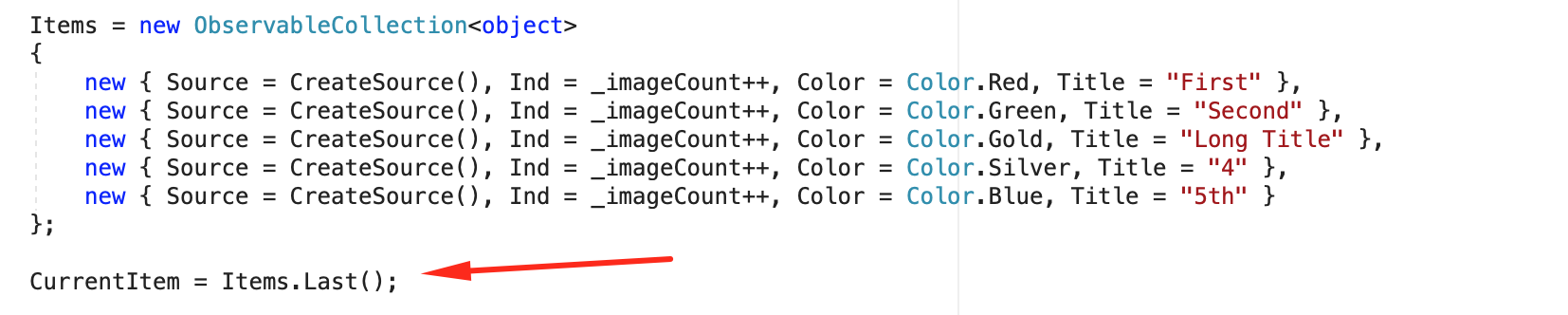
    <cards:CarouselView
        ItemsSource="{Binding Items}"
        SelectedItem="{Binding CurrentItem}">

        <cards:CarouselView.ItemTemplate>
            <DataTemplate>
                <ContentView>
                </ContentView>
            </DataTemplate>
        </cards:CarouselView.ItemTemplate>
    </cards:CarouselView>
Works fine for me
AndreiMisiukevich
on 9 Oct 2019
AndreiMisiukevich
on 9 Oct 2019
try to build a small sample
AndreiMisiukevich
on 9 Oct 2019
btw there is SelectedIndex property if you want to use index instead of an item
AndreiMisiukevich
on 10 Oct 2019
Andrei,
I am using the CoverFlowView and your example is the CarouselView.
When i use the SelectedIndex instead of the SelectedItem it works fine.
When i use the SelectedItem is does not work.
jorgvanriet
on 11 Oct 2019
@jorgvanriet can I reproduce this issue on my CoverFlowView sample?
AndreiMisiukevich
on 11 Oct 2019
You mean you can reproduce or you cannot?
jorgvanriet
on 11 Oct 2019
@jorgvanriet sorry. It was a question :) Is it possible to reproduce this issue on my sample? Are you able to do it?
AndreiMisiukevich
on 11 Oct 2019
As a work around i am now binding to the SelectedIndex where i am setting the SelectedItem (i need it for the information it holds)
I will try to reproduce it.
jorgvanriet
on 11 Oct 2019
It works with the simple version
I have no idea what the difference is between SelectedIndex and SelectedItem
And no clue why 'SelectedIndex' works and 'SelectedItem' doesn't
Tnx for the help
jorgvanriet
on 11 Oct 2019
@jorgvanriet can you build a sample that represents this issue?
AndreiMisiukevich
on 11 Oct 2019
Seems I've fixed it
AndreiMisiukevich
on 12 Oct 2019
@jorgvanriet I will create a release on this/next week :) if it's not super urgent for you
AndreiMisiukevich
on 15 Oct 2019
Tnx alot Andrei !
I will be looking forward to the update :)
jorgvanriet
on 16 Oct 2019
Just to let you know it works like a charm!
Tnx for the quick response!
jorgvanriet
on 22 Oct 2019
@jorgvanriet thanks for the feedback :)
AndreiMisiukevich
on 22 Oct 2019
Related issues
 IgorPopov56
·
4Comments
IgorPopov56
·
4Comments
 stealthcold
·
6Comments
stealthcold
·
6Comments
 shoeIT
·
6Comments
shoeIT
·
6Comments
 InquisitorJax
·
6Comments
InquisitorJax
·
6Comments
 jungjanos
·
8Comments
jungjanos
·
8Comments