Cardview: CachedImages (FFImageLoader) appear with wrong placeholder image in a CarouselView
Hello Andrei!
We have an application where we would like to use your plugin to show images to users in a CarouselView (just CV from now on) using CachedImages from FFImageLoading. The only issue is that when we have many pictures in a CV and view caching is on, pictures can show the wrong image as they were cached before. However when caching is off, the pictures are fine, but switching quickly between them crashes the app on iOS (the exception talks about the collection mutating while being enumerated). This property being off and causing this kind of issue is probably not the fault of your CV while the first problem could be caused by it.
I'm still not sure if the problem is here or in CachedImage, but maybe you can check your code out for possible issues regarding the caching mechanism.
Any kind of help would be appreciated.
 tasger22
All 16 comments
Hi
What version of CardsView do you use?
What do you mean, when speak about caching? Is it CardsView IsViewCacheEnabled or FFImage?
Could you please provide me the small sample ? Also it would be great if you could test it with regular Xamarin Image
 AndreiMisiukevich
on 10 Sep 2018
AndreiMisiukevich
on 10 Sep 2018
We are using version 1.5.8 currently (used it for it still having an ItemTapped event, definitely gonna update it as I saw giving it a TapGestureRecognizer works now).
By caching I mean IsViewCacheEnabled, since CachedImage does the caching automatically for us without setting any property.
The code that uses these features looks like this: https://pastebin.com/H67dXaeb (Here MediaItems contain the ImageSourceUrl and the PlaceholderImageSourceUrl)
Changing CachedImage to Xamarin Image fixed it mostly, but downloading the images everytime the user enters this page with the pictures would mean a problem for them especially if they use a cellular network. This is why we used the former method.
Hope this helps, and thanks for your quick response.
tasger22
on 11 Sep 2018
I think, you should to update to latest version
Add TapGesture by yourself and try these two approaches again )
AndreiMisiukevich
on 11 Sep 2018
Alright, I'm going to try it, then come back with the results.
tasger22
on 11 Sep 2018
Okay, so I checked out the new version. It didn't fix neither the crashing on iOS with IsImageViewCaching=false or the the problem with CachedImage placeholder images appearing on the wrong pictures on both platforms.
Also noticed that even while the mentioned property is off not all views appear in the CarouselView. For example the indicator shows there are 8 views in the CV while it only has 6 children views. This image can help to understand it:
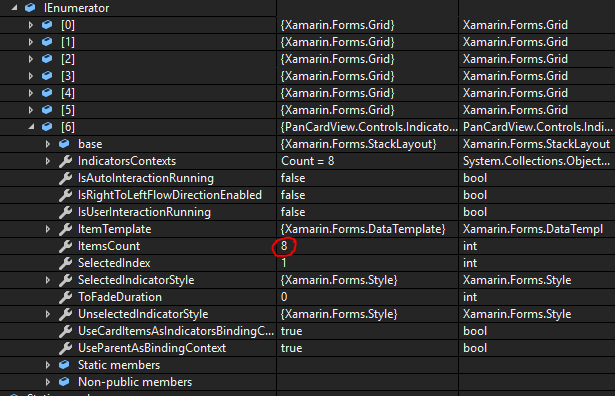
It might be intentional, just thought I might ask it, since I feel like it is perhaps connected to my issue. What would happen if all the views would be present when IsImageViewCaching=false?
tasger22
on 11 Sep 2018
Sorry, i don't understand
You said that there are 6 items, but we see 8
AndreiMisiukevich
on 11 Sep 2018
Could you please create small sample project. i will appreciate it
AndreiMisiukevich
on 11 Sep 2018
Of course, here it is: CVBugSampleProject.zip
Also, the issue in the picture above is probably just a debugger problem, not caused by the code. Sometimes the Visual Studio debugger can show weird results.
tasger22
on 12 Sep 2018
Thank you, i will check it on weekend)
if somebody wants to debug it, i will be grateful))
AndreiMisiukevich
on 12 Sep 2018
Tried on iOS. It works fine
Is it Android issue?
AndreiMisiukevich
on 15 Sep 2018
Also, what does it mean "we see wrong images".
Does it mean, that we see wrong image during several seconds, then see right image?
AndreiMisiukevich
on 15 Sep 2018
So, you can try such workaround
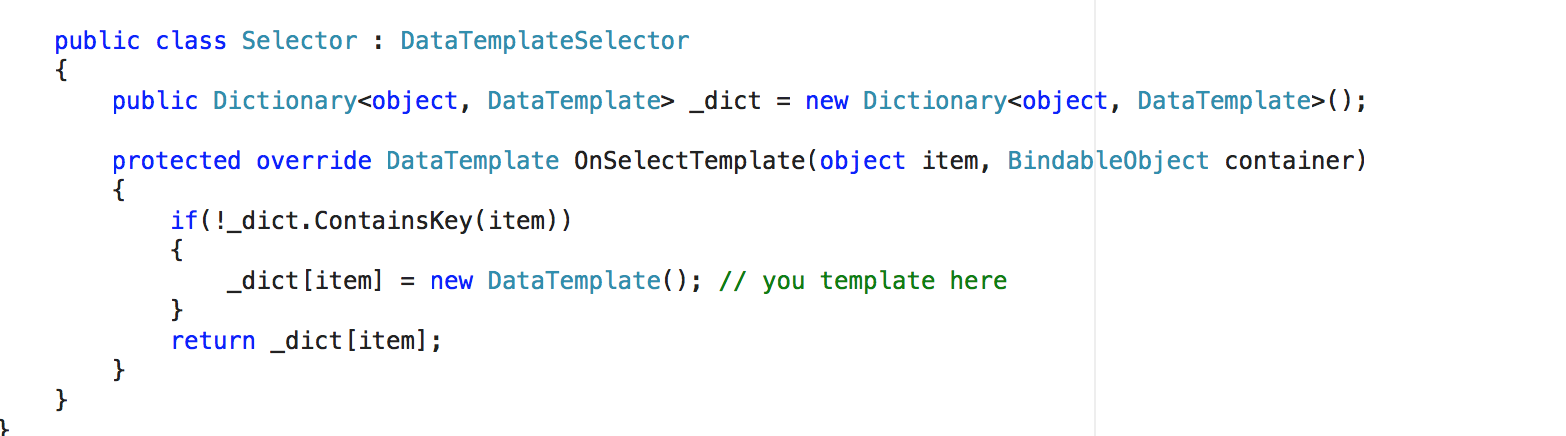
But set MaxChildrenCount and DesiredMaxChildrenCount to 100 =)
So, every item will have own view =)
AndreiMisiukevich
on 15 Sep 2018
Okay, thank you. Will try it on monday, hope it will work in our app :)
tasger22
on 15 Sep 2018
Also the answer for your question is yes, you see the wrong one for 1 second then it fades to the correct picture
tasger22
on 15 Sep 2018
@tasger22 ok, i see)
you can see wrong image, because there are 4-5 views at all. They are shared among all items from itemsSource. I made it for better performance (we needn't create new view each position change).
Well, i think you can create ticket for FFImage (show loading preview if we change source)
As I see, FFImage shows LoadinPlaceholder only if it is first image loading..
AndreiMisiukevich
on 15 Sep 2018
@tasger22 ping me if it won't help you))
I will continue researching
AndreiMisiukevich
on 15 Sep 2018
Related issues
 troyvnit
·
8Comments
troyvnit
·
8Comments
 ssotir
·
7Comments
ssotir
·
7Comments
 JTOne123
·
5Comments
JTOne123
·
5Comments
 alicint
·
3Comments
alicint
·
3Comments
 jolugarbe
·
8Comments
jolugarbe
·
8Comments