Carbon: OrderedList - position of numbers in the ordered list
OrderedList - position of numbers in the ordered list
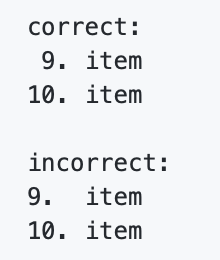
The position of the numbers in the Ordered list does not seem right. In a two digit number, the SECOND digit should align with the single digit - not the first.
correct:
 9. item
10. item

incorrect:
9.  item
10. item
What package(s) are you using?
- [x ]
carbon-components - [x ]
carbon-components-react
What browser are you working in?
Chrome, FF, Safari, Edge
What version of the Carbon Design System are you using?
"carbon-components": "10.10.3",
"carbon-components-react": "7.10.3",
What offering/product do you work on? Any pressing ship or release dates we
should be aware of?
KC - IBMDocs
https://react.carbondesignsystem.com/?path=/story/orderedlist--default

 Daynssjal
All 8 comments
I believe this is an intentional design decision, cc @carbon-design-system/design
 tw15egan
on 10 Dec 2020
tw15egan
on 10 Dec 2020
This bug title should read: vertical alignment of decimal (dot) in numbered list.
It can't be intentional. If it is, I would like to see an audit explaining why left alignment of numbers and decimal makes any sense. Perhaps there is.. just don't know of any.
Google: numbered list alignment, and all you will see is how to make the decimal align vertically, in whatever tool, platform or programming languages. That is how our brain process vertical alignment quickly based on a fix element, and that fix element in numbered list is the decimal.
Same goes with multiple decimal in a number.
In ease of reading documentation this is pretty important.
This bug is filled by IBM Knowledge Center - the official product documentation.
 aiproulx
on 10 Dec 2020
aiproulx
on 10 Dec 2020
I think this was a mistake, these two are the same:

I think you meant to do this:
What you're calling a bug, was an intentional design decision to both left align the numbers in the list and then also left align the content that follows so it specifically does not jog like it does in your "correct" example. @mjabbink I believe tabbing like this is a very common, long-standing convention in print to ensure ease of scanability.
Right-aligning numbers and left-aligning the content after them is not something you'd ever see in editorial design, so I think the medium may be the distinction here. Not sure why a jog in alignment would help with legibility in any medium though... is it a "best practice" because it's common due to technical contraints with code? Or is it a best practice because it somehow helps with legibility in a way that I'm not familiar with?
 jeanservaas
on 10 Dec 2020
jeanservaas
on 10 Dec 2020
Oops I just went into the original comment and fixed his example. Markdown processed it to look the same. So now it should show correctly to @Daynssjal intent.
 aagonzales
on 10 Dec 2020
aagonzales
on 10 Dec 2020
@aagonzales thank you, now it looks exactly how I wanted it :)
Daynssjal
on 10 Dec 2020
@jeanservaas
I fail to understand your response.
aiproulx
on 10 Dec 2020
OK, sorry, I'm not sure I understand your issue either.
jeanservaas
on 10 Dec 2020
Hi @jeanservaas. Thank you for your answer. The markdown processed my example badly, but luckily Anna corrected it to my intent. So this is what my correct example was supposed to be:
   9. item
  10. item
 122. item
1222. item
The vertical alignment of the text is okay as it is in Carbon right now, the text should definitely not jog.
The problem seems to be with the numbers. What if the ordered list has numbers which are even larger than 2 digits? The spacing between the single digit number and the content would be very wide:
9.     item
10.    item
122.   item
1222.  item
12222. item
The decimal point, when vertically aligned, looks much better and consistent:
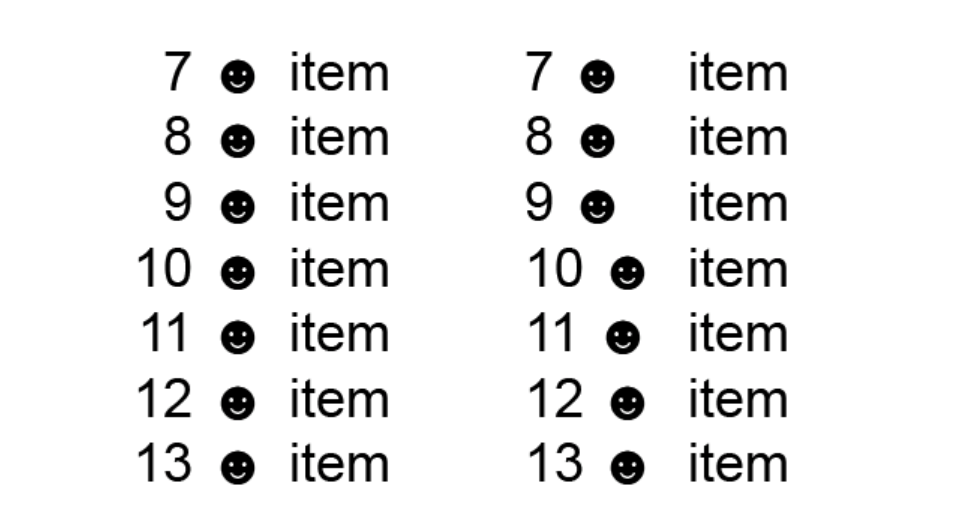
In the mozilla developer documentation for the ordered list for example, the html builds the list with right-aligned numbers:
https://developer.mozilla.org/en-US/docs/Web/HTML/Element/ol
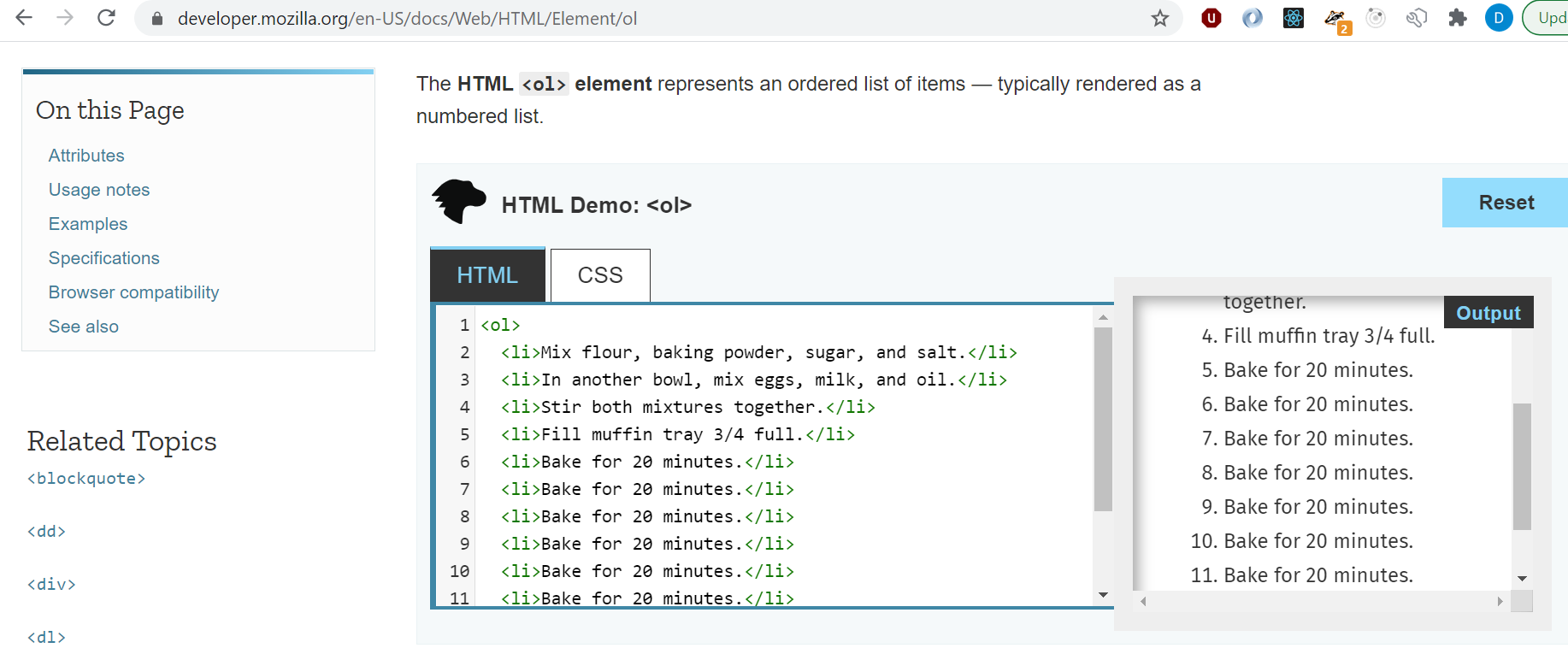
Does this shed more light into what we mean by this issue? Thank you
Daynssjal
on 11 Dec 2020
Related issues
 laurenmrice
·
3Comments
laurenmrice
·
3Comments
 AnthumChris
·
3Comments
AnthumChris
·
3Comments
 carmacleod
·
3Comments
carmacleod
·
3Comments
 ajdaniel
·
3Comments
ajdaniel
·
3Comments
 joshblack
·
3Comments
joshblack
·
3Comments