Carbon: Inline dropdown does not change color when light prop is set to true
What package(s) are you using?
- [x]
carbon-components - [x]
carbon-components-react
Detailed description
Describe in detail the issue you're having.
When using the inline variant of the Dropdown component, the light prop does not change the color of the dropdown.
Is this issue related to a specific component?
Dropdown.
What did you expect to happen? What happened instead? What would you like to
see changed?
I expect that when I add the light prop to the component, the dropdown will change color ($ui-02 background in my use case)
What browser are you working in?
Chrome
What version of the Carbon Design System are you using?
carbon-components: 10.20.0
carbon-components-react: 7.20.0
What offering/product do you work on? Any pressing ship or release dates we
should be aware of?
Watson Assistant
Steps to reproduce the issue
- Create or find an exiting dropdown component
- Add prop
type="inline" - See the default color of dropdown for theme being used
- Add
lightprop to dropdown - See that color of dropdown doesn't change
https://codesandbox.io/s/wizardly-kare-46bgo?fontsize=14&hidenavigation=1&theme=dark
Additional information
light=false


light=true


 lucasmccomb
All 10 comments
I _believe_ the inline variant, when light is enabled, just has a transparent background. It doesn't actually set the background to f4f4f4. If the background was gray10 then, the background of the inline dropdown should match.
https://codesandbox.io/s/nice-stallman-mjwnm?file=/src/index.js
So this seems to be working as expected based on https://github.com/carbon-design-system/carbon/pull/5322
Going to close this as light prop isn't needed/supported for the inline variant. Hope this helps!
 tw15egan
on 6 Oct 2020
tw15egan
on 6 Oct 2020
@tw15egan why doesn't this dropdown function as any other input provided by Carbon in respect to the light prop being passed? We are using a a them where passing the light prop to this should turn the background $ui-02, which works with every other component that accepts a light prop.
lucasmccomb
on 6 Oct 2020
Going to close this as light prop isn't needed/supported for the inline variant. Hope this helps!
Why is this the case?
lucasmccomb
on 6 Oct 2020
After looking at https://github.com/carbon-design-system/carbon/pull/5322, it seems the solution to the original issue was an oversimplification. For our specific use-case, we do not want a transparent background. We need the light prop to toggle the f4f4f4 background, not to make it transparent.
lucasmccomb
on 6 Oct 2020
Do you have any examples of the flow you are trying to create? The inline dropdown is not meant to be contrasted with the background it is on.
The inline dropdown should always have the same background as the container it is placed on, so the light prop is not needed.
From our designers:
https://github.com/carbon-design-system/carbon/pull/5322#issuecomment-586342816
asudoh It's still wrong. Inline dropdown shouldn't have a background color except on hover.It should be transparent and therefor will not need the light variant.
tw15egan
on 6 Oct 2020
This is what our design team wants to implement (please ignore the blue text):
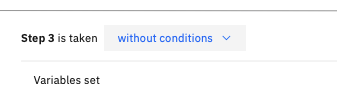
Why shouldn't the inline dropdown have color except on hover? Doesn't this create accessibility issues on white backgrounds?
lucasmccomb
on 6 Oct 2020
cc @carbon-design-system/design
tw15egan
on 6 Oct 2020
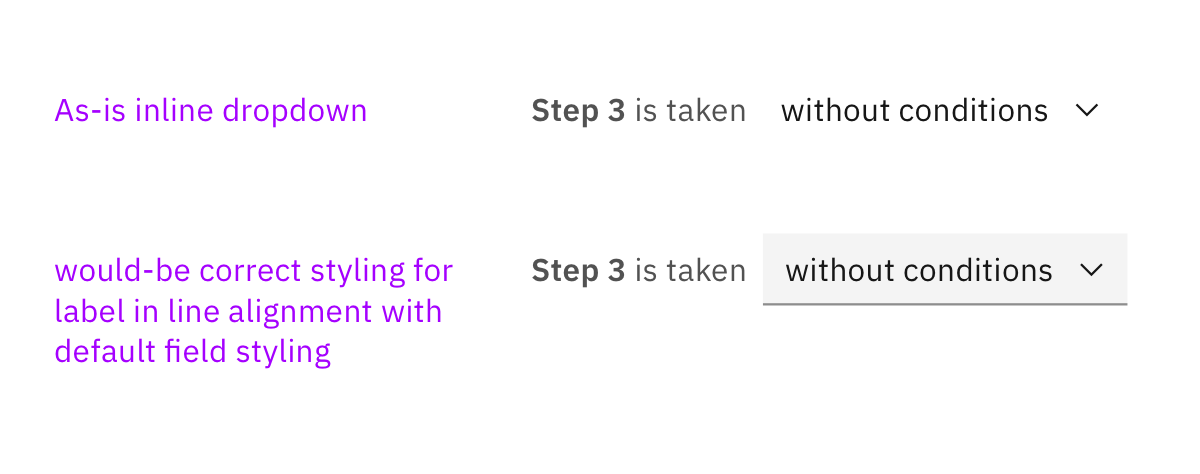
It sounds like we're conflating input styling and alignment. What I'm hearing you want @lucasm is the styling of the default dropdown but the alignment of the inline dropdown.
So that :point_up: is not just about using the light prop. light props are meant to use on the alternate backgrounds color. So this is a bit of a misuse of the light prop. The inline dropdown is meant to be transparent. Initially, we thought the background was a bit cumbersome for this type of alignment but if your team does want that style we could probably add it.
What you're asking for is almost a new variant. What you shared would be somewhat correct, it would need the proper field styling you can see in the attached image.
Follow up: can I ask why the team thinks the background of the dropdown is necessary in your scenario? Is it just a styling choice?
 aagonzales
on 6 Oct 2020
aagonzales
on 6 Oct 2020
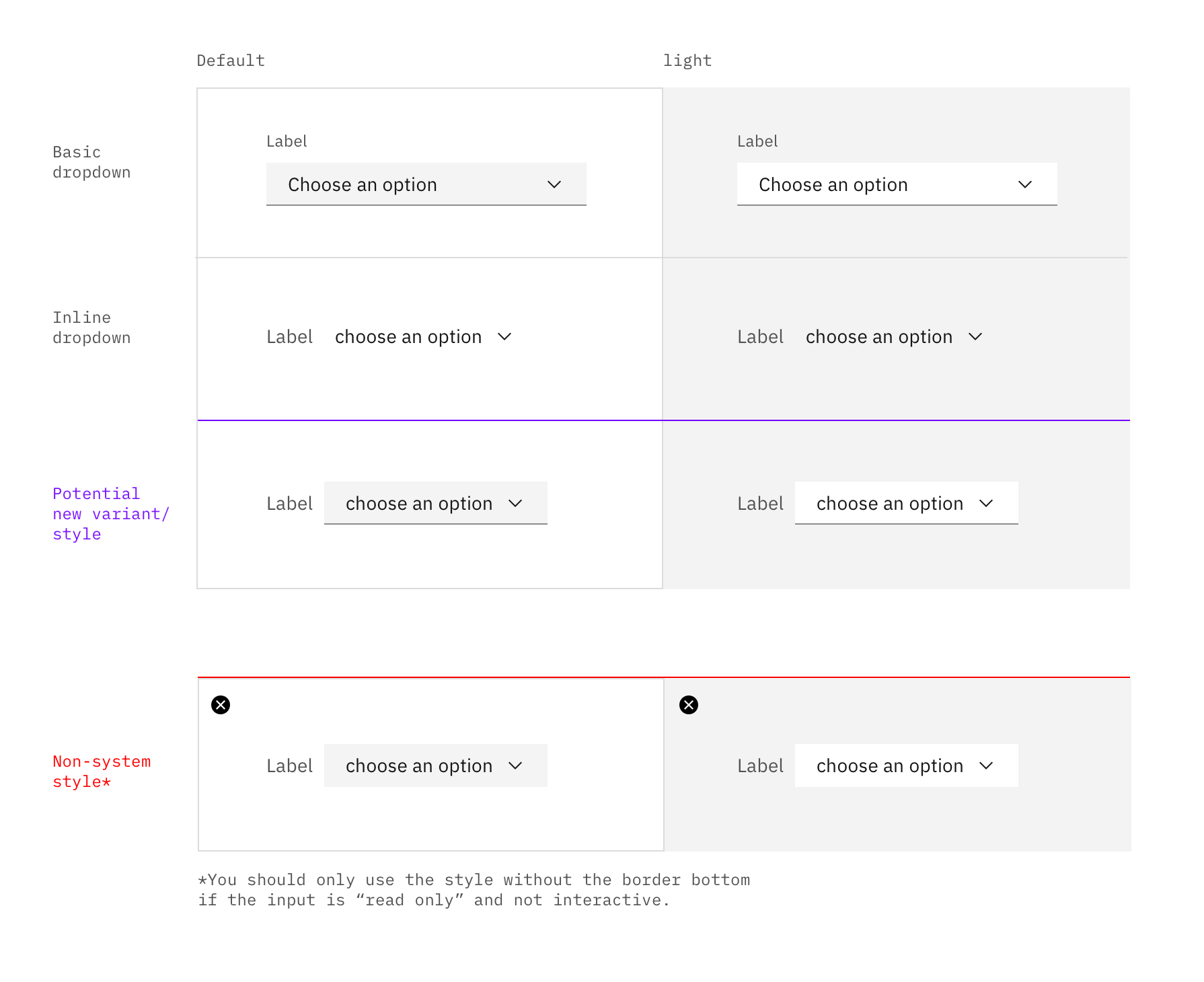
Approved spec
aagonzales
on 7 Oct 2020
🟢 Design has signed off on this variation📝
tw15egan
on 7 Oct 2020
Related issues
 AnthumChris
·
3Comments
AnthumChris
·
3Comments
 PatrickDuncan
·
3Comments
PatrickDuncan
·
3Comments
 JordanWSmith15
·
3Comments
JordanWSmith15
·
3Comments
 laurenmrice
·
3Comments
laurenmrice
·
3Comments
 jhpedemonte
·
3Comments
jhpedemonte
·
3Comments
Most helpful comment
🟢 Design has signed off on this variation📝