Carbon: Disabled number input (light mode) is the wrong background color
We have the number input set up properly in our environment but it is rendering incorrectly. We're using light settings but the background is showing up as white; causing it to be invisible. Matt Howard is our dev on this.
What package(s) are you using?
- [x]
carbon-components - [x]
carbon-components-react
Detailed description
Describe in detail the issue you're having.
It renders like this...

But in storybook, it looks like this...


Is this issue related to a specific component?
Yes, the Number stepper
What did you expect to happen? What happened instead? What would you like to
see changed?
What browser are you working in?
This is browser agnostic as it appears in all browsers this way.
What version of the Carbon Design System are you using?
current.
What offering/product do you work on? Any pressing ship or release dates we
should be aware of?
Modeler Flows for Watson Studio / Elyra canvas
Please create a reduced test case in CodeSandbox
Additional information
 quarryboy
All 9 comments
Which version of the components is this coming from? ~On the latest, I'm not seeing the bx--text-input--light:disabled selector anywhere...~

 tw15egan
on 27 Aug 2020
tw15egan
on 27 Aug 2020
I think he was comparing the differences with the disabled light text input
 emyarod
on 27 Aug 2020
emyarod
on 27 Aug 2020
Correct. The textinput has the disabled light selector. The numberinput control doesn't have this selector.
"carbon-components": "^10.14.0",
"carbon-components-react": "^7.14.0",
 matthoward366
on 27 Aug 2020
matthoward366
on 27 Aug 2020
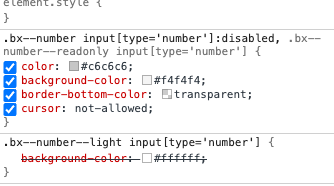
Gotcha. Seems like we are explicitly setting a background that takes precedence over the light background, so I'd make sure that your number input matches this selector:
tw15egan
on 27 Aug 2020
This is coming directly from https://react.carbondesignsystem.com/?path=/story/numberinput--default. This seems to be coming from the carbon styling.

matthoward366
on 27 Aug 2020
I think there needs to be a light variant for disabled on the number control.
matthoward366
on 27 Aug 2020
Gotcha, so the issue is that the light disabled styles are identical to the non-light disabled styles. I originally thought that you were _getting_ this but expecting the normal disabled background.

tw15egan
on 27 Aug 2020
That's correct.
matthoward366
on 27 Aug 2020
it looks like the labels and helper text also are not receiving disabled styles so I can make that change
emyarod
on 27 Aug 2020
Related issues
 snidersd
·
3Comments
snidersd
·
3Comments
 drewdistefano
·
3Comments
drewdistefano
·
3Comments
 laurenmrice
·
3Comments
emyarod
·
3Comments
laurenmrice
·
3Comments
emyarod
·
3Comments
 AnthumChris
·
3Comments
AnthumChris
·
3Comments
Most helpful comment
it looks like the labels and helper text also are not receiving disabled styles so I can make that change