Carbon: Zebra styles broken on Data Table component
Zebra styles aren't working on specific types of the data table component; with batch expansion, with dynamic content, with expansion.
What package(s) are you using?
- [ ]
carbon-components - [x]
carbon-components-react
Detailed description
When selecting zebra styles on the above listed data table types, the background to every row becomes white.
Is this issue related to a specific component?
Data Table
What browser are you working in?
Chrome
What version of the Carbon Design System are you using?
10.7.4
Step 1: Select either "with batch expansion", or "with dynamic content" or "with expansion"
Step 2: Under Knobs, select "with zebra styles"
You'll see the rows aren't acting as intended, please let me know if you guys need any more info
 andysherman2121
All 4 comments
Hi there @andysherman2121! 👋 Could you help us out by filling out the issue template with a link to a codesandbox and steps to reproduce?
 joshblack
on 14 Apr 2020
joshblack
on 14 Apr 2020
Hey @joshblack Sure, will do!
I added the steps to reproduce in the initial comment, let me know if you need any more info
andysherman2121
on 14 Apr 2020
 emyarod
on 14 Apr 2020
emyarod
on 14 Apr 2020
Reopening issue due to continued issues in production. Storybook seems to be showing correct zebra styles but for some reason breaks when using the component. It may be how storybook book shows the component(my fix was based on how it looked in storybook) vs how it actually renders in production.
Production:
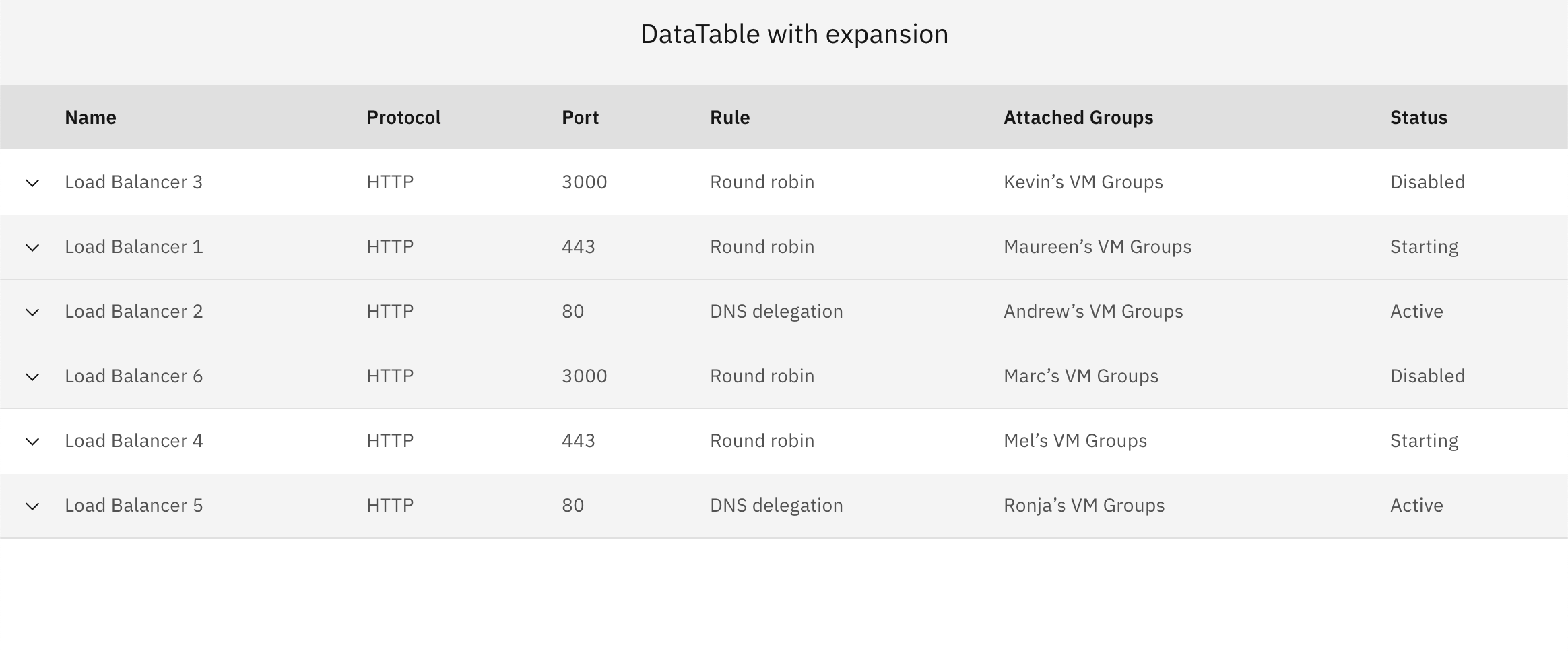
I think the component itself needs a larger refactor.
 aledavila
on 17 Nov 2020
aledavila
on 17 Nov 2020
Related issues
 antonmc
·
3Comments
emyarod
·
3Comments
antonmc
·
3Comments
emyarod
·
3Comments
 jendowns
·
3Comments
jendowns
·
3Comments
 ajdaniel
·
3Comments
ajdaniel
·
3Comments
 laurenmrice
·
3Comments
laurenmrice
·
3Comments