Carbon: Tooltip positioning problem, when starting offscreen
- [ ]
carbon-components - [x]
carbon-components-react
Detailed description
Using the top positioning is incorrect if you toggle the open attribute using another means other than clicking on the component. For example, if you toggle it with Show / Hide buttons similar to how it's done in the
It should position it immediately next to the triggerText, but it positions it far below it, off the screen.
Firefox 72.0.2 and others
"carbon-components": "10.9.1",
"carbon-components-react": "7.9.3",
Steps to reproduce the issue
1) Open code sand box
2) Scroll down to buttons
3) Click show
4) scroll down more to see the tooltip
https://codesandbox.io/s/dazzling-mountain-98i0z
 techtenk
All 5 comments
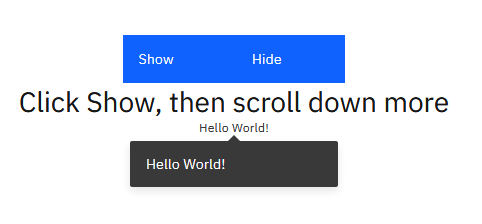
I'm not able to reproduce the issue following those steps, this is what appears after the final step:
 emyarod
on 19 Feb 2020
emyarod
on 19 Feb 2020
@emyarod What browser / version are you using? This reproduces every time for me
techtenk
on 21 Feb 2020
Make sure you scroll the browser window first before clicking the "Show" button. If your resolution is large enough that you can still see the Show button and click it without scrolling first, then it will position it correctly. Increase the spacing div height in that case to force you to scroll before clicking
techtenk
on 21 Feb 2020
If your resolution is large enough
this was likely why I was not seeing it. maybe in Code Sandbox we should unset the height in .mainDiv and set the .bufferDiv height to something like 100vh to reproduce the issue more consistently
emyarod
on 21 Feb 2020
can do
techtenk
on 21 Feb 2020
Related issues
 laurenmrice
·
3Comments
laurenmrice
·
3Comments
 PatrickDuncan
·
3Comments
PatrickDuncan
·
3Comments
 mouadcherkaoui
·
3Comments
mouadcherkaoui
·
3Comments
 joshblack
·
3Comments
joshblack
·
3Comments
 kalyanixraut
·
3Comments
kalyanixraut
·
3Comments