Carbon: Add left/right direction to tooltipIcon
Summary
I would like to have an option left/right added for TooltipIcon
Justification
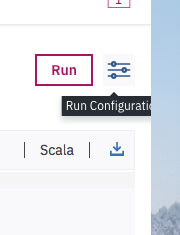
I have a problem with TooltipIcon as it’s getting cut by the window. I could solve it by moving tooltip to the left but supported direction are only top and bottom. Regular tooltips support left/right.
 filipmadej
All 11 comments
@IBM/carbon-designers I believe we had a conscious decision to make it top/bottom only, but please let us know if I’m wrong here - Thanks!
 asudoh
on 13 Sep 2018
asudoh
on 13 Sep 2018
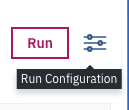
If that's the case then can we add some logic to move tooltip to viewable area like so:
filipmadej
on 13 Sep 2018
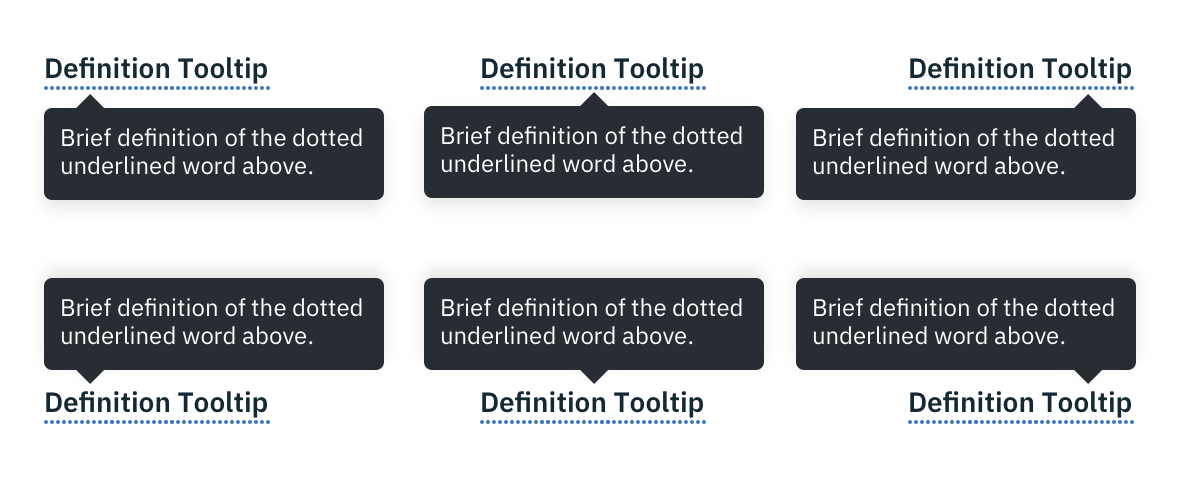
Yes, only top and bottom because opening left or right could cover up associated information. However, moving the sharkfin to the left or right side is acceptable. All of the below are correct. With the icon-tooltip it should be 8px from either edge.
 aagonzales
on 18 Sep 2018
aagonzales
on 18 Sep 2018
@filipmadej Given the suggestion from @aagonzales, we'll monitor how many people would like this feature. Meanwhile, you may want to try something like applying right:0 to bx--tooltip--definition__bottom and left: auto/margin-right: 0.5rem to .bx--tooltip__caret.
However, @aagonzales' above words seems to imply that definition tooltip for explaining words, which may conflict the icon usage shown by @filipmadej.
asudoh
on 19 Sep 2018
@asudoh You've provided solution for definitiontooltip, not TooltipIcon
 filipmadejIBM
on 19 Sep 2018
filipmadejIBM
on 19 Sep 2018
@filipmadej OK we thought it's definition tooltip given your screenshot. Anyhow icon-based tooltip has a different story - <Tooltip> has menuOffset prop, which takes an object with top/left properties or a function returning that object. You can adjust the position by that. You can adjust the position of caret by CSS. Hope it helps!
asudoh
on 20 Sep 2018
I think the rule would apply to all 3 kinds of tooltips.
aagonzales
on 20 Sep 2018
@asudoh looking at the code of <TooltipIcon> I don't see menuOffset prop. Is someone working on adding such a prop to tooltip icon? Because I don't see how you answer might help in my situation if prop doesn't exists.
filipmadej
on 11 Oct 2018
<TooltipIcon> takes a route of style adjustment. You can do it youself by editing the style in DOM inspector. Below is something you may end up with:
.your--tooltip-icon__bottom.bx--tooltip--icon__bottom:after {
  transform: translate(0%, calc(100% + 10px));
  margin-left: 0;
  right: 0;
}
We've marked this issue as stale because there hasn't been any activity for a couple of weeks. If there's no further activity on this issue in the next three days then we'll close it. Thanks for your contributions.
![stale[bot] picture](https://avatars3.githubusercontent.com/in/1724?v=4&s=40) stale[bot]
on 1 May 2019
stale[bot]
on 1 May 2019
Hi there! :wave: If you're wondering why this issue was moved, we're currently updating our repo structure so that every package is found in the same project.
This should not have any impact for you, but we wanted to give you a heads up in case you were wondering what is going on. If you have any questions, feel free to reach out to us on Slack or contact us at: [email protected]. Thanks!
 carbon-bot
on 9 May 2019
carbon-bot
on 9 May 2019
Related issues
 carmacleod
·
3Comments
carmacleod
·
3Comments
 ahoyahoy
·
3Comments
ahoyahoy
·
3Comments
 xrissot-ibm
·
3Comments
xrissot-ibm
·
3Comments
 ajdaniel
·
3Comments
ajdaniel
·
3Comments
 drewdistefano
·
3Comments
drewdistefano
·
3Comments
Most helpful comment
Yes, only top and bottom because opening left or right could cover up associated information. However, moving the sharkfin to the left or right side is acceptable. All of the below are correct. With the icon-tooltip it should be 8px from either edge.