Carbon: DropdownV2 - itemToElement not taken into account when selectedItem is used
I would like to have icon next to selected dropdown option and next to list options.
DropdownV2 has itemToElement prop to allow this:

Unfortunately this prop is not taken into account for selected dropdown item (selectedItem prop), itemToString is used there:
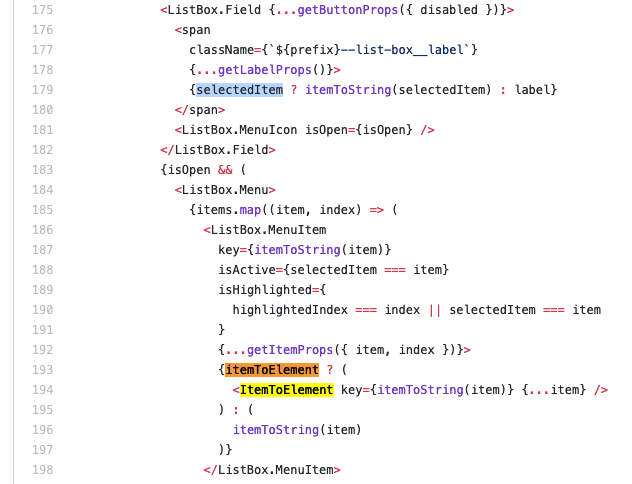 .
.
Result looks like below, there is a missing icon next to selected value (itemToString using only label value):
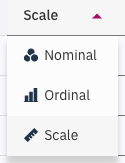
Currently this is blocking issue for SPSS Statistics, so I'm asking for quick fix.
 tomkdgun
All 11 comments
@joshblack Example in sandbox https://5zxm9yp4nx.codesandbox.io/
I've used just paths instead of icons
tomkdgun
on 25 Mar 2019
Hi! I have kind of the same issue, I need a label next to the selectedItem as well as for the displayed ItemToElement list.
I solved this issue creating this function:
const itemToElement = ({ text, label }) => (
  <h5>
    { text }
    <Label className="dropdown-label">
      { label }
    </Label>
  </h5>
)
And using the Dropdown like this:
      <Dropdown
        initialSelectedItem={items[0]}
        label={itemToElement(items[0])}
        tabIndex={-1}
        ariaLabel="dropdown menu label"
        items={items}
        itemToString={itemToElement}
        itemToElement={itemToElement}
      />
Basically I'm using the same function in itemToString and itemToElement but I'm getting the following warning in React:
Warning: Encountered two children with the same key, '[object Object]'. Keys should be unique so that components maintain their identity across updates.
Which I guess make sense due to the way the list is being mapped ?:
<ListBox.Menu>
                  {items.map((item, index) => (
                    <ListBox.MenuItem
                      key={itemToString(item)}
                      isActive={selectedItem === item}
                      isHighlighted={
                        highlightedIndex === index || selectedItem === item
                      }
                      {...getItemProps({ item, index })}>
                      {itemToElement ? (
                        <ItemToElement key={itemToString(item)} {...item} />
                      ) : (
                        itemToString(item)
                      )}
                    </ListBox.MenuItem>
                  ))}
</ListBox.Menu>
Is there a propper way of solving this?
Thank you very much!
 ferdelamad
on 15 Apr 2019
ferdelamad
on 15 Apr 2019
Seems like a bug in the library: <ListBox.MenuItem /> requires a key because it's in a list with sibling elements being returned from items.map. The child of each <ListBox.MenuItem /> does not require a key though, because it has no siblings – I think that's the cause of the "duplicate key" warning.
Using <DropdownV2 /> works for me (but haven't tried when implementing itemToString)
 exactchange
on 16 Apr 2019
exactchange
on 16 Apr 2019
We've marked this issue as stale because there hasn't been any activity for a couple of weeks. If there's no further activity on this issue in the next three days then we'll close it. Thanks for your contributions.
![stale[bot] picture](https://avatars3.githubusercontent.com/in/1724?v=4&s=40) stale[bot]
on 2 May 2019
stale[bot]
on 2 May 2019
Hi there! :wave: If you're wondering why this issue was moved, we're currently updating our repo structure so that every package is found in the same project.
This should not have any impact for you, but we wanted to give you a heads up in case you were wondering what is going on. If you have any questions, feel free to reach out to us on Slack or contact us at: [email protected]. Thanks!
 carbon-bot
on 9 May 2019
carbon-bot
on 9 May 2019
Hi, just wondering if you are still working on a fix for this or looking for some outside help now. I could open a PR with a fix I've found, so let me know if you'd be happy with that.
 sanduteo95
on 7 Feb 2020
sanduteo95
on 7 Feb 2020
@sanduteo95 Would welcome a PR to fix this if you've got a solution ready 🙏
 tw15egan
on 7 Feb 2020
tw15egan
on 7 Feb 2020
By chance I found that someone else had attempted a similar fix to mine and then reverted their changes: https://github.com/carbon-design-system/carbon/pull/5023. From the comment linked in that PR it sounds like it might not be a good idea to allow custom components as the dropdown label, so I'll put off opening a PR for now.
sanduteo95
on 11 Feb 2020
@joshblack based on the revert of #5023 , is this something we will not support?
tw15egan
on 11 Feb 2020
@tw15egan I think we'd have to pass on it but definitely not 100% sure. When talking to Jen, I think two things came up:
- Controlling color contrast on the field
- Controlling what is announced for the value on a field
It seemed like we wanted to limit what is displayed in the field to our design specs, but if there is a good use-case for otherwise I would get it. For the value, I think it was important that it serialized into something readable which could be addressed by this?
Overall, it seemed worth it at the time to restrict usage of this to help steer folks in a clear direction. Let me know if what I shared above is missing something though, or misinformed 👍
 joshblack
on 11 Feb 2020
joshblack
on 11 Feb 2020
That makes sense, going to close this out then as it does not seem like something we are going to take on / enforce.
tw15egan
on 11 Feb 2020
Related issues
joshblack
·
3Comments
 skaparelos1
·
3Comments
skaparelos1
·
3Comments
 ahoyahoy
·
3Comments
ahoyahoy
·
3Comments
 snidersd
·
3Comments
snidersd
·
3Comments
 AnthumChris
·
3Comments
AnthumChris
·
3Comments
Most helpful comment
Hi! I have kind of the same issue, I need a label next to the
selectedItemas well as for the displayedItemToElementlist.I solved this issue creating this function:
And using the
Dropdownlike this:Basically I'm using the same function in
itemToStringanditemToElementbut I'm getting the following warning in React:Warning: Encountered two children with the same key, '[object Object]'. Keys should be unique so that components maintain their identity across updates.Which I guess make sense due to the way the list is being mapped ?:
Is there a propper way of solving this?
Thank you very much!