Carbon: [Button] Add 40px height option aka "field button"
Need to decide if we want 40px form field and button option, or 48px.
- [x] Make decision
- [x] Make specs for dev to implement
- [x] Implement 🤖
- [x] Update kits with new designs

 laurenmrice
All 5 comments
Add field button
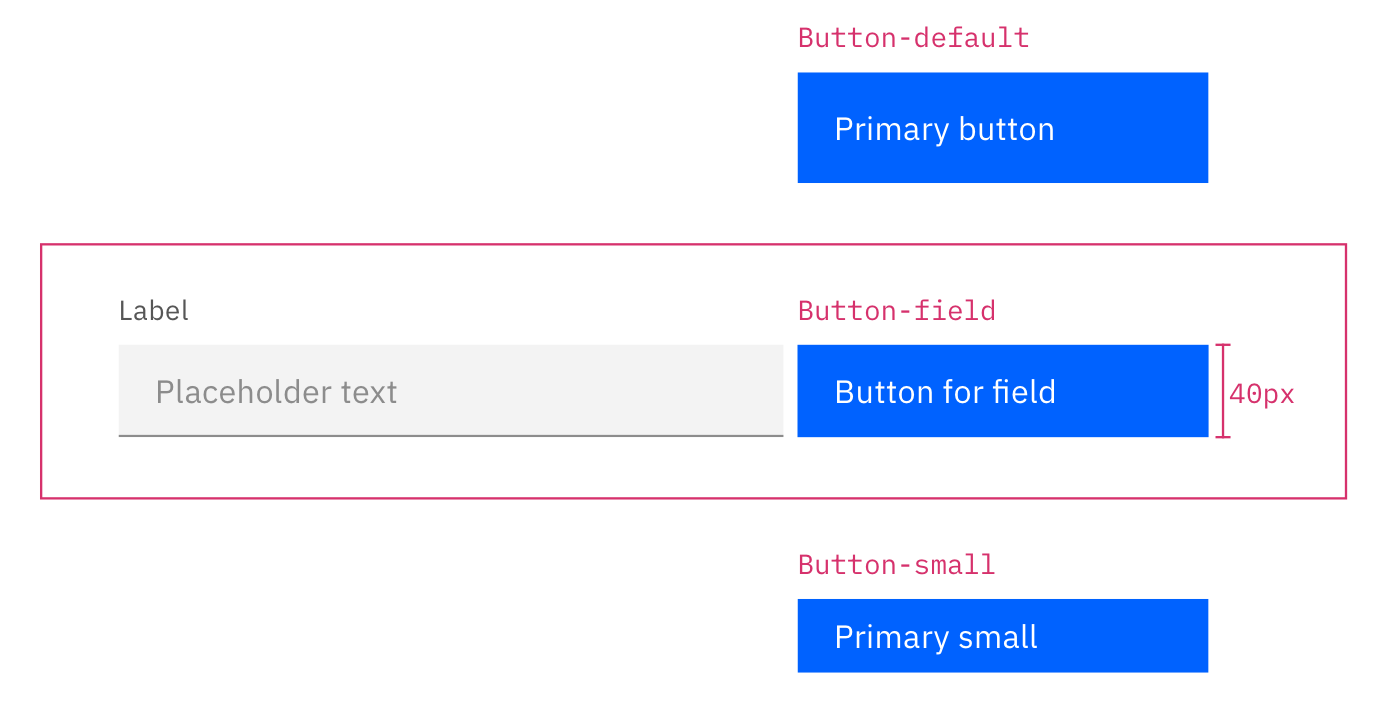
Adding 40px option for buttons so it may match our fields height! Here's the spec. Ready for dev.
 shixiedesign
on 10 May 2019
shixiedesign
on 10 May 2019
If the different variations of inputs are horizontally next to eachother (ex: no label, labels, helper text, helper text+ label) We would align the fields and buttons.

laurenmrice
on 14 May 2019
📖 Guidance to add
@connor-leech
If the different variations of inputs are horizontally next to eachother (ex: no label, labels, helper text, helper text+ label) We would align the fields and buttons.
shixiedesign
on 15 May 2019
thanks @laurenmrice !
@laurenmrice & @shixiedesign can we verify what happens when error text is present in such a state? if we have dynamic measurements for both the text above and below the input fields, that might be pretty tricky to implement… but we can definitely dig into (and hopefully solve) the feasibility of this if we can check against a spec!
also, just thought to myself: will we suggest wrapping-to-next-line on these elements by giving them a default minimum width? (this is something that could be left up to the product team implementing to solve when implementing them on a page, but if some kind of default is sensible and not too technically restrictive, we could look at that)
 lovemecomputer
on 16 May 2019
lovemecomputer
on 16 May 2019
@lovemecomputer error messages goes under the inputs, so it shouldn't affect the buttons aligned to the field, and only push down the next set of field+button as a group.
will we suggest wrapping-to-next-line on these elements by giving them a default minimum width?
At the moment, we are not technically offering a field+button as a component, so how product teams want to align/stack/arrange elements is completely up to them (we also don't have the context to restrict behaviors I think). For this issue at least, we just need to add a set of buttons with 40px height. How it positions next to input fields are guidelines to add, and no implementation needed! Lemme know if this make sense.
shixiedesign
on 16 May 2019
Related issues
laurenmrice
·
3Comments
 kalyanixraut
·
3Comments
kalyanixraut
·
3Comments
 joshblack
·
3Comments
joshblack
·
3Comments
 jendowns
·
3Comments
jendowns
·
3Comments
 drewdistefano
·
3Comments
drewdistefano
·
3Comments
Most helpful comment
Add field button
Adding 40px option for buttons so it may match our fields height! Here's the spec. Ready for dev.