Carbon: Carbon Radio Button Selection not visible in Windows High Contrast Mode
- Find a Windows machine, or use a Windows VM
- Open either IE, Edge, or Firefox (Chrome does not show the problem because it does not honor Windows high contrast mode... instead it relies on 3rd party extensions to do high contrast).
- Go to the Carbon Radio Button page.
- Type
left Alt + left Shift + PrintScreen(then Yes) to turn on Windows high contrast mode - Select one of the radio buttons.
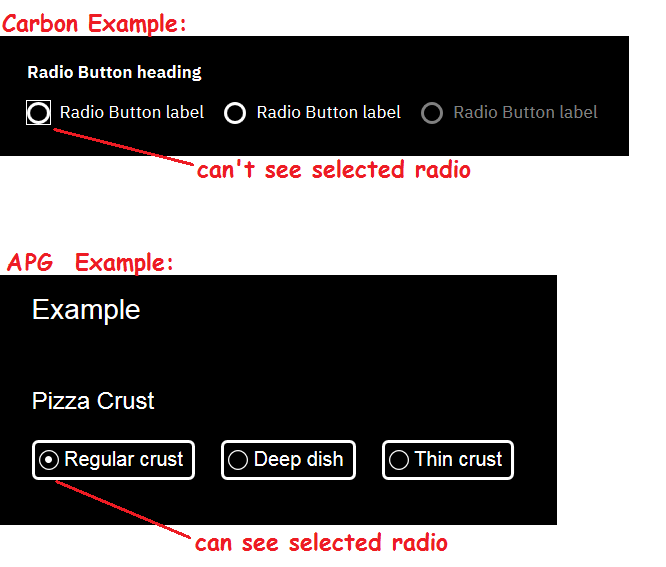
- You can't see the blue dot, so there's no way to know that the radio is selected.
(This is probably because background colors and background images are ignored in high contrast mode)
Note that the example radio buttons in the ARIA Practices Guide work correctly in Windows High Contrast mode.
Notes:
- For more about why Windows High Contrast mode is important, this slack conversation might be helpful.
 carmacleod
All 4 comments
We've marked this issue as stale because there hasn't been any activity for a couple of weeks. If there's no further activity on this issue in the next three days then we'll close it. Thanks for your contributions.
![stale[bot] picture](https://avatars3.githubusercontent.com/in/1724?v=4&s=40) stale[bot]
on 2 May 2019
stale[bot]
on 2 May 2019
Still a problem.
Note point 2 in initial comment: IE, Edge, or Firefox. Not Chrome.
carmacleod
on 2 May 2019
Yep! We've addressed this upstream in the elements repo and are waiting on those fixes to get utilized in the core repos.
You can track that work here
https://github.com/carbon-design-system/carbon-components/issues/2104
 dakahn
on 4 May 2019
dakahn
on 4 May 2019
@dakahn is the radio button an icon in this case? Seems like it's implemented in CSS and will need a fix in there, as a result.
 joshblack
on 2 Jul 2019
joshblack
on 2 Jul 2019
Related issues
carmacleod
·
3Comments
 jhpedemonte
·
3Comments
jhpedemonte
·
3Comments
 snidersd
·
3Comments
snidersd
·
3Comments
 jendowns
·
3Comments
jendowns
·
3Comments
 JordanWSmith15
·
3Comments
JordanWSmith15
·
3Comments