Carbon: [Data table] Header should be sticky
Use this template if you want to request a new feature, or a change to an existing feature.
If you are reporting a bug or problem, please use the bug template instead.
Summary
The head of the data table should be 'sticky' and only the table body will be scrolled so when user looks at the data, they can reference the column name quickly without back-and-forth scrolling.
Another problem with it is if tbody ends up being very tall, user can not see the horizontal scroll bar as the visual cue which indicates there are more columns to the right. (see below)

require review from both design and development
Justification
It's a pretty standard data table / grid behavior for the ease of use when number of rows cause the parent container to scroll.
Desired UX and success metrics
- it should be flexible - user should not need to be asked to defined the specific dimension.
- width of the columns should still be dynamic based on the content - just like the way it is right now
"Must have" functionality
same as the previous section
Specific timeline issues / requests
2019 Q1
Available extra resources
N/A
Extra
I raised this question on slack, was suggested to try out:
https://github.ibm.com/IBMDecisionOptimization/dd-carbon-addons-do and a demo here https://pages.github.ibm.com/IBMDecisionOptimization/dd-carbon-addons-do/packages/carbon-addons-do-react-grids/storybook/
Even though it has what I wanted - sticky table head, this add-on is not compatible with our analytics platform styles (ap styles) as the grid itself doesn't share the bx class names. Moreover, the significant API changes will require us more time on the migration.
 nelsonchen90
All 38 comments
cc @IBM/carbon-designers is this a pattern we want to support?
 joshblack
on 7 Jan 2019
joshblack
on 7 Jan 2019
I would like to see a fleshed out design of this before agreeing to the pattern.
 aagonzales
on 7 Jan 2019
aagonzales
on 7 Jan 2019
@aagonzales @joshblack This is a common required pattern in products in Unified Governance and Integration. This is a critical issue which we need support resolving ASAP. It is blocking progress and can impact our release.
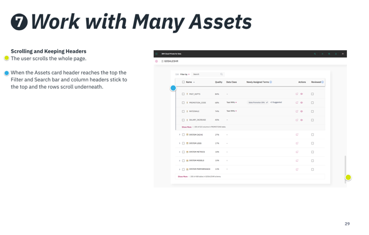
There are probably at least two variations required by our UX designs that achieve the same purpose, ( i.e. keep header and actions at top so that users don't have to remember the column names and can easily access actions). 1) the page scrolls but when header reaches top of browser viewport (benetah browser and app navigation chrome) then it stops scrolling and then only the rows in the table scroll, 2) in order to scroll rows in a table, the user sets focus on table content and can scroll the row independent of the page.
I'm attaching a few different examples for your reference.

 johnhbailey
on 7 Feb 2019
johnhbailey
on 7 Feb 2019
Is it only the column headers that will remain sticky or the whole top title area?
(just getting clarification on what the exact pattern is, having the header be sticky is a desired pattern we would like to add to the system, we just need some further details).
aagonzales
on 7 Feb 2019
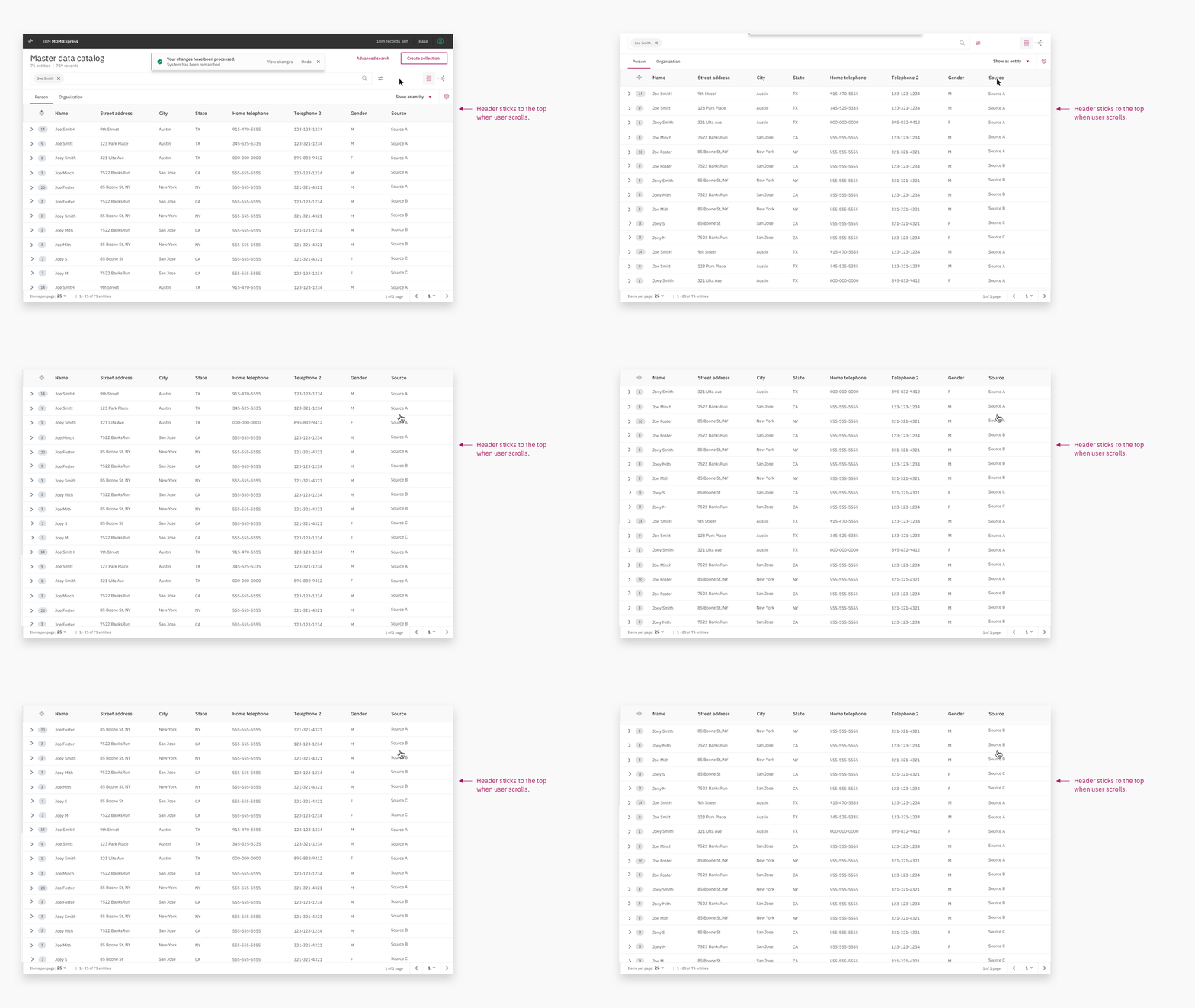

johnhbailey
on 12 Feb 2019
Above are two variations that should be supported. A third might be to scroll the headers and anchor at top where also an action bar is showing
johnhbailey
on 12 Feb 2019
Our project's requirement in this area is consistent with the second option (header sticks to the top). We would also add that the option to show vertical scrollbar is a required feature for our project.
The vertical scrollbar would have the behavior one is used to from most contexts (e.g., web browser page): thumb size is reflective of relationship between visible window height and total table row height. I bring this up because the preceding examples don't show a vertical scroll.
Side note: Once you talk about vertical scrolling you also need to talk about rendering performance. For example, many full-featured grids (such as dojo's gridx) also provide a "render on demand" as an option so that users don't have to wait for large numbers of off-screen rows to be rendered in the DOM before they can see content in the visible window. Yes, we know that pagination is another option. Happy to make a separate enhancement request for "render on demand", if you would prefer.
 rpenny125
on 12 Feb 2019
rpenny125
on 12 Feb 2019
Weighing in - While virtual scrolling is neat, IIUC we have chose a route of paging for now due to performance/complexity concerns around virtual scrolling. Also nice to look at how web platform evolves around this topic, like here.
I think it's good to separate "sticking header" topic and "virtual scrolling" topic.
 asudoh
on 13 Feb 2019
asudoh
on 13 Feb 2019
@johnhbailey @rpenny125 Thanks for the level of detail - it's already in process for vX, although the actual delivery timeframe is not yet nailed down.
If we weren't already doing this, this is where the open source development model shines - if a team has an immediate need they are advised to expend the resources necessary to extend or modify these components and submit them back, giving that team with the specific need control of their time lines and benefiting the broader Carbon community.
 chrisconnors-ibm
on 13 Feb 2019
chrisconnors-ibm
on 13 Feb 2019
Closing this as a dup of efforts already underway to transition Data Table to Carbon X.
https://github.com/IBM/carbon-components/issues/1303
chrisconnors-ibm
on 13 Feb 2019
After reviewing the work in progress on v10 this is additional functionality. In addition to the header behaviors above it appears the footer is also sticky to the bottom of the viewport - is that part of the requirement?
chrisconnors-ibm
on 25 Feb 2019
I couldn't find footer examples in https://github.com/IBM/carbon-components/issues/1246, so I can't be sure, since I don't know what's in the footers. If it's a paginator or other optional content that is intended to be in what would be recognized as a footer, it would make sense.
Our particular tables (for one specific product) have the paginator at the top, and the only thing at the bottom is a horizontal scroll (yes, it's best not to have horizontal scrolling of tables, but there is a variety of reasons why we have to support that). I don't think that counts as a footer... So, I don't have specific footer needs. but, if you have a footer, it makes sense to me for it to be sticky in the same way the header should be.
rpenny125
on 25 Feb 2019
Our footers do no currently stick to the bottom of the viewport. I can't think of any that do. When would they appear - as soon as the table (which would mean the header row) scrolls into the view?
Probably the most important thing is that as an open source development effort, _your development team_ is empowered to build this functionality according to your urgency and submit it back as a Pull Request. Is something blocking your team from doing this since January?
chrisconnors-ibm
on 25 Feb 2019
Ahh, I misunderstood what footers you were referring to. I thought you were talking about footers in your experimental implementation. Now I realize that you are talking about the examples provided by @johnhbailey .
I'll try to make my answer clearer in light of that:
- I can't use core carbon tables for my project until they add sticky columns (https://github.com/IBM/carbon-components/issues/1814), and resizable columns (https://github.com/IBM/carbon-components/issues/1815) which I understand will not be soon, so the rest of what I say is just opinion.
- I'm adding comments to this ticket because @johnhbailey did a nice job of describing requirements, and they seemed like a reasonable and consistent set of requirements. but my project needs are not associated with his needs
- I personally, for my products, don't have real table footers, but to the extent that the horizontal scroll bar is part of the table, I agree with @johnhbailey that it should be visible at all times, and not default hidden if the table height exceeds the height of the containing element.
rpenny125
on 25 Feb 2019
I personally don't think the footer needs to be sticky at the bottom of the viewport/ or containing element. the footer is used mostly for pagination and it can be visible after user finishing viewing the current page, so it doesn't have to be visible all the time.
having said that, I would think the new 'body-only-scroll' should enable applications to define its own footer behavior, might it be visible all the time or not.
I would also like to learn more about this 'sticky' footer design from @johnhbailey . and what's the thinking behind it.
nelsonchen90
on 25 Feb 2019
I might be misunderstanding exactly what you are trying to accomplish without seeing a design, but having the scrollbar visible at all times might be tricky since that is controlled by the browser. (for example chrome/mac it shows only when you hover over a scrollable area)
 alisonjoseph
on 25 Feb 2019
alisonjoseph
on 25 Feb 2019
I won't speak for @johnhbailey other than to point to the part of his request that applies to my specific needs:
He said (first item in this issue, Jan 3)):
Another problem with it is if `tbody` ends up being very tall, user can not see the horizontal scroll bar as the visual cue which indicates there are more columns to the right. (see below)
This is the counter example to your example. If (for whatever reason), your too-tall table ends up also being too wide, you shouldn't have to scroll to the bottom of the table to
- be aware that the table is wide
- be able to scroll to view the remainder of the already visible rows (in fact, without a sticky horizontal scroll, to see the rest of the first several rows, you'd have to scroll to the bottom, scroll to the right, and scroll back to the top)
If you believe that horizontal scrolling issues can be handled consistently and well outside of the table component itself, then the horizontal scroll problem doesn't have to be a problem solved by the table, but can be solved by the consumer of the table.
For the sticky column table requirements I have (https://github.com/IBM/carbon-components/issues/1814), handling of the horizontal scrolling is much better and more naturally handled by a sticky scrollbar managed by the table itself.
rpenny125
on 25 Feb 2019
@alisonjoseph: I am confused by your question, for a few reasons
- @johnhbailey already provided moving pictures in this issue, to illustrate his design request
- There are many table components that have solved this problem: gridx (dojo) and Prime Data table (https://www.primefaces.org/primereact/#/datatable/scroll) to name two
- where a scroll appears, and what it does, is in the control of the web developer, even if it means one has to do one or two "clever" things (like wrapping the html table in another DOM element that is part of the "table component").
rpenny125
on 25 Feb 2019
Sorry, didn't see the images for some reason when I was first linked to this issue.
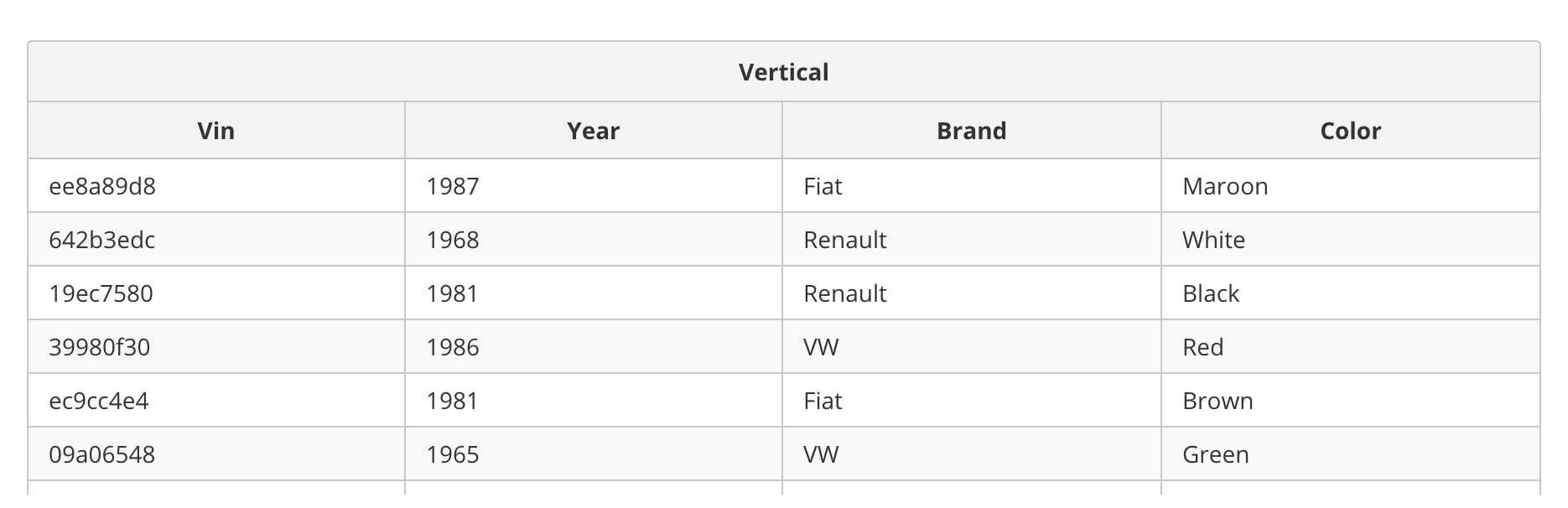
The example you linked only shows the scrollbar on hover in chrome. (I haven't seen the dojo tables) although there might be a way to force scrollbar visibility, I'd just be worried about browser consistency there. Just something to keep in mind. https://www.primefaces.org/primereact/#/datatable/scroll
alisonjoseph
on 25 Feb 2019
The example you linked only shows the scrollbar on hover in chrome.
When I talked about "visible by default" I meant "not scrolled off" (which was the point made by @johnhbailey, at least as I interpreted it) . I didn't focus on your hover visibility point. Yes I (if I could use carbon tables) would not be trying to control the hover visibility behavior necessarily, just the "not scrolled off" behavior (i.e., the stickiness of at least the horizontal scroll bar, which I had understood to be the question you had in your earlier post).
BTW, the focus on different aspects of horizontal scroll visibility explains why I was confused by your "controlled by the browser" comment.
rpenny125
on 25 Feb 2019
- I can't use core carbon tables for my project until they add sticky columns (#1814), and resizable columns (#1815) which I understand will not be soon
As an open source development effort, @rpenny125 _your development team_ is empowered to build this functionality according to your urgency and submit it back as a Pull Request. Is something blocking your team from doing this?
chrisconnors-ibm
on 25 Feb 2019
I'm a bit confused about what is being asked now. From what I had understood, this issue was to request a sticky header that would also work with horizontal scrolling and pagination (makes sense). There were a few variations that people have pointed out, and while sticky header is something we're working on, we do not have specs for all the variations that have been asked for here (referring to the first example https://github.com/IBM/carbon-components/issues/1587#issuecomment-462542341), which is why I think this issue was re-opened.
@rpenny125 Yes, there are definitely tables that have been able to implement sticky header with horizontal scroll but there are a lot of reasons as to why the way they implemented those would not work for us. One example would be https://www.primefaces.org/primereact/#/datatable/scroll. If you inspect the dom, you can see that these are not actually 1 table. They're 3 different tables styled to look like one. Changing our data table component in such a way would be a huge pain for users already building with Carbon, which is why we would love to implement this feature with as few markup changes as possible.
 jnm2377
on 26 Feb 2019
jnm2377
on 26 Feb 2019
I very much appreciate this discussion, but I feel like I need to emphasize again that my personal comments are just opinion in the short term, as I cannot use carbon tables at all until the sticky columns and column resize features are in (https://github.com/IBM/carbon-components/issues/1814, https://github.com/IBM/carbon-components/issues/1815).
As for trying to clear up what variations I care about, the "horizontal scroll bar not being scrolled off for tall tables" is the only variation I've mentioned as relating directly to this ticket, and I interpret that "variation" as having been included in the initial request.
I am not voting for the first example in the comment you mentioned (where the header first floats and only gets sticky when it hits the top of the container). My long-term need only goes as far as the second example, with the only part of a sticky footer I care about being the horizontal scroll.
As for the long term, we have done some experiments whereby sticky headers (and sticky columns) are done with css all in one table (not multiple tables), but I think that for sticky horizontal scroll (particularly in the sticky columns case) one might have to play some games with the DOM (though it doesn't have to be another table).
As for the multiple table solution in prime datatable, we have found that it interacts badly with screen readers such as JAWS, so we are not happy with it as far as accessibility is concerned.
gridx does the sticky columns and headers all in one table, as best I can tell (http://oria.github.io/gridx/demos/columnLock.html ) and, while I'd have to check, I think it worked well in accessibility testing with JAWS. However, gridx does funky things for the scrollbars, and other funky things for "even/odd" styling of rows.
rpenny125
on 26 Feb 2019
@johnhbailey @nelsonchen90 As an open source development effort, _your development team_ is empowered to build this functionality according to your urgency and submit it back as a Pull Request. Is something blocking your team from doing this?
chrisconnors-ibm
on 26 Feb 2019
We understand this. Unfortunately, we don't have the resources right now, but when we get back on track we will take a look at adding this ourselves.
Our first question, however, is:
We get the impression that this functionality is approved for the core table (modulo agreement on the footer/horizontal-scroll aspect), can you confirm?
When we get back on track with the rest of our project, we will review the contribution documentation,
rpenny125
on 26 Feb 2019
@chrisconnors-ibm
which functionality are you referring to? the whole issue or just the sticky footer from the sticky footer from https://github.com/IBM/carbon-components/issues/1587#issuecomment-462542341 ?
I thought the core carbon team is already working on the sticky header for carbonX, should we invest resource to work in parallel?
@johnhbailey
nelsonchen90
on 26 Feb 2019
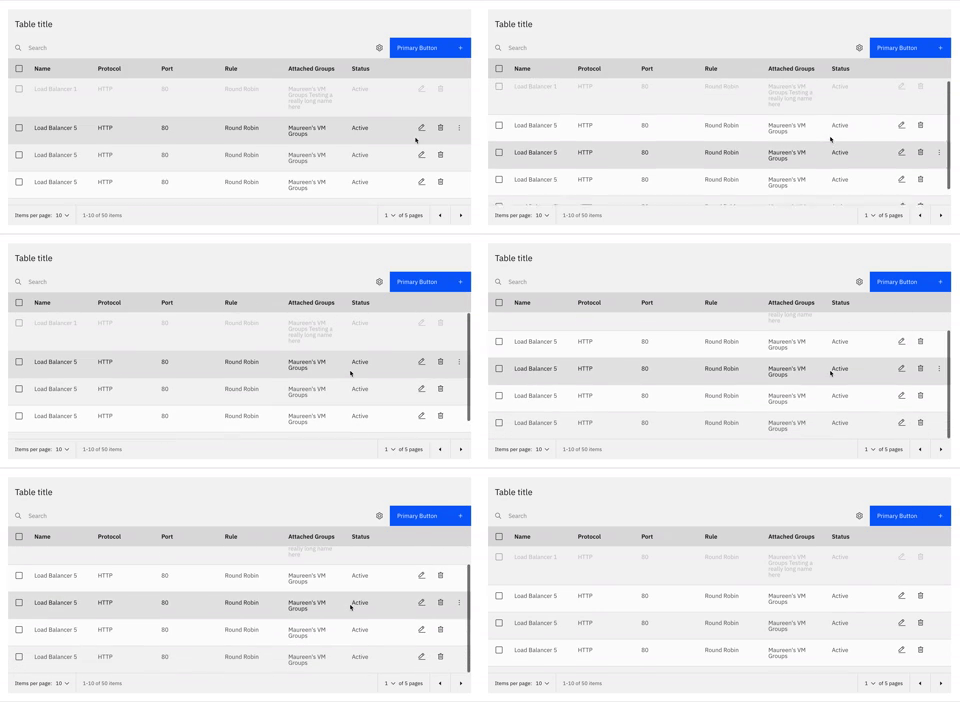
@nelsonchen90 @johnhbailey we are working on a version of sticky header. This is what it'll look like in v10. We don't have any intentions of including this in v9. Not sure if this is what you guys are needing, but if it's not, then we would welcome a PR.
jnm2377
on 26 Feb 2019
We've marked this issue as stale because there hasn't been any activity for a couple of weeks. If there's no further activity on this issue in the next three days then we'll close it. Thanks for your contributions.
![stale[bot] picture](https://avatars3.githubusercontent.com/in/1724?v=4&s=40) stale[bot]
on 1 May 2019
stale[bot]
on 1 May 2019
Ping @jnm2377 to double-check if we still have an interest in this in foreseeable future.
asudoh
on 2 May 2019
Yup we still want this.
aagonzales
on 2 May 2019
related issue for react: https://github.com/carbon-design-system/carbon-components-react/issues/1448
 lovemecomputer
on 9 May 2019
lovemecomputer
on 9 May 2019
Team, looks like <DataTable.TableBody> has className property which (in theory) can be used to add custom CSS class defining how the TableBody should scroll. But, adding such class doesn't do anything.. and wrapping <DataTable.TableBody> in <div> tag does the job but now Table headers are all out of place and not aligned w the table body.
I feel like it would be nice if we can let products/users use the className to define the scroll behavior of the DataTable, thoughts?
 rraavi
on 16 May 2019
rraavi
on 16 May 2019
@rraavi as you can see from your experimentation, getting this behavior done well can be tricky! we're working on an update to offer sticky header as a pre-solved solution for you :)
lovemecomputer
on 16 May 2019
@rraavi to your point tho, i'll comment back here once a PR is up for review so you can check our solution. happy to hear your thoughts!
lovemecomputer
on 16 May 2019
@jnm2377 when this sticky header with table body scroll will be available in V10 ?
 veerabhadraswamy
on 20 May 2019
veerabhadraswamy
on 20 May 2019
@veerabhadraswamy We are doing monthly-ish release cycle at this moment, and seeing which milestone we can make sticky feature in. Stay tuned.
asudoh
on 21 May 2019
FYI,
this topic has a lot of in-depth discussion with potential implications of future work, so for this milestone i created a new issue (https://github.com/carbon-design-system/carbon/issues/2862) where we're tracking our work for this milestone which ends in a few days!
i pulled out the salient points for our immediate work, and this discussion has been marked as "deferred" in the current milestone. that way we can keep track of the discussion in future milestones 😇
lovemecomputer
on 28 May 2019
Closing as it seems like the upstream https://github.com/carbon-design-system/carbon/issues/2862 has closed. Let me know if this is a mistake!
joshblack
on 6 Dec 2019
Related issues
 emyarod
·
3Comments
emyarod
·
3Comments
 snidersd
·
3Comments
snidersd
·
3Comments
 drewdistefano
·
3Comments
drewdistefano
·
3Comments
 carmacleod
·
3Comments
carmacleod
·
3Comments
 xrissot-ibm
·
3Comments
xrissot-ibm
·
3Comments
Most helpful comment
@rraavi to your point tho, i'll comment back here once a PR is up for review so you can check our solution. happy to hear your thoughts!