Carbon: Tooltip needs keyboard accessibility improvements
Detailed description

Is this issue related to a specific component?
Yes, Tooltip Label http://www.carbondesignsystem.com/components/tooltip/code
What did you expect to happen? What happened instead? What would you like to see changed?
Keyboard navigation inside the tooltip, before navigating to the next interactive element
What browser are you working in?
Chrome, Firefox,
What version of the Carbon Design System are you using?
Public version at http://www.carbondesignsystem.com/components/tooltip/code
What offering/product do you work on? Any pressing ship or release dates we should be aware of?
a BLuemix app called Accessibility Compliance System (ACS)
Steps to reproduce the issue
- Step one: use Tab key to navigate to Tooltip Label
- Step two: Tooltip opens as expected, focus remains on icon as expected
- Step three: Tab key should navigate to link and/or buttons in tip text, but doesn't. Tried arrow keys, etc.
- Esc Key should dismiss tooltip dialog, but doesn't
Additional information
- Screenshots or code
- Notes
Add labels accessibility
a11y
Please choose the appropriate label(s) from our existing label list to ensure that your issue is properly categorized. This will help us to better understand and address your issue.
 philljenkins
All 13 comments
@philljenkins Thank you for writing this up! ESC key support would be a nice addition. Whether focus should be moved upon opening tooltip would depend on applications' use cases, and where it's the case, application can set data-floating-menu-primary-focus attribute to the element to focus on.
 asudoh
on 16 Oct 2018
asudoh
on 16 Oct 2018
@asudoh ESC key support is more than just a nice addition - it is essential.
Now that the Tab key works (at least, it works for me in Chrome), please follow @philljenkins's steps 1 - 3, except keep typing Tab.
Note that you are stuck in a focus trap. The ESC key would get you out of the focus trap.
Note that when you implement the ESC key handling, you will need to call event.stopPropagation(); so that the side nav doesn't close when the user closes the tooltip. ;)
 carmacleod
on 28 Nov 2018
carmacleod
on 28 Nov 2018
Hello,
I think my issue is related to this issue.
I also took https://codepen.io/team/carbon/full/pdeLom/ component (if I navigate with TAB, it works and next focused element is in tooltip), but I added two more components with specific ids for each. Now it looks like this https://codepen.io/reinis/pen/jJmBJd if I try to navigate with TAB key. It is impossible to get into tooltip`s content. Is there any fix for this issue?
Regards, Reinis.
 reinisg
on 8 Mar 2019
reinisg
on 8 Mar 2019
We've marked this issue as stale because there hasn't been any activity for a couple of weeks. If there's no further activity on this issue in the next three days then we'll close it. Thanks for your contributions.
![stale[bot] picture](https://avatars3.githubusercontent.com/in/1724?v=4&s=40) stale[bot]
on 1 May 2019
stale[bot]
on 1 May 2019
We have this functionality in the React repo and need to backport the chanes here
fix(Tooltip): adds esc listener #2248
 dakahn
on 1 May 2019
dakahn
on 1 May 2019
@dakahn Is there any update to having a fix for getting into a tooltip`s content while TABing? Our team is running into a similar issue while working with the tooltip
 mrinasugosh
on 12 Aug 2019
mrinasugosh
on 12 Aug 2019
This PR resolves keyboard a11y issues in Carbon vanilla: https://github.com/carbon-design-system/carbon/pull/3476
 elizabethsjudd
on 12 Aug 2019
elizabethsjudd
on 12 Aug 2019
@elizabethsjudd is this only for Carbon Vanilla? We are using Carbon React.
mrinasugosh
on 12 Aug 2019
@mrina24 my PR is specific to Carbon Vanilla but the hope would be that Carbon React ports over the changes as well.
elizabethsjudd
on 12 Aug 2019
Seems to still be an issue, at least in the Live Demo on the Carbon - Component - Tooltip page https://www.carbondesignsystem.com/components/tooltip/usage#live-demo
Tabbing with keyboard to More Info... icon automatically opens tooltip - its shouldn't, because on mouse hover it doesn't. Clicking icon or pressing Enter on icon should open the tooltip. However, once opened, there is no keyboard key to select the links in the link in the tooltip. Since up and Down arrow seem to control the scrolling, then Left and Right arrow could be assigned.
Tab moves to the next control (which is should), and closes the tooltip as well. ESC also closes the tooltip, but leave the focus on the icon (which it should).
DM me if you need help specifying the keyboard behavior for a tool tip.
See latest UX design guidance at https://www.ibm.com/able/toolkit/design/ux/keyboard
philljenkins
on 31 May 2020
@emyarod When will this fix be on https://www.carbondesignsystem.com/components/tooltip/usage#live-demo ?
(Alternatively, is there a link to a preview?)
carmacleod
on 1 Jun 2020
the live preview from the pull request should still be available here https://deploy-preview-5489--carbon-components-react.netlify.app/?path=/story/tooltip--default-bottom. to my understanding, this PR is meant to be a stopgap solution for the time being
 emyarod
on 1 Jun 2020
emyarod
on 1 Jun 2020
Thanks, @emyarod.
to my understanding, this PR is meant to be a stopgap solution for the time being
Ok, cool, but I'll just leave a couple of comments here that you may want to consider adding to the final solution. :)
I like the tab-through behavior, but only if it's _not_ opened automatically on focus (let the user choose whether they want to see it by typing space or enter on the "?" button... also, just curious if that can be a real html button instead of div?). :)
Also, if I add a "before" and "after" button so that I can check the tab order, it doesn't work properly... focus gets slammed to the body after you tab or shift+tab through the tooltip. That would be disorienting. :)
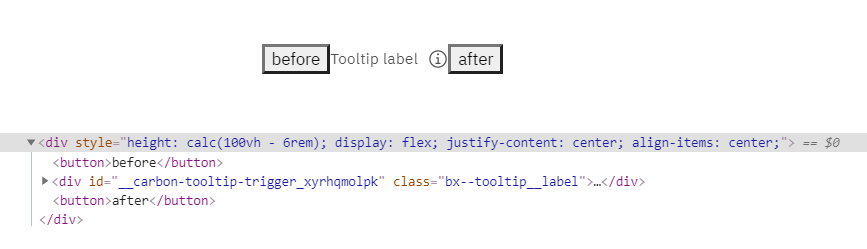
I also like that it can be closed with escape. However, when that happens, focus should go back to the "?" button.
Would be nicer if the "tooltip" content was in the DOM right after the "?" button. That way you'd get all of the above desired behavior for free. (Of course, then you'd have to make sure it doesn't take up space in the containing element, and doesn't get clipped in scrollable containers, but there must be ways to do that?)
carmacleod
on 2 Jun 2020
Related issues
 ConradSchmidt
·
3Comments
ConradSchmidt
·
3Comments
 ajdaniel
·
3Comments
ajdaniel
·
3Comments
 snidersd
·
3Comments
snidersd
·
3Comments
 jhpedemonte
·
3Comments
jhpedemonte
·
3Comments
 kalyanixraut
·
3Comments
kalyanixraut
·
3Comments
Most helpful comment
@mrina24 my PR is specific to Carbon Vanilla but the hope would be that Carbon React ports over the changes as well.