Carbon-fields: Private to Public meta fields
I see Carbon field creating the meta fields as Private (automatically generating '_' before field's name). How can i make them public?
Btw, thanks for a nice plugin.
 zahedkamal87
All 7 comments
Hi, you can change/remove the default prefix by using a custom Datastore. Here is an example which you can use for reference -- https://carbonfields.net/docs/guides-serialized-datastore/?crb_version=2-2-0
 lstoyanoff
on 29 Jan 2020
lstoyanoff
on 29 Jan 2020
Hi, I tried that Datastore. But couldnt get it working. Getting this error
Fatal error: Class 'Carbon_Fields\Datastore\Datastore' not found in \wp-content\themes\z_embryo_digital\inc\carbon-fields-datastore.php on line 9
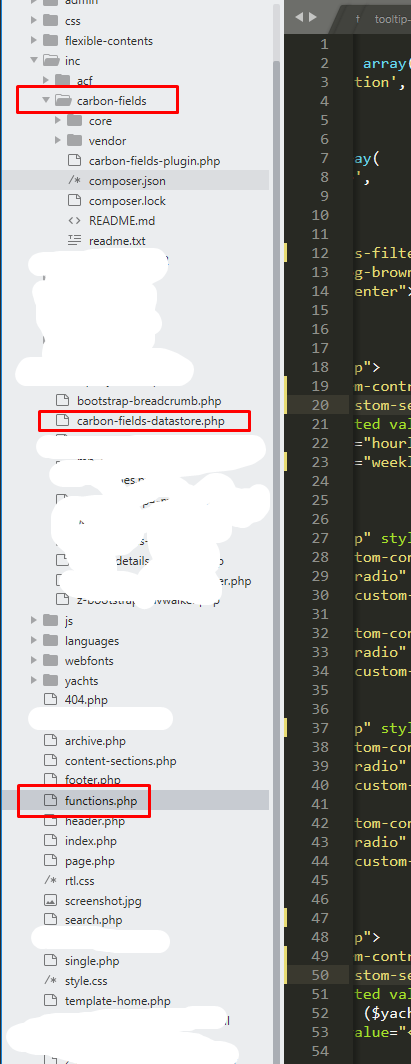
This how i've included the CF.
zahedkamal87
on 29 Jan 2020
Hi, in order to work you should register your custom datastore after CF are loaded. For example add this code to functions.php:
add_action( 'carbon_fields_register_fields', 'crb_register_custom_datastore', 5 );
function crb_register_custom_datastore() {
require_once( __DIR__ . '/inc/carbon-fields-datastore.php' );
}
Hi, thanks for the response. Because, CF's documentation doesn't have any documentation on Datastore, i'm not sure how to take care of the load(), save(), delete() functions in the extended Datastore class.
Currently i've this -
`
use Carbon_Fields\Field\Field;
use Carbon_Fields\Datastore\Datastore;
class Serialized_Theme_Options_Datastore extends Datastore {
public function init() {
}
protected function get_key_for_field( Field $field ) {
$key = 'yacht_' . $field->get_base_name();
return $key;
}
public function load( Field $field ) {
$key = $this->get_key_for_field();
$value = get_post_meta(get_the_ID(), $key, true);
return $value;
}
public function save( Field $field ) {
$key = $this->get_key_for_field();
$value =
$update = update_post_meta(get_the_ID(), $key, $value);
return $update;
}
public function delete( Field $field ) {
$key = $this->get_key_for_field();
$value = delete_post_meta(get_the_ID(), $key);
}
}
`
It would be a great help if you can look at the code and tell me what to do in update() function specially, so it works fine in Complex/Group/Image fields like it should.
Thanks again :)
zahedkamal87
on 30 Jan 2020
Hi, after some deep digging I've found that workaround for overriding the meta_key prefix globally:
- Create a new class ( for example;
Custom_Key_Toolset) which will extend theCarbon_Fields\Toolset\Key_Toolset
<?php

use Carbon_Fields\Toolset\Key_Toolset;

class Custom_Key_Toolset extends Key_Toolset {
    /**
     * Prefix appended to all keys
     */
    const KEY_PREFIX = '';
}
- Before booting the Carbon Fields override the
key_toolsetdependency
<?php
add_action( 'after_setup_theme', function() {
    require_once( __DIR__ . '/vendor/autoload.php' );
    require_once( __DIR__ . '/includes/Custom_Key_Toolset.php' );

    \Carbon_Fields\Carbon_Fields::instance()->ioc['key_toolset'] = function( $ioc ) {
        return new Custom_Key_Toolset();
    };
    \Carbon_Fields\Carbon_Fields::boot();
} );
- After the above changes the meta_key prefix for all Carbon Fields should be removed
Personally, I do not recommend overriding the default behavior of the Carbon Fields data storage.
lstoyanoff
on 31 Jan 2020
@lstoyanoff so, using Datastore is the better option then? Anyway you could tell me what to do in update() function specially in the class i've shared above? so it works properly with Complex/Group/Image fields like it should.
I wish CF had something like an option for Prefix or to disable using Private meta keys. I found CF much better then CMB2 or Metabox, but because of this prefix (private fields), i had to go back to CMB2. Still trying to use CF, but worried if doing what you said above may break anything later.
zahedkamal87
on 31 Jan 2020
Hi, sorry for the late response, you can check the Meta_Datastore and Key_Value_Datastore but as I've mentioned above both of these Datastores are using the Carbon_Fields\Toolset\Key_Toolset which is responsible for resolving and finding the fields meta_keys patterns. You can use the Custom_Key_Toolset solution but I've not tested it in depth.
My advice is to write a SQL script to prefix all custom meta_keys with _(underscore) and leave the default Carbon Fields Datastores.
lstoyanoff
on 4 Feb 2020
Related issues
 dmhendricks
·
3Comments
dmhendricks
·
3Comments
 Mick00
·
3Comments
Mick00
·
3Comments
 Obvio
·
4Comments
Obvio
·
4Comments
 ittikorns
·
3Comments
ittikorns
·
3Comments
 bjoernhasse
·
3Comments
bjoernhasse
·
3Comments
Most helpful comment
Hi, after some deep digging I've found that workaround for overriding the
meta_keyprefix globally:Custom_Key_Toolset) which will extend theCarbon_Fields\Toolset\Key_Toolsetkey_toolsetdependencyPersonally, I do not recommend overriding the default behavior of the Carbon Fields data storage.