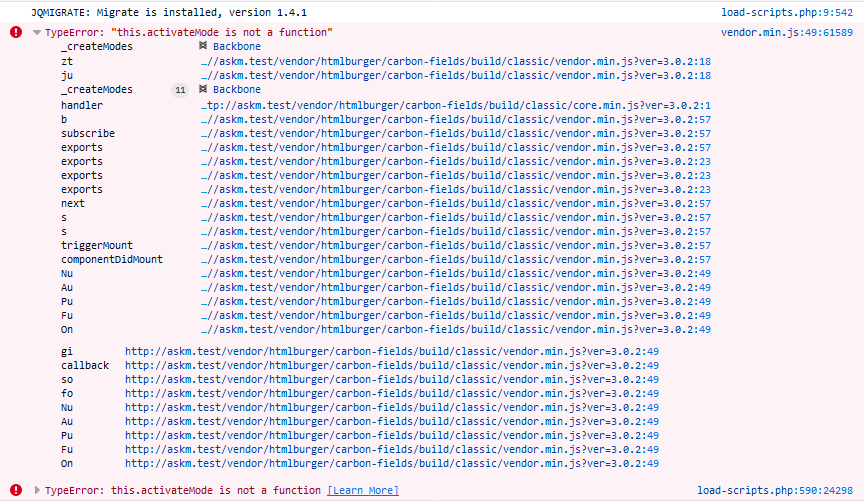
Carbon-fields: TypeError: "this.activateMode is not a function"
Version
- Carbon Fields: 3
- WordPress: 4.9.8
- PHP: 7.2 on nginx server (windows - localhost)
Expected Behavior
including an image field type to function in the backend
Actual Behavior
Javascript fatal error
Container definition
` /**
- Plugin Name: Carbonfields Settings
- Description: Defines the carbon fields
- Author: Dean
- Version: 1.0
**/
use Carbon_Fields\Container;
use Carbon_Fields\Field;
require_once( ABSPATH . '/vendor/autoload.php' );
add_action( 'carbon_fields_register_fields', 'crb_attach_theme_options' );
function crb_attach_theme_options() {
Container::make( 'theme_options', 'Stores' )
->set_page_file( 'stores-edit' )
->set_icon( 'dashicons-cart' )
->set_page_menu_position( 25 )
->add_fields( array(
Field::make( 'complex', 'stores', 'stores' )
//->set_datastore( new Serialized_Theme_Options_Datastore() )
->setup_labels( array( 'singular_name' => 'Store', 'plural_name' => 'Stores' ) )
->set_collapsed( true )
->add_fields( array(
Field::make( 'text', 'name' )->set_width(25),
Field::make( 'text', 'host_pattern')->set_width(25),
Field::make( 'text', 'score')->set_width(25)->set_default_value( 0 )->set_help_text('Higher values get higher prioriity'),
Field::make( 'text', 'score_eg', 'score Egypt')->set_width(25)->set_default_value( 0 )->set_help_text('Higher values get higher prioriity'),
Field::make( 'image', 'image' ) ->set_value_type( 'url' ),
Field::make( 'text', 'redirect_pattern' ),
Field::make( 'text', 'redirect_function'),
))
->set_header_template( '<% if (name) { %><%- name %><% } %>' )
));
}
add_action( 'after_setup_theme', 'crb_load' );
function crb_load() {
require_once( ABSPATH . '/vendor/autoload.php' );
\Carbon_Fields\Carbon_Fields::boot();
}
`
Steps to Reproduce the Problem
- Create a theme options container according to the setup above
- Visit the "Store" theme option in the admin
- Click the Add Store button (complex field) to trigger the JS error. Removing the image fields resolves the problem
Comments
Upon investigation the bug appears to be related to loadash enqueing:
https://github.com/WordPress/gutenberg/issues/4043
https://github.com/WordPress/gutenberg/issues/6399
Error details:
 dean-me
All 8 comments
The problem appears to be a conflict with the yoast plugin. Deactivating yoast solved the issue
dean-me
on 6 Feb 2019
@dean-me, I have tested this in WordPress v5.1 with Yoast SEO v9.6 and Carbon Fields v3.0.2 and I cannot reproduce it.
Please consider updating to the latest versions and if the issue persists re-open this issue 🙂
 jorostoyanov
on 22 Feb 2019
jorostoyanov
on 22 Feb 2019
I'm seeing this issue w/o Yoast, after upgrading Carbon fields from 2.2 to 3.0. Also running WP 4.9.8. Is Carbon Fields 3.0 incompatible with WP 4?
 davejtoews
on 25 Mar 2019
davejtoews
on 25 Mar 2019
@jorostoyanov After upgrading to Wordpress 5.1.1 it appears that the conflict is with the Classic Editor. If I enable Gutenberg, the problems go away, but if I run the classic editor I still get a pile of JS errors and my fields don't show up. Just empty containers.
Update: It may have been different problems I was dealing with, but I did need to update to WP5 along with the latest Yoast in order to avoid this or similar errors.
davejtoews
on 25 Mar 2019
I have the same problem, did you solve it somehow?
I do not want to disable the Yoast plugin
 TheJema
on 10 Jan 2020
TheJema
on 10 Jan 2020
@TheJema It's been a while since I dealt with this, but reviewing my comments here and in #629, it does appear that I resolved this particular error by upgrading both Yoast and WP itself to the latest versions.
davejtoews
on 10 Jan 2020
Yes, I downloaded the latest version and the problem is solved, thank you very much!
TheJema
on 10 Jan 2020
It happened again. When I turned off Yoast, the bug disappeared. How to fix it?
 sdelfi
on 16 Oct 2020
sdelfi
on 16 Oct 2020
Related issues
 ArekZw
·
4Comments
ArekZw
·
4Comments
 halvardos
·
3Comments
halvardos
·
3Comments
 proweb
·
3Comments
proweb
·
3Comments
 olegburakov
·
3Comments
olegburakov
·
3Comments
 Obvio
·
4Comments
Obvio
·
4Comments
Most helpful comment
Yes, I downloaded the latest version and the problem is solved, thank you very much!